


















How Do I Pay My Bill?
Check out this tutorial video on how to pay your Execulink bill on the MyExeculink customer portal:
There are a few different ways to pay your bill, but the easiest way by far is to set up Pre-authorized Payment (or PAP) for your account and have each payment automatically withdrawn each month. To set up Pre-authorized Payment:
Setting Up Pre-authorized Payments (PAP):
- Once you’re signed in to MyExeculink, click on the blue “Set up payment” button on the home page.
- On the next page, select which method of payment you would like to use to pay your bills on an ongoing basis – Credit, Debit Credit, or a bank account.
- Once you click on your selection, you will see a popup telling you that you will be redirected to Execulink’s secure payment processing site. Click “Continue”.
- On the next page, enter your details of your account or card, and select save. Your Pre-authorized Payment will then be set up.
Telephone or Online Banking:
Telephone and online banking are also available. Set up Execulink Telecom as a payee, using the account number listed on your invoice.
(Payee Name: Execulink Telecom)
One-Time Payment on My Execulink:
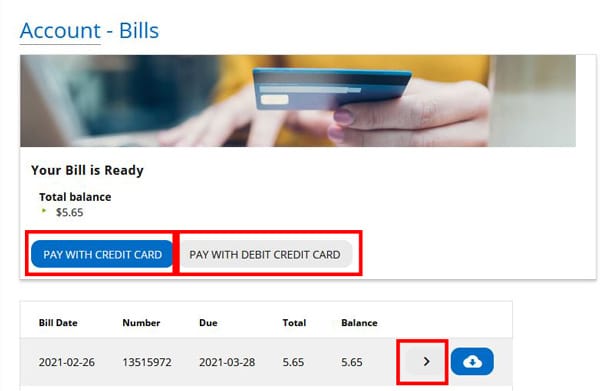
- Once you’re signed in to MyExeculink, click on “Bills and Payment” under the My Account heading. You’ll be directed to a page where you can see all your bills. Your most recent balance is shown at the top in the “Your Bill is Ready” section. You can click “Pay with Credit Card” or “Pay with Debit Credit Card” to pay it right away.
- Or you can choose which bill you would like to pay from the list below by clicking on the grey arrow button beside the bill. On the next page, click “Pay with Credit Card” or “Pay with Debit Credit Card” to pay it right away.
- Once you click on your selection, you will see a popup telling you that you will be redirected to Execulink’s secure payment processing site. Click OK to continue.
- On the next page, enter the details of your account or card, and then click “Make Payment”. Your payment will be made.

Other One-Time Payment Options:
Execulink’s Offices
We accept debit, credit card (Mastercard/Visa), money order, Visa/Mastercard debit or cheque.
By Mail to Execulink’s Woodstock Office
We accept cheque or money order by mail.
By Phone to Execulink’s Customer Service department
We accept Visa and Mastercard by phone.
