


















How do I View My Bill on MyExeculink?
Check out this tutorial video on how to view your Execulink bill on the MyExeculink customer portal:
1. Log into MyExeculink using your username and password and click Sign In.
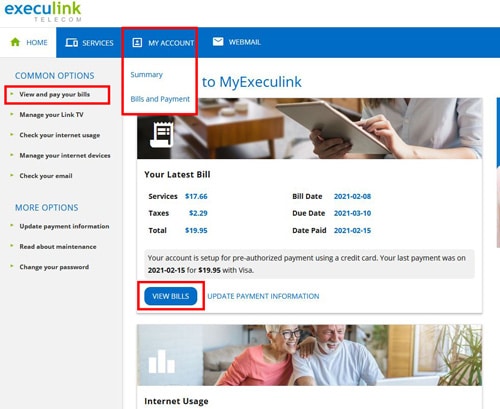
2. There are a couple different ways to access your Bills section:
- On the home page, you may see a “Your Latest Bill” card. Click on the “View Bills” button on that card.
- You can also click “View and pay your bills” on the left hand menu.
Or the “Bills and Payment” option under My Account in the blue navigation.
3. This will take you to your Account – Bills section, which shows your current bill and the total balance owing, as well as your previous bills listed below.
4. If you want to download the bill as a PDF, click the blue download button next to the bill you want to download a PDF for.
5. If you want to see quick details about a bill such as when it’s due and the total owing, click on the grey arrow button to the left of the download button.
