















When your team is away, who answers your customers?
October 8, 2026 Category: Business Services
A customer calls to check an order, confirm an appointment or follow up on a quote. Their usual contact is away. Does your business call coverage plan get them to someone who can help, or does the message wait until that person returns?
As you plan the last few months of the year, review how your business handles calls during staff absences and closures. Whether you expect a busy season or a quieter stretch, a clear coverage plan helps your team know what to do.
Start with how calls are handled today, then check that your phone settings match the coverage you need.
Choose a backup for the calls that need an answer
Look at the numbers customers use, including your main line, department numbers and direct extensions. Decide which calls need to reach another person when the usual contact is away.
The right backup depends on the request. Someone confirming an appointment may be able to speak with any available team member. A customer asking about a specific quote may need a colleague who knows the details.
Write down who is covering each number and the dates involved. Make sure that person has the information and access needed to help. If your service supports call forwarding or call groups, check that the settings match the plan.
Agree on who checks messages and follows up
A shared inbox is useful only when someone is responsible for it. Before an absence, agree on:
- Who will check voicemail and how often.
- Who will return each type of call.
- Where the team will record completed callbacks.
- Who will cover if the backup person is unavailable.
Use a system your team already works with, such as your customer management software or an approved shared task list. Make sure colleagues can see when someone has taken ownership of a message.
If you already use voicemail-to-email, check that messages reach an inbox the covering person can access. Send a test message and confirm it arrives.
Update greetings before your hours change
If your business will close or reduce its hours, tell callers when you will reopen and when they can expect a response. Check your main greeting, individual voicemail greetings and any menu options that send callers to unavailable staff.
For a full closure, you can adapt this message:
“Thank you for calling [business name]. We’re closed from [date] and will reopen on [date] at [time]. Please leave your name, number and a brief message. We’ll begin returning calls when we reopen.”
If someone will check messages during the closure, adjust the greeting to explain the actual response arrangements. Include an alternative contact only when someone is assigned to monitor it.
Set a reminder to restore your regular greeting and call routing when the team returns.
Test your business call coverage
Call your main number from a separate phone. Follow the menu, let a call go unanswered and leave a message. Ask the person covering to confirm that the message arrived and that they know who should respond.
If your setup has different routing outside business hours, test that too. Check any direct numbers customers regularly use so those calls are covered as well. A short test can reveal an outdated greeting, an incorrect destination or a missed step in the handoff while there is still time to fix it.
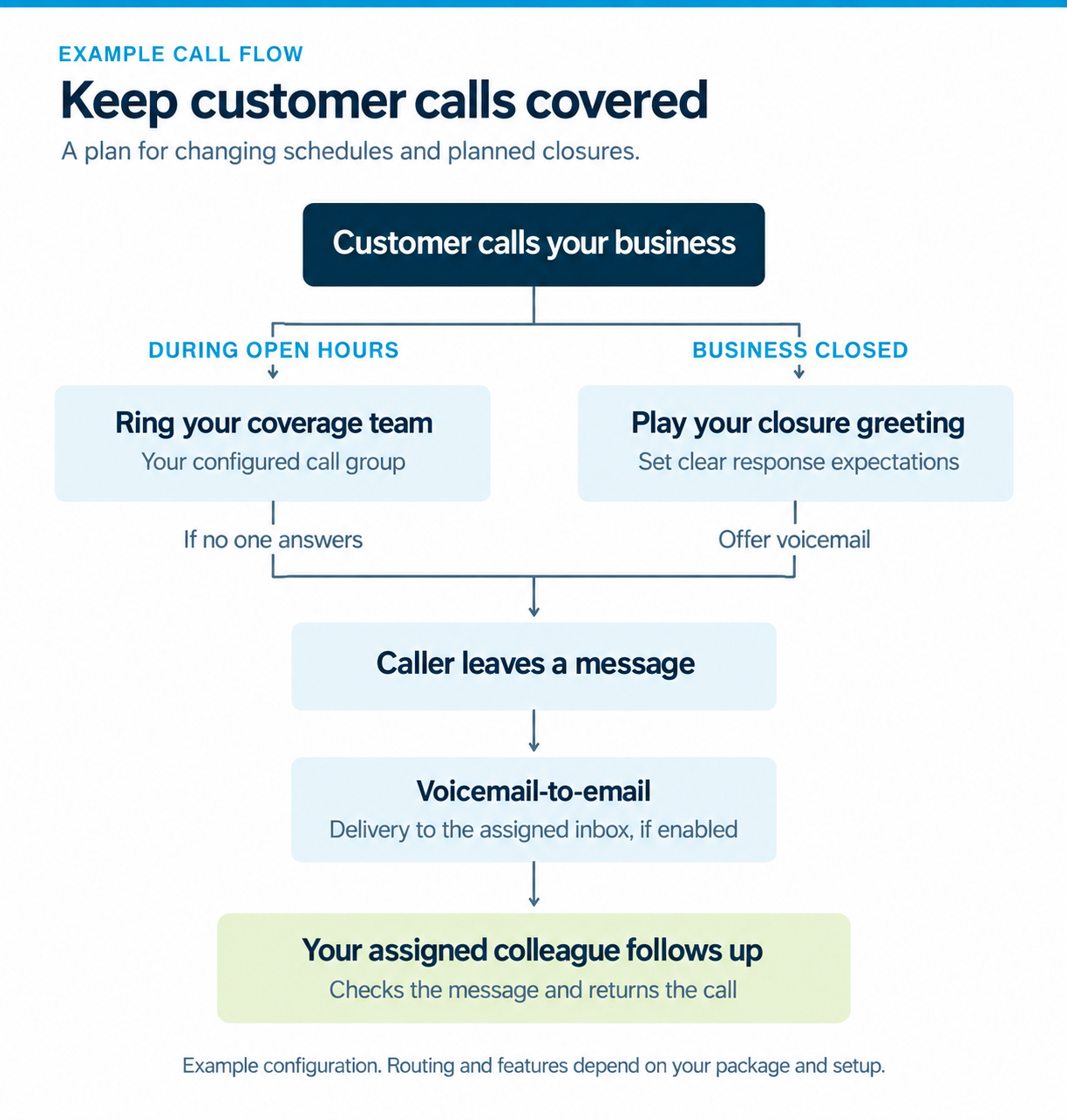
Hosted Phone features that can help with coverage
If calls keep reaching an empty desk or messages are difficult to share, review the options available with your current service.
If you use Execulink Hosted Phone or are considering it for your business, these features can help with call coverage:
- Call forwarding: Route calls to another number. Delayed forwarding can redirect an unanswered call after a set time.
- Multi-Line Hunt Group: Share incoming calls across the team members assigned to provide coverage.
- Premium Auto Attendant: Set greetings and call menus for business hours, after hours and holidays.
- Voicemail-to-email: Send voicemail messages as email attachments to a designated address.
Ask our Business team which features are available with your current or proposed service and how they can be configured for your business. Some features or changes may involve additional charges. Explore the full Hosted Phone features list (PDF).
To discuss your business phone needs and call coverage options, call our Business team at 1-877-571-9201. If you have an Execulink Relationship Manager, you can also contact them directly.