















Planning for 2027? Start with the services you already have.
October 8, 2026 Category: Business Services
Before carrying this year’s service costs into your 2027 budget, start with a business service review. Are those services doing what you need? Has the way your team works changed? Are there questions you have been meaning to ask about a charge or a feature?
A review can help you understand what to keep, what could work better and what needs planning. Start with the services you have today, whether that is Internet, phone, email, domains or a combination.
Get a clear picture of your current services
Gather recent bills and service agreements. If services are spread across providers or locations, bring those details together in one list.
For each service, note:
- What it supports and who uses it.
- The regular charge, including equipment, licences and add-ons.
- Whether it is billed monthly, annually or another way.
- Any contract, renewal or promotional end dates you need to check.
If a charge is unfamiliar, ask what it covers. Before removing something that appears unused, confirm whether another service depends on it and whether a change would affect your agreement or bundled pricing.
If you’re an Execulink customer, you can start your account review by signing in to MyExeculink. Keep your agreements handy for details that may not appear on a bill.
Note what may change in 2027
Next year’s needs may look much like this year’s, or you may be planning changes. Write down what you know so far and separate confirmed plans from possibilities.
Will more people need access to your services? Are you moving, adding a location or changing where people work? Will new software, online bookings, video meetings or larger file transfers become part of the workday?
Be specific about the number of people, locations, tools and expected dates. For a move or new location, check service availability at the exact address before relying on it in your plans. Execulink’s Business Internet options vary by address.
Describe the problems you want to solve
Ask your team where the current setup creates extra work. Choose one or two recurring problems and record when they happen, who is affected and what task is interrupted.
For example, “files upload slowly when three people send them at once” gives a provider more to investigate than “we need faster Internet.” Note whether a connection issue affects one device or several, and whether they are using Wi-Fi or a wired connection.
Ask what can be improved within your current setup. Settings, equipment, coverage or staff guidance may need attention. If a different service is suggested, ask how it addresses the problem you described.
Ask for the full cost of a proposed change
If a change would help, request a written breakdown before adding it to your budget. Ask about:
- Regular charges, including required equipment and add-ons.
- One-time installation, setup, equipment or training costs.
- Usage charges or limits, where they apply.
- Contract length, renewal terms and prices after any offer ends.
- Charges or pricing changes if you add or remove users or services.
- Any cancellation or early termination charges, and whether quoted prices include taxes.
Compare options over the same period and include annual renewals alongside monthly charges. Confirm when each cost would begin, particularly if old and new services will overlap during a move or transition.
Turn your business service review into an action list
Sort your findings into three groups: services that still fit, adjustments to explore within your current setup, and changes that need a quote or preparation.
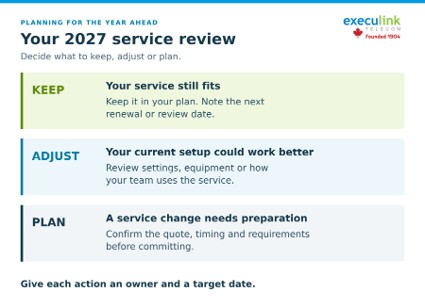
Give each action an owner and a target date. Allow time for availability checks, installation, testing or staff training where needed. If a plan is still uncertain, record what needs to be confirmed before you commit.
Bring your service list, the problems you want to solve and your expected changes to the review. The result may be a small adjustment, a planned service change or confirmation that your existing setup still fits.
To discuss your business service needs and available options, call our Business team at 1-877-571-9201. If you have an Execulink Relationship Manager, you can also contact them directly.