How to Perform an Internet Speed Test and What it Can Tell You

Your home and business rely on a powerful Internet connection to help facilitate all your online activities. But what happens when your Internet connection isn’t as fast as you’d like it to be? The truth is, speed matters! One of the best ways to determine the speed of your current Internet connection is to run a speed testing tool. These handy tools can give you an approximation of how fast your Internet connection is performing. In this article, we will break down everything you need to know about performing a speed test and what it can tell you.
What does an Internet speed test tell me?

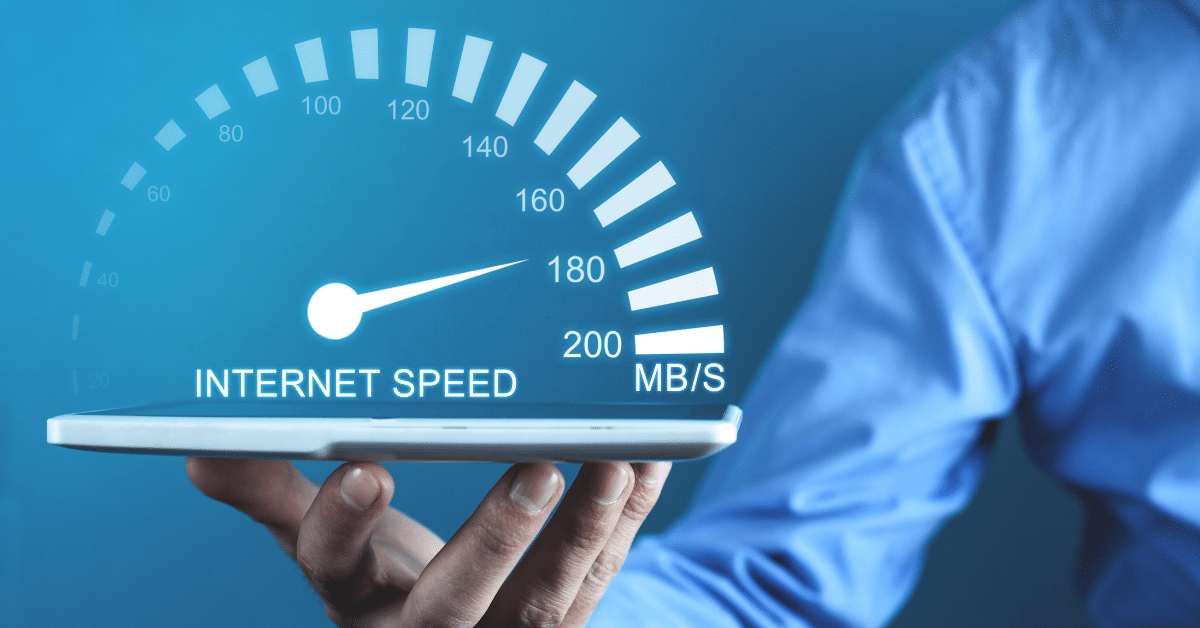
An Internet speed test has a few measurements that will help determine how fast your Internet is. Most Internet speed tests will be measured in Megabits per second (Mbps). This is how much data can be transferred each second, otherwise known as the bandwidth of the Internet connection. It typically shows the maximum speed or how fast your device can upload or download information. Your download speed is how fast data is pulled from the server to your location. Meanwhile, your upload speed is how quickly your data is sent to others.

Another measurement that your speed testing tool may show is Ping Rate. The Ping Rate is measured in milliseconds and indicates the reaction time of your connection or how fast you get a response once you make a request. It’s important to know that speed tests won’t give you your exact Internet speed but more of an approximation.

How to run a speed test

The easiest way to run a speed test is to first determine if your own Internet service provider (ISP) has a speed test tool on their website. This is a safe and straightforward way to discover how well your Internet connection performs. You can even use the Execulink Speed Test tool. It only takes a few seconds to show your speed test results. When you start the test, it will begin to attempt to download a file from the test server. If you are already an Execulink customer, our support app, Execulink Helps can help you conduct a speed test to validate your current Internet speed and find ways to improve issues. You will get the most accurate results if you have your device plugged directly into your router via Ethernet, rather than using Wi-Fi. If you are running the test using Wi-Fi you should stand near your router.

Before starting the test, ensure you stop any high bandwidth activities and close any programs. This will help show you a more accurate indication of your speed. Once your download test is complete, the speed testing tool will attempt to upload a file to the test server. Then it will present you with your speed results.

How do I know if my speed test results are good?

You’ll probably wonder if your speed test results match what was promised to you from your ISP. If your speed test results are aligned with your Internet package speeds or are typical of speeds in your neighbourhood, then that is considered a good speed test result. Also, keep in mind that the speeds your ISP often gives you are mostly based on your download speed, not your upload speed. The speed test results may be an approximation because the testing tool is not using actual files and is using a test server. These may not give you an accurate performance measurement since it’s not using typical files that you would upload or download. Another factor is the time of day you’re running the speed test. This will add an element of variability since the network may be more congested at certain times of the day than others.

Why is my Internet slow even though the speed test says it is fast?

There’s a chance your speed test may show faster speeds than what you feel you’re truly experiencing. If this is the case, then there may be another reason your Internet isn’t performing as well as it could be. You’ll need to investigate further to understand why you’re not getting the speeds you want.

How to boost your Internet speed

Before contacting your ISP to determine why your Internet speed is slow, consider if anybody in your household is downloading a large file, video chatting or any other online activity that requires high bandwidth. You should also run the test close to your router since more distance can potentially interfere with your connection. If you investigate and none of these activities are happening, you can try rebooting your router to see if that helps. Your router may be the reason for slower internet speeds – check out this blog for more information on how to boost Wi-Fi signals.

You check to see if your provider has a support app similar to Execulink Helps to allow you to investigate issues on your own. Once you’ve exhausted your troubleshooting options, you may want to contact your ISP. They can help explore why your Internet speed is slow and potentially provide some solutions. If that doesn’t do the trick, it may be time for you to upgrade your plan. A slow connection is also a sign that it may not be meeting your needs. Perhaps, your household or business requires a more robust Internet connection.

At Execulink, we provide high-speed Internet service across southern Ontario. We understand how important it is to our customers to receive reliable service without interruption. We offer 24/7 customer support to help get your Internet running as fast as possible. When shopping for home or Business Internet Service, it’s best to explore our Internet technologies to find the one best suited for you.

You deserve awesome Internet!

Case Study – The Beach House

Introductions: Who is The Beach House?

Overlooking the beautiful Long Point Bay is The Beach House. A prime spot for dining with views, situated in the Heart of Port Dover. Local and visiting patrons come to enjoy the scenic views, charming atmosphere, and coastal cuisine provided by the Knechtel Family.

The Knechtel family has been supporting the town of Port Dover, its people, and visitors since opening their first hamburger stand in 1960. Since then, they have expanded their business to include four restaurants, a clothing store, a variety store, and two gift shops.

THE CHALLENGE

Internet speeds and inconsistent service was a major pain point for The Beach House owners, their suppliers, and staff. With inadequate Internet services, it had a negative impact on their day-to-day operations, including point-of-sale transactions, ordering, data input, and sales.

The need for better Internet service was only intensified as they were trying to compete in a new digital world brought on by the pandemic. They were planning to implement new business tools and amenities to improve their overall employee and customer experience and stay a step ahead in the new normal.

They wanted to update their phone system, provide guest Wi-Fi access, and better TV programming options but knew their current services were not up to par to help facilitate these changes. After looking at various options, and seeing Execulink trucks around town, ads in their local media, and speaking with Execulink techs in the restaurant, The Beach House owners reached out to Execulink.

THE SOLUTION

The expected outcomes were:

  • Update phone system
  • Provide guest Wi-Fi access
  • Provide better TV programming
  • Reliable Internet
  • Enhanced customer service

A business representative worked with The Beach House to understand their needs and gain knowledge of their operations. With a full suite of business services available, Execulink designed a complete business solution for The Beach House. With Internet, Wi-Fi, Phone, and TV services, The Beach House could work with one provider to address their connectivity issues and implement new services for a more efficient workflow and superior customer service.

With the recent installation of Execulink’s Fibre Internet services in Port Dover, The Beach House was set up with a Fibre Internet solution, providing 1 Gbps download and 30 Mbps upload speeds. A Hosted Phone solution was implemented to help streamline their communications and customize their call flow and to provide an even better customer experience, The Beach House implemented Link TV’s starter package and selected their own specialty “Sport” themed package.

Because of its unique and large establishment, The Beach House required a very strategic setup to ensure the Phone and TV service would get proper signal throughout the restaurant. A site survey was completed to determine the number and placement of wired access points that would provide enhanced Wi-Fi coverage throughout the restaurant.

Pandemic restrictions were in full effect throughout installation and implementation, but both Execulink and The Beach House worked together to secure the installation and implementation plans through online meetings, training seminars, 24/7 support, and detailed guidance and instructions provided by Execulink.

“Overall, we are confident and happy about our decision to go with Execulink. They have solved many of the problems our business was facing in this new ‘linked’ world…we felt we were falling behind our competitors, and missing out on all the things that required a business to be ‘up to speed.’ The service from the initial discussions, through the install, and the ongoing support has been outstanding.”
Peter Knechtel
Owner, The Beach House

THE RESULTS

Execulink’s Fibre network provides a robust, secure, and cost-effective high-speed connection that since implementation, has made the speed of their online interactions 100 times better, resulting in increased productivity, while also saving The Beach House money.
Link TV’s streaming and programming options have improved what they are able to offer their customers, giving them another reason to continue coming back to their establishment.
And with their Hosted Phone solution they were able to add multiple phone lines/extensions, advanced features based on their unique needs, and gain more control over their inbound and outbound calls.

Related Links

Interested in learning more? Check out some of these handy links below.

Humans of Execulink: Sara Oliver

At Execulink Telecom, we celebrate when employees take on a new challenge by joining a new department or moving into a new role. Sara developed her career with Execulink by starting in Residential Sales and moving to Business Sales. She’s passionate about finding awesome solutions for her customers and living our values!

What does providing an awesome experience for customers mean to you?

To me, providing an awesome experience means paying attention to customer’s needs, providing solutions customized to those needs and ensuring they get the best customer service experience with every communication they have with us.

How would you describe yourself and your role at Execulink? What was your career path here?

I have been with Execulink for 3 years now. I have recently transitioned into an Inside Business role from Residential Sales. I am enjoying learning more about the business sales side of Execulink by creating custom solutions for each business I work with. I love making strong long-term relationships with my customers.

What’s the most unique part of working at Execulink?

The values, I have never worked in a place where the company values are such a big part of our day-to-day work.

What’s one thing you’re learning now or learned recently?

I’ve been learning about bigger more complex business solutions that allow for a completely customizable experience for our customers. I am learning more about our Hosted Phone solution, which is great for businesses of all sizes, but there are many features available for larger companies. For example, the Find Me Follow Me feature allows a subscriber to specify a list of numbers that are rung whenever their line is called, and an order for those numbers. Each number is rung in order (and several numbers can be rung simultaneously) until one of them answers the call, or the list is exhausted.

What’s your email signature preference?

Thank you, have an awesome day!

Rapid Fire ‘This or That’ Questions!

  • Introvert or extrovert? Introvert
  • Rollercoasters or spinning teacups? Spinning teacups
  • Work at home or work in office? Work at home
  • Movies or TV? Movies
  • Emojis or no emojis? Emojis 😀 ❣️ 👌
  • Hot coffee or iced coffee? Iced coffee
  • iPhone or Android? Android
  • Router only or router with mesh node? Router with mesh node
  • Using acronyms for telecom terms or writing out the full phrase? Acronyms
  • Wordle or no wordle? No wordle

Sara works hard to build relationships with our customers to ensure they are satisfied with Execulink’s services.  She is an extremely valuable part of our team!  Check out our careers page to see if there are any opportunities open on the Sales team where you could have a chance to work with Sara too!

Find your new career with Execulink!

The Most Common Causes of a Poor Internet Connection

Your Internet connection is likely important to your everyday life in our connected world. It can help you enjoy your favourite hobbies or boost productivity for your business. Yet, it can be downright frustrating when your Internet connection isn’t living up to your expectations. Suddenly, you’re struggling to stay connected just as the best part of a movie is about to happen, or you’re just about to send that important report to your boss. When a poor Internet connection strikes, it may be time to investigate to determine what the cause is.

If you are an Execulink Internet customer, we recommend downloading our support app, Execulink Helps to assist with diagnosing Wi-Fi connection issues. You can conduct speed tests to validate your current Internet speeds, determine optimal placement of your devices, and find ways to improve speed issues! Many other providers provide similar support apps to help with your Internet and Wi-Fi concerns.

Here are 6 of the most common causes of a poor Internet connection:

1. Outdated Devices

Although it’s easy to get attached to your devices, the older they become, the less they can hold up alongside newer technologies. If you’re using outdated devices to run new programs online, it can cause them to operate slowly. Your old devices simply can’t handle processing these programs the way newer ones can. Using old devices can ultimately affect the way your Internet connection runs.

It may be time to upgrade your devices, whether your computer, mobile device or other Internet hardware such as your router. Your router feeds the connection to your devices and can make or break your Wi-Fi experience.

2. Too Many Devices

When all your household devices share one Internet connection, it can cause issues. As you connect more devices, your Internet needs to share its power with all of them. This often leads to poorer user experience and overloaded equipment. To help avoid this issue, you can start by disconnecting more of your devices when they’re not in use to determine if that helps strengthen your Internet connection.

3. Slow Internet Plan

Your Internet package will have a maximum speed outlined in the plan. Internet speeds are measured in megabits per second (Mbps) or gigabits per second (Gbps), referencing your connection’s total bandwidth. When you first purchased your Internet package, it may have worked for your needs, but your needs may change over time. Suddenly, your current Internet package may not have the speeds you need. Check to see if the speed advertised by your ISP aligns with the speed you’re experiencing. We have a handy tool you can use to measure your Internet speed here.

If your current speed isn’t working for your Internet needs, it may be time to upgrade your plan. Depending on the types of activities you use your Internet connection for, you may be ready for more bandwidth. For instance, if you’re using your Internet to stream the latest blockbuster movie or play games online, you likely need a more robust Internet plan. In contrast, if you primarily use your Internet to check emails and other light activities, your current plan may suit you.

4. Network Management Issues

Your network can be overburdened depending on the types of activities online and the number of devices connected. Since a connection can’t support everything at once – when you know you have a significant update or want to upload a large file, you can try to ensure that only this activity is occurring on your network. Tell other regular users of your network to avoid using the Internet at this specific time.

You can also create a guest network when visitors are using your Internet connection. It will help keep your personal network secure, but it will also avoid overburdening your network with your guests’ online activities.

5. Device Location

When you’re using your home Wi-Fi, you may notice that the closer you’re located to your router, the better the connection is. To optimize your connection, you may want to move your router to a place close to where you use all your devices.

Another consideration is whether your furniture or a wall is obstructing your Wi-Fi signals from your router to your device. You can move your furniture around to optimize your connection better. If you live in a one-story home, it’s optimal to position your router in the center of the house. Meanwhile, if you have a two-storey home, you’ll want to place it on the second floor since the connection flows downward.

If you find this seems to be the main cause of your poor Internet connection, you can invest in Wi-Fi extenders or add one or two of Execulink’s Mesh Wi-Fi Nodes. These handy devices will help extend your Wi-Fi radius to areas of your home experiencing poor Internet connections.

6. Spyware and Viruses

Both spyware and viruses can both negatively affect your Internet connection.

Spyware monitors your Internet activity and slows down your system by interfering with your browser. If there’s more than one spyware software operating simultaneously, it can substantially affect your Internet connection. You should regularly run an antispyware program to remove spyware from your system.

When a virus infects your computer, it will try to expand its hold on your device by creating copies of itself. Since it’s using your Internet connection to help multiply itself, the virus can cause slowdowns. You may not even know when a virus infects your computer, so it’s important to run anti-virus software frequently.

At Execulink, we provide high-speed Internet service across southern Ontario. We understand how important it is to our customers to receive reliable service without interruption. We offer 24/7 customer support to help get your Internet running as fast as possible. We have the extraordinary services your home or business needs to stay connected to what matters the most! Call us at 1-866-706-1942 today or visit our Internet page to find the Internet package you’ve been looking for!

Click here to explore your Internet options!

What are NFTs?

You may have heard about NFTs before, the boom surrounding this new way of selling digital assets started around March 2021. However, they have been around since 2014. The NFT scene evolved rapidly over the past year and we thought it would be helpful to breakdown exactly what NFTs are, whether or not they are a scam, and what their future could hold.

Defined: NFT stands for Non-Fungible Token

Non-fungible means it cannot be replaced with something else – it is unique. On the other hand, if something is fungible it can easily be traded for another thing and it will have the same value. For example, a bitcoin or even a regular loonie is fungible. A one-of-a-kind trading card is non-fungible and if you trade it, you would have a different card. A NFT is essentially a one of a kind digital trading card.

NFTs could be anything digital and the current most popular type of NFTs is digital art. Some people have even sold their tweets as NFTs. Much of the conversation around NFTs is that it is a new form of fine art collecting but for the digital age.

Can You Just Download the Digital Art and Have Your Own Copy?

Yes, you can copy a digital file as many times as you want, including the art that is part of an NFT.

NFTs give you something that cannot be copied: the ownership of the digital art. The artist retains the copyright and reproduction rights just like with physical artwork. In terms of art, anyone can buy a print of the Mona Lisa but only one person (or museum) can own the original.

NFTs as a Way to Claim Ownership of a Digital File

The Internet is essentially a giant copy machine – any digital file can be duplicated an infinite number of times, and every copy is the same as the original. This is great for reproducing digital objects but it is horrible for making them scarce. If you were a digital artist and wanted to make only a few copies of your digital artwork your options were not great before the rise of NFTs.

A few years ago, people realized that blockchains (the databases that power Bitcoin and other cryptocurrencies) could create unique, uncopiable digital files. These files were simply entries on a public database and anyone could verify the owner and track any trades made. This prompted the creation of NFTs.

The entries on the public database that state you own an NFT are essentially a certificate of authenticity. Certificates of authenticity are used to prove the ownership of things like artwork, memorabilia, and sculptures. If you owned a rare sculpture and someone copied it or broke into your house to steal it, this certificate would prove that you are the real owner.

Why Are They Valuable?

No one is arguing that NFTs are valuable because they are useful. A lot of the value is created from speculation and bragging rights. Defenders of NFTs say that people buy things that are useless all the time for a variety of reasons – to feel good, to show off to their friends, or to signal membership to a group.

One could argue that NFTs are a form of social currency that make people feel more interesting.

Will They Eventually Become Worthless?

In January, the estimated size of the NFT market was $50 billion dollars. However, the market is showing signs of cooling.  In January, the average price was $6800 and now the average price is below $2000. The drop seems to be caused by a variety of factors including inflation, the war in Ukraine, and increased regulatory scrutiny.  Experts have predicted that many NFTs will eventually cause investors to lose money. This makes them quite controversial among the crypto community.

As the market cools, there has been an increasing focus on creating utility. Some NFTs will also come with concert tickets, signed memorabilia or early access to releases so that there is something of value included even if the NFT’s value decreases.

Are There Frauds in the NFT Market?

Yes, there have been tons of frauds in the NFT market. Sometimes developers will abandon a project and run away with the buyer’s money. There are also several examples of “whitelisting” where groups of people are invited to buy exclusive NFTs before they are available to the public. The insiders will get the NFTs for a lower price and then sell them for a profit when they are released.

Stealing is also quite popular in the NFT market. Some hackers have convinced owners of NFTs to give up their passwords to access their NFTs. Other people will steal the work of artists and sell it as “official” versions without their permission.

What Are Some Examples of Famous NFTs

One of the most famous NFTs is the Nyan Cat NFT, which sold for US $590,000. The Nyan Cat meme started on YouTube and quickly became an Internet sensation.

Crypto Punks are also very popular. There are 10000 uniquely generated Crypto Punk characters created through the Ethereum blockchain. Their history dates back to 2017 when a blockchain was added to the files to track their ownership.

Why Do People Still Support NFTs?

  1. Creators see NFTs as a way to de-centralize the Internet. Most creators have to put their work on giant platforms like Spotify, Facebook, and YouTube where they make a small amount of money per stream or view. If they turn their work into NFTs they could sell unique digital assets directly to their fans and keep a larger amount of money for themselves.
  2. The Metaverse is growing and that means more interactions and experiences will take place in digital worlds, rather than offline in physical spaces. Kids continue to spend money on Fortnite skins and Roblox accessories. It’s expected that people will start spending more money on digital assets and many of these digital assets will take the form of NFTs.

The Future of NFTs

Despite the NFT market declining in recent months, companies like Starbucks have mentioned creating digital collectables using NFTs for their customers to purchase as part of their loyalty program. As the Metaverse and Web 3.0 evolves, NFTs will likely be a big part of that evolution. They could include things like keys to online communities and events, assets for use in video games, and ownership of digital identities and usernames.

Currently the NFT market is extremely risky due to a lack of regulation. Some artists and creators see NFTs as a way to make money from their art. Many investors use NFTs to obtain bragging rights to say that they own the original content or they simply speculate that the asset will increase in value. At their most basic level, NFTs allow people to create and trade scarce digital objects. As the world becomes immersed in the Metaverse, NFTs could become more prominent.

Keep your home connected to the Internet with Execulink!

Top 5 Considerations When Choosing a Phone System For Your Business

The success of an organization highly depends on effective internal and external communications, which is why Phones are still one of the most significant and effective forms of business communication. Phones however are only effective if they are meeting the needs of your business.

Traditional phone systems have become outdated, impeding a business’s ability to be competitive and communicate effectively, and they are increasingly expensive to maintain. Unfortunately, many businesses fail to update their outdated systems and as a result, it’s costing them more money, hampering their customer service, hindering business growth and productivity, and not providing the flexibility needed to accommodate today’s modern workplace.

Fortunately, today’s business communication tools are consistently evolving, and there are many types of business phone systems available like PBX, VOIP, and Hosted VOIP. These types of systems include many technological advancements, features, and benefits which are a far cry from the traditional phone systems you might still be using today.

Phone systems are now designed to better meet the requirements of today’s modern business, but they are not a one-size-fits-all solution. Choosing the right phone system for your business will depend on your needs, budget, location, and more.

Top 5 factors you should consider when choosing a business phone system:

Usage: Conducting a needs assessment will help you decide what you need your phone system to do. Consider how many employees you currently have, their job types and responsibilities, and calling habits. Perhaps you have employees that work offsite – these are all factors that would benefit from a specific set of phone features and phone type. Most providers will work with you to design your phone system solution based on the functions of your team and what they need to do their job successfully.

It’s important to also think about your customer’s usage and call in experience. This could be the first interaction they have with your company so you need to make a good first impression that is seamless, quick, user friendly, and easy to navigate. With this in mind, think through your greeting, and department directory options when you are open and closed.

Mobility: As previously mentioned above you may have employees that work remotely or in hybrid roles, or perhaps you have sales staff who travel a lot for work. Choosing a phone system that allows for flexibility will be important so your team can communicate from where ever they are.

Scalability: Consider your short and long-term goals. How many staff members require a phone/phone line now and how many will you need in 3 to 5 years? You may only need the functionalities of a standard service now, but once your business grows you may find you require advanced features, like conference calls and extensions.

As your company grows, your phone system should be able to adapt, be it expansion or downsizing. New business phone systems, like VoIP and cloud-based systems, scale with your business needs, allowing you to add on features and equipment as you grow, and will likely make the process of expansion easier and more affordable.

Features: Think about the features you have now with your traditional phone system and consider all the other features that would be helpful or required based on your procedures and activities that regularly take place within your organization. Create a wishlist of features and map out the options that would streamline or simplify processes.

Consider your staff resources as well – do you have a receptionist or would an auto-attendant be required to reach people? Phone systems today have a wide range of calling features, some of which are capable of filling staffing gaps like auto-attendants and softphones.

Cost: Don’t solely choose a phone system based on cost. The cheapest phone or the most expensive one may not be enough or it might have more than you require. Find the perfect balance between reliable and affordable.

Older phone systems can be costly and include ongoing maintenance costs, often needing specialized support. Newer systems like Hosted PBX will cost more than a standard analog phone system but the available features and level of functionality may be a necessity based on your business needs. Take into consideration the number of phones you will need, and factor in the cost of hardware, installation, service charges, and other cost variables.

If you are hampered by your legacy phone system, require additional features based on your growing business needs, or starting a new business and setting up your first phone system, ensure you take some time to assess your needs and think through these considerations. Selecting a Business Phone System is an important decision because a reliable Phone system is critical to the success of any company and an investment in your company’s future.

Modernize your call infrastructure and transform your business with the right Phone solutions from Execulink. Call us at 1-877-561-6771 today or visit our Voice Solutions page to find the right Phone system for your business.

Learn more about Execulink’s Voice Solutions here!

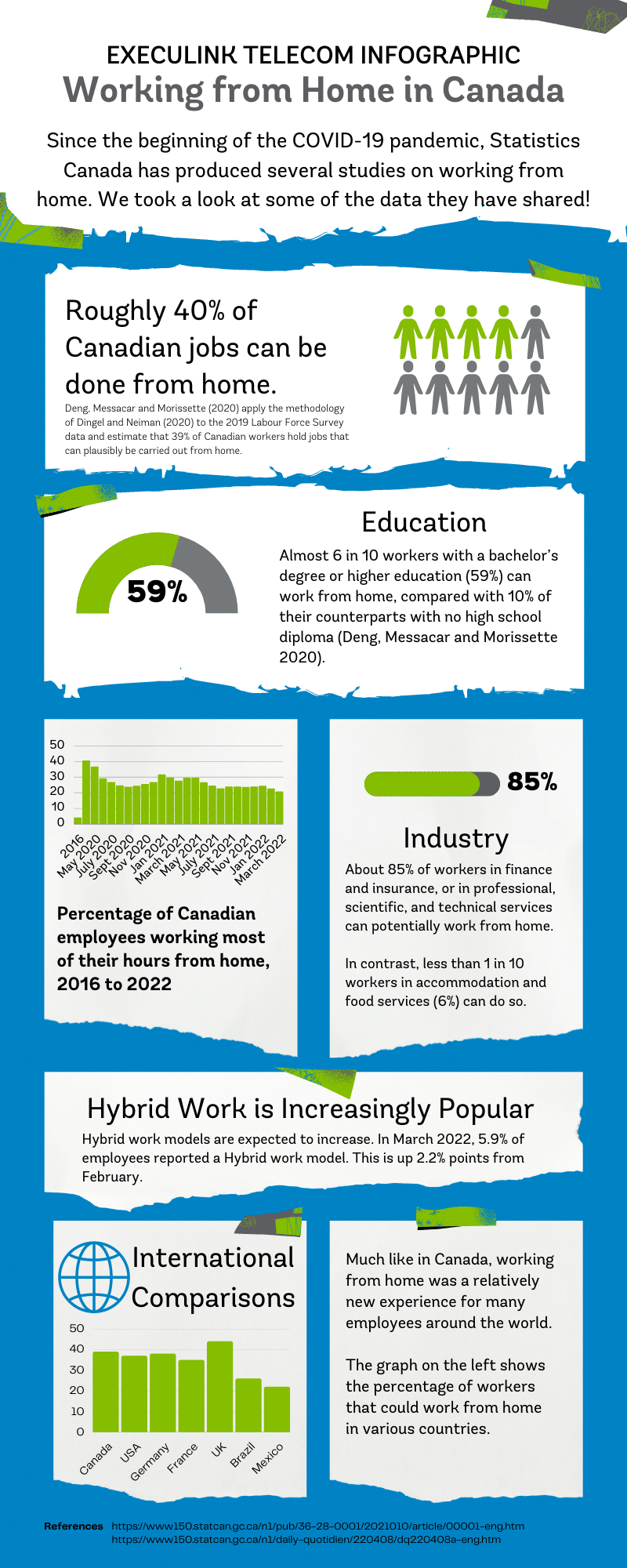
Infographic: Working from Home in Canada

It’s always interesting to see census and labour market data from Statistics Canada to learn what’s going on in our society. Since March 2020, a lot has changed in the labour market, particularly regarding remote and hybrid work. The difference between the numbers of people that worked most of their hours from home in 2016 compared with April 2020 is extreme. We decided to share an infographic that breaks down some insights on remote work from the last few years.

If you want to find the perfect Internet speeds for your home office check out our Internet page today! For business owners, explore our solutions for a remote or hybrid workplace.

Execulink’s Home Internet


Remote Work Solutions

References:

https://www150.statcan.gc.ca/n1/pub/36-28-0001/2021010/article/00001-eng.htm

https://www150.statcan.gc.ca/n1/daily-quotidien/220408/dq220408a-eng.htm

https://www150.statcan.gc.ca/n1/daily-quotidien/220311/dq220311a-eng.htm

https://www150.statcan.gc.ca/n1/daily-quotidien/220204/dq220204a-eng.htm

https://www150.statcan.gc.ca/n1/daily-quotidien/220107/dq220107a-eng.htm

https://www150.statcan.gc.ca/n1/daily-quotidien/211203/dq211203a-eng.htm

https://www150.statcan.gc.ca/n1/daily-quotidien/211105/dq211105a-eng.htm

https://www150.statcan.gc.ca/n1/daily-quotidien/211008/dq211008a-eng.htm

Exploring MyExeculink: 6 Tips and Tricks!

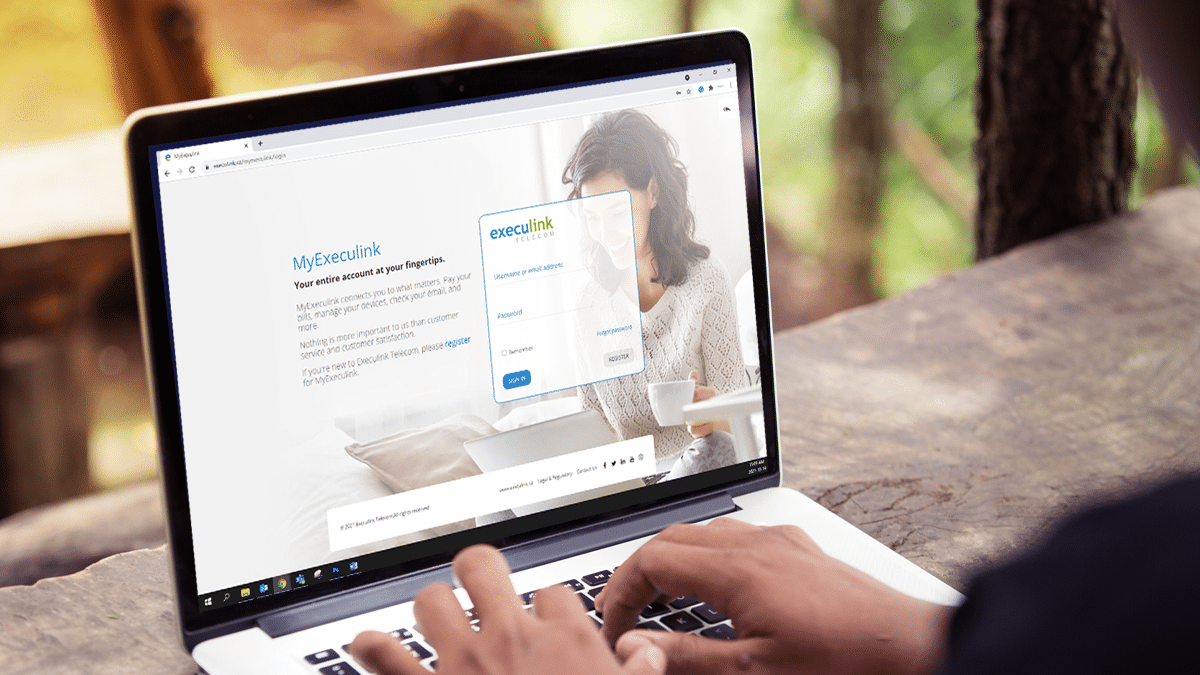
MyExeculink is our customer portal that can help you manage your services with us! We want to make updating your account easy so that you can save time. This blog will point you in the right direction within our support centre to find tips on how to use your MyExeculink account.

https://www.youtube.com/watch?app=desktop&v=mflrSOz2sp4&feature=emb_title

Here is a summary of all the things you can do through MyExeculink:

  • Manage the services you have
  • View and pay your bill
  • Change your password
  • Check your Execulink email
  • Manage access and create email addresses
  • Monitor your phone calls and usage
  • Manage your Internet usage
  • View your sign in history
  • Update your Hosted Phone services
  • And more!

1. How to Register for MyExeculink

If you have recently signed up for Execulink’s services, we encourage you to register for a MyExeculink account! You will love having access to this portal. You will need your account number to register; you can find this in the Welcome email we sent you upon sign up.

Learn how to register for MyExeculink

2. How to Update Your Wi-Fi Password

Managing your Wi-Fi password is easy through MyExeculink. If you have our Premium Router, you can do this by configuring it’s settings.

Follow this video for a step by step process!

https://www.youtube.com/watch?v=SVOtuWKBVPE

Learn how to configure your Premium Router

3. How to View your Bill

There are a few ways you can view your bill on MyExeculink.

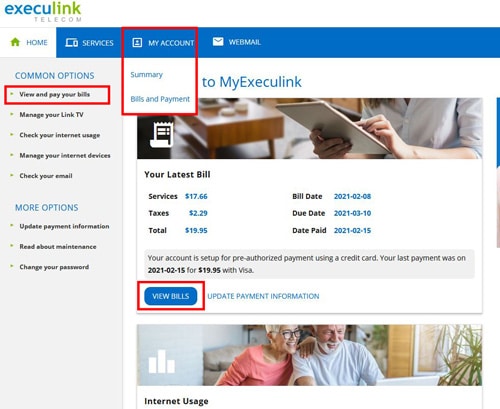
  • On the home page, you may see a “Your Latest Bill” card. Click on the “View Bills” button on that card.
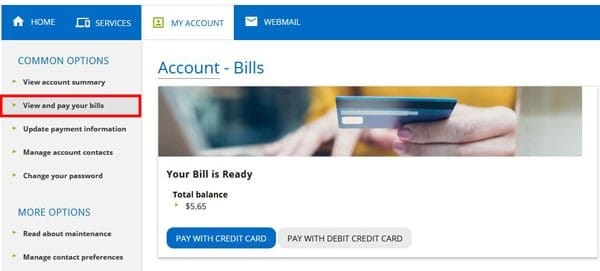
  • You can also click “View and pay your bills” on the left-hand menu.


Learn how to view your bill!

4. How to update PAP information

There are a few different ways to pay your bill, but the easiest way by far is to set up Pre-authorized Payment (or PAP) for your account and have each payment automatically withdrawn each month. To set up Pre-authorized Payment check out this support article.


Learn now to set up PAP!

5. How to Add/Remove Channels

If you have Link TV, you can add or change your TV channels and packages, remove devices and more through our convenient MyExeculink portal at any time. Check out the below tutorial video!


Learn how to update your Link TV service!

6. Viewing Long Distance Charges

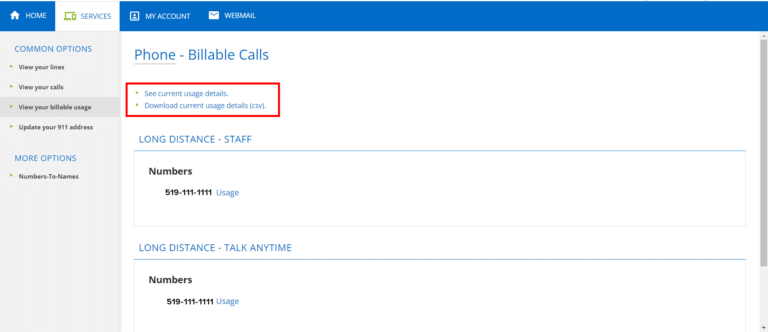
You also have the ability to view your long distance charges through MyExeculink under the Phone tab. You can see current usage details and download them!

MyExeculink is a great tool that allows you to manage and update your account information with us! It is also very mobile friendly, so you can access all of this information while you are on the go! If you have not logged in yet we encourage you to get started today.

Log in to MyExeculink!

How Can a Hosted Phone Solution Help Your Business?

Your business relies on solid communication between employees and customers. Whether it’s the Internet or the Phone, equipping your employees with the right technology can make a difference. The right Phone service is part of your business’ productivity, facilitating collaboration and potential profitability. That is why it is essential to carefully consider Phone service options to ensure you choose the right one for your business. As more companies use technology as a competitive advantage, they may not be thinking about Phone service. However, one should not underestimate what the right Phone service could bring to your bottom line.

What is a Hosted Phone service?

Unlike a traditional Phone service, a Hosted Phone service is generally hosted on an IP network in the cloud. It is not based on your company’s premises but instead is hosted on a server typically owned by your service provider. It uses Voice over Internet Protocol (VoIP) technology to make calls over the Internet. You won’t be relying on hardware and fixed Phone lines running through your office building anymore to make all your important calls.

The Benefits of Hosted Phone service

Scalability

As your business grows, you’ll likely want a Phone service that can quickly grow alongside it. If your list of employees is becoming longer, then having Hosted Phone service will provide your company with flexibility. You’ll be able to add Phone lines with ease and remove them – without any hassle. Unlike traditional Phone services, setting up a Hosted Phone service is fast. Whether you’re a business that experiences seasonal upswings or one which requires an increase in staffing needs, you’ll have the right technology to scale with your business.

Cost Savings

Since your Hosted Phone doesn’t require your business to invest in infrastructure, substantial cost savings can be had. Instead, you’ll simply choose a package from a provider and ensure you have high-speed Internet to support your Hosted Phone service. If it’s the right provider, they’ll offer affordable packages that suit your business needs. If you’re a startup or small business, installing on-site Phone services may be an expense you simply can’t afford. These funds might be better put towards growing your business instead. That’s why Hosted Phone service can be an attractive option to support your employees’ communication needs.

Support

There are also potential maintenance fees and repairs if Phone lines are in your office building. Typically, you may need to hire a dedicated person to manage your traditional Phone service. The system can become quite complex depending on how many employees you have and how large your office premises are. They’ll potentially deal with many upgrades and ensure your employees can access and effectively use the service. With Hosted Phone service, maintenance and repair fees won’t be necessary. You’ll have the support of your Hosted Phone service provider every step of the way.

Reliable Calls

A Hosted Phone service will allow your employees to place high-quality calls. However, this depends on your Internet service provider. A quality provider will give you confidence that you’ll be less likely to experience technical outages and disruptions like those experienced with Phone service with copper wires with the right high-speed Internet. With crystal clear communication, your employees will be less frustrated and more ready to work towards your business mission, feeling supported with the right technology. The reliable service will also reduce the chance of needing your service provider to step in to troubleshoot.

Improved Security

You may think a Hosted Phone service may not be as secure as a traditional one, but this isn’t the case. Your Hosted Phone provider will protect your business with advanced security features. With firewalls and software upgrades, you’ll have an outsourced team working towards securing your Hosted Phone service round the clock.

Mobile Workforce

As the world embraces remote work, Hosted Phones can help ensure your employees have a Phone connection anywhere. They’ll need an Internet connection and IP address to stay productive and empowered when they work out of the office – whether at their home or travelling abroad for business. Your business can support your remote workforce with sophisticated technology. This can be a competitive advantage when trying to attract top talent since many employees want the option of fully remote or hybrid models. To meet the needs of these forward-thinking employees, give them the tech they deserve.

Business Continuity

If you own a business that typically operates in your office space, then a Hosted Phone service can offer business continuity should something happen. In the event of poor weather, employee illness, or damaged tech – you can be sure that your Hosted Phone service will be operational. You can have confidence that your business will have the right communication technology to thrive despite inconvenient circumstances.

With 24/7 support and a wide range of Internet and Hosted Phone services options to suit every business, at Execulink, we have the excellent services your home or business needs to stay connected to what matters the most! Call us at 1-877-561-6771 today or visit our website to find the Internet or Hosted Phone solution you’ve been looking for!

Learn more about Hosted Phone!

What is an IP address?

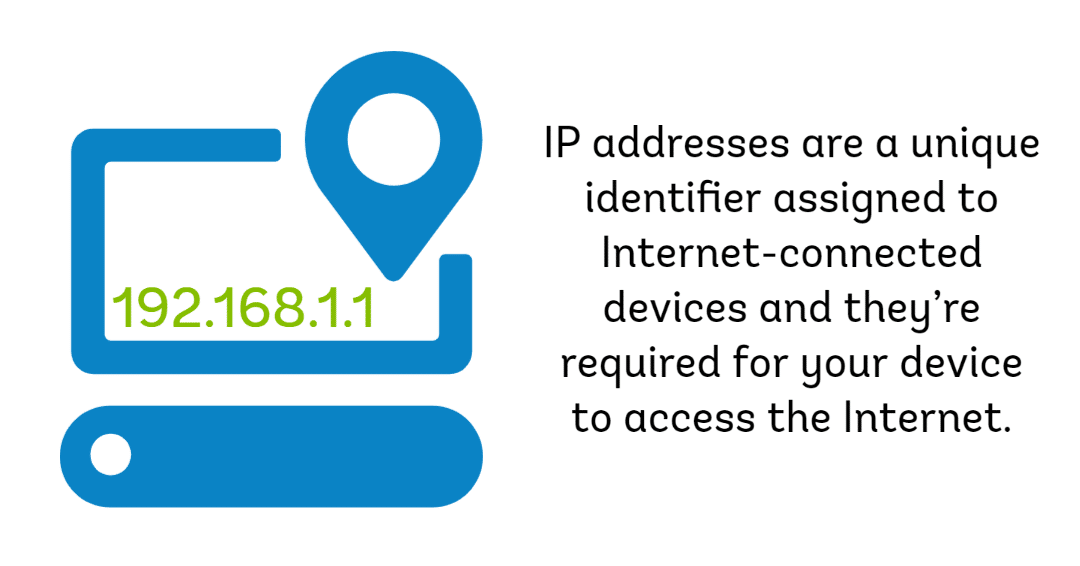
IP stands for “Internet Protocol”, the address refers to the unique number that is linked to all online activity you do. It is actually part of a longer abbreviation – TCP/IP (Transmission Control Protocol/Internet Protocol). It is similar to a return address on a letter you would send. The Internet Protocol is a set of rules governing the format of data sent via the Internet or local network. The technology behind IP addresses can quickly become complicated, so we are going to explore what we think you should know about your IP addresses!

What does it look like?

IP addresses are a string of numbers separated by periods. The most common IP version is IPV4 assigned by Internet Service Providers (ISP). These addresses are a set of 4 numbers, each number in the set can range from 0 to 255. So, the full IP addressing range goes from 0.0.0.0 to 255.255.255.255.  An example looks like 192.145.2.22.

IP addresses are mathematically produced by the Internet Assigned Numbers Authority (IANA), which is a division of the Internet Corporation for Assigned Names and Numbers (ICANN).

How does it work?

If your computer is connected to the Internet and you go online to search for the nearest takeout restaurant, your request is sent to the right destination (ie the restaurant’s website) and the information needs to come directly back to you.  IP addresses are the identifier that allows information to be sent between devices on a network; they contain location information and make devices accessible for communication

With millions of devices on the Internet, how can your single device jump in and connect you with your emails without any problems? The answer: Protocols.

Protocols

Your computer’s networking software is set up to follow a list of networking standards and protocols to connect to the Internet and swap information back and forth. One of those protocols is the Internet Protocol, responsible for addressing and routing online requests.

The IP address is assigned by your ISP. Since your ISP is the source of your Internet connection, your Internet activity goes through your ISP’s network and then it’s routed back to you using your IP address.

Temporary

Most IP addresses are not permanent. It could change if you restart your modem or router. If you travel, your IP address does not go with you because you would be using a new network to connect to the Internet.

Therefore, if you go to a coffee shop or the airport, you will be temporarily assigned a different IP address depending on where you are located and the ISP of that location. You do not need to think about this at all, it happens automatically when you connect via Ethernet or Wi-Fi.

If you are curious about what your IP address is, wherever you are, check out this website.

How many types of IP addresses are there?

There are different categories of IP addresses, and within each category, different types. Every individual or business will have two types of IP addresses – Private and Public.

Private IP addresses

  • Every device that connects to your Internet network has a private IP address, including smartphones, computers, tablets, and Bluetooth speakers. Your router identifies each device by their private IP address to differentiate them on the network.

Public IP addresses

  • This is the primary address associated with your whole network. This is how your ISP identifies your network. Your public IP is the address that all devices outside your network will use to recognize your network.
  • Public IP addresses can either be:
Dynamic IP addresses

These change automatically and regularly, as we mentioned above, simply re-starting your router or modem can re-set your IP address.

Static IP addresses

Most people do not need a static IP, the vast majority of Internet activities can be done without them including web browsing, email sending and receiving, video streaming, and VoIP. If you operate a business, you may require a static IP if you do the following activities:

    • Maintain your own web server or other Internet server, such as an email server that requires users to connect from the Internet.
    • You have external devices or services that need to connect to your network via IP address.
    • You use a VPN or other service to remotely connect to computers in your business.

For website owners who do not host their own server, there are two types of website IP addresses:

Shared IP addresses

An IP address that is shared among multiple different domains. A shared IP is mostly used by smaller businesses that used a managed WordPress host or shared hosting providers.

Dedicated IP addresses

An IP address that is unique to your web domain.

IP addresses identify your devices on the Internet, provide you with web pages, and allow you to access to the services you need online. They route Internet traffic where it needs to go and directs emails to your inbox. Now that you know a bit more about what goes on behind the scenes when you’re browsing the Internet, find the right Internet package for your home with Execulink. Qualify your address here or give us a call at 1-877-561-6771.

Check out your Internet options


Check out your Business Internet options

The Internet Services You Deserve
Affordable. Reliable. Lightning fast.

We’re proud to provide the communities we know, love, and live in, with the reliable Internet, TV, Phone and Mobility services they deserve.

  • Your local choice for residential and business telecommunication services
  • Renowned 24/7 customer service you can depend on
  • Affordability, service, integrity and transparency are the pillars of our business

Here to help. 24/7.

Sales Inquiries

Sales: Mon-Fri 8AM-8PM, Sat 8AM-5PM

(866) 706-1991

Support Inquiries

Technical Support: 24/7, Customer Care: Mon-Sun 7AM-11PM

(866) 706-1994

Online Help

Chat With Us

We'll respond as soon as we can!

Email Us

We'll get back to you as soon as possible.

Support Centre

Find the answer to your question.

Check availability

Enter your address to find services and offers available to you!