
How to Choose a Wi-Fi Router: 7 Things to Consider

Routers are the gateway to a strong Wi-Fi connection in your home. They can really make or break your Wi-Fi experience. Everyone wants reliable and fast Internet; one of the first steps to getting this is making sure you have the right router. Join us as we explore the relevant facts about Wi-Fi, Mesh Systems, and other jargon to help you identify the perfect router for your home.

1. Compatibility and Support From Your ISP

When you purchase your own router, your ISP is limited in how much support they can provide you. If you decide to buy your own, you may need to replace it every few years to ensure that it is compatible with your Internet speeds and the latest technology – this can actually become more costly than simply renting.

Often times when you rent a router from an ISP, they have more insights into what could be causing your connection issues. For instance, if your Internet connection is unstable Execulink can monitor recent and current errors based on data from our Premium Wi-Fi Router. We will be able to identify interference on your Wi-Fi network from other devices. When you rent a router from your ISP, you will have access to their resources and tips on managing your router. For tips on how to configure settings on your Execulink Premium Router, check out this support article.

2. Choose a Dual-Band Router

As we increase the amount of electronic devices we bring into our homes, network interference also increases. Switching to a dual band router may be the fix you need to optimize your Internet experience- that is why we are giving you the low down on dual band routers and how to use them to your advantage!

Single band routers operate with a 2.4 GHz frequency. This is the original Wi-Fi standard, however many household items such as baby monitors, cordless home phones and other Wi-Fi routers use this same frequency which can ultimately cause interference. Dual-band routers utilize two different frequencies: the 2.4 GHz plus the 5 GHz. The 5 GHz frequency is a lot faster than 2.4 GHz and congestion is less of a problem because the 5 GHz band has more channels to navigate. The 5 GHz band many whereas the 2.4 GHz band only has a few. The coverage area for 5 GHz is a bit shorter. With a dual-band router, you have two alternative networks to choose from, which increases your wireless bandwidth and enhances your Wi-Fi experience!

3. Ports (USB and Ethernet)

Having at least one USB port available on a router is a must in modern homes. We have all kinds of USB devices that we need to connect to our wireless router: external hard disks, printers, USB modems, etc. Your router should preferably have one that is USB 3.0.

Having a sufficient number of Ethernet ports is also recommended to ensure you can connect more reliably to the internet. Connecting via Ethernet provides the most consistent internet experience, especially if you do activities like gaming.

The Premium Wi-Fi Router has four Gigabit Ethernet ports that let you connect a variety of wired multimedia devices for rapid data sharing across your network.  You can also share large files effortlessly over the network by connecting your portable storage devices to the Premium Wi-Fi Router’s USB port.

4. Support for Mesh Wi-Fi

You will need a router that can provide a Wi-Fi range large enough to cover your whole home. Sometimes this means getting a router that can support a Mesh Wi-Fi system. Mesh Wi-Fi systems are becoming more popular and the approach to these systems can vary from vendor to vendor.  These systems can be expensive, with starting rates at around $300 to upwards of $500, depending on the number of additional satellites you need to extend coverage.

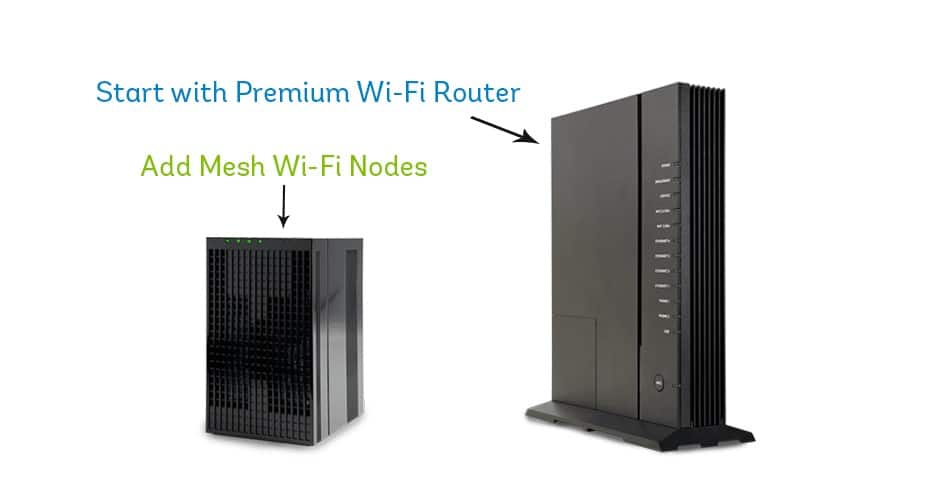
Ensure your router has a compatible node or extender that will connect seamlessly to extend your network range. Execulink’s Complete Wi-Fi solution includes a Premium Router and you have the option to add Mesh Wi-Fi Nodes if required.  If your home is large and spread out, then you may need this.

If you start with just the Premium Router and find that it does not quite reach everywhere, you can easily get a Mesh Wi-Fi Node down the road. That is the awesome part about Complete Wi-Fi – it is expandable and can change as your home and Wi-Fi activities change.  You can connect up to 4 Mesh Wi-Fi Nodes to your Premium Router.

5. Features

When choosing a router you are going to want to look at the additional features the router can provide you. Some features can really make a positive difference on your experience. Here are a few we recommend looking for:

Quality of Service (QoS)

This lets you prioritize traffic on your network. With the Premium Router’s Wi-Fi Multi-Media feature, you can prioritize traffic on your 2.4 GHz radio. For example, if you are a gamer but you also live with people that stream videos, you can enable settings to prioritize traffic to your Xbox.

Multi-User, Multiple Input, Multiple-Output (MU-MIMO)          

With MU-MIMO, your router can support multiple wired and wireless connections more efficiently by dividing up your bandwidth and supporting all connected devices simultaneously. Without MU-MIMO the router would send bandwidth to one device at a time, even if they are connected at the same time.

Beamforming

Beamforming allows your router to direct a Wi-Fi signal to a device. Before beamforming, routers would send Wi-Fi in all directions. Beamforming is much more efficient and focuses on the devices that actually need Wi-Fi signal.

6. Wi-Fi Standards

Wi-Fi has a global standard and to ensure that devices can connect without issue; there are certain specifications that routers must adhere to ensure compatibility. The standard is called 802.11 and is followed by the letters a, b, g, n, ac, and ax to identify the version of that standard. When you connect to an earlier version, your device will be capped at a slower speed. Most routers do not support a, b, and g anymore.

Execulink’s Premium Router has the 802.11ac standard, which could hypothetically provide wireless network speeds of 1.5 Gbps to 7 Gbps if utilizing channel bonding.  Execulink’s current infrastructure can support download speeds of up to 1 Gbps which are some of the fastest available in Ontario.

7. Enabling DHCP on Your Router

You will want to ensure that your router’s Dynamic Host Configuration Protocol (DHCP) is enabled. DHCP automatically assigns a device specific IP address to each device on your router’s network, which will ensure that no two devices will share an IP address and thus encounter connection errors. When you rent a router from Execulink this will be enabled.

Choosing the right router for your home doesn’t have to be complicated, simply follow these tips to help you consider the capabilities of your router. If you decide to purchase your own, be sure to check compatibility with your Internet Service Provider. At Execulink, we want to make sure you’re having the awesome experience you deserve. By renting a router with us, you can enjoy better technical support and a hardware warranty.

Learn more about Complete Wi-Fi

Staying Ahead of the Curve in a Post-Pandemic Future

As a result of the pandemic, many industries had to do a serious pivot from the way they used to do things. Business owners/operators had to accelerate their uptake of digital products, services, and tools to adapt their in-store and online strategies to continue to operate and meet the needs of their consumers. Though the transition may have been challenging, this new direction in many cases brought with it positive results.

Digital adoption that would have taken months or years to implement was essentially done overnight. Companies had the opportunity to innovate and introduce new products to the market to keep business operations up and running. As a result, businesses have become more confident with digitalization now that they have experienced the need, seen the efficiencies and convenience it’s created, and in some cases cost savings.

Online services including retail shopping, food ordering services, and grocery services have all seen an increase in popularity. More people have begun to appreciate the value of being able to order all their goods and services from the comfort of their own homes and an increasing amount of people are enjoying the benefits that come with working from home. Because of the positive results to both businesses and consumers, this shift in direction has and will continue to become a more permanent change in the way organizations do business going forward.

So even though we are nearing the end of the pandemic, this doesn’t mean things will go back to the way they were. This new normal has opened a window for innovation and technology that is only going to get better as the demand continues to grow for this new way of operating. As your business plans for the post-coronavirus future, it will likely include a combination of the things that worked for you before and the adoption of new technologies to succeed in this new normal.

Let’s take a look at some key business trends that are here to stay, some industries that embraced them, and the impact these changes have had on business today.

Remote Work Arrangement

The pandemic brought on a major shift to remote working. Initially, this was a solution to enable companies to continue their operations while in-person work was halted. However, it was quickly realized by both employers and employees that there are many benefits to remote working. As a result of this shift, today’s business landscape has forever changed. Many organizations have now moved to, or are planning to move to a hybrid working model.

A hybrid working model is set up to allow employees to work remotely and in the office. The benefits gained from offering a more permanent and flexible arrangement for staff include increased employee satisfaction and retention, increased productivity and performance, a decrease in the overall environmental impact, and lower operating costs to your business.

To adopt a hybrid work model, businesses require the right tools and technology to manage off-site work and enable seamless collaboration among their dispersed staff. As such, centralized networks have become mission-critical. The first priority is providing secure access to IT resources within the business and the Internet, typically through an Internet provider and virtual private network (VPN). From there you need to provide access to productivity applications including communications/collaboration tools like Microsoft Teams, or unified communication solutions like a Hosted Phone, plus traditional communication tools like e-mail and phone solutions.

Digitization of Customer Service

The call volumes in hospitals, government, financial institutions, and travel agencies skyrocketed during the pandemic. To handle this extreme volume they had to quickly transition their customers over to digital-first solutions, providing support to their consumers through digital channels like live chat, video chat, email, chatbots, SMS, and more. This enabled businesses to accommodate the needs of the consumer, giving them instant answers to their queries. It also gave customers the ability to interact with these businesses from all of their devices, for a faster, more convenient experience.

Healthcare providers shifted to telehealth services and remote monitoring, and gyms were forced to go remote due to lockdowns and social distancing. Remote healthcare in the past has been resisted, but with the sudden uptake brought on by crisis and the evolving technology that has allowed the industry to adapt, this will likely continue to grow after the pandemic subsides.

In the restaurant industry, many businesses launched delivery apps and partnered with third-party ordering apps to be able to offer a mobile solution to meet the needs of their customers while lockdown measures were in place. As restrictions lifted and in-person dining resumed more owners have leveraged modern technology into their in-house experience through digital and QR-coded menus and optimized payment processes; all in an effort to provide customers with the seamless, and quick dining experience they want.

For consumers, digital customer service gives them speed and convenience. For a business, digital customer service can help you increase customer satisfaction and reduce costs. Digital channels help cater to consumer demand, providing you with a competitive advantage based on offering the best customer experience. It’s also a more cost-efficient way to support your customers, specifically if they include self-service options like a support section on your website or a company support app like Execulink Helps.

Greater Use of Self-Service

Organizations needed to limit their customer contact and adhere to social distancing guidelines. To do so, they needed to migrate their key contact types to touchless transactions but still provide a simple user experience for both their customers and employees.

Many outlets increased their investments in self-service kiosks. More retail outlets installed them or installed more for checkout. The healthcare sector used kiosk technologies for check-in purposes to help improve customer wait times.

As more people were using the kiosks the greater their comfort level grew with the technology and the value to both a consumer and businesses was realized. Customers now have more choice and convenience and employees can focus on other or more important tasks.

According to the 2021 Canadian Kiosk Market Report, Canadian businesses are including kiosk technology as part of their digital transformation strategies, with 77 percent of organizations stating kiosk technology to be important to their business in the next five years.

Shift to E-commerce

Canadian consumers turned to online shopping as strict guidelines were put in place to combat COVID-19 and businesses had to turn to an e-commerce sales channel to survive. Businesses that implemented e-commerce to sell their products during the pandemic are likely to keep this channel in the future. It provides another touchpoint to interact and sell their products and gives their customers more options and most importantly, convenience.

According to a study conducted by PayPal Canada, Canadians overall increased their monthly online shopping spending by more than $2 billion compared to pre-pandemic times, and this has permanently accelerated e-commerce.

With the adaptation of e-commerce among more businesses to stay afloat during the pandemic, competition has now increased substantially. Businesses will need to embrace emerging technologies that will help to create connections with their customers and continue to make their experience even more convenient to stand out from the crowd.

Execulink can help you build the proper network infrastructure for your business to support this new digital world so your business remains competitive and positioned for growth. Put your business ahead of the curve by taking a proactive approach to new and accelerated business trends.

Call us at 1-877-561-6771 today or visit our Business Solutions page to find the right technology and tools for your business.

Learn more about Execulink’s Business Solutions here!

How to Use the Execulink Helps App

At Execulink we strive to stay innovative – it’s one of our Values! Part of that means adopting new technology to help our customers stay connected. We recently released a new app called Execulink Helps to better serve those who require technical support. There are several benefits to this app and we’re going to explore them all in this blog!

Why Use Execulink Helps?

Execulink Helps will improve your experience when you require assistance from our Customer Care team. We know that your time is valuable and we want to resolve your concerns as quickly as possible. If you have the app it will make troubleshooting easier and it provides some self-help solutions! Your Internet connection is of vital importance, especially if you have to work remotely or do online school. If connection issues arise, we want to get you back on track.

How Can Execulink Helps Assist Me?

Execulink Helps is a diagnostic tool for your Internet and Wi-Fi connection. This app is not able to run diagnostic tests for your TV, Mobility, or Phone service.  There are 4 main situations when you should consider downloading the app to get assistance:

1. Speed Issues

If you are noticing slower internet speeds the app can diagnose the cause.  When you run a network scan through Execulink Helps, you will receive your Wireless network speed results. You can also check your current Internet speed by visiting our speed test site! To learn more about what internet speed is appropriate for your home and devices check out our blog to learn more.

2. Video is Buffering or Your Games Are Choppy

The frustration that comes with a movie or game that won’t load is undeniable! Luckily the Execulink Helps app can help resolve issues in your network that might be causing this.

3. Wireless (Wi-Fi) Coverage Issues

Depending on the layout of your home, your Wi-Fi network might not reach all areas or you might be experiencing occasional drops in connection. The Execulink Helps app will be able to examine your network and suggest ways to boost your signal.  You may also want to consider our Complete Wi-Fi solution which encompasses the Premium Router and Mesh Wi-Fi Nodes.  If you are on a call with our team we will be able to determine if these products are right for you!
4. Devices Dropping Off the Network

If you find that certain devices disconnect from your network or if you can’t reach certain websites, Execulink Helps can suggest easy ways to fix this.

What Are the Self-Help Options?

Your time is valuable and sometimes it is preferable to resolve issues on your own without calling our Customer Care team.  Luckily, the Execulink Helps app offers self-help solutions to get your connection up to speed. Once you have downloaded the app, you can run a network test to access the assistant cards which provide suggestions to improve situations such as slow speeds, coverage issues, or buffering.

Some of the new updates to the app include the ability to trigger a speed test at any point to validate if your issue has been resolved. The app also provides tips on how to avoid issues in the future as you work to resolve them.

You may be able implement the suggestions on your own or you could require further support from our team at which point we recommend giving us a call.

Working with Execulink’s Customer Care Team to Resolve Issues

Our latest update to the app provides some detailed examples of how to improve your network connection by working with our Customer Care team through the Execulink Helps app. The app allows our team to provide timely and contextual instructions during a support call. Here are some examples:

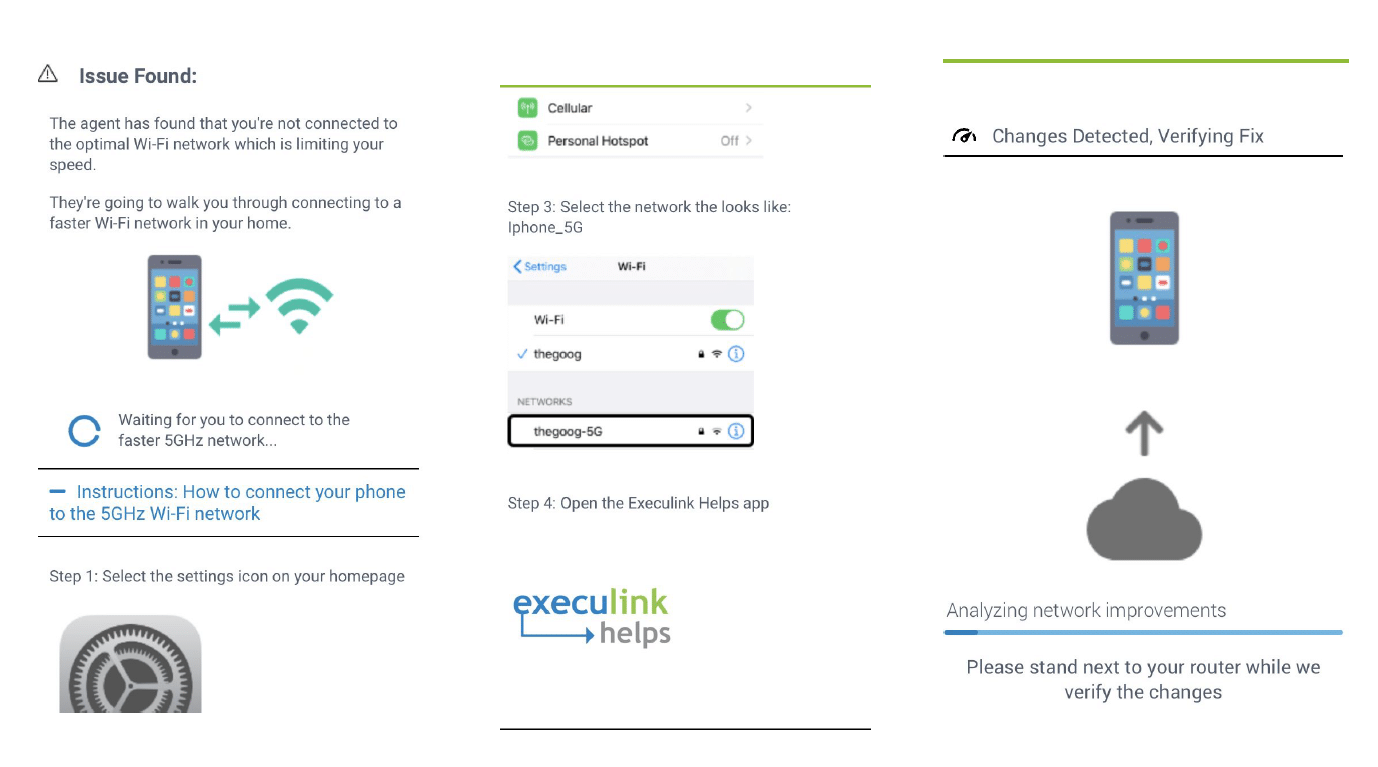
Managing the 5.8 GHz band and the 2.4 GHz band

Using the 5.8 GHz network in your home instead of the 2.4  GHz network is usually recommended because it provides an optimal Wi-Fi experience. It sends data at faster speeds. However, It’s range isn’t as large as the 2.4 GHz network. The 5.8 GHz network is better for streaming videos and your device will need to be closer to the router. The 2.4 GHz network is better for basic web browsing but the maximum speed is about 50 Mbps

Sometimes there can be more conflict from neighbouring Wi-Fi networks on the 2.4 GHz band, which can cause intermittent connectivity. The app will be able to identify this and our agents will make the necessary changes to improve this for you.

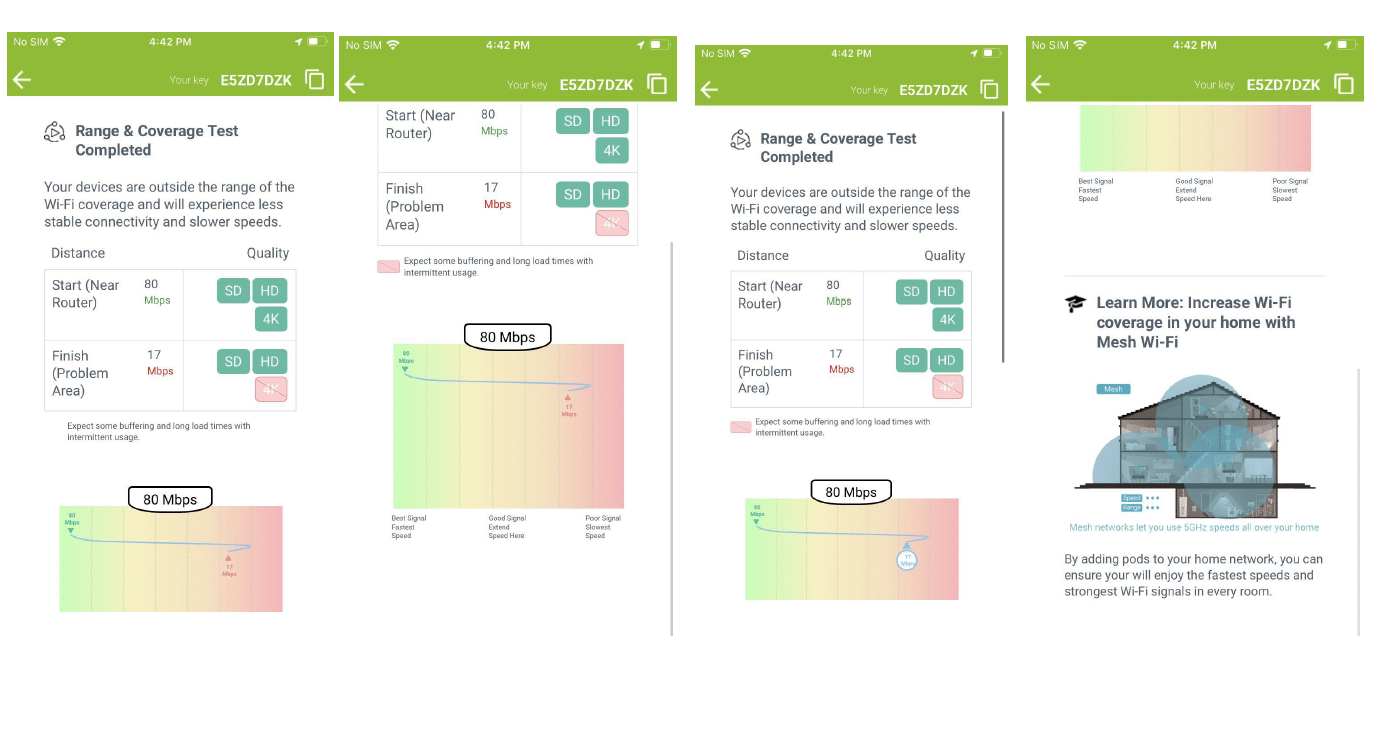
Find Dead Spots

Through the app, we will be able to guide you through a few simple steps to identify poor coverage areas in your home. A helpful interactive graph will help optimize device placement and eliminate coverage problems. We will have you walk to the problem area and the app will identify where the speeds begin to drop off and it could recommend adding a Mesh Wi-Fi Node to extend your network.

Age and Location of Router

Sometimes the issue may be that your router doesn’t support the latest networking standards and limits the speed/stability of your devices. The app is able to identify this and it will recommend a newer router, such as our Premium Router, that supports 5GHz.

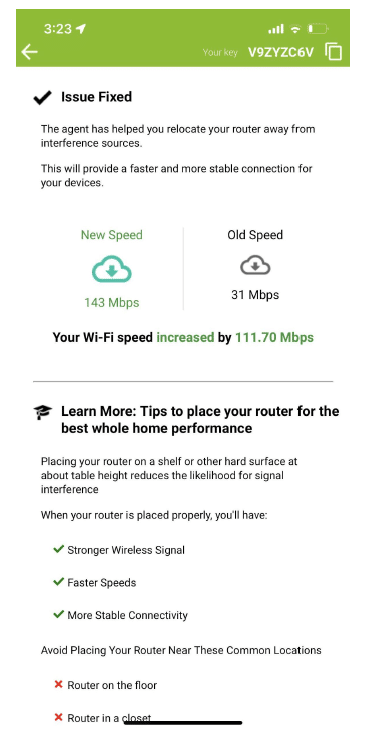
Execulink Helps is also able to identify if the router location is not optimal. Using the live view feature of the app our Customer Care team will be able to help improve the placement of your router away from interference sources

Follow These Steps to Start Using the App Today!

1. Download the App and Click “Begin”

When you open the App for the first time you will be presented with an 8-digit alpha-numeric code to share if you were on a call with us.  To test the app on your own, you can click “Next” and then “Get Wifi Network”. You will need to allow the app to access your location to provide extra information about your wireless network when the scan is running.  Click “Connect to Router” to ensure the communication line between your phone and the router is open.

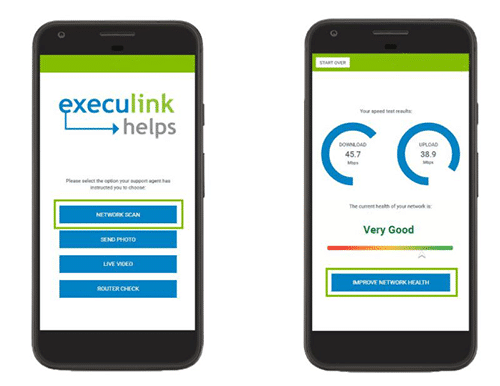
2. Select “Network Scan”

This is how the diagnosis begins.  You will need to stand about 1 meter or 3 feet away from your router before starting the scan.  It will take about two minutes and you should not leave the app or check other notifications while it’s running.

3. Check Results

After the scan finishes you will have access to the results. It will provide your current wireless Internet speed.  Note that wireless speeds are expected to be about 10-20% slower than your wired speeds.

4. Improve Network if Necessary

To see the suggestions for network improvements, click the “Improve Network Health” button.  The app will present a list of options for improving your Internet connection which you might be able to do on your own.  The recommendations will be customized to your network depending on the scan’s results. Examples of self-help solutions could include:

  • Moving the device that is having difficulty connecting to the network closer to the router to see if that improves the connection. You can also remove other electronic devices that are nearby to reduce interference such as baby monitors, microwaves, and TV boxes.
  • Rebooting your router to move to a Wi-Fi channel that is being used by fewer neighbours to improve Wi-Fi speeds.
  • Moving your router to a more central location in your home.

When Do I Need to Use Live View?

One of the awesome features of the Execulink Helps app is the live view feature which allows you to take a live video or photo of your router, modem, and computer set up so we can get a better understanding of your services. Three ways this is especially useful include:

  • Checking physical setup
  • Checking lights
  • Identifying a device

Having this feature will take some of the guesswork out of our conversations with you which will lead to a faster resolution!

Sounds AWESOME – How Do I Download Execulink Helps?

The app is available for download on the Google Play and Apple App store for your mobile phone or tablet. Follow the below links or you can simply search “Execulink Helps” within the app stores to give it a try on your own network.  The app is free so you don’t need to pay anything extra for it!  Sometimes you will need to enter your credit card information in the App/Google Play store if it’s the first time you are downloading an app, in case you decide to purchase other apps in the future.

Apple Download


Android Download

Get Started Today!

Everyday our mission is to connect you to everything that matters with the awesome and affordable experience you deserve.  To make that happen, the Execulink Helps app delivers customized solutions for your home network.  Our 24/7 support team will be there for you if you have any questions about the app or your services.  If you want to learn more about Execulink’s awesome Internet plans qualify your address, give us a call at 1-866-706-1942, or send us an email at sales@execulinktelecom.ca. Whether you’re looking for faster Internet speed options for streaming and gaming, or basic packages for surfing the Internet, we have the services you and your family deserve.

Click here to learn about Execulink’s Home Internet options

The Top 7 Signs That Your Home Internet Services Aren’t Meeting Your Needs

Your home Internet allows you and your family to stay online to do your favourite activities like video conferencing, streaming movies, gaming, and more. But what happens when your Internet isn’t living up to your needs and expectations? A poor-performing Internet connection can be downright frustrating in this modern world. If your Internet service isn’t meeting your needs, then it may be time to find a new provider that can give you precisely what you want. Whether it’s faster speeds, more reliability, better pricing, or other perks – you’ll want to read this article to ensure you’re getting the excellent Internet services you deserve.

Here are seven signs that your home Internet service may not be meeting your needs:

1. You lose your connection frequently

If you lose your Internet connection frequently, then you’re simply not getting the most out of your Internet connection. Dropped connections mean you can’t do all the things you want to do online without frequent interruptions. If your Internet continues to be unreliable, first you should look at your router or modem to ensure it’s capable of providing the speeds you need. If you are still experiencing issues, perhaps it is time to investigate other Internet service providers (ISP) with a solid reputation for reliability. Finding a reliable provider can help keep you online whether you use your Internet for business or pleasure. Having an Internet connection, you can always count on is priceless.

2. You get consistently slow speeds

If you’re experiencing slow speeds consistently while using your home Internet, then it may be time to shop around for a new Internet provider. We all understand how frustrating a slow Internet connection can be, especially when you’re trying to binge-watch your favourite show online or trying to send an important email. Speed is a large part of enjoying your online experience because it allows you to do your favourite online activities quicker. Ultimately, the time you save online will be the time you can spend doing other important things since you won’t be waiting around for your Internet to load. Imagine fast speeds all the time; what could be better? Try testing your Internet speed with an online tool to see your current Internet speeds. Consider if they align with the speeds your ISP said would be available with your plan. Keep in mind that an Ethernet connection rather than Wi-Fi will provide a more accurate picture of what your Internet speed truly is. As well, download speeds are much faster than upload speeds with most Internet plans.

3. You’re being charged too much

Is your current Internet too expensive? It’s essential to shop around for an Internet provider willing to meet your budgetary needs. Different ISPs will have packages with different price tags attached. If you use your Internet above your monthly data cap, some Internet providers charge you. If you’re noticing extra charges on your bill, it may be time to choose a new ISP without data caps and opt for an unlimited Internet plan. If your ISP is offering limited-time offers as a discount, keep in mind these are only temporary. You’ll be better off finding a consistently affordable plan with another provider instead. Another issue could be that you’re paying for more Internet than you need. If that’s the case, you should take another look at your plan or provider. Lastly, if you’re worried about paying activation fees when you switch to a new provider, you’ll be happy to learn that some ISPs don’t charge activation fees.

4. Their customer support isn’t helpful

If something goes wrong with your home Internet, then you’ll likely turn to your ISP’s customer support team. Consider how easy it is to get in touch with someone from their customer support page or number. Do they have 24/7 availability if an issue arises late at night or early in the morning? Are they available by your preferred communication method like email or over the phone? Are they helpful when you do get in touch? If the customer support isn’t experienced and knowledgeable, you won’t get the fast and efficient help you need. Customer support is often an overlooked factor in selecting the right home Internet service, yet, it can make a huge difference. It’s important to ensure that the company you purchase from is one you want to continue dealing with as long as you have Internet with them.

5. They don’t have many technology options

The type of technology your ISP offers will play a role in the performance of your Internet. If the technology supporting your home Internet seems outdated, then you may want to see what new options are available on the market. Having a reliable router or modem is important and your ISP should have options that will support your Internet package.

6. They don’t offer bundles

Does your Internet provider offer bundles for your Internet, television, and home phone? With bundles, you can save money on all of the services you use in your everyday life. If your current home Internet isn’t available as a bundle, you may want to explore your options with other ISPs. However, some providers may not offer other services along with your Internet, which means you may not be getting the most bang for your buck. It can be exceptionally convenient to have all your services with one provider. With everything in one place, you’ll have more straightforward billing because you’ll pay only one bill every month for all your services. Also, if there’s an issue with any of your services, you can get in touch with one provider you know and trust.

7. They aren’t flexible

If your current ISP doesn’t offer flexibility for your home Internet, then it may be time to find a new ISP. Many providers will show you a flashy sales pitch followed by locking you into a contract. The contract terms may not give you the flexibility you need to make changes to your Internet as your life changes. Whether it’s pricing, speeds, or other features – these terms outlined in the contract may not allow you to negotiate further if your Internet doesn’t fit your needs. If you’re feeling trapped by your agreement, then you may want to consider shopping around for a new Internet provider. Some providers offer no contracts and ample flexibility. It’s your Internet on your terms, instead of on theirs.

With 24/7 support and a wide range of Internet options to suit every lifestyle, at Execulink, we have the reliable, fast services your home or business needs to stay connected to what matters the most! Call us at 1-866-706-1942 today or check out our Internet plans to find the Internet package you’ve been looking for!

Execulink’s Home Internet Options

Humans of Execulink: Jennifer Versteegen

Jennifer is a committed member of Execulink’s Sales team. She’s a Business Relationship Manager passionate about delivering awesome solutions for small, medium, and enterprise businesses across the province. Her career has grown with Execulink since she started in 2015 as an Inside Sales Representative. Throughout her time, she has learned the importance of maintaining strong, long-lasting customer relationships

Jennifer answered a few questions for us and we were so happy to learn more about her!

1. How would you describe yourself and your role at Execulink?

I am a very outgoing person who loves working with people. I would describe myself as a team player that works hard to exceed our clients’ needs on a daily basis.  In my role at Execulink, I am a business solutions expert.  I work with small, medium and large enterprise businesses specializing in complex business solutions.  I offer solutions ranging for Internet and Voice services, to Hosted Phone, Fibre, custom Wi-Fi and Data Centre solutions.  I leverage my years of experience and success of other large business partners as I work with prospective customers to provide them with the awesome experience they deserve.  Each customers’ needs are unique and I work to tailor my recommendations to meet both their current needs and offer recommendations for their future expansion.  I truly value the relationships and partnerships that I have established with my customers at Execulink.

2. What has your experience been with Execulink’s company culture?

Execulink is very family oriented. They offer a great work life balance and are extremely accommodating towards their employees’ personal needs.  We are encouraged to be innovative and develop professionally.  Execulink is very inclusive and treats their employees as they would treat their customers. Health and safety of employees is paramount and Execulink has taken extensive measures to ensure staff feel safe in their work environments, especially during the evolving pandemic.  Execulink works to ensure they are meeting the needs of our ever-expanding employee and customer base.

“Telecommunications is a growing market and I love being able to provide cutting edge technology solutions to support our business customers.”

3. How have you grown professionally while on our team?

Execulink has supported me at every stage of my advancement. I have had the opportunity to grow and expand my role over my past 8 years with Execulink.  My initial role with Execulink was an Inside Sales Representative, where I answered incoming and placed outgoing calls and offered business solutions for small to medium sized customers. I then transitioned into the role of Outside Account Manager, where I travelled across South-Western Ontario to work with medium to large business customers. That role led me to my current position as a Relationship Manager, where I manage a book of over 130 clients and specialize in complex telecom business solutions for large enterprise customers. No matter what the size of business is, I am always willing to help provide my customers with the tailored telecom services they need to ensure they receive the awesome experience they deserve.­­­  The Internet and telecommunications is a growing market and I love being able to provide cutting edge technology solutions to support our business customers.

Jennifer’s ability to deliver awesome experiences and solutions for her customers’ is incredible. If you think that being a Relationship Manager like Jennifer sounds like a great opportunity, consider joining the Execulink team – we are currently recruiting for a Relationship Manager!

Learn more about Execulink’s Career Opportunities

FAQs about Execulink’s TV App on Fire TV and Android TV

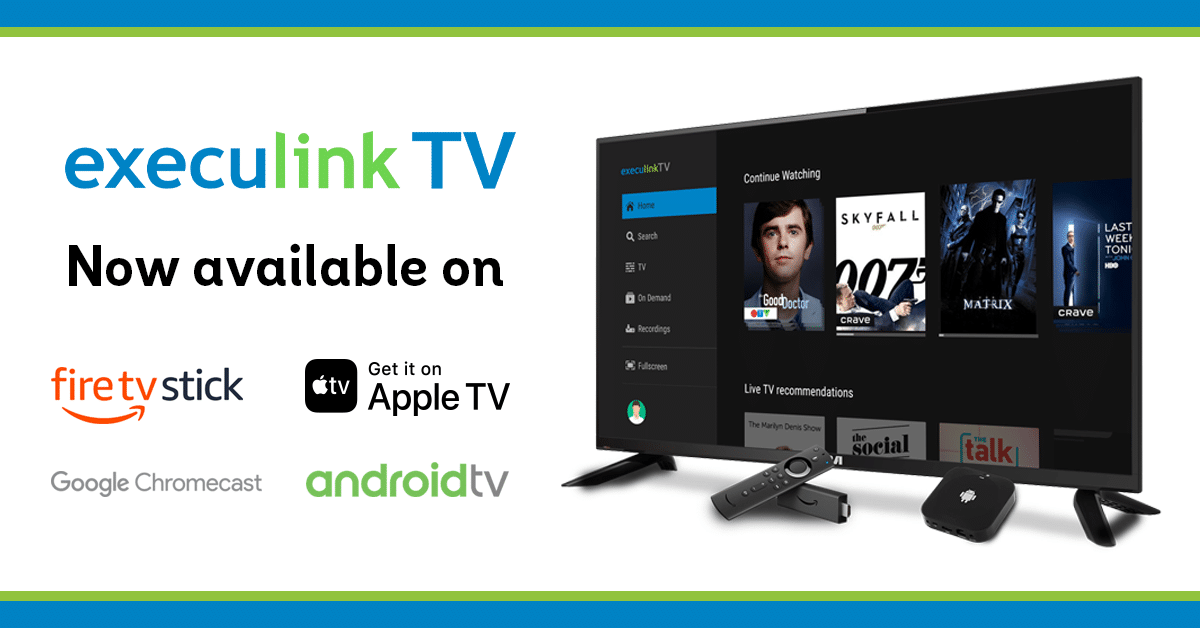
Execulink TV is available on Amazon Fire TV, Android TV, Apple TV and Google TV with Chromecast!  We know that having flexibility on how you watch TV is important, over 50% of Canadian households have at least one digital streaming device in their home. Adding our app gives you the freedom to access content wherever and however you want it! We thought it would be helpful to answer some frequently asked questions about downloading and using these apps.

What is the benefit of watching Android and Fire TV?

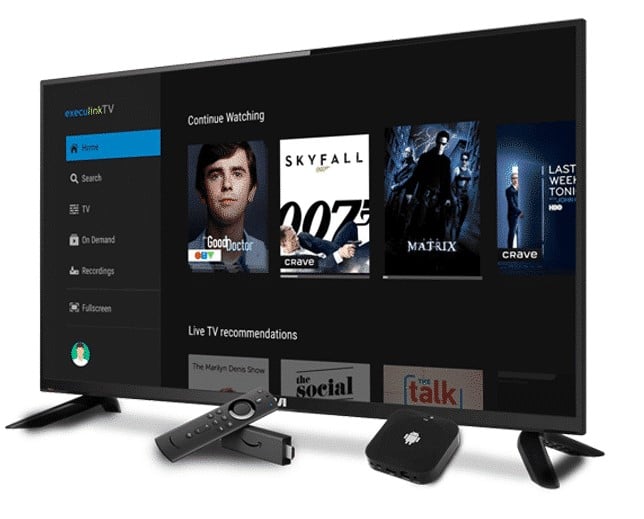
With the new Android TV and Fire TV apps, you have the flexibility to watch content on more devices such as your smart TV, cellphone, or tablet! You will be able to access Execulink TV in the same place as the rest of your favourite content like Netflix, Fire TV, and Disney+.  Your Cloud DVR recordings are stored in the cloud so you can record shows right on the app!

Everything that you currently enjoy with Execulink’s Set Top Box will still be available through the apps such as Restart TV or Catch Up TV.  Overall, you are getting the same AWESOME experience, but you can save on your monthly bill.  You no longer need to pay the Set Top Box rental fee if you decide that having one is not beneficial to your home.

What are the system requirements?

You must have Execulink Internet and Link TV service. The apps are compatible with many devices including

Android Compatibility:

  • Android mobile (5.0 and up)
  • Android tablet (5.0 and up)
  • Android enabled Smart TV
  • Chromecast with Google TV
  • Google TV Streamer 4K

Apple Compatibility:

  • Apple iPhones (iOS 10.0 and up)
  • iPad (iOS 10.0 and up)
  • Apple TV running 14.0+

Amazon Compatibility:

  • Amazon Fire TV stick (2nd Generation or higher)
  • Fire TV Stick Lite
  • Fire TV Stick HD
  • Fire TV Stick 4K (excluding 4K Select)
  • Fire enabled Smart TV
  • Fire tablets

However, the app is not available on Roku TV or Smart TVs not running Android or Fire TV operating systems yet.  We are working on it!

How do I download the apps?

You can watch this video for a quick explanation of how to download the apps!

If you prefer to have written instructions… this is how you download the apps!

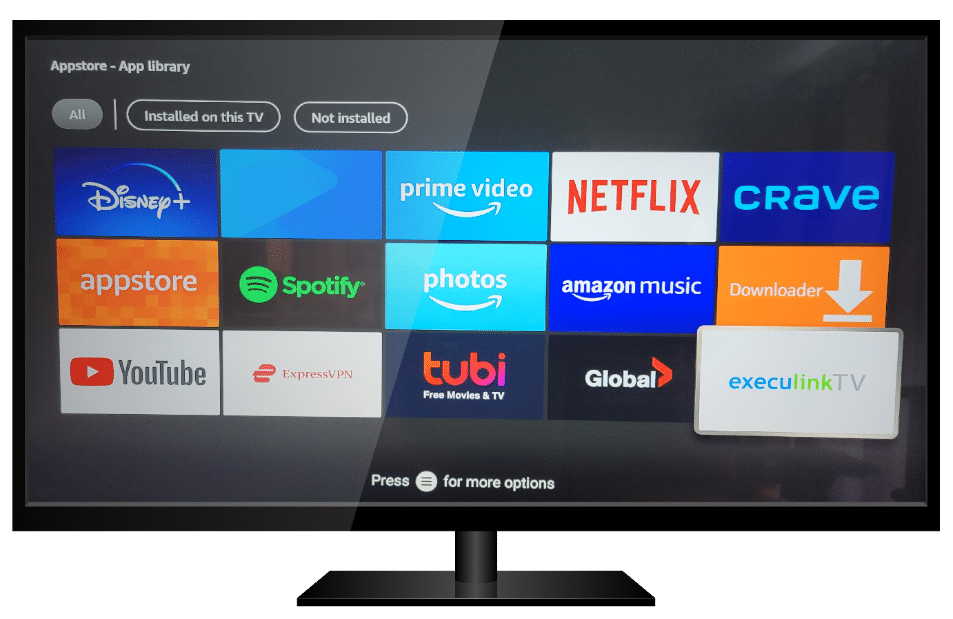
1: Navigate to the Appstore or Play Store on your device.

2: Search For “Execulink TV”

3: Download Execulink TV App. Once you click download, the app will begin installing automatically and in a few minutes, you’ll be able to sit back and enjoy all your Execulink TV content!

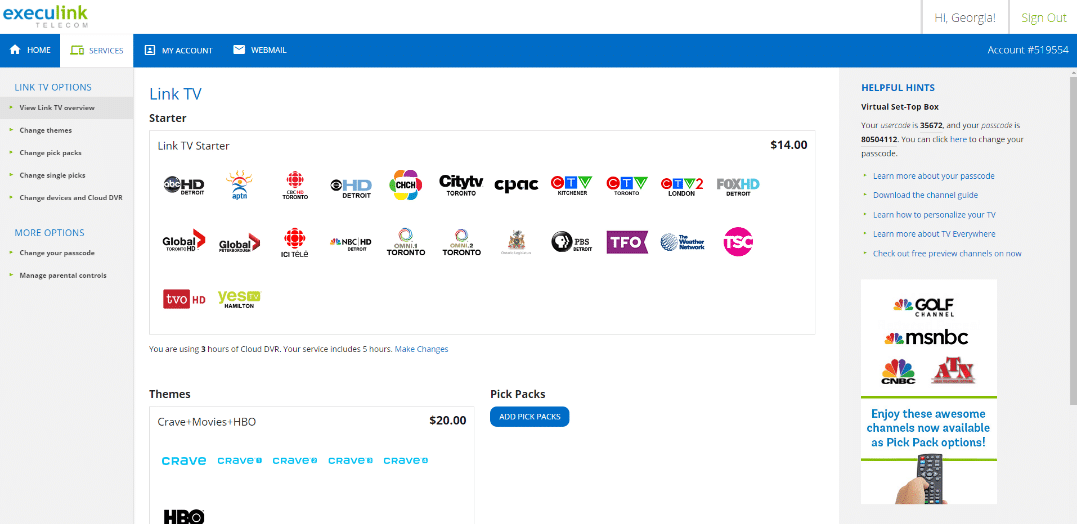
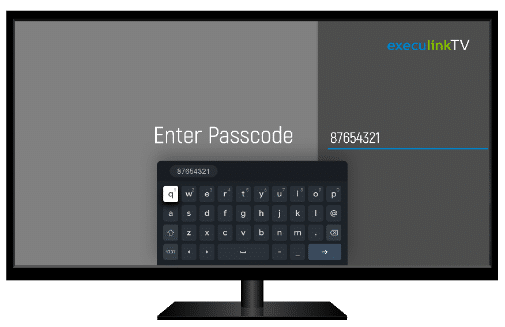
4: To use the app, log in to your MyExeculink account to locate your Usercode and Passcode. You do this by select the Services tab, then Select TV, and your Usercode and Passcode will be displayed under Helpful Hints on the right panel.

5: Go back to your TV and open your app.

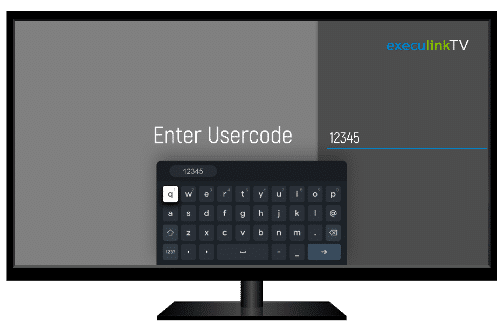
6: Enter the User ID and Passcode that you found on your MyExeculink account. This will look slightly different from device to device.


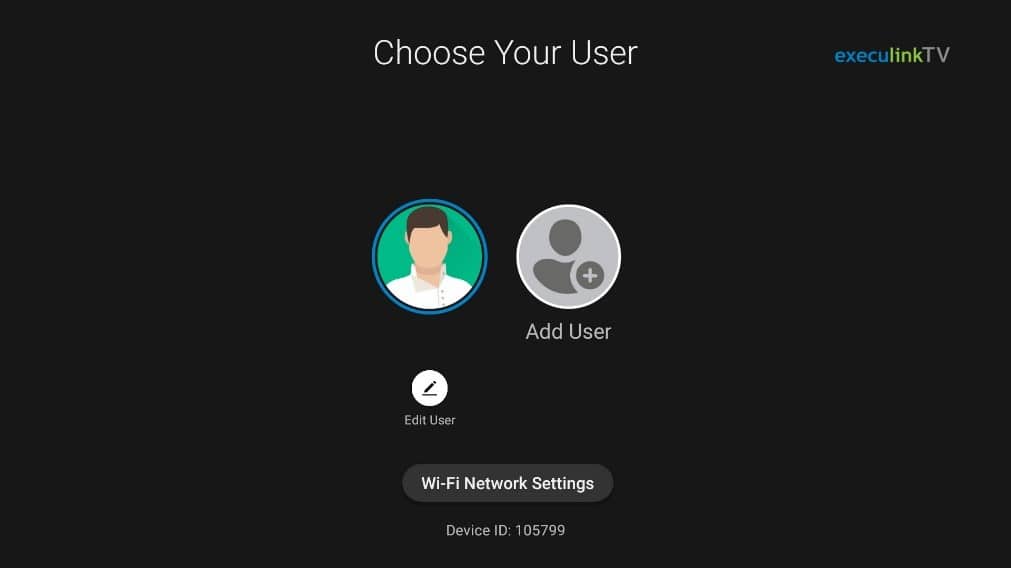
7. Once you’ve logged in, you’ll get your user menu. Here you can change users, edit your avatar, and change Wi-Fi network settings.

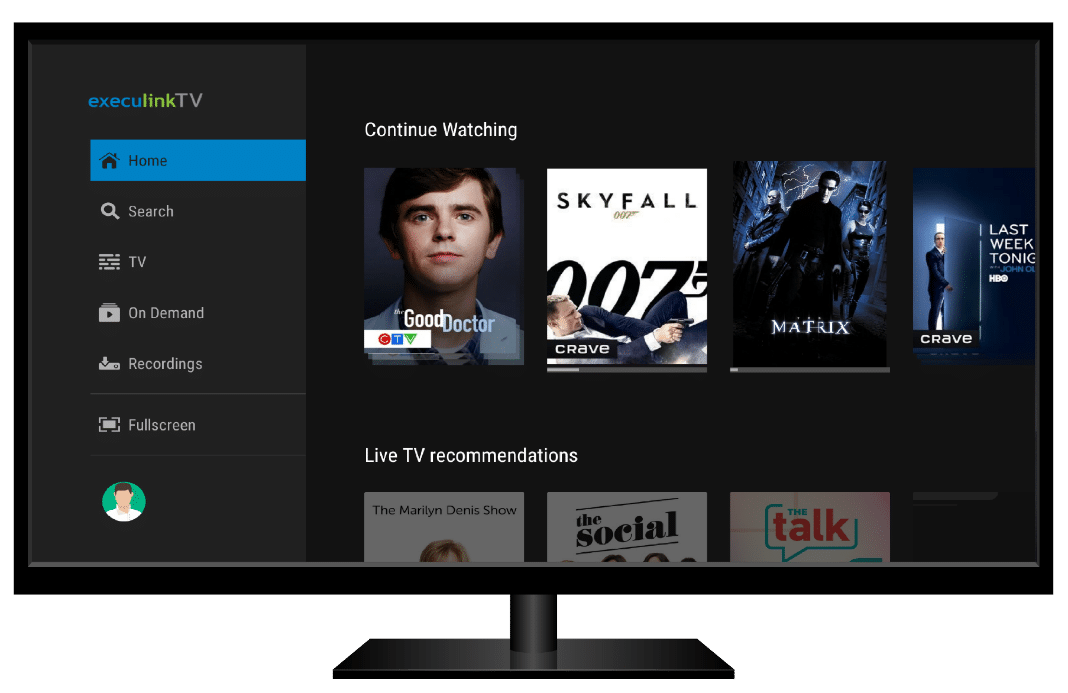
From the Home Screen, you can continue watching your favourite shows or see what’s trending now. You can navigate to the search menu to search for something to watch or you can head over to the TV tab and browse through the guide.  The On Demand menu features all of Execulink’s On Demand offerings and the Recordings tab gives you access to your Cloud DVR recordings.

Do I need to rent a Set Top Box?

If you prefer to use your Android TV or Fire TV, you no longer need to rent a Set Top Box. You can return your equipment at our stores or send it back by mail. However, we still offer the option to rent our Android Set Top Box for $9.95/month. We have options for everyone!

You deserve to watch TV according to your schedule, on familiar devices! At Execulink, strive to keep it simple and the Execulink TV app on Fire TV and Android TV intend to do just that!  Explore all the ways to watch Execulink’s TV service here!  To learn more about Execulink’s TV service give our Sales team a call at 1-866-706-1942 or visit our TV page to find a plan that works for you.

Learn more about Link TV

7 Factors to Consider When Choosing a Networking Solution

Networks are the backbone of businesses today that enable the interconnectivity and support of different types of applications, devices, and people within an organization. They are used to transmit, receive and exchange data, voice, and video traffic so employees, suppliers, and customers can share resources and communicate.

Networks can be used to link thousands of users within one organization or multi-site locations spread across the globe. There are many types of network solutions available for business, but choosing the best solution will depend on the size of your business and specific needs. Below we will walk you through some key factors you should consider before choosing a networking solution for your business.

7 Factors to consider when choosing a networking solution

1. Geographic and physical location: Are you a start-up working out of your home or in a co-working space? Do you rent out an entire floor of a building, and maybe plan to expand within the same building over time? Or, perhaps you have a multi-site business with locations in other cities, countries, or even across the globe. Your current and future infrastructure will require a different network solution designed for these physical and geographical attributes.

2. Bandwidth: How many people will be accessing your network at the same time? Work with your Internet Service provider to ensure you have the bandwidth you require to accommodate high volumes of traffic on your network.

3. Network Security: A primary concern for most companies is keeping their network secure and free from outside intrusion and data theft. The right network design can help to eliminate the risks. It’s important to look at the key features provided by your network provider to ensure you are getting the reliability and security your business needs. Execulink offers a high-quality, high-performance, and fully managed Private Network Solution that encrypts and secures your data in transit.

Encryption is the most important privacy-preserving technology available. It protects your data when it’s sitting on your computers and when it’s being delivered around the Internet. In addition to standard encryption, Private-WAN technology distributes packets across multiple Internet connections. This ensures an attacker can’t intercept, modify, or forge messages sent between your sites.

4. Redundancy: It’s important to consider redundant services in your network. Having backup devices for storing your sensitive data will help to reduce any costly downtime.

5. Scalable: It’s important to plan for growth now and in the future. You want to be prepared to accommodate new employees and business applications so that you don’t have to rebuild your entire network, which will incur added time, resources, and cost.

6. IT Maintenance: Maintaining hardware and software components is an ongoing and important task to ensure the peak performance of your network service. You will need to consider if this is something you have the resources to do in-house or decide if this is something that needs to be outsourced by your Network Solutions provider.

7. Cost: Depending on your business the cost to design a network will vary. However, regardless of your business, you need to consider the equipment and material needed, maintenance fees, and resources.

If you are starting a new business, looking to expand, or need to update your current solution, choosing the right network is vital to ensure seamless communications, secure your data and grow your business. When you work with a Network Solutions provider like Execulink, they can help you design a network that is configured to your specific business type and needs.

Connect your business and branches to your customers with secure and reliable networking solutions from Execulink and transform how your business communicates. Call us at 1-877-561-6771 today or visit our Networking Solutions page to find the right network for your business.

Check out Execulink’s Networking Solutions Today!

2022 Smart Home Trends

With the first month of the year under our belts we thought now would be a great time to look ahead at what’s to come in the world of smart home technology! From sleeping better to improving your home’s security, there are many new devices coming soon or available now that will enhance the IQ of your home.

Technology Trends in 2022 – The Metaverse

The 2022 Consumer Electronics Show (CES 2022) recently happened in Las Vegas where exhibitors shared compelling technology and trends, including the next generation of the Internet, the metaverse. The pandemic has accelerated the demand for interactive, online, and on-demand consumer products. All of these demands are captured within the metaverse. The metaverse blossomed from using video games as social media platforms. Players of games like Roblox and Fortnite can build their own universes and attend concerts and other events. Smart home technology is still in its infancy and as the metaverse gets embraced by smart home companies, more of your everyday appliances could change to embrace this new universe.

Samsung unveiled a metaverse service called My House at CES 2022. The platform introduced new appliances and products through a 3D avatar platform where users can test out a variety of Samsung appliances while decorating and furnishing virtual homes.

Amazon Astro Robot

2022 may be the year that we finally get a Rosey the Robot from the Jetsons! Amazon’s Astro Robot is a device designed to interact with users in a new way. This robot is essentially an Alexa on wheels with a 1080p camera that can extend 42 inches above the floor. The wheels allow it to roam around your home and it provides services like video calling. It can also integrate with your smart doorbell, the Ring to provide enhanced security.

Astro has a ton of awesome uses! It even comes with a detachable cup holder and can carry other items (sold separately) like a Ziploc container, the OMRON blood pressure monitor, and a Furbo Dog Camera that tosses treats to your pet (adapter required). The only thing this device can’t do is go up and down stairs!

Health Tracking

The pandemic has pushed innovators to think of new ways to maintain and monitor our health from inside the house. For example, sleep health technology is poised to improve this year with things such as Smart Beds. Smart Beds use sensors to gather data about how you sleep and deliver the information to your smartphone. They can provide tips on how to improve your sleep or even identify sleep disorders you were unaware of. Some beds adjust with temperature changes overnight or come with a built in TV or alarm.

Other health monitoring smart home devices include toilets with sensors, a smart assistant that can remind you to sit up straight or take a break from sitting on the couch.

Security

A major driving force behind many smart home devices is improving home security. Devices such as the Nest Hub Max can listen for the sound of breaking glass, beeping appliances, and more. Some security cameras can even monitor for fire.

Devices like this would be extremely beneficial if you have a cottage or a second home that you aren’t living in 365 days a year.  (In Lambton Shores, Long Point, or Turkey Point perhaps?) Keeping an eye on things can give you peace of mind.

Complete Wi-Fi – Mesh Wi-Fi Trends
Keeping all of your smart home devices connected is easy with Execulink’s Complete Wi-Fi solution.  Complete Wi-Fi technology works by combining our Premium Router with our Mesh Wi-Fi Nodes. It creates a strong network in your home by covering more areas and sustaining your devices’ connections. The Premium Wi-Fi Router helps maintain a strong connection in your home with self-healing functionality that reduces noise to improve performance.  This reliability is important if you are a heavy Internet user or gamer.


The mesh system is created when you connect a Mesh Wi-Fi Node to your premium router. They are designed to help extend your signal to hard to reach areas. Simply plug into a nearby power outlet and push a button to pair a node with your router. You can add up to 4 Mesh Wi-Fi Nodes to create a unified Wi-Fi experience.

TV Apps

Canadians are increasingly watching TV on more devices; over 50% of Canadian households have at least one digital streaming device in their home. TV isn’t just for TVs anymore. Watching live TV from the same place where you find your favourite streaming apps is easy with the Execulink TV app. You can download the app and start watching on a variety of Android, Apple or Amazon FireTV devices.

As our world evolves, it’s becoming increasingly important to stay connected with an Internet plan built to handle many devices and users.  Explore Execulink’s Internet options with speeds up to 1 Gbps to find the perfect package for your home and all its smart devices!

Connect your Smart Home with Execulink’s Internet!

The Benefits of Direct Routing for Microsoft Teams

In today’s business landscape many organizations have moved to a remote or hybrid workplace. With more employees communicating across different locations, it’s no surprise that more and more businesses are adopting Microsoft Teams and looking to the advanced voice and calling features it offers.

Direct Routing turns your Teams platform into a fully-fledged business phone system that leverages the Public Switched Telephone Network (PSTN). It allows organizations to standardize and streamline their communications for today’s distributed workforce while lowering costs, reducing complexity, and providing a consistent employee and customer experience.

Many businesses opt for Direct Routing because it enables customers to choose their own telecom provider to host their PBX, allowing for greater flexibility with calling plans. This is just one of the many benefits of Direct Routing. We have outlined more key benefits below to help you decide if Direct Routing is right for your business.

Benefits of Direct Routing for Microsoft Teams

Unified Communications

Teams transforms into a business phone system allowing you to make and receive calls, chat, meet, file share, and more all from one place, on any device, from anywhere.

Greater Flexibility

Avoid any expenses related to changing providers and the complexity of dealing with different carriers across regions by choosing your own/existing provider for your lines and calling plans.

Cost Savings

No on-site phone system is needed since Direct Routing is a hosted solution. All you need is a broadband connection and Teams installed on your devices, saving you from purchasing and maintaining any hardware and equipment.

Business Continuity

Keep your existing customer-facing numbers and DIDs so you can migrate your voice to Teams with ease.

Reliable PSTN Access

Session Border Controllers have geographical and physical redundancy, ensuring impeccable uptime so your calls go uninterrupted.

Broader Geographic Coverage

Providers like Execulink have nationwide coverage and North American calling options including long distance. With Microsoft calling plans, minutes are allocated to each user per month and are only available in certain countries.

Lower Rates

Choosing your own provider allows you to take advantage of lower rates than Microsoft Calling Plans.

If you are currently a ‘Microsoft Teams’ business or considering Microsoft 365, integrate Direct Routing into Microsoft Teams and turn your Teams environment into a unified collaboration platform with enterprise-grade voice capabilities.

Call us at 1-877-561-6771 or visit our Direct Routing for Microsoft Teams page to learn if Direct Routing is right for your business.

Learn more about Execulink’s Direct Routing for Microsoft Teams!

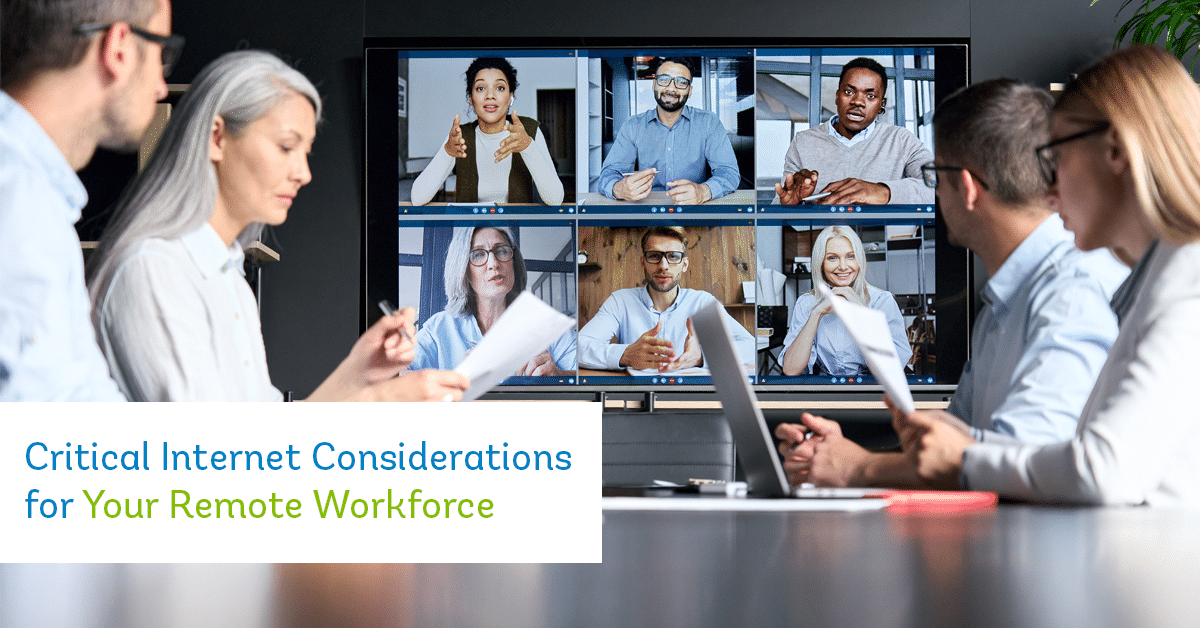
Critical Internet Considerations for Your Remote Workforce

The world is evolving and remote work is spreading rapidly. People are trading up the traditional work environment for more flexibility and a greater focus on work/life balance. With this shift is the rise of the remote workforce. Depending on the industry, partial or full remote working schedules may be possible. While this modern way of working is becoming popular, there are important considerations that employers need to make to maintain an effective remote workforce. A key part of having a successful remote workforce is securing the right Internet connection since it helps employees stay connected and productive without being under the same roof.

What is a Remote Workforce?

A remote workforce is a group of employees from an organization who work from a location outside their traditional office workspace. Remote workforces can work anywhere there is an Internet connection whether that is at home, in a coffee shop, while traveling, in your backyard, or anywhere else you choose. Ideally, a remote worker should be able to perform all their essential work tasks from this remote location.

Benefits of a Remote Workforce

Cost Savings – Without the need for employees to be at the office, your company can downsize your office space, which will lead to savings. With limited commutes and lowered office electricity consumption, this is also a great way to help the environment, since your company’s carbon footprint will be reduced.

Increased Employee Engagement – Surveys indicate that remote employees are more productive and engaged than non-remote employees. Typically, this is because employees don’t have to participate in a lengthy commute to the office, have increased work/life balance, and are in more control of their work environment.

Increased Retention – Since employees tend to be happier with the flexibility of remote work, this often results in increased retention. Companies can benefit by retaining their highly valued talent simply by offering the work arrangement that suits them best.

Emergency Preparedness – As we have seen with the COVID pandemic lockdowns, remote employees have been able to remain productive without missing a beat, unlike their centralized counterparts.  Whether it is yet another pandemic lockdown or simply a parent needing to stay home with a sick child, having remote access allows both the business and the employee to balance the unexpected events that life throws at us, all while remaining productive to work as feasible.

If you’re ready to reap the benefits of a remote workforce, then the next step is setting up the infrastructure to support this type of working model. Technology is essential for operating a remote workforce. Whether it’s video conferencing, sending emails, or collaboration, your Internet connection will keep your employees connected, collaborative, and productive.

Here’s what to consider when selecting an Internet connection for your remote workforce:

Secure Connections

If you are an employer and need an Internet connection for your head office location. You should choose secure Internet options, especially if you have a remote workforce. Some examples of ways to enhance security of your business network when managing a remote workforce is to use a Virtual Private Network (VPN) or an Internet Protocol Virtual Prviate Network (IP-VPN).  With employees working remotely, they’re using their own personal network rather than the protected network supplied by their organization. This creates an opportunity for sensitive data to be intercepted or stolen. Utilizing a VPN connects remote users through their business’ private network or a third-party VPN service, effectively avoiding the potential for data theft. IP-VPNs are very similar to VPNs except they use multiprotocol label switching (MPLS) technology to prioritize internet traffic and avoid public gateways to increase security.

Internet Speeds

If you are a remote worker looking for an Internet connection, you should consider the types of activities you do online for work. Finding the right Internet speeds that suit your work is an important consideration. For instance, if you’re a video designer, then you likely are running software that can easily slow down your Internet. In comparison, if your job involves checking emails and lightly browsing the web, then your Internet speeds may not be as important to you. But you should monitor the types of activities and tasks you complete online for your job, and make an informed decision on the Internet package that will fit your needs.

Bandwidth

When you’re working from home, then you may be competing with other members of your family also using the Internet.  Whether there are kids streaming video content, or a spouse who is also working from home, the amount of bandwidth will affect how everyone is able to utilize or enjoy their online activities. If you use the Internet during peak times and there is excessive network congestion, then this may also cause challenges to how efficiently you’re able to work.

Management

It’s important to build and train a team of managers and employees who are able to work effectively in a remote working environment. Provide them the digital tools and resources to stay productive online. Since the traditional idea around remote working is that employees may be less productive and neglect their responsibilities, it’s critical to hire a management team that knows how to manage and empower remote workers. Managers can ensure employees still participate, collaborate, and feel part of the company culture despite working outside of the office.

Covering Business Internet

If you’re an employer, one of the best ways to ensure your remote workforce is able to effectively work online is to invest in separate home Internet connections. Legally, a business isn’t required to cover these Internet connections if they don’t want to, but it’s certainly a value-added perk to your employees and ensures that they have the right tools to support your business. While some employees are responsible for covering the cost of their remote Internet connection, there have been instances where companies will cover the cost of a home Internet connection as long as the employee is predominantly using the connection for business purposes. This is an option instead of having your employees share their residential connection for business use.

Keen to learn more about Internet solutions that will keep your remote workforce happy and productive? Talk to the Execulink team and we’ll guide you through our exclusive business Internet features, packages, and services that may help you more effectively manage and support your company.

With 24/7 support and a wide range of Internet options to suit every lifestyle, at Execulink we are proud to offer the awesome services your home or business needs to stay connected to what matters the most! Call us at 1-877-561-6771 today or visit our Internet page to find the Internet package you’ve been looking for!

Check out your Home Internet options

Check out your Business Internet options

The Internet Services You Deserve
Affordable. Reliable. Lightning fast.

We’re proud to provide the communities we know, love, and live in, with the reliable Internet, TV, Phone and Mobility services they deserve.

  • Your local choice for residential and business telecommunication services
  • Renowned 24/7 customer service you can depend on
  • Affordability, service, integrity and transparency are the pillars of our business

Here to help. 24/7.

Sales Inquiries

Sales: Mon-Fri 8AM-8PM, Sat 8AM-5PM

(866) 706-1991

Support Inquiries

Technical Support: 24/7, Customer Care: Mon-Sun 7AM-11PM

(866) 706-1994

Online Help

Chat With Us

We'll respond as soon as we can!

Email Us

We'll get back to you as soon as possible.

Support Centre

Find the answer to your question.

Check availability

Enter your address to find services and offers available to you!