Winter Connectivity Tips for Your Business.

5 Ways Businesses Can Stay Connected During the Winter Season


Key Takeaways

  • Winter weather can affect staff mobility, customer communication and day-to-day operations.
  • Keeping contact information, phone routing and remote access tools updated reduces disruptions.
  • Small steps like protecting equipment and sharing clear updates can improve customer experience.
  • Preparing ahead helps teams stay productive and reachable during unpredictable conditions.


Winter in Ontario often brings snow, ice and fast-changing conditions that can impact travel, staff availability and customer expectations. When this happens, businesses rely on strong communication to keep operations moving smoothly.

The good news is that a few practical adjustments can make your business more resilient. By updating your contact information, fine-tuning your phone setup, supporting remote work, protecting key equipment and communicating proactively, you can stay ready for whatever winter brings.


  1. Keep your hours and contact information consistent

Winter storms and shifting conditions can affect your schedule. Consistency across platforms helps customers easily find accurate information without having to call.

Make sure your winter hours and contact details match across:

  • Your website
  • Your Google Business Profile
  • Social media channels
  • Voicemail and on-hold recordings

Clear and consistent details reduce unnecessary calls and confusion on busy days.


  1. Tune up your phone setup for seasonal needs

December and January often bring higher call volumes and changing staff availability. A few simple phone-system adjustments can help:

  • Update your auto-attendant greeting
  • Add a short holiday or weather message
  • Turn on voicemail-to-email for quicker follow-ups
  • Use overflow rules or team ringing so more than one person can answer calls

These updates make it easier for callers to reach someone who can help, even when your team is juggling higher demand.


  1. Make remote and flexible work easier

Snow days and icy roads can make commuting difficult. When staff work from home or switch locations, they still need to be reachable and connected to your tools.

Test these basics ahead of time:

  • Can staff answer business calls from a laptop or mobile app?
  • Do shared files and cloud tools work smoothly offsite?
  • Are messaging and email apps syncing across devices?

A short test now can prevent delays and downtime later.


  1. Protect must-stay-online equipment

Winter storms can cause brief power dips or outages that interrupt your internet and Wi-Fi. Preparing key equipment helps your business avoid unnecessary downtime.

  • Use a small battery backup for your modem and router
  • Confirm POS systems reconnect smoothly after a disruption
  • Check Wi-Fi coverage in your busiest areas

These small precautions support daily operations and reduce interruptions for both customer-facing and back-office teams.


  1. Communicate proactively during winter changes

Clear communication helps customers and partners plan around weather and schedule changes.

Consider:

  • Posting updates early on your website
  • Sharing changes on social media
  • Using a temporary banner on your homepage
  • Sending reminders or confirmations during stormy periods

When customers know what to expect, they can plan their day and trust that your business is prepared.


FAQs

What winter issues cause the most communication problems?
The most common issues are unexpected closures, staff delays, short power interruptions and changing hours. All of these can affect how and when customers reach you.

Should smaller businesses use backup power?
A small battery backup for your modem and router can keep your internet and Wi-Fi online during brief outages. This can be helpful for payment terminals, cloud tools and VoIP phones.

How often should we update our phone greeting?
Update your greeting anytime your hours or availability change for more than a day, especially around holidays or major storms.

What’s the easiest way to keep customers informed in winter?
Update your website, Google Business Profile and voicemail greeting. When all three match, most customers will find accurate information quickly.


About the Author

Execulink Telecom has been serving Southwestern Ontario for over 120 years. We provide Internet, Phone, Network, TV, and Mobility solutions for local businesses, with support teams based in the communities we serve. Learn more at  execulink.ca/business.


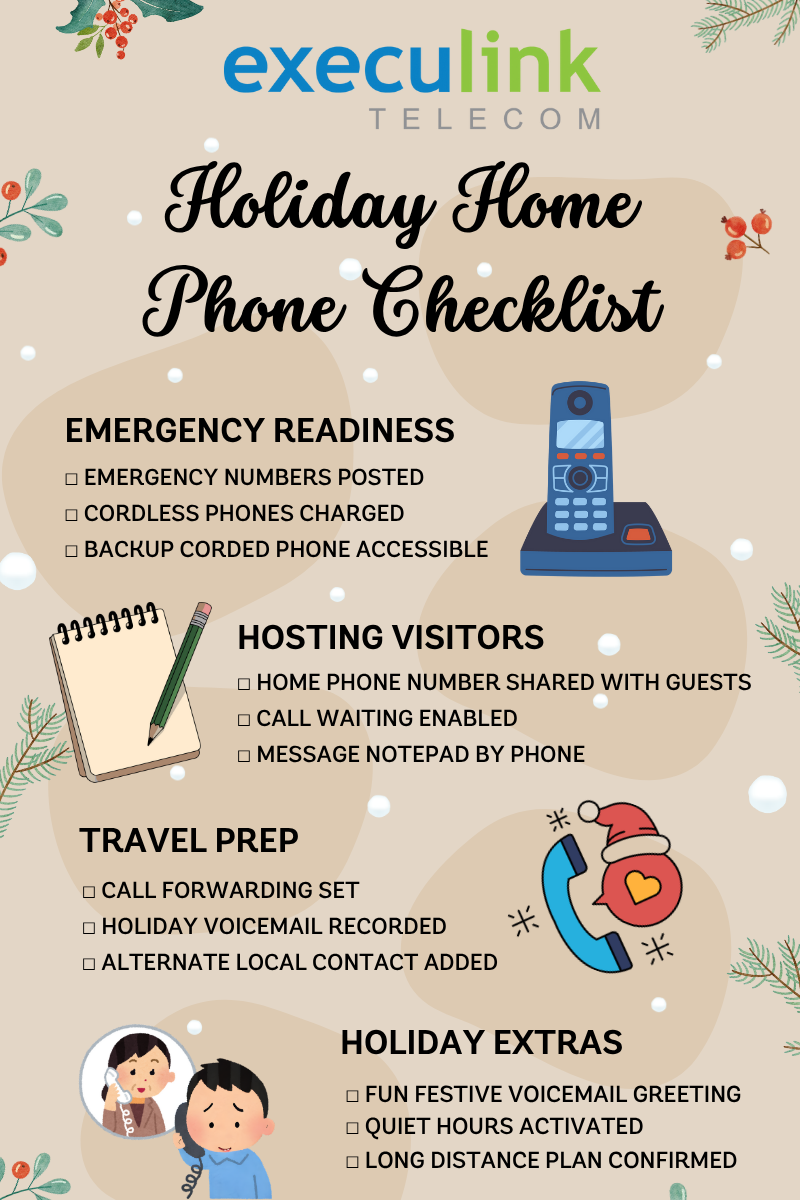
Your Handy Holiday Home Phone Checklist

The holiday season is busy, cozy, and sometimes a little chaotic, and staying connected shouldn’t add to the stress. From hosting family, travelling, or just getting ready for winter weather, your home phone can be a simple tool that keeps everything running smoothly.

We’ve put together a Holiday Home Phone Checklist you can print, pin to your fridge, and use throughout the season. From emergency readiness to fun voicemail ideas, this guide helps you get the most out of your Execulink Home Phone.

  1. Be Ready for Holiday Emergencies

Winter weather and holiday gatherings can be unpredictable. A quick home phone check helps you stay prepared.

✔ Essential Emergency Numbers List
Keep these written and near your phone:

  • Local emergency services
  • Hydro outage line
  • Road conditions hotline
  • Neighbours or nearby family
  • Your veterinarian (for holiday pet mishaps!)

✔ Test Your Cordless Handsets
Make sure they’re fully charged and placed where everyone can find them.

✔ Know Where Your Backup Phone Is
If you have a corded backup phone, keep it plugged in or easily accessible.

  1. Hosting Guests? Make Communication Easy

When family and friends visit, your home phone becomes the hub of the house.

✔ Share Your Home Phone Number
Add it to your holiday invitations or group chats so guests can reach you easily.

✔ Set Up Call Waiting
That way you won’t miss important calls during the holiday rush.

✔ Keep a Notepad by the Phone
Perfect for messages, grocery lists, or gift reminders that pop up during conversations.

  1. Travelling Over the Holidays? Prep Your Phone Before You Go

Your Execulink Home Phone can make travelling easier and help protect your home while you’re away.

✔ Use Call Forwarding
Forward your home phone to your mobile so you never miss a call while on the go.

✔ Consider a Custom Away Voicemail
Let callers know you’re travelling but will return their call soon.

✔ Share an Alternate Contact
Add someone local, like a neighbour or house sitter, to your voicemail message for emergencies.

  1. Add a Little Holiday Fun

Your home phone can spread some festive cheer too!

✔ Create a Holiday Greeting Voicemail
Try something warm and simple like:
Happy Holidays! You’ve reached the [Last Name] household. We’re busy decking the halls at the moment, leave a message and we’ll call you back soon!

✔ Set Up Quiet Hours
If your device supports it, silence rings after bedtime to protect those long winter naps.

✔ Keep Kids’ Wish Lists Off the Phone Line
If little ones will be calling grandparents or Santa, make sure your long-distance plans are in order.

A Home Phone from Execulink is a simple, reliable way to stay connected, and a little preparation can make the season feel smoother and more enjoyable for everyone.

Don’t forget to download and print the Holiday Home Phone Checklist below to keep everything organized and easy to find throughout the season!

How to Get Your Home Internet Holiday-Ready

Simple tips to avoid slow Wi-Fi, streaming glitches & unexpected tech headaches this season

The holidays bring cozy nights, family visits, and more devices connected to your home network than any other time of year. Between video calls, holiday movie marathons, smart speakers playing festive playlists, and kids home from school, your connection works overtime.

Here’s how to make sure your Internet and TV are fully holiday-ready and what to do if things start slowing down.


1. Give Your Wi-Fi & Streaming Setup a Holiday Tune-Up

Before the hustle and bustle of the holiday season begins, take a few minutes to make sure your setup is in good shape.

  • Move your router into the open – Routers don’t work well when they’re stuffed behind TVs or inside cabinets. Give it some breathing room. Your router should be high up, open, and central.
  • Update your smart TV and apps – App updates improve stability, picture quality and loading time.
  • Close unused apps on your TV or streaming box – Too many apps running in the background can cause lag and buffering.
  • Hard-wire when possible – Plugging your TV directly into your router with Ethernet gives rock-solid picture quality.
  • Upgrade your router if it’s older – Older equipment can’t always keep up with the number of people and devices. Plus newer mesh systems, like Complete Wi-Fi from Execulink, ensure that every corner of your home gets a strong signal.

2. Expect More Devices and More Bandwidth Needs

Holiday gatherings and techy gifts can easily double the number of devices on your network.

  • Visiting guests bring phones, tablets, and laptops
  • Smart home gadgets go into overdrive with holiday lights and timers
  • Online gaming and group video calls spike over winter break
  • New electronics add more congestion

If your Internet plan is already near its speed limit, this extra load can cause buffering, slow browsing, or TV quality issues. A small speed upgrade, even just for the season can make everything run smoother. Check out your options and upgrade your speed easily through MyExeculink.


3. Watch for Holiday-Light Interference

This one surprises people. Did you know that certain holiday lights can interfere with Wi-Fi, especially older LED strands or ones with blinking patterns? They emit small bursts of electrical noise that weaken nearby signals.

Quick fixes:

  • Keep your router at least a few feet away from holiday lights, décor plugs, and smart plugs
  • Avoid wrapping lights around TV stands or entertainment units
  • If a room’s Wi-Fi suddenly drops then unplug the lights briefly to test


4. Create a Guest Network

If you have family staying over, a separate guest network keeps guests connected without slowing your most important devices.

  • Your main devices more secure
  • Your smart home devices isolated
  • Your Wi-Fi less congested

Quick Troubleshooting for Slow Wi-Fi & TV Glitches

Holiday chaos doesn’t have room for tech headaches. So, to sum it up, here are fast, do-it-yourself fixes.

 If your Wi-Fi suddenly slows:

  • Move a bit closer to the router
  • Unplug and re-plug your router and modem (30 seconds)
  • Check for overloaded devices and disconnect anything unused (hint: download the Execulink Helps app to diagnose Wi-Fi issues)
  • Test if holiday lights or décor are causing interference
  • Create a guest network

 If your TV buffers or pixelates:

  • Switch the TV from Wi-Fi to wired if possible
  • Restart your TV, streaming device or Set-top box
  • Check for apps running in the background
  • Move other electronics (Bluetooth speakers, lights, baby monitors) away from the TV area
  • Confirm your Internet speed is high enough for the number of people and devices in your household


Give Yourself a Stress-Free Holiday Season! A little planning goes a long way. With just a few small tweaks, you can ensure those holiday movie nights are uninterrupted, those video calls are smooth, and your Wi-Fi is reliable for every guest. Don’t forget, if you ever need help or advice, our team is always available to make your season bright.


What Your Voicemail Says About You

Think about it, when’s the last time you actually called your own number just to hear your voicemail greeting? Whether you’re a “short and sweet” type or you’ve still got that classic robotic message from 2008, your voicemail might be saying more about you than you think!

That little recorded message can reveal a lot about your personality (and maybe even how busy life gets), so let’s take a look at a few voicemail “types” and what they say about you.

The Classic Professional

“Hi, you’ve reached [Your Name]. I can’t take your call right now, but please leave your name and number and I’ll get back to you as soon as possible.”

You mean business. Whether it’s your Home Phone or your cell, your voicemail is crisp, polite, and to the point – just like your inbox, which we’re guessing is always at zero. You’re reliable, organized, and you like keeping communication straightforward.

Your perfect match: Execulink’s Mobility plans; with flexible talk and data options that keep you connected on the go, you’ll never miss that important follow-up or client call.

The Warm Welcomer

“Hey there! Thanks for calling. Sorry I missed you, please leave me a message and I’ll get back to you soon!”

Your voicemail sounds like a cozy chat with a friend. You’re approachable, friendly, and probably the go-to person for recommendations, from the best local coffee to the latest community event.

Your perfect match: Execulink’s Home Phone Premium plan – enjoy dependable call quality and 7 handy features like call forwarding and call display that make staying in touch simple and personal.

The Creative Soul

“Leave a message after the beep – unless you’re calling about extending my car warranty!”

You’ve got personality, and you’re not afraid to show it. By cracking jokes or even singing your own jingle, your voicemail makes callers smile. You’re probably the life of every group chat.

Your perfect match: Execulink Mobility – stay connected wherever inspiration strikes with plans that fit your lifestyle (and your creative streak).

The “I’ll Get to It” Type

[Robotic default voicemail voice] “The person you are trying to reach is not available…”

You’ve been meaning to record something new for months… maybe years. Life gets busy – we get it! Between work, errands, and family time, updating your voicemail just isn’t high on the list. But hey, that’s where a reliable phone line really shines, because when you do miss a call, you want to know the message will be waiting.

Your perfect match: Execulink Home Phone Lite – simple, affordable, and perfect for everyday calling with voicemail included, so you never miss an important message again.

The Dual Line Master

Maybe you’ve got a Home Phone for family calls and a Mobility plan for when you’re on the go. Your voicemails might serve totally different purposes; one calm and collected, the other quick and efficient. It’s a sign you value balance and you’ve mastered the art of staying connected wherever life takes you.

Your perfect match: Pair Execulink Home Phone with Execulink Mobility – the ultimate combo for clear, reliable calling whether you’re at home or on the move.

So… What Does Your Voicemail Say About You?

No matter which type you are, your voicemail is a little snapshot of your personality, and the right phone connection makes sure it always comes through loud and clear.

From landline to mobile, Execulink has the reliable, affordable calling options to fit your lifestyle (and your voicemail vibe). Explore our Mobility Plans and Home Phone options today – because every message deserves to be heard.

Phones & Reachability: Features That Make Q4 Easier

Phones & Reachability: Features That Make Q4 Easier

It’s Q4, peak busy season. More people are calling, hours keep shifting, staff are in different places, and weather doesn’t always cooperate. The right phone features take the pressure off: more calls get answered, callbacks happen faster, and customers stay in the loop without extra steps.

Here are the phone features that help most in Q4.

1) Be reachable anywhere (busy days + bad weather)

Use your business number on any device
Place and receive calls from a laptop or mobile app, no personal cell needed.
Why it helps: Snow days, split shifts, curbside pickups, your team can still answer as the business.

Forward-to-mobile automatically
If the main phone isn’t picked up, it rolls to a mobile/app.
Why it helps: Saves calls during rush minutes or short-staff moments.

Voicemail in your email (audio; transcription if enabled)
New messages land in inboxes so you can scan and call back fast.
Why it helps: Morning callbacks get done quickly; no logging into a phone system.

Backup if internet blips
Set a backup route and consider LTE Backup so calls still reach you.
Why it helps: Winter outages happen; customers can still get through.

2) Handle rushes with fewer missed calls

Ring a small team together (Front Desk, Sales)
Whoever is free answers, customers wait less.
Why it helps: Black Friday, Super Saturday, and holiday lines mean more calls at once.

Overflow after a few rings
If no one answers by ring 3-4, bounce to a backup (like the app).
Why it helps: Saves the call before it becomes a voicemail.

Ring multiple devices at once
Ring the desk phone and app together to shave seconds.
Why it helps: Those seconds add up on peak days.

Simple missed-call list
Start the day with a who-to-call-back list.
Why it helps: Clears the queue, keeps customers happy.

Seasonal staffing tip
If you add holiday staff, give them temporary users/extensions and drop them into your Front Desk ring group.
Why it helps: More hands answering without rewiring your setup.

3) After-hours & holiday hours made easy

Determine holiday hours and set an open/close schedule via your attendant
Routing switches between day and night automatically.
Why it helps: Fewer “Are you open?” calls; no one has to remember to flip settings.

Record a short holiday/closure message
Share today’s hours and what to do if it’s urgent.
Why it helps: Sets expectations and reduces repeat questions.

Shared voicemail
One place for messages the team can assign and clear.
Why it helps: Nothing gets lost when people are off.

Short on-hold message (or music)
In 10–15 seconds, share hours, pickup instructions, or a seasonal promo. Use licensed/royalty-free music only.
Why it helps: Customers get answers while they wait.

4) Work-from-home & on-the-go

Laptop or mobile app = your business line
Same extension, same number – no confusion.
Why it helps: Staff can help from anywhere during weather days or flexible schedules.

See who’s on a call
Check who’s free before you transfer.
Why it helps: Faster hand-offs; less time bouncing callers.

Do Not Disturb, with coverage
Someone can focus while the group still answers.
Why it helps: Keeps work moving without dropping calls.

5) Simple visibility (no call-center needed)

Basic dashboard
See answered, missed, and time to answer.
Why it helps: Staff your busy hours and fix gaps quickly.

Per-line history
Know who called which line and when.
Why it helps: Accurate follow-ups, fewer “Sorry we missed you” moments.

Record a tricky call (with consent)
Use sparingly for training or complex orders.
Why it helps: Fewer mistakes on special requests.

6) Small customer-experience boosts

Click-to-call from your site or CRM
One click, no misdials.
Why it helps: Faster help when it’s hectic.

Text updates from your business number (if available)
“Your order’s ready.” “Weather hours today.”
Why it helps: Answers common questions without a call.

Local or toll-free options
Use a local presence or a memorable number for promos.
Why it helps: Easier to recognize and remember.

Q4 is when every call counts. If features like team ringing, overflow rules, voicemail-to-email, scheduled holiday hours, or answering on the go would take pressure off, let’s talk. We’ll look at your setup, show what Hosted Phone can do, and agree on a practical plan and timeline that fits your business this season.


See Hosted Phone → execulink.ca/business/hosted-phone
Talk to us about setup → Call 1-866-706-2052 or visit execulink.ca/contact-us

Your Bahamas Getaway Made Easy with Roam Everywhere™

Dreaming of the Bahamas? From the colourful streets of Nassau to the quiet beaches of Exuma, staying connected can make your trip even smoother. With Execulink’s Roam Everywhere™, you can use your phone just like you do at home, without worrying about surprise roaming fees.

Let’s walk through what your Bahamas trip looks like with Roam Everywhere:

Before You Leave

  • Check your plan: Make sure you’re on an Execulink Mobility plan that supports your phone needs while traveling
  • Sign up for Roam Everywhere: Head toMyExeculink to easily sign up for Roam Everywhere. Our user-friendly interface makes the process quick and seamless
  • Enable data roaming: In your phone’s settings, turn on data roaming so your device can connect when you land
  • Confirm compatibility: Ensure your SIM card is the most up-to-date version so it works with networks abroad. Contact us if you are unsure of your SIM card version
  • Know the cost: For $15/day, you can use the talk, text, and data from your existing plan while you’re in the Bahamas. Or if you prefer flexibility, you can choose our Pay-Per-Use option and pay only for what you use, with clear rates based on local pricing

Arriving in the Bahamas

When your plane lands in Nassau, you’ll power on your phone and automatically connect to a local carrier (just make sure your APN settings are configured correctly). You’ll receive a welcome text from Execulink confirming that Roam Everywhere is active and ready to go. From this moment, you are able to call, text, and use data just like you would back home.

  • Example: Open your maps app to find the best route to your hotel
  • Example: Call your resort to confirm check-in details

Everything works seamlessly, without the need for a local SIM card or a scramble for Wi-Fi.


Staying Connected Throughout Your Trip

With Roam Everywhere, your phone stays reliable wherever you explore.

  • On the beach: Share photos and videos instantly with friends and family
  • In town: Use Google Maps to navigate Nassau’s Straw Market or find the nearest café
  • At dinner: Look up reviews of local restaurants before you order
  • Back at the hotel: Video chat with family over dinner, knowing you’re still covered by your plan

Behind the scenes, you’re connected to trusted and carefully selected local networks in the Bahamas, so you’ll enjoy dependable service throughout your stay.

Understanding the Costs

You will only be charged for the days you actually use roaming. For example:

  • If you spend 5 days in the Bahamas and use your phone each day, the cost will be $15 × 5 = $75
  • If you turn off roaming for a day and rely solely on hotel Wi-Fi, you won’t be charged that day

No guesswork, no surprise bills, just a flat daily rate that makes budgeting for your trip simple.

Tips for the Best Experience

  • Use Wi-Fi when it’s convenient to stretch your data
  • Monitor your usage through MyExeculink if you’re a heavy data user
  • Keep a charger handy because roaming can use more battery power

With Execulink’s Roam Everywhere, staying connected in the Bahamas is simple. Call home, share photos, or find your way around, all for one daily rate. So, go ahead – pack your bags and enjoy paradise, your connection comes with you!


Fall TV Preview: Must-Watch Shows & Events Coming This Season

As the leaves change and the air gets crisp, it’s the perfect time to cozy up and dive into a new season of television. Whether you’re into dramas, laugh-out-loud comedies, reality TV, sports, or binge-worthy thrillers, fall always brings a fresh lineup of can’t-miss programming.

At Execulink, we know how important it is to stay connected to your favourite shows – and we’re here to make sure you never miss a moment. With our customizable Link TV service and On Demand access, your fall TV experience will be better than ever.

Here’s a look at what’s coming to your screen this fall.

SUNDAYS

Halloween Bakeshop – In this new series, 8 skilled bakers enter a high-stakes competition for the chance to win big money. It all started September 14th at 9pm on Flavour Network.

Celebrations with Lacey Chabert – In this heartwarming new series that premiered September 14th on W Network, Lacey surprises deserving people making impacts in their community. Tune in at 8pm Sundays!

Crossroad Springs – Super Channel Heart and Home premiered this new series Sunday September 7th. Catch up On Demand and watch new episodes Sundays at 8pm.

The Secret of Skinwalker Ranch – In the sixth season, the investigation heightens, and the team finds itself surrounded by a shocking phenomenon. Check it out Sundays at 10pm on History.

Building Baeumler – Bryan and Sarah will take on a new hotel renovation in this new series which started September 7th at 10pm on Home Network.

90 Day Fiancé: Happily Ever After – The hit 90 Day Fiancé show returns for a brand-new season with some of the most memorable couples. Watch Sundays at 8pm on TLC as they navigate the next chapters of their marriages.

The Whole Story with Anderson Cooper – Sundays at 8pm on CNN, Anderson Cooper hosts a deeply rooted series that goes behind the headlines and into the heart of the most important stories of our future.

The Road – A new series starting Sunday October 19th on Global. From Taylor Sheridan (Yellowstone, Landman), Blake Shelton and Keith Urban, TheRoad takes viewers inside the gritty, unforgiving life of touring artists.

MONDAYS

Wild Rose Vets – Tune in to APTN at 8pm to watch Wild Rose Vets, a docuseries following three Indigenous vets as they provide care for pets and wildlife across Western Canada.

90 Day Fiancé: The Other Way – Americans move to a foreign country all in the name of love. Monday nights at 8pm on TLC.

The Voice – Block off your calendar September 22nd at 8pm for The Voice on NBC. The season will feature coaches Reba McEntire, Michael Buble, Niall Horan, and Snoop Dogg.

DMV – A new comedy series beginning Monday October 13th on Global. DMV finds comedy in everyday chaos as a crew of lovable misfits take on bureaucracy, bad tempers, and broken printers.

To Catch a Smuggler – 124 million people enter the U.S. through airports each year. Help the people of the Department of Homeland Security to catch the smugglers Mondays at 9pm on National Geographic. All new season begins October 13th.

TUESDAYS

Dancing with the Stars – New season returned September 16th at 8pm on ABC.

Murder in a Small Town – Chilling new cases begin again in Season 2 on September 23rd at 8pm on Global.

The Traitors Canada – A reality competition series where a group of strangers must identify and banish secret Traitors from their group to win a cash prize. 9pm Tuesdays beginning October 21st.

Remembering James Dean – On September 30th beginning at 8pm, TCM and fans worldwide remember James Dean, the iconic actor who died in a car crash on that date in 1955.

Doc – It’s back for Season 2 on September 23rd. Dr. Amy Larsen fights to reclaim her lost eight years after a traumatic injury. Catch it Tuesdays at 9pm on Global.

The Real Housewives of Salt Lake City – Season 6 premiered on September 16th at 8pm on Bravo.

Top Chef Canada – All new Tuesdays at 10pm on Flavour Network. The most prestigious and exciting cooking competition in the country returns for a milestone 12th season on October 14th.

Reservation Dogs – In this Emmy nominated series on APTN on Tuesdays at 8pm, it follows the exploits of four indigenous teenagers in rural Oklahoma.

WEDNESDAYS

Finally Caught – Season 5 of this exciting series premiered September 3rd at 8pm on Super Channel Fuse. Tune in and solve these cold case homicides like the pros.

Survivor – Canada’s #1 reality returns with Season 49 on September 24th at 8pm on Global.

Spotlight: Edith Head – During the month of September on TCM at 8pm, you can watch a curation of films showcasing Edith Head’s career.

Chicago Fire, PD & Med – One can’t-miss night of premieres on October 1st beginning at 8pm on NBC.

THURSDAYS

The Paper – From the crew that brought you The Office comes a new comedy series on Showcase at 10pm. It started September 4th, but you can catch up on missed episodes On Demand.

9-1-1 Nashville – In this highly anticipated new series premiering October 9th at 9pm on CTV, follow heroic first responders as they respond to emergencies.

Grey’s Anatomy – Season 22 of this medical romantic drama returns on October 9th at 10pm on ABC.

Beer Budget Reno – In this all-new series that began September 4th at 9pm on Home Network, Kristen Coutts delivers life-changing renos for people who are told they can’t afford them.

Deadman’s Curse – The team returns to the wilds of British Columbia in search of Slumach’s lost gold in Season 3. Don’t miss it at 10pm on History.

MasterChef Canada – Season 8 premieres October 2nd on CTV.

Underdogs – On National Geographic at 9pm Thursdays, Underdogs celebrates the unique behaviours of the animals who don’t usually get to be the stars of the show.

Law & Order – Beginning on September 25th at 8pm on NBC, Law & Order and its two other spinoffs will air.

Ice Road Truckers – New season starts October 30th on History.

FRIDAYS

Up in the Air – George Clooney, Vera Farmiga, and Anna Kendrick star in this romantic comedy movie September 26th at 8pm on Super Channel Vault.

WWE Friday Night SmackDown – Get ready to rumble every Friday night on USA Network with WWE SmackDown! It’s where the biggest superstars clash, jaw-dropping moves fly, and epic storylines unfold live in the ring.

Boston Blue – In this spinoff of Blue Bloods, Donnie Wahlberg moves from the NYPD to join the Boston Police Department. Coming October 17th on CTV.

Celebrity Wheel of Fortune – Ryan Seacrest will host for the first time, joined by Vanna White. It starts Friday September 26th on ABC.

Sheriff Country – Premiers October 17th at 9pm on CBS. Sherriff’s Deputy Mickey Fox investigates criminal activity in Edgewater while contending with her ex-con father and a mysterious incident involving Skye, her wayward daughter.

SATURDAYS

Have I Got News For You – On Saturday nights at 9pm on CNN, host Roy Wood Jr. and team serve up a smart take on the news of the week.

Cold Justice – This unscripted true crime series returned for its eight season on at 8pm on Oxygen True Crime.

The Death Investigator – Every episode unravels chilling cases and uncovers the secrets behind unexplained deaths. Premieres September 27th at 9pm on Oxygen True Crime.

SPORTS AND OTHER LIVE EVENTS

It’s a big time of year for sports, music, and celebration. Here are the must-see events this fall:

  • CTV will host football on Monday, Thursday and Sunday nights starting in September as well as Super Bowl LX in February.
  • The CFL continues on CTV with seven regular season games airing exclusively Saturdays at 3pm beginning September 13th.
  • The Toronto Blue Jays are MLB post-season ready starting September 30th on Sportsnet.
  • NHL Season kicks off October 7th with games airing on both Sportsnet and TSN.
  • Hockey Night in Canada on CBC begins October 11th.
  • TSN will air the 112th Grey Cup on Sunday November 16th.
  • 59th Annual CMA Awards – Wednesday November 19th on CTV
  • And if you missed the recent 77th Emmy Awards or Canadian Country Music Awards on CTV, you can watch this through On Demand.

Don’t Miss a Moment This Fall! With so many great shows hitting the airwaves, now’s the time to make sure your home entertainment setup is ready. We’ll keep you connected to all your favourites —whether you’re watching live, recording for later, or streaming on the go.

Explore Link TV today and turn every night into a front-row experience.

Exciting Updates to Execulink Webmail

What is Webmail?

Webmail is Execulink’s email platform for Execulink email addresses. It allows you to conveniently access your email from any device with an internet connection, without needing to download or install a separate program. Whether you’re at home, at work, or on the go, Webmail gives you a reliable and secure way to manage your communications.

Here are some of the latest updates you’ll notice the next time you log in:

New Settings Icon

The Settings button has been updated from the sliders icon to a gear icon. This makes it easier to find and is consistent with many other online platforms.

  –>

Dark Mode Option

You now have the ability to switch your Webmail into Dark Mode. This feature helps reduce eye strain, especially in low-light environments, and gives your inbox a sleek, modern look.

New SPAM Button

A brand new SPAM button has been added! This tool lets you send unwanted phishing-type emails directly to spamexamples@execulinktelecom.ca as an attachment, while also removing them from your inbox. This helps us block future threats and keep your email experience safer. Please note that this feature is intended for phishing or suspicious emails only, not for promotional or marketing emails.

These updates are designed to improve both the security and usability of your Webmail. Log in today to try them out!

Back to School, Back to Connected: Find the Right Mobility Plan for Your School Year

A new school year is here! Between online classes, homework, socializing, and staying in touch with family, being connected is essential. A mobility plan that fits your needs (not just your budget) can make a huge difference. Execulink Mobility offers flexible options to keep students and families connected whenever and wherever they are!

Plan Recommendations for Students and Families:

  1. For Light Users:
    • Mobility Text & Talk 100 – $20/month
      Perfect for students or seniors who mainly need calls and texting, with 100 talk minutes and unlimited texts. No data required, making it a great budget-friendly option.
    • Mobility Text & Talk Unlimited – $25/month
      Unlimited talk and text for those who want freedom from worrying about minutes, without needing data. Ideal for messaging and calling without limits.
  2. For Everyday Use and Apps:
    • Mobility 2 GB – $50/month
      A balanced plan for light data users who need email, browsing, and app access on the go. Unlimited talk and text included.
    • Mobility 6 GB – $75/month
      For medium data users who check social media, use study apps, or need a bit more flexibility while staying connected.
  3. For Heavy Users:
    • Mobility 10 GB – $90/month
      Ideal for students who stream music, light video, or use multiple apps daily. Unlimited talk and text make staying in touch simple.
    • Mobility 20 GB – $125/month
      Perfect for social media lovers, heavy streamers, or students who rely on video calls and apps throughout the day.

Tips for the School Year:

A new school year is the perfect time to review your mobility plan. With Execulink Mobility, you can stay connected, keep up with school demands, and make sure your budget stretches as far as your data. Check out the plans today and start the school year smart and connected!

Execulink’s Execulink Summer Recap

This summer was busy, oh what a sight,
So many events brought joy and delight! 

In Oneida we started, the update was new,
Eric presented, “Fibre’s coming to you!” 

At Turtlefest in Tillsonburg, under the sun,
We played Plinko games—it sure was fun! 

Our Business Team sparkled, they gave it their best,
At London’s Tech Showcase, they wowed all the rest. 

At Kettle Point we gathered, the day was so sweet,
With Mr. Cool’s ice cream—a cool, tasty treat! 

On Canada Day in Ingersoll, we shared lots of cheer,
And told the town “Our new hours are here!” 

At Pizza Fest in Ingersoll, with so many slices,
Just as tasty as our great prices! 

Back in Tillsonburg, with ice cream to share,
Our Customer Appreciation brought smiles everywhere! 

But summer’s not over, there’s still more to do,
September is coming with fun just for you! 

From the 9th to the 11th, the Farm Show is near,
We’ll be the prime internet provider again this year! 

Then on the 24th, Parkhill will see,
A Customer Appreciation Event — with treats (they’re free!). 

What a summer it’s been, and more still in store,
We love Execulink events—and can’t wait for more! 


Written by Execulink Marketing Team Summer Student Jasmin Paterson

The Internet Services You Deserve
Affordable. Reliable. Lightning fast.

We’re proud to provide the communities we know, love, and live in, with the reliable Internet, TV, Phone and Mobility services they deserve.

  • Your local choice for residential and business telecommunication services
  • Renowned 24/7 customer service you can depend on
  • Affordability, service, integrity and transparency are the pillars of our business

Here to help. 24/7.

Sales Inquiries

Sales: Mon-Fri 8AM-8PM, Sat 8AM-5PM

(866) 706-1991

Support Inquiries

Technical Support: 24/7, Customer Care: Mon-Sun 7AM-11PM

(866) 706-1994

Online Help

Chat With Us

We'll respond as soon as we can!

Email Us

We'll get back to you as soon as possible.

Support Centre

Find the answer to your question.

Check availability

Enter your address to find services and offers available to you!