5 Ways to Use Link TV for Educational Content

Back-to-school season isn’t just about books and backpacks – it’s also the perfect time to explore how your home entertainment can support learning. With Execulink’s Link TV, you can enjoy a customizable selection of channels that aren’t just fun to watch, but also educational for the whole family. Whether your child is in elementary school, a high school student preparing for exams, or you’re an adult looking to learn something new, Link TV offers countless opportunities to expand your knowledge.

Here are 5 ways to use Link TV for educational content this school year:

1. Explore History and Culture

Channels like The History Channel and the Documentary Channel offer fascinating documentaries and programs covering world history, historical figures, and important events. These shows can complement school lessons, making history more engaging and memorable. Parents can even plan themed family nights around historical topics their kids are learning about in class.

2. Learn Through Cooking Shows

Believe it or not, cooking can be an incredible learning experience. Channels like Flavour Network or CTV Life Channel teach more than just recipes – they introduce students to math (measuring ingredients), science (chemical reactions in baking), and even geography (learning about dishes from different countries). It’s a delicious way to bring learning to life!

3. Boost Science and Nature Knowledge

From National Geographic to CTV Wild, Link TV offers a wide range of science and nature programming. These shows can help students understand complex concepts like ecosystems, space exploration, and environmental conservation, making them ideal for homework support or sparking curiosity in young minds.

4. Develop Language Skills

Language-focused shows, news programs, and even children’s educational series can help improve vocabulary, pronunciation, and comprehension. Younger kids can watch age-appropriate shows on Treehouse or Family Jr., while older students might benefit from watching foreign films or subtitled content to enhance their second-language skills.

5. Stay Informed with Current Events

For older students, staying on top of current events is key for courses like social studies, political science, or debate clubs. News channels such as CTV News Channel and CNN provide reliable updates and in-depth reporting, helping students develop critical thinking skills and a better understanding of the world around them.

Execulink’s Link TV is more than just entertainment – it’s a tool to inspire curiosity, creativity, and lifelong learning. With customizable packages, you can choose channels that fit your family’s interests and educational goals. Whether it’s discovering the wonders of space, mastering a new recipe, or staying informed about global events, Link TV offers something for every learner.

Get started today and make this school year both fun and educational! Learn more about Link TV here.

National Intern Day: Meet Our Summer Student Edition

At Execulink Telecom, we believe in investing in people — not just through the services we provide, but through the opportunities we create. National Intern Day, which took place on July 18th, is a chance to recognize the bright, talented students who help our company grow while building valuable skills for their futures.

Each year, our Summer Student Program brings fresh perspectives and big ideas into our teams. From marketing to Fibre installation, project management to app development — our students help shape the future of Execulink while shaping their own.

To celebrate, we’re sharing a look at our Summer Students, and what they’ve learned along the way.

Jasmin Paterson

School: Communications Studies at Wilfred Laurier University

Role: Marketing Coordinator 
What I Do: I manage Social Media and Events, including handling swag, creating content, and preparing for community events.
Future Plans: After I graduate, I’d like to take an Events Planning course with the Canadian Tourism College. I hope to build a career in social media and events for a sports team.
What I’ve Learned: I’ve learned how valuable collaboration can be. While it’s rewarding to handle a project independently, working with a supportive team often leads to smoother processes and even better results.

Chance Page

School: Computing and Network Communications at Brock University & Network Engineering Technology at Sheridan College
Role: LAN Summer Student
What I Do: I’m developing applications for Inventory and HR and working on automation projects to make operations more efficient.
Future Plans: I want to start my own consulting business focused on app development and internet technologies.
What I’ve Learned: I’ve learned how essential good project management is when developing apps. Staying organized and tackling tasks in the right order has helped me deliver projects more efficiently and effectively.

Allison Stevens

School: Specialization of Psychology at Western University
Role: Project Management Specialist
What I Do: I’m documenting Execulink’s ordering processes and identifying opportunities for improvement.
Future Plans: I’d like to continue working in process documentation and optimization, possibly at a consulting firm.
What I’ve Learned: I’ve learned a lot about how different departments interact with each other and with customers. It’s interesting to see how many people collaborate to complete an order.

Craig Sutherlands

School: Concurrent Education
Role: P&I Team – Fibre Installation
What I Do: I help install Fibre in large buildings.
Future Plans: I hope to become a high school teacher.
What I’ve Learned: I’ve learned how to strip Fibre and the correct colour order for installation.

Andrew Stephen

School: Sport Psychology at Laurentian University
Role: Infrastructure Locator
What I Do: I locate where Fibre and other services are buried underground and map them out to prevent damage during construction.
Future Plans: I plan to become a sport psychologist for a professional sports team, in Canada or internationally.
What I’ve Learned: Working at Execulink has taught me valuable skills for any workplace, like managing my time well and staying organized. I’ve also built stronger communication skills by keeping my team and supervisor updated on my work in the field.

Scott Stevens

School: Osteopathy at Sheridan College
Role: Infrastructure Locator
What I Do: I find and mark where our underground infrastructure is located so construction projects know where it’s safe to dig.
Future Plans: I plan to become an Osteopath and possibly open my own clinic.
What I’ve Learned: I’ve learned how important standard procedures are. Following consistent steps helps the job run more smoothly and reduces mistakes.

Emma Sager

School: Entering Grade 12
Role: Inventory Agent
What I Do: I handle shipping and receiving, order processing, truck stock management, and product preparation.
Future Plans: I plan to study Firefighting at Conestoga College.
What I’ve Learned: Working at Execulink has taught me organization, time management, and teamwork. I’ve also learned how hardware systems work and how to process and distribute equipment — skills that will help me succeed as a firefighter.

Thank You, Summer Students!

We’re proud of our students and the dedication they bring to Execulink. They remind us that learning never stops — and that our company is about more than just reliable internet, TV, phone, and smart home services. It’s about people, growth, and connection.

To our 2025 Summer Students: thank you for your hard work, energy, and ideas. We can’t wait to see where your future takes you.

If you’re a student looking for a meaningful summer opportunity, keep an eye on our Careers Page — we’d love to help you grow too.

Humans of Execulink: Outgrowing Your Business Setup?

Have you outgrown your business setup?

Ashley Zavitz, a Business Relationship Manager at Execulink, often sees local businesses relying on phone or Internet setups that no longer meet their needs. Whether it’s slow speeds, outdated systems, or no backup in place, many are reacting to problems instead of planning ahead.

Ashley works with businesses across Ontario to review their services and recommend better options, often saving time, money, and stress. In this Humans of Execulink feature, she shares the most common issues she sees, one small change that makes a big impact, and a lesser-known phone solution many businesses don’t realize is available.

Q. What’s a common issue you see local businesses facing with their current setup?

A. Most companies have outgrown the current set up and need to update what they currently have in place. A good majority require a more robust connection than what they once had. Another one I see a lot of is customers aren’t thinking about a backup solution until an outage has directly affected them. So, most are reactive with solutions rather than being proactive.

Q. What’s one simple change that can make a big difference?

A. Set up yearly account reviews with your relationship manager. New services come out all the time and we want to make sure you are set up with the best option for your business.

Q. What are signs a business might be outgrowing their phone or Internet setup?

A. If your system isn’t working for your day-to-day work activity, odds are you need to implement something new or make changes to your current set up.

Disruptions or waiting time for files to load is a good indication you need a faster connection.

Q. Are there any lesser-known solutions you often recommend?

A. Our Direct Routing option is a newer phone option; most customers are unaware of.  Many companies utilize a Microsoft Teams environment but don’t have Direct Routing set up for their phone system. This can be a huge game changer and cost savings for those already using Microsoft Teams.

Q. What do you wish more customers knew about Execulink?

A. I wish more knew how much we care about them and that we truly want to make sure we have a customized solution that fits their needs. This ensures they are not stuck with a packaged deal and services they are paying for that they don’t need or use.

Q. Any advice for a business starting to think about changes?

A. Reach out to your account manager to reassess what you have in place and where your business is going. A simple conversation of what your future goals are will ensure we have you set up with the right tools to get you where you want to be.

Outgrowing your setup? We’re here to help.
Explore our Business Internet and Phone solutions or connect with our team to find the right fit for your needs.

View Business Solutions


Calling Made Easy: How to Know What’s Free to Dial with Execulink

Have you ever picked up your home phone, made a quick call to a nearby town, and later found out it counted as long distance? We get it, figuring out which numbers are free to call and which aren’t can be confusing. But with Execulink, we make it simple.

Here’s your go-to guide for understanding Execulink’s Local and Expanded Calling Areas, and how we give you more value every time you make a call.

What Is a Local Calling Area?

Think of your Local Calling Area as your “no-charge zone.” It’s the standard region where you can call landlines and local numbers without worrying about long-distance fees. These zones are set by the CRTC (Canada’s telecom regulator) and vary based on your home phone exchange; basically, where your phone number is based.

For example:
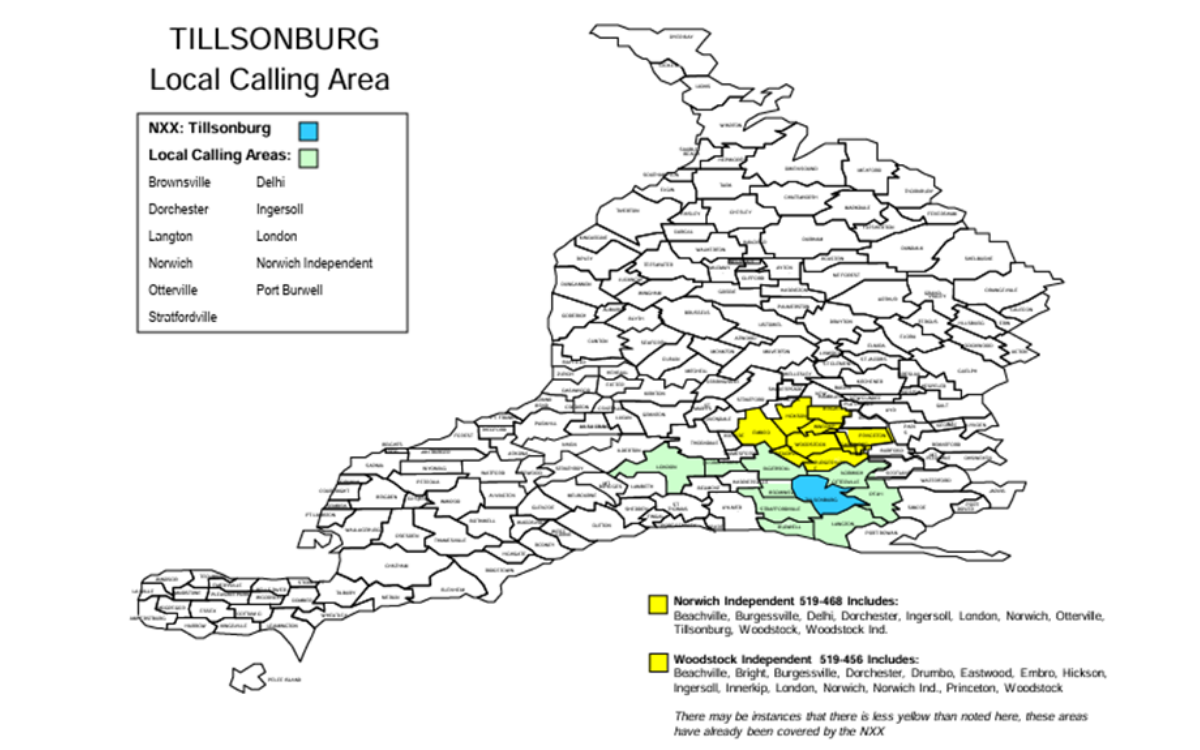
If you live in Tillsonburg, you can call Brownsville, Delhi, Dorchester, Ingersoll, Langton, London, Norwich, Otterville, Port Burwell, and Stratfordville without ever seeing a long-distance charge. Handy, right?

Execulink’s Expanded Calling Areas

Here’s where Execulink goes the extra mile.

In select communities, we offer what’s called an Expanded Calling Area. These are extra towns and regions that we’ve chosen to include at no extra cost to you, even though they normally fall outside your standard Local Calling Area. It’s a little bonus we cover because we think staying connected shouldn’t cost more.

For example:
If you live in Parkhill, here’s what you get:
Local Calling Area (free for everyone): Ailsa Craig, Ilderton, London, Nairn, Port Franks, Thedford
Expanded Calling Area
(free with Execulink only): Exeter, Forest, Grand Bend, Lucan, Strathroy

Even though these extra towns would usually mean long distance, we cover the cost – so you don’t have to think twice about making that call to your sister in Grand Bend or your doctor in Lucan.

Want to see your full local or expanded calling area list? Click here.

We believe in keeping our customers connected without the guesswork. From calling your loved ones, booking an appointment, or checking in on a neighbour, your phone line should feel like an open door to your community. So go ahead and make the call! With Execulink, you’ve got more reach and fewer worries.

If you have questions about your calling area or need help with your Home Phone service, our friendly team is just a call or click away!

Still need help?

 Use this public tool to check If a call Is long distance or local:
https://www.localcallingguide.com/lca_exch.php?exch=153390

Check out our support page which outlines all available calling areas:
https://www.execulink.ca/support/articles/what-is-my-local-calling-area/

Order Your Execulink Business Fibre Online – It’s Now Easier Than Ever!

At Execulink, we believe in keeping things simple for our customers. That’s why we’re excited to share that our Business Fibre service is now available to order online!

We know that running a business leaves little time for back-and-forth phone calls or lengthy processes. You need fast, reliable Internet—and you want it on your terms. With our new online ordering option, you can now check your address and submit your Business Fibre order in just a few clicks.

Simple. Convenient. Reliable.

Whether you’re running a local storefront, clinic, office, or home-based business, Execulink Business Fibre delivers:

  • Speeds up to 3 Gbps to keep your business connected and moving
  • A fast and easy online ordering process—you can start any time, from anywhere
  • Backed by the local Ontario support and service you’ve come to trust

Check Your Address Today!

Getting started has never been easier. Simply visit our website, check if your address qualifies, and place your order online. If your address doesn’t qualify for online ordering, our team will help you explore other Execulink Internet and business solutions available at your location.

Why We Made It Easier

At Execulink, our mission has always been to connect you to everything that matters—with the awesome experience you deserve. We know your time is valuable. Our team worked to simplify this process so you can get connected faster and get back to what you do best: running your business.

Ready to Get Started?

Click below to check your address and experience just how easy it is to order Execulink Business Fibre online!


Check Your Address and Order Now


Home Phones Are Back and Better Than Ever! Here’s Why You’ll Love Them.

In a world full of texts, alerts, and endless scrolling, it is easy to forget the quiet charm of a ringing home phone. But for many households, the home phone is making a cozy little comeback – not just for convenience or safety, but for the joy it brings to everyday life.

Here are five ways a home phone can bring joy and peace of mind to your daily routine:

  1. Surprise Calls Are Still the Best Kind

Remember the excitement of not knowing who was calling until you picked up? There is something fun and nostalgic about hearing the phone ring and having a spontaneous chat, without checking your screen first. It brings back the magic of meaningful, real-time connection.

  1. Longer, More Thoughtful Conversations

Smartphone calls are often rushed or interrupted, but a home phone sets a different tone. When the cordless receiver is in hand, you tend to slow down and settle in. From catching up with your sister or checking in on a neighbour, these chats can become the best part of your day.

  1. It Brings Familiar Comfort – and a Bit of Fun

There is something comforting about the familiar ring of a home phone, it becomes part of your household’s rhythm, like the kettle whistling or the dog barking at the mail carrier. And with customizable ringtones, you can make that comforting sound uniquely yours; whether it’s quirky, classic, or just plain fun (bonus points if the kids dance to it!).

  1. It’s a Screen-Free Win for Families

With so many devices in our lives, it can be refreshing to have one that doesn’t come with notifications or distractions. A home phone is a great way for kids to connect with grandparents or friends in a safe, screen-free way. It feels a little old-school – in the best way.

  1. A Reliable Lifeline in Emergencies

Home phones provide a dependable connection during emergencies when cell phones may fail due to low battery or poor reception. Having a home phone ensures that you can reach emergency services or loved ones quickly and easily, offering peace of mind for you and your family. Plus, they often work during power outages, making them a reliable choice when it matters most.


At Execulink, we believe a home phone is about more than just calls. It is about those spontaneous conversations with family and friends, and the comforting sound that weaves itself into the rhythm of your home. Having a dedicated line brings a timeless connection and emotional warmth that stays with you.

With plans starting at only $9.95/month, staying connected has never felt so simple, or so warm. Whether you are looking for peace of mind in an emergency or a screen-free way to keep in touch, Execulink’s Home Phone brings something truly special back into your daily life.

Rediscover the joy of connection today – explore our Home Phone plans

A Day with Execulink Smart Home: Smarter Living from Morning to Night

From the moment you wake up to the time you turn in for the night, your home should work for you, not the other way around. Execulink’s Smart Home features bring everyday convenience, energy savings, and peace of mind together in one simple, connected experience. Whether it’s adjusting the thermostat, turning lights on and off, or receiving real-time security alerts, smart living has never been easier.

Morning: Wake Up to Comfort & Control

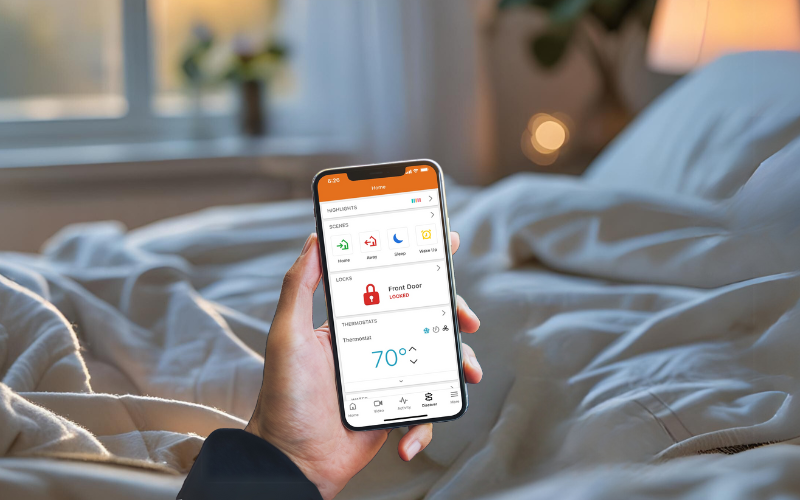
Start your day with the thermostat adjusted to your ideal temperature. Lights slowly brighten. You check your doorbell camera right from bed and see your morning paper has arrived – no surprises outside.


Heading Out: Peace of Mind in Your Pocket

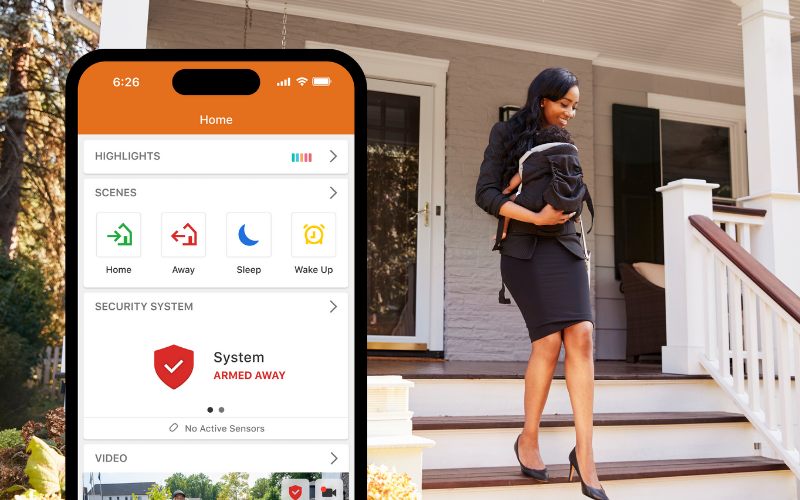
As you leave, your Smart Home arms itself with a single tap. Doors lock automatically, your garage closes if you forget, and Perimeter Guard™ activates to deter unwanted visitors.


Midday: Stay in the Know

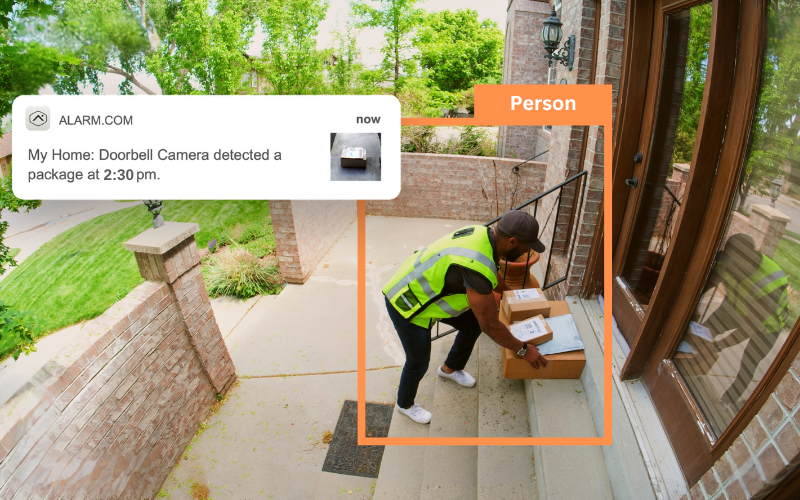
Get a notification that your package has arrived. Watch the delivery happen live via your wireless doorbell camera. You can even turn lights on remotely to give the impression that someone’s home.

Evening: Home Just the Way You Like It

Walk into a well-lit, warm home. The lights turn on as you enter, and the smart plug has already started your slow cooker. You can unlock the door remotely for a guest or adjust the temperature from your phone.


Night: Rest Easy

Before bed, your system arms itself again. Motion sensors and cameras keep watch. If a window opens or water is detected in the basement, you’ll get an instant alert. You sleep better knowing your home is protected.

Life is busy, but with Execulink Smart Home, your home works smarter so you don’t have to work harder. From morning routines to midnight peace of mind, every part of your day becomes more seamless, secure, and stress-free. Whether you’re at home or on the go, you’re always in control and always connected.

Learn more about the comfort, convenience, and confidence of smart living – your perfect Smart Home experience is just a tap away!


Already have smart devices at home? We can connect to many popular ones as long as they are compatible with the Alarm.com platform! Check compatibility here: alarm.com/hardware.

Free Spring & Summer Business Toolkit to Prepare Your Business

Spring and summer bring more customers, more calls — and more pressure to keep up.

Whether you’re managing outdoor service areas, hiring seasonal staff, or bracing for increased demand, your Internet, phone systems, and team setup need to be ready. Even small issues like weak Wi-Fi, poor call routing, or unprepared new staff can lead to missed sales, slower service, or customer frustration — right when expectations are at their highest.

To help businesses stay ahead, Execulink Telecom created the Spring & Summer Business Toolkit — a free, downloadable PDF filled with practical checklists, tools, and tips to help you stay connected, productive, and prepared throughout the busiest months of the year. It’s built with real business needs in mind and designed to save your team time and stress.

What’s Inside the Free Toolkit

  • Wi-Fi Testing Guide – Learn how to check and improve outdoor Wi-Fi coverage for patios, events, or temporary setups.
  • Peak Demand Checklist – Make sure your Internet and phones can handle the seasonal surge in customers and staff.
  • Staff Onboarding Checklist – Help new and seasonal hires get set up quickly with the right tools and access.
  • Call Flow Template – Improve how your business handles calls, reduces wait times, and avoids missed opportunities.
  • Backup Internet Setup Tips – Explore your options if your main connection fails, including LTE failover.
  • Plus more! Including links to individual guides and helpful seasonal planning advice in one easy PDF.

Who It’s For

If you’re in retail, hospitality, food service, healthcare, events, or any business that gets busier during the warmer months, this Toolkit was created for you. It’s designed to be quick, clear, and actionable — so your team can focus on what matters most.


Download the Spring & Summer Business Toolkit Now

No forms. No sign-up. Just instant access to everything in one PDF.


Why Is My Internet Slow? 7 Common Reasons and How to Fix Them

We get it — nothing is more frustrating than paying for fast internet and not getting the performance you expect. As your Internet Service Provider, we want you to enjoy every megabit you’re paying for. If your connection feels slower than it should, don’t worry — there are several common reasons (many fixable!) that could be causing it.

Here’s a breakdown of what might be going on, and how you can take back control of your speed:

1. Your Wi-Fi Setup Might Be the Bottleneck

Wi-Fi is convenient, but it’s not always the most efficient way to access high-speed internet — especially if you’re far from your router, have thick walls, or are using an outdated router. Even if we’re delivering full speed to your modem, weak Wi-Fi can make it feel like your connection is crawling.

What You Can Do:

  • Move closer to your router or place your router in a central location.
  • Upgrade to a dual-band or tri-band router that has Wi-Fi 6 technology…hint hint, nudge nudgeExeculink’s Complete Wi-Fi solution.
  • Use a mesh Wi-Fi system if you have a large home or areas with poor signal.

2. Too Many Devices Competing for Bandwidth

Smartphones, smart TVs, gaming consoles, security cameras, tablets — they all add up. If multiple devices are streaming, gaming, or downloading at the same time, your bandwidth is being shared across them.

What You Can Do:

  • Check how many devices are connected to your network.
  • Set bandwidth limits or priorities (Quality of Service settings) on your router if your router has this type of functionality.
  • Set up a Guest Network on your router – a separate Wi-Fi network for friends and family to use when they visit.
  • Consider upgrading your Internet plan if your household’s needs have grown.

3. Background Apps and Updates Are Using Data

Your computer or other devices might be running updates, syncing cloud files, or uploading backups — all of which can slow down your connection, especially during peak usage times.

What You Can Do:

  • Check for background processes using bandwidth.
  • Close all those apps on your phone that you aren’t using.
  • Schedule updates for overnight.
  • Turn off push-notifications.
  • Reboot your devices, modem, and router.

4. Outdated Hardware Is Holding You Back

If your modem or router is several years old, it may not be capable of handling today’s higher speeds. Even Ethernet ports and cables can be speed-limited if they’re not rated for gigabit speeds.

What You Can Do:

  • Ask us to check if your modem and router support the speeds of your current Internet plan.
  • Use CAT5e or CAT6 Ethernet cables for wired connections directly to the router instead of using Wi-Fi.

5. Network Congestion or External Factors

Occasionally, slow speeds come from outside your home — network congestion during peak hours, weather impacts (for fixed wireless users), or even temporary maintenance or outages in your area.

What You Can Do:

  • Run speed tests at different times of day.
  • Contact support to find out if there are any outages in your area.
  • Use wired connections for critical tasks when possible.

6. Old Wiring in Your Home Could Be Slowing You Down

This one’s often overlooked. If your home has older telephone wiring (for DSL), coaxial cables (for Cable Internet) or outdated Ethernet cables, it could be silently sabotaging your connection.

What You Can Do:

  • Have a tech inspect your phone lines or coaxial cables for corrosion or damage. Make sure the cables are high quality and in good shape.
  • Consider professional rewiring if your home is decades old or was never optimized for modern internet usage.

7. Your Plan Isn’t Right for Your Usage

Sometimes, it’s not a technical issue — your needs have just changed. If your household now includes remote workers, gamers, or heavy streamers, your old plan might not cut it anymore.

What You Can Do:

  • Review your current internet plan and compare it with your household’s current usage.
  • Reach out to us (or check online)— we can check your options and recommend the best plan for your needs.
  • Upgrade your plan if you know what you need.

Let’s Work Together

At the end of the day, we’re here to help. We want your experience to be smooth, fast, and frustration-free. Have you downloaded the Execulink Helps App? Execulink Helps will diagnose Wi-Fi coverage issues, speed issues, help with buffering and network drop offs, and much more. If you’ve run through these steps and are still having issues, reach out to our support team. We’ll help you diagnose the problem and get you back up to speed — literally.

How to Simplify Your Life with Smart Home Scenes

Ever wish your home could handle the little things, like starting the coffee maker when you wake up or making sure the curling iron turns off when you head out the door? With the Scenes feature in the Execulink Smart Home app, it can! By combining your smart devices into customized routines, you can simplify your day with just one tap. And one of the easiest tools to get started with? The surprisingly powerful Smart Plug.


What is a Scene?

A Scene is a customizable command that lets you control multiple compatible smart home devices at once. For example, a “Good Morning” Scene might turn on your Smart Plug-connected coffee machine, adjust your thermostat, and open your smart blinds – all in one tap or scheduled time.

Why the Smart Plug is a Scene Superstar

The Smart Plug is one of the easiest ways to make your everyday devices smarter and more convenient. Just plug it in, sync it to your Smart Home app, and you’re ready to go!

It works perfectly with:

  • Coffee makers
  • Lamps
  • Hair tools
  • Holiday lights
  • Fans or space heaters (low wattage)
  • Small window A/C units
  • Dehumidifiers
  • Portable exercise equipment (up to ½ HP)

With support for up to 15 amps and small motorized devices, the Smart Plug handles a wide range of appliances. It is Z-Wave Plus certified for better range, faster response times, and smoother performance, and its compact design won’t block your second outlet.

Once connected to your Z-Wave hub, you can use the Smart Plug in all kinds of time-saving ways:

  • Have your coffee start brewing with your morning routine
  • Automatically turn off space heaters when you head to bed
  • Set your lights to come on when you walk in the door

It’s a simple, energy efficient way to add automation to the devices you already use with no complicated setup or extra equipment needed.


How to Set Up a Scene in the Smart Home App (Step-by-Step)

Here’s how you can create a Scene using the Alarm.com app using your Smart Plug:

  1. Open the Alarm.com App
  2. Tap on the Scenes Tab

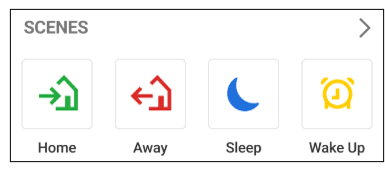
You’ll see preset Scenes like Home, Away, Sleep, and Wake Up, but you can also create your own!

  1. Tap + Add Scene

Choose a name for your Scene, like “Morning Routine” or “Nighttime”.

  1. Choose Devices to Control

This is where you can select your Smart Plug and set the desired action:

ON – Turn on your plugged-in appliance (i.e. coffee machine at 6:30 AM)

OFF – Power down devices you don’t want running all day (i.e. flat iron or lights)

You can also add other devices here like smart lights, thermostats, cameras, or locks.

  1. Set a Trigger (Optional)

You can run Scenes manually or schedule them. Want your “Wake Up” Scene to run every weekday at 6:45 AM? Just set the time and days – it’s that easy!

  1. Tap Save and You’re Done!

Your new Scene will appear in the app for easy access. You can run it manually with one tap or let it run automatically.


Daily Life Ideas with Your Smart Plug and Scenes

Not sure how you’d use it? Here are a few practical ways to bring your Scenes to life:

Wake Up Scene

6:30 AM – Smart Plug turns on your coffee maker, thermostat adjusts, bedroom lights fade in.

Leaving for Work

7:45 AM – Smart Plug turns off your curling iron and lamp, locks door, arms the security system.

Coming Home

5:30 PM – Smart Plug turns on your hallway lamp, thermostat adjusts to cozy, and your camera disarms.

Bedtime Routine

10:00 PM – Smart Plug shuts off TV, turns on white noise machine, and locks doors.

Make Your Home Smarter Today!

At Execulink, we believe Smart Home technology should make your life simpler, safer, and more convenient – and the Smart Plug is a perfect example! Whether you’re setting the mood with lighting, automating your morning routine, or saving energy with scheduled shutoffs, it’s a small device that makes a big difference.

Ready to start building smarter Scenes at home? Visit our website to learn more and find the Smart Home package that’s right for your home!

The Internet Services You Deserve
Affordable. Reliable. Lightning fast.

We’re proud to provide the communities we know, love, and live in, with the reliable Internet, TV, Phone and Mobility services they deserve.

  • Your local choice for residential and business telecommunication services
  • Renowned 24/7 customer service you can depend on
  • Affordability, service, integrity and transparency are the pillars of our business

Here to help. 24/7.

Sales Inquiries

Sales: Mon-Fri 8AM-8PM, Sat 8AM-5PM

(866) 706-1991

Support Inquiries

Technical Support: 24/7, Customer Care: Mon-Sun 7AM-11PM

(866) 706-1994

Online Help

Chat With Us

We'll respond as soon as we can!

Email Us

We'll get back to you as soon as possible.

Support Centre

Find the answer to your question.

Check availability

Enter your address to find services and offers available to you!