Case Study – Shur-way Group Inc.


Introductions: Who is Shur-way Group Inc?

Shur-way Group Inc. is a proud ISO-registered, manufacturer, and distributor of wood pallets, skids, crates, boxes, reels, and other wood packaging components. Shur-way’s head office is located in Woodstock, Ontario. Reliable Internet helps Shur-way accomplish the company mission of creating long-lasting partnerships with their customers, providing timely production schedules, and delivering consistent quality products.

THE CHALLENGE

Shur-way Group Inc. needed a strong Internet connection to drive efficient communication with customers. It started looking for Fibre Internet options with larger telecom companies but the customer service wasn’t responsive and their options were expensive. Instead Shur-way Group Inc. decided to investigate Internet options that were closer to home to support another local business – Execulink Telecom.

THE SOLUTION

Shur-way Group Inc. expected to have a quick and smooth installation of Fibre, and wanted the end result to be a reliable Internet connection. After dealing with the frustration that comes with DSL Internet when the lines inevitably go down, Shur-way Group Inc. knew that Fibre was the way to go. Within days of reaching out, a Relationship Manager provided Shur-way Group Inc. with a competitive quote and speed specifications available to the facility. Within 30 days following the decision to move ahead with the Fibre line, it was hooked up and worked reliably.

The expected outcomes were:

  • Quick and smooth installation
  • Reliable Internet

THE RESULTS

The customer service provided by Execulink Telecom Relationship Managers, Customer Care team members, and Technicians was timely, helpful, and friendly. In the 18 months since going live with Fibre, Shur-way Group Inc. has been completely satisfied. After the initial installation process, Shur-way Group Inc. needed to add additional static IP addresses to its account, and received outstanding customer service during that process. This demonstrates that Execulink Telecom not only works hard to obtain a customer but also offers strong support afterwards. The Fibre solution allows Shur-way Group Inc. to use cloud-based software and communicate effectively with internal and external stakeholders. Shur-way Group Inc. cannot imagine a better Internet solution at the given price point, and looks forward to working with Execulink Telecom for many years in the future.

Related Links

Interested in learning more? Check out some of these handy links below.

Why is Upload Speed Important?

When choosing an Internet package, many people focus on the download speed. Download speed is typically faster than upload speed because most of the activities we do online require downloads. However, you should take upload speed into consideration as well.  Upload speed is particularly important for businesses and gamers.  This blog will explore everything you need to know about upload speed and how it influences your Internet plan.


Check the speeds available to your home!

What is Download Speed?

Download speed refers to the speed at which your computer/device receives data in the form of images, videos, text, files, and audio from a server.  It’s measured in Mbps (Megabits per second).  Activities like streaming music on Spotify or Apple Music, downloading files for work, or streaming videos on Crave or Netflix all require you to download data.  Download speed is typically faster than upload speed because most of what we do online consists of downloads.

What is Upload Speed?

Upload speed refers to how long it takes for data in all its forms to be transmitted from your computer/device to the Internet server. It is also measured in Mbps (Megabits per second).  Upload speed impacts your video calls since you are essentially uploading a live video.  The same is true for live streaming.  Here are some examples of online activities that require a minimal amount of upload capabilities and speed.

  • Using cloud services like Dropbox.
  • Sharing photos online to places like Instagram or Google Photos.
  • Using P2P file sharing services.
  • Making VoIP phone calls.

There are activities that require more upload speed to accomplish.  Here are some examples and what the recommended upload speed is for each activity.

Making video calls over services like Skype or FaceTime. 

– Skype recommends 1.2 Mbps upload speeds for HD video calling. Visit their website for more information.

Uploading or live streaming videos to YouTube, Instagram, and Facebook. 

– YouTube has recommendations for the speeds necessary to support a variety of video qualities. Visit this page for more information.

– Facebook has similar recommendations. Visit this page for more information.

Home security camera footage. 

– The upload speeds required for a Google Nest vary depending on the model you have. Visit their website for more information.

Live streaming games on services like Twitch or Facebook Gaming.

– Twitch has some recommendations for modifying your video quality depending on your Internet speeds. Check out this page to learn more. 

If you are close to using full capacity of your connection, in either uploads or downloads, traffic will bottleneck. This can result in latency, which will impact your activities. A good rule of thumb is to plan to use 85% of your Internet connection’s advertised ability.

Upload Traffic Increasing

Demand for faster upload speeds has increased rapidly because more than ever before, people are working from home and uploading files, connecting to VPNs, video conferencing, or placing VoIP calls!  Building the capacity for this has become top of mind for many ISPs, including Execulink Telecom.

Upload Speed for Your Business

Choosing the right Internet speed is crucial for fostering employee engagement and productivity, downloading files quickly, and communicating with customers properly.  A deciding factor on what Internet plan you decide to go with is the number of employees you have. If you have two people uploading data, the upload speed is cut in half.  If you have 5 people uploading, then it will take even longer for each person’s upload to complete.  The same is true for downloading.  Larger businesses with more users will require faster speeds.

At Execulink you can have a Shared Business Internet plan which is appropriate if your business requires a simple connection that is reliable, economical, and can keep your employees connected.  Businesses with this form of Internet share the infrastructure with other businesses nearby. Whereas, a Dedicated Business Internet connection provides your business with service that isn’t shared.

Execulink offers Business Internet upload speeds from 1 Mbps to a synchronous 1 Gbps. We will work with you to determine which Internet type is best for your business and how we can accommodate your future needs.

Upload Speed for Gaming

In the online gaming community, there is contention about the optimum speeds needed to have a seamless experience while playing.  Compared to the regular Internet user, online gamers are constantly sending data to the server – through game actions or messages to other players during a multi-player game.

A minimum of 1 Mbps upload speed is recommended for most casual online gaming sessions. The number of devices you have connected in your home will also impact your gaming experience.  You should consider plans that have a 5-50 Mbps upload speed to support your devices.  If you need to confirm your current speed, check out our speed test.

For professional gamers, upload speeds are a more pressing concern.  Streaming content on platforms like Twitch or Facebook Gaming require a faster upload speed than if you were just playing a standard online game.  To accumulate followers your stream must be high quality, consistent, and reliable.

High-Speed Internet with Execulink Telecom

Whether you’re looking for higher speed options for work and gaming or basic packages for surfing the Internet, we have the services you and your business deserve.

With 24/7 support and a wide range of Internet options to suit every lifestyle, we have the awesome services your home or business needs to stay connected to what matters the most! Call us at 1-866-706-1942 today, and visit our Internet or Business Internet page to find the Internet package you’ve been looking for!

Explore your Business Internet options!

Humans of Execulink: Our First Internet Memories

Execulink Telecom has been providing Internet services for over 25 years. So much has changed since those early days of dial-up! It’s hard to remember a time without the Internet. Now we rely on it for almost everything including research, social interaction, leisure activities, and more. To celebrate our history of Internet services, we sent out a questionnaire to a group of Execulink employees to reminisce about their first memories of the Internet and computers.

Ben – Customer Experience Coordinator

What was your first memory of the Internet?

I remember the first few forays into the greater Internet was surfing for helpful hints for some games I was playing on Nintendo.

What was your first computer?

The first computer I recall was an old IBM. This was just as Windows 3.1 was released. We got it so my mother could begin teaching continuing education courses for Windows and eventually MS Office Products. I was unknowingly used as a test subject for some lessons and that lead to my early computer use. I recall my mom calling it “Sydney”. It was also an early look into my later career in Technical Support when we had to troubleshoot this and other early computers. I seemed to have a knack for figuring them out.

Michelle – Community Sales Representative

What was your first memory of the Internet?

The first memory of the internet that comes to my mind was the robotic sound of dial up internet…connecting. As minutes passed and sometimes turned into what seemed like hours just to check something as simple as the weather on the internet. Just when you thought you were so close to be connected……THE TELEPHONE RINGS and there went that tiny bit of progress you had that you were so patiently waiting for!

What was your first computer?

Well that was quite some time ago but I believe it was probably an intel or IBM with those floppy discs!

Justin – Field Supervisor

What was your first memory of the Internet?

My first memory of the internet was back in 1996 when my elementary school got a new computer for each classroom and they each had access to the internet. I remember that there were not enough phone lines for each computer to be online at the same time and the teachers would often accuse each other of leaving the connection active while the computer was not in use. It was amazing to be able to click the Netscape Navigator icon in Windows 95 and then then enter whatever website we had heard about from other students and teachers at that time. Web chatrooms were also popular with the other students.

What was your first computer?

1998 Pentium 2- 333 MhZ processor with 32 MB of ram and a 3 gigabit hard drive. It had a 56k modem and Execulink dial up internet service.

We hope you enjoyed this walk down memory lane. Everyone’s memories are unique and we loved seeing the diversity in these answers. Internet speeds have really improved since those early days. You can find the perfect packages to suit your lifestyle for gaming, streaming, or working from home. Explore your options with Execulink today by qualifying your address or reach out to us at 1-866-706-1942.

Discover lightning fast Internet speeds today!

Staying Safe Online: The Top 6 Password Security Tips

At Execulink, we care about your safety online.  A strong password is your first line of defence against unauthorized access to your computer and personal information.  The stronger your password, the more protected your computer will be from hackers and malicious software.  You should maintain strong passwords for all accounts on your computer.

There are primarily three ways that your password security can be compromised:

  • Login bypass – The hacker finds a way to avoid the requirement for a password. For instance, you leave your computer unlocked while you’re away from your desk.
  • Malicious software and phishing – You could unknowingly provide the password to the hacker directly by falling victim to a phishing attack. Computer viruses can also provide hackers with access to your accounts. Check out our blog about protecting remote workers from phishing attacks.
  • Guessing – The hacker guesses your password using password-cracking software to compromise your device or account. This blog will primarily focus on how to prevent your password from being guessed.

You deserve awesome Internet! Qualify your address today!

1. Change Your Passwords Regularly

Frequently changing your passwords is a good practice for maintaining secure accounts.  The more sensitive the information, the more often you should change your password.

2. Use a Password Manager

Password managers are services that auto-generate and store strong passwords for your accounts.  These passwords are kept in an encrypted, centralized location which you can access with a master password.  Do not forget this password! Many of these services are free, such as the Google Password Manager which is available when using Google Chrome.

You shouldn’t give your passwords to anyone else or write it down on a sticky note on your computer monitor. Consider creating a password hint sheet rather than recording the passwords themselves. If you store this on your computer in a document file, consider naming the file something random so it isn’t a dead giveaway. i.e. don’t name it “Password Hints.”

3. Do Not Re-Use Passwords

We are all for recycling and re-using when it comes to paper and plastics but not when it comes to passwords!  If hackers are able to complete large scale hacks, a list of compromised emails and passwords could be published online.  If your account is compromised and you use this email and password across multiple accounts, this information could be used to get into any of these accounts.

4. Avoid Using Personal Information

Avoid using information that could easily be found on social media like your birthday, anniversary, address, city of birth, high school, and relatives’ or pets’ names.  Using this sort of information in a password makes it easier to guess.  If you are prompted to create security questions, choose answers that are not easily found on your social media pages.

5. Use Two-Factor Authentication

This is an extra layer of security that will use a piece of information such as another password, your phone number, or biometric data like a fingerprint.  Commonly, you will use your phone number for  two-factor authentication.  After you enter your username and password on the website you’re trying to access, the site will send a unique one-time passcode via SMS text message. You can also add push notifications so you receive a notification every time your account is accessed and you can approve or deny access with a single touch.

Biometric data like fingerprints, retina patterns, and facial recognition are being explored for two-factor authentication.

6. Make Passwords Long and Use Symbols

You can easily create a secure password by substituting common letters for numbers.  For example:

  • replace the letter ‘ A/a‘ with the ‘ @ ‘ symbol
  • replace the letter ‘ E/e‘ with number 3
  • replace the letter ‘ I/i‘ with the number 1
  • replace the letter ‘ O/o‘ with the number 0

Examples of Simple Passwords

  1. C4tf1sh@tt@ck vs Catfishattack
  2. P@n5yFl0w3r vs Pansyflower
  3. Mu5hR00mH0u53 vs Mushroomhouse
  4. G0ld3n5un53t vs Goldensunset
  5. C0nfused3quipmentD1ssolveUp5tairs vs. ConfusedEquipmentDissolveUpstairs

Due to letters being replaced by numbers these passwords no longer contain whole words found in the dictionary.  Using random phrases is a good method for choosing a password.  If your passwords aren’t in the dictionary or in published literature, it makes them harder to crack.  Another tip: do not use letters that are sequential on a keyboard like “QWERTY”.

Password-cracking software is becoming more advanced and is able to work with variables as defined by the hacker. This can include conditions for letter to number substitutions and letter reversals, just to name a few. Passwords that were considered secure a couple years ago are now easily broken as word lists grow and higher GPU vs CPU speeds are utilized to check hashes quicker.  Longer passwords can be just as effective as passwords full of complex characters and they can be easier to remember. For example, using a “Pass-phrase” with multiple random words strung together could be a good password, and adding numbers or symbols sparingly will help improve it.

Discover your residential Internet options!

We hope that this blog will help you create strong passwords for your online accounts.  When changing a password for your MyExeculink account, be sure to consult these tips!  Taking a proactive approach to password management will help save your personal data from cyber-attacks.

Speed Up Your Internet Connection with Execulink

Whether you’re looking for faster Internet speed options for streaming and gaming or basic packages for surfing the Internet, we have the services you and your family deserve!

With 24/7 support and a wide range of Internet options to suit every lifestyle, we have the awesome services your home or business needs to stay connected to what matters the most! Call us at 1(866) 765-2282 today or visit our Internet page to find the Internet package you’ve been looking for!

9 Frequently Asked Questions about Complete Wi-Fi

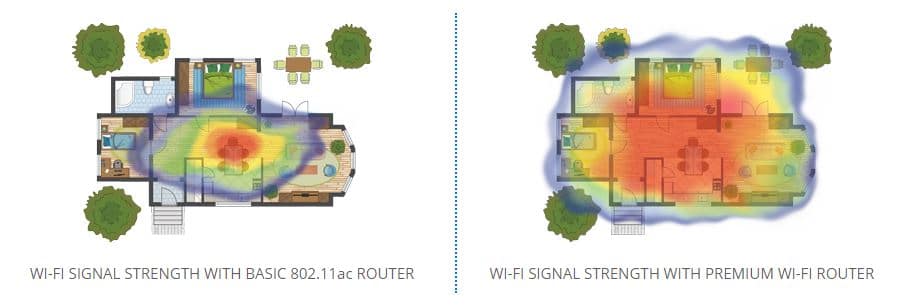
Our Complete Wi-Fi system is an awesome solution if you’re looking to enhance your Wi-Fi network.  You can start with the Premium Router and add Mesh Wi-Fi nodes if you need an extra boost in your backyard, basement, shed, or garage. Some of the main benefits of Complete Wi-Fi include a higher quality signal in your home, the ability to expand the signal anywhere you need with the Nodes, and a seamless transition from one band to another. You also have access to better support tools to understand what’s really going on with your Wi-Fi network! We spoke with our technical specialists to identify some frequently asked questions related to Complete Wi-Fi. We hope this blog gives you some answers!

Check out your Residential Internet options!

1. I decided to get the Premium Router. I’ve noticed that the Wi-Fi range is better but it still doesn’t reach some parts of my home?

You have to consider your home layout and what factors you have that will influence your signal. Normally moving the router to a more central location in an open area, away from other electronics, cement walls, steel doors, or enclosed areas will provide a better signal. If that is not a possibility, we suggest adding a Mesh Wi-Fi Node for that hard to reach area.

2. When I do a speed test, why is the Wi-Fi signal slow?

Depending on if you are connected to the 2.4 GHz or 5 GHz band frequency, your speeds may differ. Some older devices are unable to handle higher speeds or connect to the 5 GHz band frequency. The Premium Router’s unified network merges the 2.4 GHz and 5 GHz band frequencies to give you the best connection suited to your device.  The 2.4 GHz band frequency can handle up to a maximum of 450 Mbps (megabits per second) which equals to 56.25 MBps (megabytes per second) while the 5 GHz band frequency can handle up to 1300 mbps which is roughly 150 mb/s. Mileage varies based on distance, devices, and interference of the environment. You can also try connecting to Ethernet to improve your speeds.

3. I only have one wireless network name for my Wi-Fi whereas my old router had two, one for 2.4GHz and one for 5GHz?

The Premium Router provides a unified SSID which means you only have one wireless network and password to remember for both 2.4GHz and 5GHz band frequencies. The router uses a technique called band steering to select the best Wi-Fi frequency available to get your device connected.  You can change your wireless network name and password easily through MyExeculink. If you don’t like the unified SSID you have the option to change it back to a separate 2.4GHz and 5GHz networks. Check out this support article for instructions on how to do that!

4. What provides a better Wi-Fi signal, 2.4 GHz or 5 GHz?

A 2.4 GHz band frequency will have wide coverage which is ideal for devices that move around the house like a smart phone.  The 5 GHz band frequency is faster which is ideal for stationary device like a smart TV.  We recommend using the unified SSID technology with the Premium Router because it can automatically select the best frequency for each device and reduce connection drops.

5. Is it possible to completely eliminate Wi-Fi interference?

Unfortunately, it is not possible.  Many household devices and materials can cause Wi-Fi interference from your TV, your neighbour’s router, your oak TV stand that holds your peripherals, to your furnace, and even your microwave! With that in mind, you can try moving your router to a more open space or talking with us to see if the Execulink Mesh Wi-Fi Node will be the better solution for your home.

6. Can I plug another router into the Premium Router to extend the Wi-Fi range?

This will cause interference and a scenario called Double Nat where two routers, each with their own private Wi-Fi network, are connected to each other.  Your personal devices like your laptop, printer, or phone will have a hard time connecting to Wi-Fi in this situation. We recommend never plugging a router into another router.

7. How will I know the Mesh Wi-Fi Node is sending out a signal?

You should see at least 3 green lights on the Node which means that the Wi-Fi is connected. You can check out this support article and video for instructions on setting up your Mesh Wi-Fi Node.

8. What model is the Premium Router?

The Premium Router is the Calix 844 E and the Mesh Wi-Fi Node is the Calix 804 Mesh.

9. How do the Mesh Wi-Fi Nodes and the Premium Router communicate?

The Mesh Wi-Fi Nodes can connect to your Premium Router via Ethernet or Wi-Fi Protected Set Up (WPS).  This will allow the Node to be used as a separate Access Point which will expand your Wi-Fi coverage area. We recommend connecting the Node and Router by Ethernet if possible for the best stability.

Our Sales team can help you decide what the right Complete Wi-Fi option is for you.  You can make the upgrade with your existing Execulink services or sign up as a new customer!  Check out our Complete Wi-Fi page for more information. Call us at 1-866-706-1942 to ask more questions about these devices or qualify your address and sign up now!

Check out your Residential Internet options!

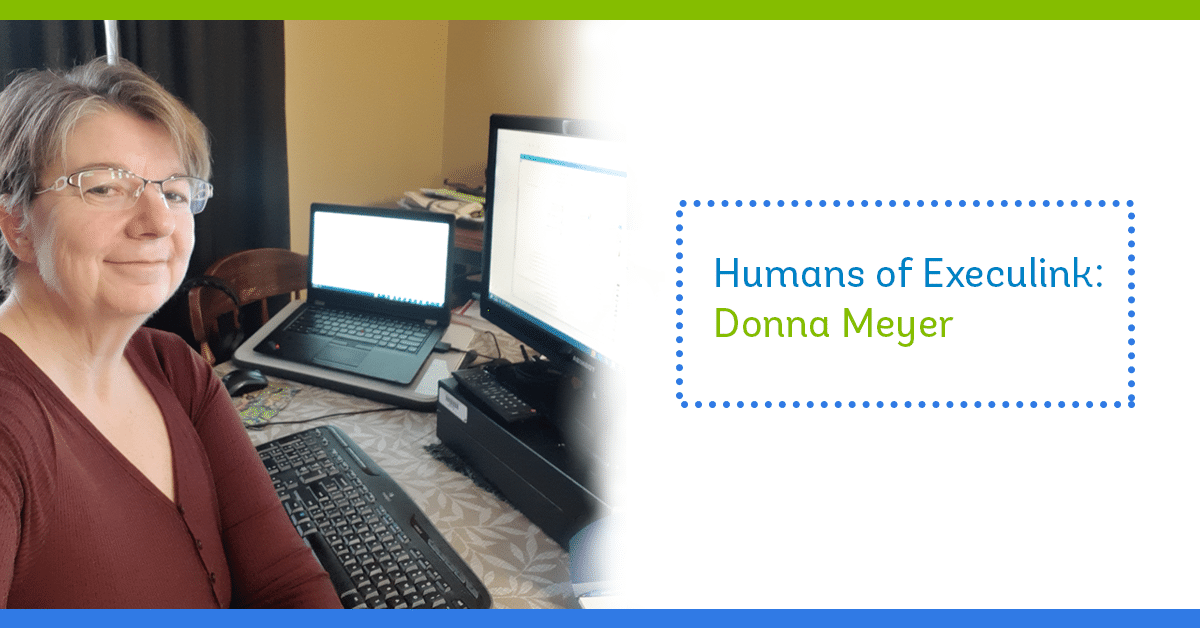
Humans of Execulink: Donna Meyer

Donna is a member of Execulink’s LAN (Local Area Network) team.  She works hard to keep our offices in Woodstock, Burgessville, Tillsonburg, Port Dover, and Thedford connected. She ensures every team has access to the programs, files, and hardware they need.  Since COVID-19 began, she now supports everyone who’s been working remotely.  She’s passionate about helping others and her positive attitude is contagious!

Working from home? Check out Execulink’s Home Internet options

How would you describe your position and how long have you worked at Execulink?

Never a dull moment and never the same day twice!  The LAN team is responsible for setting up Execulink employees with logins and access to programs and files based on the department they work in as well as providing the employee with any hardware required to do their job.  I consider Execulink employees our customers. I’ve been with Execulink for 4 ½ years. I started in a contract position with LAN for half a year and then went to the Account Support team for a year and then back to LAN.

What is your favourite memory from work?

Besides the day I got hired full time, I’d have to say the first lockdown in March of 2020.   Our team set up about 130 employees to work from home in 2 ½ days. We created VPN profiles for them to connect to work. We set up users with Remote Desktop sessions so they could have access to all of Execulink’s files and programs. That was a huge accomplishment for the team!

Donna’s home office set up. Note the “LAN” coffee mug!

How do you prefer to start and end your day?

Work day: I start my day with a cup of coffee while reviewing emails and checking on LAN tickets followed by check-in with the team.  To end my day, I go over my To-Do list for the day and move anything that didn’t get done to the next day as well as a final check-in with the team.

Day in general:  I like to start my day with a game or two of Candy Crush. Don’t judge me! To end my day, I like to read a couple of chapters of whatever book I’m reading.

Do you have a favourite newspaper, book, or blog that you like to read?

I like mystery books and I like our Humans of Execulink Blog 😉. My favourite book is called “Master of the Game” by Sidney Sheldon.

What’s the most common IT-help question you get from employees at Execulink?

The most common question I receive from the employees of Execulink would have to be “Why can’t I access usershares?”.  This is our internal file-sharing system that is essential for every team.

Rapid Fire – THIS OR THAT Questions!

  • Remote work or in office? In office!
  • Internet or TV? TV!
  • Wi-Fi or Ethernet? Wi-Fi!
  • Laptop or tablet? Tablet!
  • Book or movie? Book!
  • iOS or Android? Android!
  • Iced coffee or hot coffee? Hot coffee!
  • Movie at home or movie at the theatre? Movie at home!
  • Mac or PC? PC!
  • Text message or phone call? Text message!

We loved this opportunity to learn more about Donna’s work at Execulink! She provides an awesome experience for our employees by getting them set up with the tools necessary to do their jobs. The help she provides on a daily basis is appreciated by everyone.  If you’re interested in joining the LAN team, be sure to check out our Careers Page for any open opportunities.

Check out Execulink’s Business Services for the Remote Workplace!

About Execulink

With over a century of experience in the telecommunications industry, Execulink has been serving Ontario proudly since 1904. Our team is extremely knowledgeable about our products and plans and we are happy to help in any way we can. We offer several unlimited Internet options that are straightforward and easy to understand.  Give us a call at 1-866-706-1942 to learn more.

What is Fibre Internet?

Whether it’s business or pleasure, having the right type of Internet makes a huge difference in your life online. When you’re exploring your options, it often requires learning about the technology available.

In your process of weighing the pros and cons of Fibre Internet, it’s important to consider the availability of the service, alongside your needs and budget. In this blog we’ll be exploring how Fibre Internet works, the benefits of this technology, and the equipment you’ll need to operate it.

At Execulink, we provide high-speed Internet service across South Western Ontario.  We understand how important it is to our customers to receive reliable service without interruption; that’s why we’re working to expand our Fibre Internet availability.

How does Fibre Internet work?

Fibre Internet typically uses a clear glass core (Fibre) wrapped in a plastic cladding to support the transmission of light instead of traditional electrical signals.  This is what separates Fibre from copper wire and Wireless services.

Fibre Internet can carry large amounts of data over its cables, moving at speeds approaching the speed of light. Currently it is considered the most advanced way of transmitting data.

Fibre surpasses both Cable and DSL Internet options in terms of response and speed. Since DSL and Cable signals are electronic, this can cause latency. Fibre Internet uses light waves as a signal, meaning the latency experienced with DSL and Cable is avoided.  Most Fibre plans these days offer speeds up to 1 Gbps (1,000 Mbps) which means it can easily support multiple devices using Wi-Fi in your home.

Benefits of Fibre Internet:

Reliable

Fibre technology is viewed as a more reliable Internet connection compared to DSL and Cable.  Most other types of Internet can be affected by various interferences and as a result, can fall short of advertised speeds. Meanwhile, Fibre is not affected by extreme weather conditions like lightning, snow storms, and Internet traffic.

Fast speeds

Fibre Internet is considered the fastest Internet option and has a proven track record, having been used by large businesses and corporations to deliver voice and data services. You can upload and download files, fast. Even if the address of your home isn’t physically close to the Internet source, Fibre isn’t affected by distance in the same way Cable and DSL are. It can manage a significantly higher data rate (bandwidth) over greater distances.

Support multiple devices

It’s also ideal for households with multiple devices under one roof. If your family uses the Internet often and engages in high-bandwidth Internet activities such as online gaming or movie streaming on Crave, Netflix, Amazon Prime, or YouTube, then Fibre fits the bill. It offers high-quality streaming and smooth web browsing, which means no matter how many people are using the connection, the overall performance is superior.

Consider how often your household enjoys watching their favourite shows and movies online. With 4K ultra-HD becoming more common, Fibre Internet can support these crystal-clear viewing experiences. You can expect the same consistency when video calling with friends and loved ones.

What is the difference between Cable Internet and Fibre Internet?

The main difference between Cable Internet and Fibre Internet is that Cable Internet signals are sent over a coaxial TV wire.  DSL lines were originally created to support voice services. Coaxial lines were originally created to support TV services. Service providers shaped and enhanced this cabling to support all services, voice internet and TV. Meanwhile Fibre internet has the upper hand since it was designed with many paths to newer technology. It was created with futureproofing in mind!

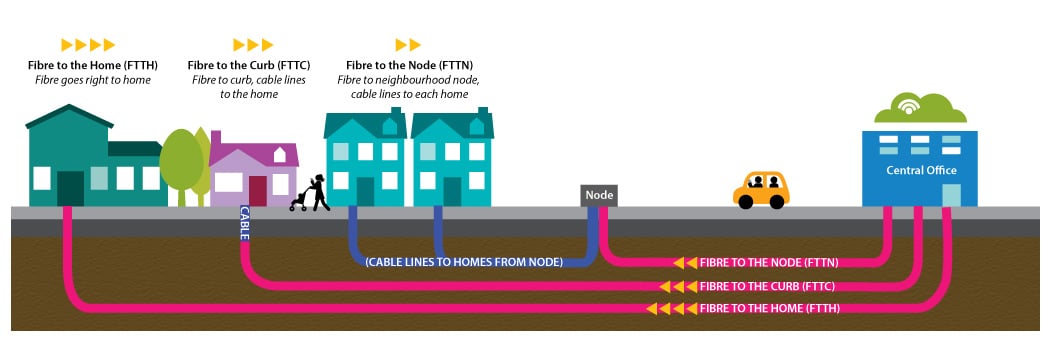
What’s the difference between ‘Fibre to the Home’ and ‘Fibre to the Node’?

Execulink offers Fibre to the Home (FTTH) and Hybrid Fibre or Fibre to the Node (FTTN) services.  Availability of these services depends on the area where you live.  If you have FTTH, this means that the optical fibre lines are laid directly to your house. Hybrid Fibre or FTTN service involves the optical fibre lines running to the node near your house.  These networks use coaxial cables to transmit data directly to your home.

What do I need for Fibre Internet?

To get the most out of what Fibre Internet has to offer, you’ll need the following equipment for installation:

Optical Network Terminal (ONT) – Traditional DSL and Cable modems are not compatible with fibre optic technology since they cannot translate light signals into digital ones. With Execulink’s Fibre internet, you won’t need to rent a modem which will save you in rental fees. Instead of a modem, the Fibre installation comes with an Optical Network Terminal (ONT) device.

Fibre optic cables – You will need fibre optic cables run to the ONT device installed in your home.

Router – A wireless router will also be necessary to support all the Wi-Fi enabled devices in your home taking advantage of the fibre optic signals. With these faster speeds, routers need to be capable of handling them.  At Execulink, we currently offer two router options in Fibre areas: the Comtrend WR-6895 or the Premium Wi-Fi Router, which is a popular part of our Complete Wi-Fi solution.

Who should get Fibre Internet?

Almost everybody can benefit from getting Fibre Internet!

It should be noted that, depending on where you live, there may be limited availability.  Some communities and rural areas in Ontario do not have access to Fibre but some ISPs, like Execulink, are bringing it to smaller towns across South Western Ontario.  Execulink is committed to supporting the community and delivering awesome Fibre Internet to rural communities. We also pride ourselves in hiring and investing in local employees to deliver that awesome service.

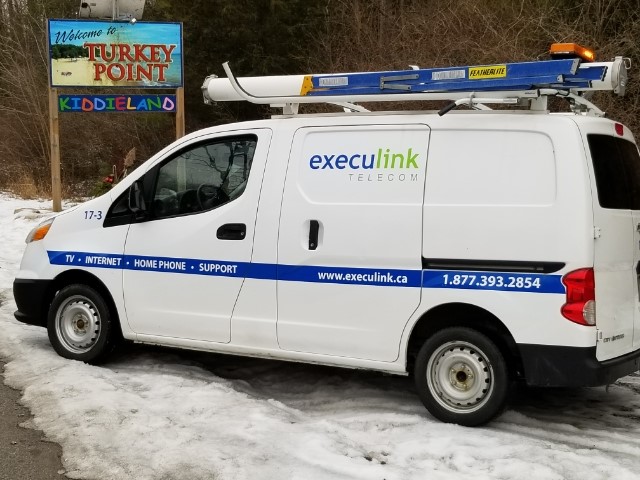
Execulink’s Fibre Internet is available in Turkey Point!

Businesses can experience major benefits from using Fibre Internet. The reliability, low latency, and high upstream bandwidth help with large data back-ups. Execulink also offers a TLS (Transparent Local Area Network Service) to give you the ability to connect your remote offices to your head office. Check out this case study about Tigercat, a global business with a facility in Woodstock, Ontario that has benefitted from having a Fibre Internet connection

Speed Up Your Internet Connection with Execulink

Whether you’re looking for faster Internet speed options for streaming and gaming or basic packages for surfing the Internet, we have the services you and your family deserve!

With 24/7 support and a wide range of Internet options to suit every lifestyle, we have the awesome services your home or business needs to stay connected to what matters the most! Call us at 1(866) 765-2282 today or visit our Internet page to find the Internet package you’ve been looking for!

Protecting Remote Workers from Phishing Scams

Phishing has always been a risk to employees and businesses, but like every other part of our lives, COVID-19 has impacted it as well.  Cyber criminals have kept up with the times and are creating targeted attacks with content relevant to remote workers and our collective fear surrounding the pandemic.  This blog will explain how phishing attempts have changed due to COVID-19 and what a common form of cyber attack called ‘spear phishing’ is all about.

Click here for your Business Internet options

The History of Phishing

Phishing is a term coined around 1996 by hackers stealing America Online accounts and passwords.  The term is an analogy for Internet scammers using lures online, and setting out hooks to ‘fish’ passwords, credit card information, and data from the ‘sea’ of Internet users. It is typically done through email, instant messages, or popups on webpages. Often times it can appear completely legitimate and trustworthy.

Remote Workers at Risk

A recent study done by a cyber security company TerraNova security found that in 2020 more users were caught by phishing scams.  This study was conducted in a simulation with emails and webpage templates that reflected real-world scenarios, especially targeted to those working remotely. The templates measured phishing behaviours including clicking on suspicious email links and submitting data using a webpage form.  The results found that an increasing rate of users would have compromised their data if the simulation been real. Almost 20% of employees clicked on phishing email links which was an increase from 11% in 2019. The study was conducted in 12 different languages from 28 different countries around the world. Read more about the study and TerraNova Security here.

COVID-19 Impacts Phishing Attempts

2020 was a year of tumultuous change and accelerated digital transformation for companies.  These shifts also increased cyber threat risks because cyber criminals took advantage of the volatility with targeted phishing attacks.  Cyber criminals leveraged fear and uncertainty in their messages to trick users. According to Zscaler, a cyber security company, there was a 30000% increase in phishing, malicious websites, and malware targeting remote users between January and March of 2020. Yes – 30000% – this is not a typo! The number of COVID-19 spear phishing attempts also increased by 667%. You can read more about their findings here.

What is Spear Phishing?

According to the Canadian Anti-Fraud Centre, one of the most common and most dangerous attack methods is called spear phishing. Fraudsters will take their time to collect information about the intended target, so they can send convincing emails from a trusted source. They will use a tactic known as spoofing where the sender’s address appears to be the actual email address of the source they’re pretending to be. These scams target businesses or individuals and can be done over email, text, phone, and fax.  There are several variations of this type of phishing including business executive spoofs, existing employee spoofs, or the supplier/contractor swindle.

Business Executive Spoofs

When the email appears to come from a high ranking official in your company they could request gift cards for employee rewards, a birthday or just a direct wire transfer.

Existing Employee Spoofs

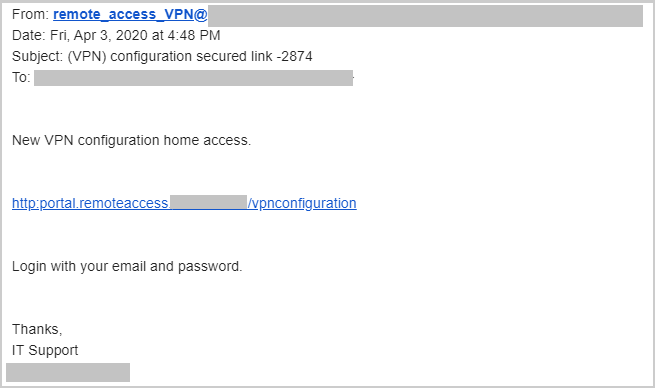
A scammer sends an email that appears to come from an existing employee in your company. If the email appears to come from someone in payroll, they could request a change to the employee’s direct deposit information. This tricks the company into depositing the employee’s paycheque into a fraudulent account. Another related scam targeted to remote workers is when the cyber criminals pose as your company IT department with an email about your VPN.

Here is an example of what a phishing email could look like targeted to a remote worker. The link included in this email likely prompted the worker to provide personal information or passwords.

Supplier/Contractor Swindle

A scammer targets a business with an existing relationship with a supplier, wholesaler, or contractor. They send a spoofed email informing the business of a change in payment details. The email provides new banking information and requests that they send the future payments to the new account.

Help Your Organization and Employees Avoid Attacks

There are many uncertainties with COVID-19 and businesses are striving to find new ways to ensure their employees’ data remains protected no matter where they work.  Distributed virtual offices have lessened the effect of technical data protection measures and put employee’s ability to detect phishing scams under a microscope. There are a few ways you can stay cognisant of the heightened risks of phishing attacks amid COVID-19…

  • Stick with reputable sources for COVID-19 information
  • Be wary of requests for emergency funds via email (call the sender to confirm, even if it appears to be from a known contact)
  • Look at the language used in the email and be wary of unusual requests that do not follow internal procedures, request confidentiality, use pressure or a sense of urgency, or include unusual promises of reward.
  • Do not open links or attachments from unknown sources
  • Do not provide personal information online
  • Enable two-factor authentication
  • Apply security updates to your operating system and computer
  • Activate SMS/email notifications for any financial transaction

What Should You Do When You Receive Spam?

After following these suggested methods to protect yourself online, you can also report any suspicious emails to your company’s IT department and the Canadian Anti-Fraud Centre.  The best thing you can do is trust your gut feeling if the email or text message seems off to you.  It’s more important than ever to stay vigilant about your online security and stay skeptical when faced with suspicious emails.

Get Started Today!

Execulink understands the importance of providing a secure Internet connection for your business.  To stay connected, learn more about our Business Internet options by visiting our webpage. If you’re working from home, consider Execulink’s residential Internet options! Qualify your address, give us a call at 1-866-706-1942, or send us an email at sales@execulinktelecom.ca. Whether you’re looking for faster Internet speed options, or unlimited usage, we have the services you and your business deserve.

Click here for your Business Internet options

Winter 2021 TV Guide

After coming in from the chilly winter weather your couch and blankets start calling. It’s that time of year when staying inside and cuddling up to the TV looks pretty appealing.  We accumulated all the awesome TV shows airing this winter. We can’t wait to see the new season of The Great Canadian Baking Show on CBC, Resident Alien on CTV Sci–Fi, and NHL hockey on Sportsnet. We also have lots of Free Previews on now so you can watch shows you don’t normally have in your lineup.

Add new channels through MyExeculink!

Monday

8:00pm – The Bachelor – Season Premiere – CityTV – January 4

8:00pm – 9–1–1 – Season Premiere – Global – January 18

9:00pm – 30 Coins – New Episodes – Crave – January 11

9:00pm – Jamie and Jimmy’s Food Fight Club – Season Premiere – CTV Life – January 11

9:00pm – Gold Rush White Water – New Season – Discovery – January 18

10:00pm – Ty Breaker – Series Premiere – HGTV – January 11

10:00pm – Wheeler Dealers: Dream Cars – New Episodes – Discovery Velocity – January 11

12:37am – A Little Late Night with Lilly Singh – Global – January 11

Tuesday

8:00pm – Kim’s Convenience – Season Premiere – CBC – January 19

8:00pm – NCIS – Season Premiere – Global – January 19

9:00pm – Workin’ Moms – Season Premiere – CBC – February 16

9:00pm – Mega Marine Machines – New Episodes – Discovery Science – January 12

9:00pm – Self Made Mansions – Series Premiere – HGTV – January 19

9:00pm – Prodigal Son – Season Premiere – Global – January 12

9:00pm – Chopped – Season Premiere – Food Network – January 5

9:30pm – Humour Resources – Series Premiere – CBC – January 5

9:30pm – TallBoyz – Season Premiere – CBC – February 16

10:00pm – FBI: Most Wanted – Season Return – Global – January 19

10:00pm – Heavy Rescue 401 – New Episodes – Discovery – January 12

advertising the free preview for food network

Wednesday

NHL Return – Sportsnet – January 13

8:00pm – Graveyard Carz – New Episodes – Discovery Velocity – January 13

8:00pm – Coroner – Series Premiere – CBC – February 3

8:00pm – The Masked Dancer – Series Premiere – CTV – January 6

8:00pm – Tough as Nails – Season Premiere – Global – February 10

9:00pm – Rehab Addict Rescue – Series Premiere – HGTV – February 10

9:00pm – SEAL Team – Season Premiere – Global – January 13

9:00pm – Pretty Hard Cases – Series Premiere – CBC – February 3

10:00pm – S.W.A.T. – Season Premiere – Global – January 13

10:00pm – 100 Day Dream Home – Season Premiere – HGTV – January 6

10:00pm – Resident Alien – Series Premiere – CTV Si–Fi – January 27

10:30pm – Full Frontal with Samantha Bee – Season Premiere – CTV Comedy – January 13

Thursday

3:01pm – RuPaul’s Drag Race UK – Season Premiere – Crave – January 14

7:00pm – Mr. Mayor – Series Premiere – CityTV – January 7

8:00pm – documentary Channel originals Fear of Dancing, Clydesdale: Saving the Greatest Horse and The Oslo Diaries premiere January 7 through 21 on CBC

8:00pm – Call Your Mother – Series Premiere – Global – January 14

8:30pm – Superstore – Season Premiere – Global – January 14

9:00pm – Restaurant Hustle 2020: All on the Line – Series Premiere – Food Network – January 7

9:00pm – Restaurant: Impossible – Series Premiere – Food Network – January 14

9:00pm – Call Me Kat – Series Premiere – CTV – January 3

10:00pm – Rock Solid Builds – Series Premiere – HGTV – February 18

10:00pm – Big Texas Fix – Season Premiere – HGTV – January 7

10:00pm – Clarice – Series Premiere – Global –  February 11

10:00pm – The Flight Attendant – Season Finale – Crave – January 14

10:00pm – All Girls Garage – Season Premiere – Discovery Velocity – January 8

No time – Two Weeks to Live – Crave – January 7

Friday

8:00pm – MacGyver – Season Premiere – Global – January 8

9:00pm – Beat Bobby Flay – Season Premiere – Food Network – January 8

9:00pm – The Sister – Series Premiere – Crave – January 29

9:00pm – Vikings – Season Premiere – History – January 1 (Next new episode January 13 at 9:00pm)

10:00pm – HBO’s Real Time with Bill Maher – Season Premiere – Crave – January 15

Saturday

6:30pm – Hockey Night in Canada – CBC – January 16

8:00pm – Big Food Bucket List – Season Premiere – Food Network – January 9

8:30pm – Diners Drive–ins and Dives – Season Premiere – Food Network – January 9

11:45pm – Sherlock Holmes: A Game of Shadows – Movie – CTV Sci–Fi – January 16

Sunday

7:00pm – Heartland – Season Premiere – CBC – January 10

8:00pm – Les Miserables – Series Premiere – CBC – January 10

8:00pm – The Great Canadian Baking Show – Season Premiere – February 14

8:00pm – The Circus: Inside the Greatest Political Show on Earth – Season Premiere – Crave – January 10

8:00pm – American Idol – Season Premiere – CTV 2 – February 14

9:00pm – Belgravia – Series Premiere – CBC – February 14

9:00pm – Home Town – Season Premiere – HGTV – January 3

9:00pm – Shameless – Season Premiere – Crave – January 10

10:00pm – Kitchen Crash – Series Premiere – Food Network – January 10

10:00pm – The Equalizer – Series Premiere – Global – February 7

10:00pm – Undercover Billionaire – Season Premiere – Discovery – January 17

No time – No Man’s Land – Crave – January 10

No time – Tiger (Part 1) – HBO and HBO Max – January 10

No time – Tiger (Part 2) – HBO and HBO Max – January 17

Sign up for Link TV today!

From comedy to sports there are lots of awesome new TV shows and games to watch this winter.  To add new channels to your Link TV lineup visit your MyExeculink account! To sign up for awesome TV service learn more about Link TV on our webpage here, give us a call at 1-866-706-1942, or send us an email at sales@execulinktelecom.ca.

Sources:

https://www.sportsnet.ca/hockey/nhl/

https://www.corusent.com/news/hgtv-canada-boasts-more-than-170-hours-of-new-content-this-winter-with-premieres-every-night/

https://www.corusent.com/news/global-announces-2021-winter-lineup-featuring-highly-anticipated-new-series-clarice-call-your-mother-and-the-equalizer/

https://www.corusent.com/news/warm-up-this-winter-to-food-network-canadas-cozy-culinary-lineup/

https://www.bellmedia.ca/the-lede/press/january-2021-crave-streaming-overview/

https://www.bellmedia.ca/the-lede/press/ctv-channel-group-programming-highlights-jan-11-17/

https://www.bellmedia.ca/the-lede/press/january-7-13-crave-weekly-streaming-overview/

https://www.bellmedia.ca/the-lede/press/resident-alien-premieres-january-27-on-ctv-sci-fi-channel/

https://www.globaltv.com/articles/global-announces-2021-winter-lineup/

Dry Loop Internet: Everything You Need to Know


Click here to qualify your address for awesome Internet!

The Internet is changing the way we work and live. Yet, the technology being used to provide us with Internet is constantly evolving. Nowadays we have options to get the connection we desire on our own terms (what exciting times we live in!)

For some households, home phones aren’t a necessity and mobile phones are becoming a convenient substitute. This is where dry loop Internet comes in – a technology that allows you to have DSL Internet without an active home phone service.

The original concept behind DSL was to use existing telephone lines for high-speed Internet, with DSL and telephone services coexisting on the same phone line. However, increasingly customers may require only the Internet service and see no need for the traditional phone service.

Since 2003, the Canadian Radio and Television Communication (CRTC) organization ruled that dry loop DSL service can be made available in Canada allowing more Canadians to choose their ideal connection. At Execulink Telecom, we want to provide our customers with the latest technology and simplify their options for an Internet connection that works for their budget and lifestyle. In this blog, we’ll be discussing everything you need to know about dry loop Internet to help you determine if it is the right option for you.

What is Dry Loop Internet Versus Wet Loop Internet

A “dry loop” also known as dry pair, local loop, or naked loop is a telephone landline without an active telephone service. This means telephone calls cannot be made or received on this line and there is no telephone number associated. So, don’t try to call your best friend on this phone because you’ll be disappointed! Instead, the dry loop uses the telephone landline to deliver high-speed Internet access to your home or business.

A wet loop on the other hand is slightly different from a dry loop. Although, it’s important to note that both have the purpose of bringing the Internet signal to your home, the term wet comes from the fact that the battery used to sustain the loop comes from wet cells (without a dial tone). Meanwhile dry loop does not provide dial tone or use battery. Wet loop and dry loop also have the exact same quality and speed of service.

When is a Dry Loop Required?

A dry loop line is required to provide DSL Internet service for a few reasons:

  • You don’t have an active phone service.
  • You use voice over IP (VoIP) phone service.
  • You use phone service that is provided by a cable carrier (it uses your cable line instead of your phone line to give you Internet)

If any of these apply and you are considering DSL Internet – then dry loop may be your best option.

Benefits of Dry Loop DSL Internet

A general benefit is that your DSL is yours only! You don’t need to share your landline with neighbours or anybody else, thus connection consistency and speeds are more likely to be as effective as the telecommunication company advises they will be. DSL is also considered to be very reliable, although this also depends on the Internet service provider you go with.

Since dry loop offers people the opportunity to have Internet without a corresponding telephone service, this can result in cost-savings. Instead of having to pay fees for telephone services and Internet, most people can simply replace their home phone with their mobile phone and purchase only DSL service from their Internet provider.

If you want to run Internet over your landline, then the owner of the landline such as companies like Bell or TELUS will likely charge the ISP a dry loop fee to maintain the line. Some companies will include the dry loop fee in the cost of Internet while others will add the dry loop fee on top of your Internet costs.  Although, the reason dry loop is beneficial is because this cost will likely still be significantly less than paying for additional home phone service.

Speed Up Your Internet Connection with Execulink

All your favourite online activities require a powerful Internet connection that you can count on. Dry loop DSL Internet is one way you may be able to get cost-savings or flexibility for your Internet connection. If you don’t need an active phone line, would rather use VoIP phone service, or use phone service that is provided by a cable carrier, then a dry loop Internet connection may be the right option for you.

With 24/7 support and a wide range of Internet options to suit every lifestyle, at Execulink have the awesome services your home or business needs to stay connected to what matters the most! Whether you’re looking for faster Internet speed options for streaming and gaming, or basic packages for surfing the Internet, we have the services you and your family deserve. Call us at 1-866-706-1942 today or visit our Internet page to find the Internet package you’ve been looking for!

Click here to see Execulink’s Home Internet options

The Internet Services You Deserve
Affordable. Reliable. Lightning fast.

We’re proud to provide the communities we know, love, and live in, with the reliable Internet, TV, Phone and Mobility services they deserve.

  • Your local choice for residential and business telecommunication services
  • Renowned 24/7 customer service you can depend on
  • Affordability, service, integrity and transparency are the pillars of our business

Here to help. 24/7.

Sales Inquiries

Sales: Mon-Fri 8AM-8PM, Sat 8AM-5PM

(866) 706-1991

Support Inquiries

Technical Support: 24/7, Customer Care: Mon-Sun 7AM-11PM

(866) 706-1994

Online Help

Chat With Us

We'll respond as soon as we can!

Email Us

We'll get back to you as soon as possible.

Support Centre

Find the answer to your question.

Check availability

Enter your address to find services and offers available to you!