We’re here for you during COVID-19: an update

We said that you could expect to hear from us as soon as updates become available, so we want to let you know what’s happening for you and for our employees at Execulink Telecom.

In light of the recent developments concerning COVID-19, Execulink Telecom has made the decision to support social distancing and safe lockdown practices by closing its public storefronts as of Thursday, December 24th until further notice.

Visit our COVID-19 FAQ page today

Let me highlight what that means for our customers going forward:

We’re still here for you 24/7. Our Customer Care Team is available via phone at 1 (866) 706-1994, chat, and email to support you.

We’re installing using safe physical distancing practices. To keep you and our technicians safe, we’re not entering homes or businesses at this time, but we’re still providing you with outdoor installation and the support and resources you need. Watch what we’re doing to keep you connected!

We’re continuing to find ways to offer you innovative products and services. With more of us relying on Internet to keep us connected, we recognize that you need fast and reliable solutions. That’s why we’ve introduced our new Complete Wi-Fi solution, so you can get the awesome extended coverage you deserve.

We’re still connecting you with free previews on many of our TV channels to help entertain and educate you during this time. You can enjoy free previews on CTV News, Animal Planet, Silverscreen Classic, Rewind, and more, with Showcase, W Network, History, HGTV, the Food Network, and National Geographic coming soon.

There are many safe, contactless ways for you to view and pay your bills. You can visit MyExeculink, make payments through your personal online banking, or contact our Customer Care Team to pay with your credit or debit credit card and/or set up pre-authorized payments. We also recommend e-billing as an eco-friendly solution that prevents unnecessary face-to-face contact for you and our postal workers.

We’re still doing hardware returns, deliveries, and exchanges. Our storefronts are closed, but you can still get the hardware you need safely. Please contact our Customer Care Team to arrange shipping directly to and/or from your home.

We’re still working from home, too. All of our employees who are able to work from home have been doing so since March 16, 2020, so please excuse any meows, woofs, or little voices asking for Mum or Dad you may hear. We’re continuing to work hard to make sure you can stay connected.

If you have any questions or concerns, please reach out to our Customer Care Team. In the meantime, stay safe, stay connected, and be well.

Ian Stevens, CEO

Click here to see Execulink’s Home Internet options

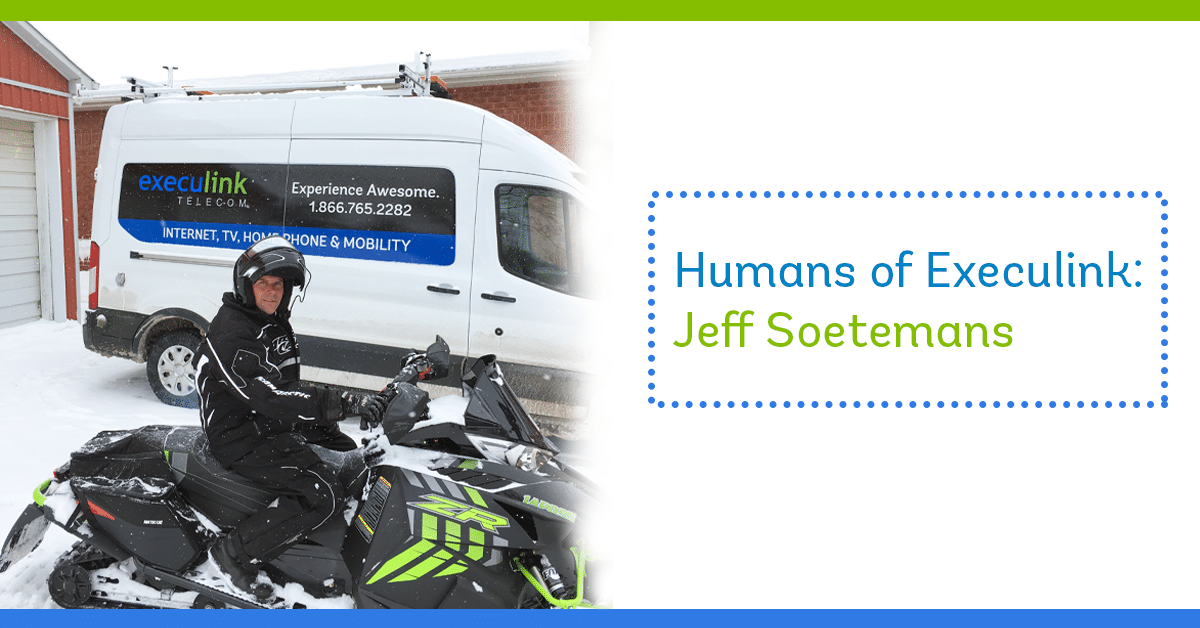
Humans of Execulink: Jeff Soetemans

Jeff has been part of the Execulink team for 33 years! His role has changed alongside technology and his breadth of knowledge.  He started when he was in high school and now works as the Outside Operations Manager.  He represents Execulink’s values in several ways: by staying innovative, prioritizing the health and safety of the teams who report to him, and by considering the interests of all customers and stakeholders in his decision making.  We had the opportunity to learn more about Jeff’s role at Execulink and a little about what he does in his spare time too!

How would you describe what it’s like to be the Outside Operations Manager at Execulink?

Fast paced, challenging, and rewarding seeing it all come together.

How has COVID-19 changed your day-to-day or how you stay innovative for your team?

COVID definitely changed how we operate in the outside plant, implementing new ways we keep ourselves and our customers safe. The demand for an awesome Internet, TV, and Phone experience has never been more important with so many people working and learning from home, or just trying to have fun and unwind. The one thing that has remained constant is our goal to make that happen!

What is one thing you want people to know about Fibre Internet from Execulink?

It’s AWESOME! Over the years I’ve been with Execulink, we’ve done our best to stay on top of new technology to deliver the most innovative products and services.  For example, we started delivering Dial-Up in 1995 and from there we’ve expanded to stay current as technology changed.  I find it extremely rewarding to deliver the quality of service that Fibre provides to our customers.

Learn more about Fibre to the Home today!

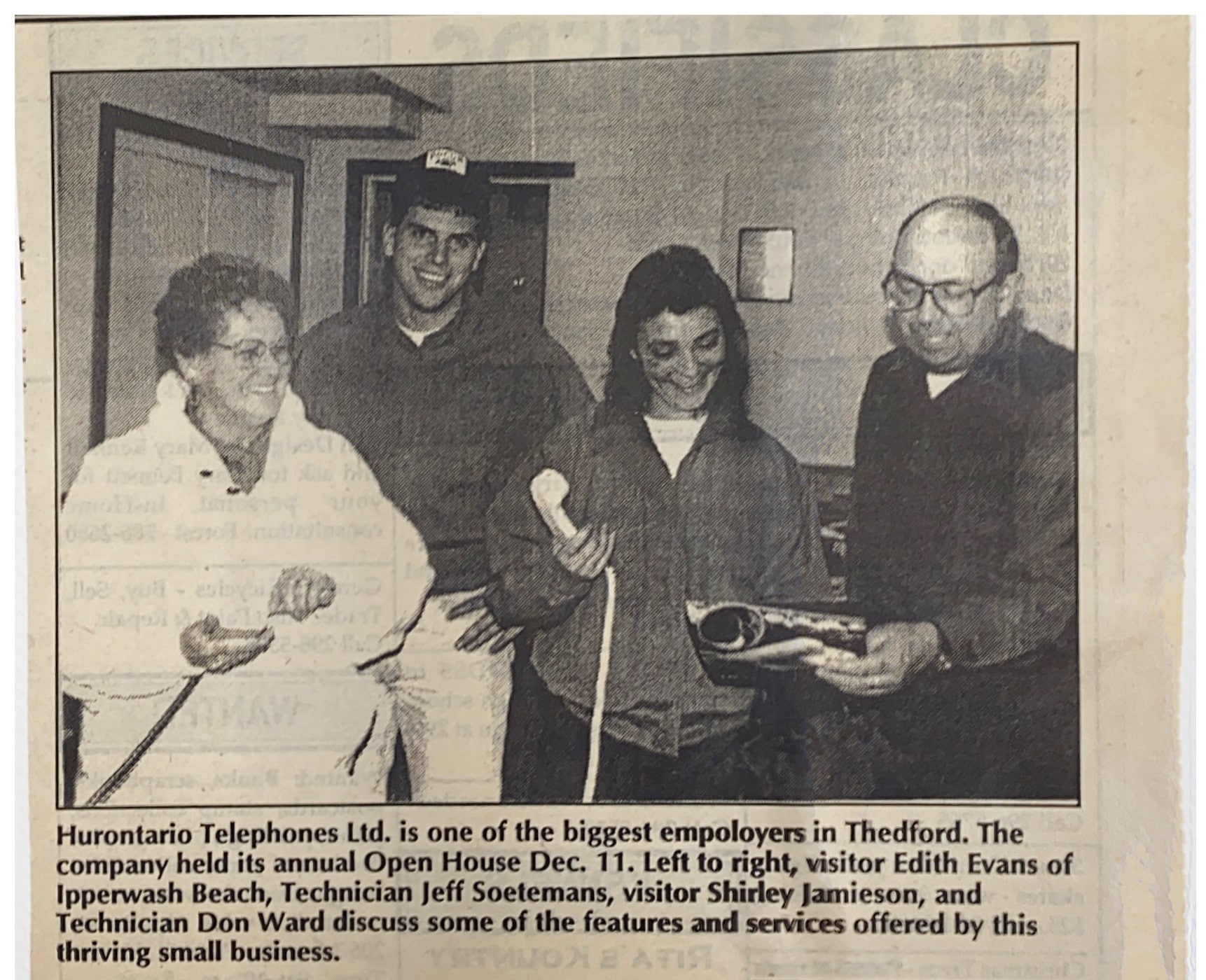
Jeff worked at Execulink when it was known as Hurontario Telephones Ltd. When this newspaper was published in the early 90s, he was working as a technician.

Do you have any memorable customer stories or anecdotes from your time working at Execulink?

There are several! I’ve worked with so many people on so many projects over the years as we moved through technology.  I think my most memorable stories come from interacting with colleagues. One that I’m most proud of spans more than 20 years. I was involved in the migration of a new digital telephone switch in 1993 which gave us many new calling features. That night after a successful migration we drank wine out of Nortel Network’s wine glasses. I kept a pair of those glasses the entire time, and back in 2016, we migrated to yet another new telephone switch. That equipment ran for over 20 years, so when it was time to pull the fuses and listen to it shut off, it was bitter sweet. I drank out of that glass again, and it’s the only time it was or will get used. Now they sit on display in my office at home as a reminder of the really awesome things this company has allowed me to be part of.

Previous
Next

What do you like to do in your free time outside of work?

I’m proud to say that I’m a Captain for the Ingersoll Fire and Emergency services and 2021 marks my 20th anniversary as a Firefighter. Its very rewarding to give back to the community and help people in such a meaningful way.  I’m happy to discuss fire safety and prevention at any time!  I also enjoy spending time with my family doing outdoor activities and as I grow older the opportunity to travel more and see the country.

Rapid Fire THIS OR THAT Questions!

  • Snowmobile or Seadoo? Snowmobile!
  • Winter or Summer? I love them equally for different reasons
  • Cats or Dogs? Dogs
  • Laptop or Desktop? Laptop
  • Wi-Fi or Ethernet? Wi-Fi
  • Cellphone or Home Phone? Cellphone
  • Video Meeting or In-Person Meeting? In-Person Meeting
  • Playing Sports or Watching Sports? Playing Sports!
  • Christmas or New Years? Christmas

Jeff’s contributions to Execulink are innumerable.  We are lucky to have his years of expertise available to help make decisions about the future of our networks while ensuring our customers continue to have an awesome experience.  If you’re interested in joining the Execulink team check out our careers page, one of the open opportunities could start an awesome and rewarding career like Jeff’s for you!

About Execulink

With over a century of experience in the telecommunications industry, Execulink has been serving Ontario proudly since 1904. Our team is extremely knowledgeable about our products and plans and we are happy to help in any way we can. We offer several unlimited Internet options that are straightforward and easy to understand.  Give us a call at 1-866-706-1942 to learn more!

Learn more about Execulink’s awesome Internet plans today!

Staying Connected: Execulink’s LTE Backup Solution

Click here to learn about Execulink’s Business Internet options

Having your business’ Internet go down is not only extremely annoying, but it could also affect your bottom line or your company’s reputation.  Although different Internet types have varying degrees of reliability, no Internet hardware is 100% immune to severe weather, construction accidents, or cyber attacks.  Any of these things could leave your essential business tools like point of sale computers practically useless.  Execulink’s LTE Backup solution is an excellent choice to maintain your network to avoid interruptions. It’s a hardware solution that can get you back up and running seamlessly.

The Solution for your Business: LTE Backup

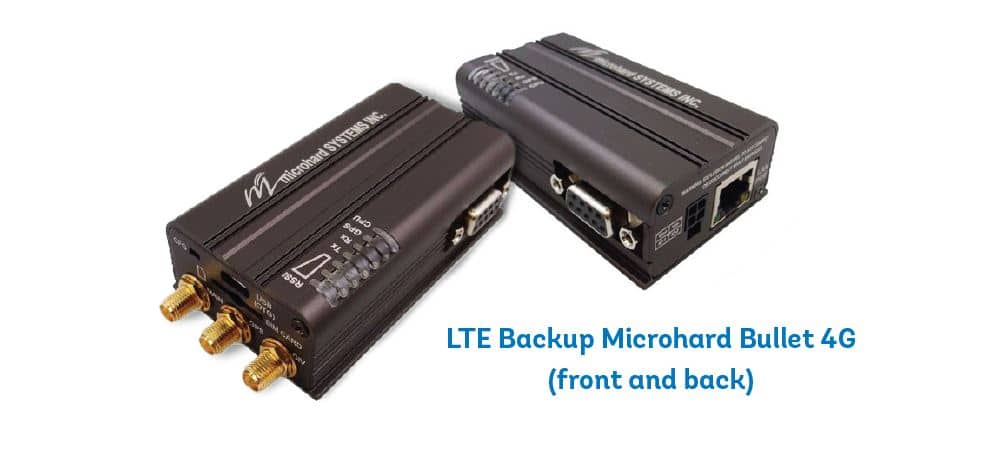
The LTE Backup solution uses cellular gateway coupled with a SIM card to provide an alternate method of access to the Internet using Mobile networks.  The failover kicks in when your primary connection goes down so that you never have to worry about downtime again.  Its perfect for businesses that require 24/7 Internet to function and it will keep your devices connected.

Our technicians recommend the Microhard 4G Cellular Gateway, which comes fully supported by our 24/7 Customer Care team.

Reasons to Guard Against Downtime

Let’s look at some examples of when downtime could be extremely harmful to your business…

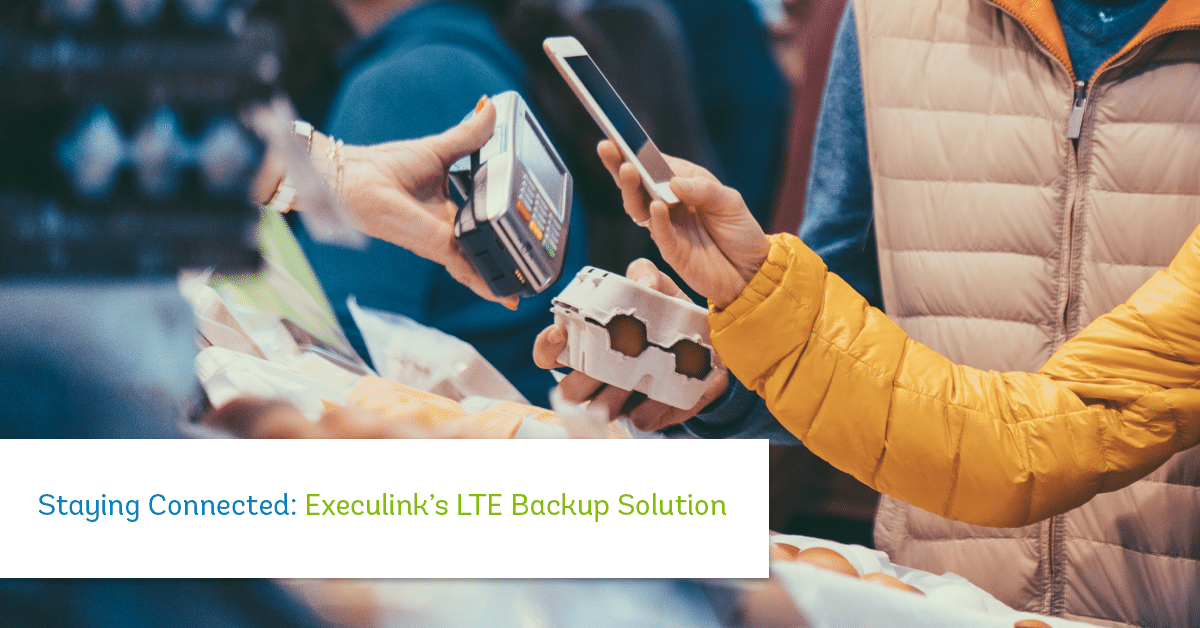
Having a secure and reliable Internet connection is perhaps the most important for transaction hardware at the point of sale.  You’ve spent endless time, money and energy into attracting customers to your business; don’t lose them because of a poor experience right at that crucial moment of sale.  If there is a network issue, the LTE backup solution will kick in to ensure your PoS system stays connected so your customers can pay using debit or credit.

Besides the point of sale hardware, there are a number of other reasons your business needs a consistent connection. For instance, many businesses have embraced mobile applications to handle customer information for loyalty programs and gift cards.  When these aren’t available due to downtime, it creates a poor customer experience and could tarnish your business’ reputation.

What about all your IoT (Internet of Things) equipment, like cameras, thermometers, or security sensors?  An LTE backup solution could keep your IoT gadgets running smoothly, creating a consistently safe and comfortable environment for you, your staff, and your customers.

Packages and Pricing

Finding the right package option for your business is best determined by speaking with a member of our Sales team.   If you want a simple failover solution for low usage IoT technology, then you might want to choose one of our more economical package from 25 to 500 Mb. Our plans go up to 100 Gb of data usage, so if you have IoT components that require more usage, you can choose a plan that suits your needs.  An important thing to note is, the data usage included with each package will apply to all locations of your business.  This allows for additional peace of mind knowing you’re covered across the board.

Set Up and Support

We are dedicated to providing the highest level of support possible.  We will work with you to set up a solution designed around your company’s needs.  Our technicians can help set up your equipment or assist you with training your employees.  Should an issue arise, it will be resolved quickly and efficiently by Execulink Telecom’s team of technicians.

If you want to learn more about our LTE backup solution or Business Internet solutions, give us a call at 1-866-706-1992 or send us an email at sales@execulinktelecom.ca. We are ready to help your business every step of the way. We can help to identify the perfect solution to meet your business’s current and future needs!

Click here to see Execulink’s Business Internet options

Execulink’s 2020 Holiday Gift Guide

Click here to see Execulink’s Home Internet options

Finding the right gadgets to buy for the technologically inclined member of your family can be tricky!  We’ve found some options for all ages in all price ranges to help make shopping a little bit easier.   Maybe there are even some things on this list that you’d like to see under the tree…

Click and Grow Smart Garden

This cool gadget is perfect for keeping herbs, such as basil, lavender, cilantro, and thyme fresh throughout the winter.  It uses energy-efficient LED grow lights to ensure your plants thrive no matter the weather!  When summer returns you can transplant the herbs into the ground.


Price point: $129.99

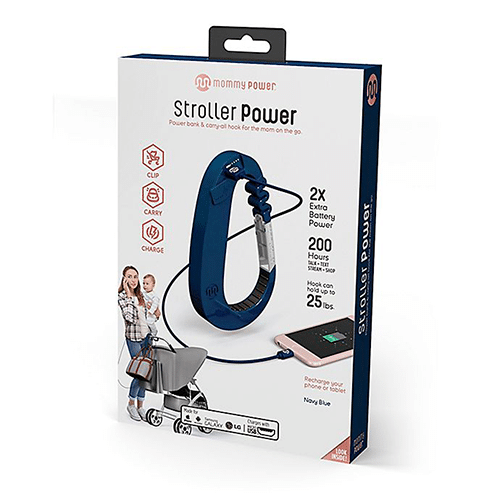
Stroller Power Hook

This device is great for the parent on-the-go. It doubles as a power bank and a carry-all hook for your diaper bags or purse.  It attaches to most stroller handles for a convenient way to charge your phone and handle all the supplies you need while out and about with your little one(s).

Price point: $51.99

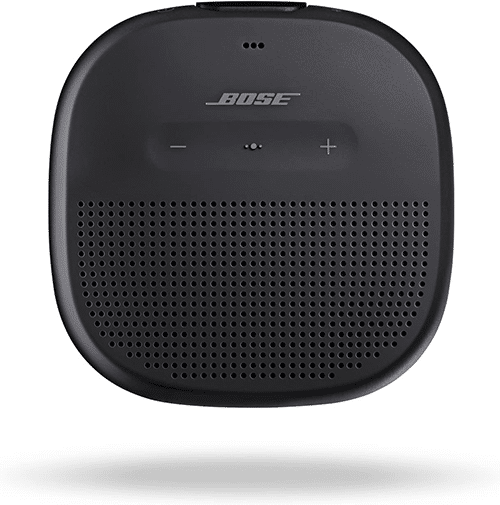
Bose SoundLink Micro, Portable Outdoor Speaker

This speaker is small enough to fit in your pocket or purse with phenomenal audio quality that Bose is known for.  It’s waterproof so you can keep it pool- or beach-side with up to six hours of battery life!  You can even speak with your phone’s Siri or Google assistant through the built-in speakerphone.

Price point: $129.99

Wyze Cam – Smart Home Camera with Night Vision

If you’re looking to protect the security of your home, consider investing in a camera to monitor visitors. This camera enables you to keep an eye on your online shopping deliveries coming to your door and is enabled to connect to Wi-Fi and your smartphone.  Bonus, the price is extremely reasonable – just ask Santa’s elves!

Price point: $32.64

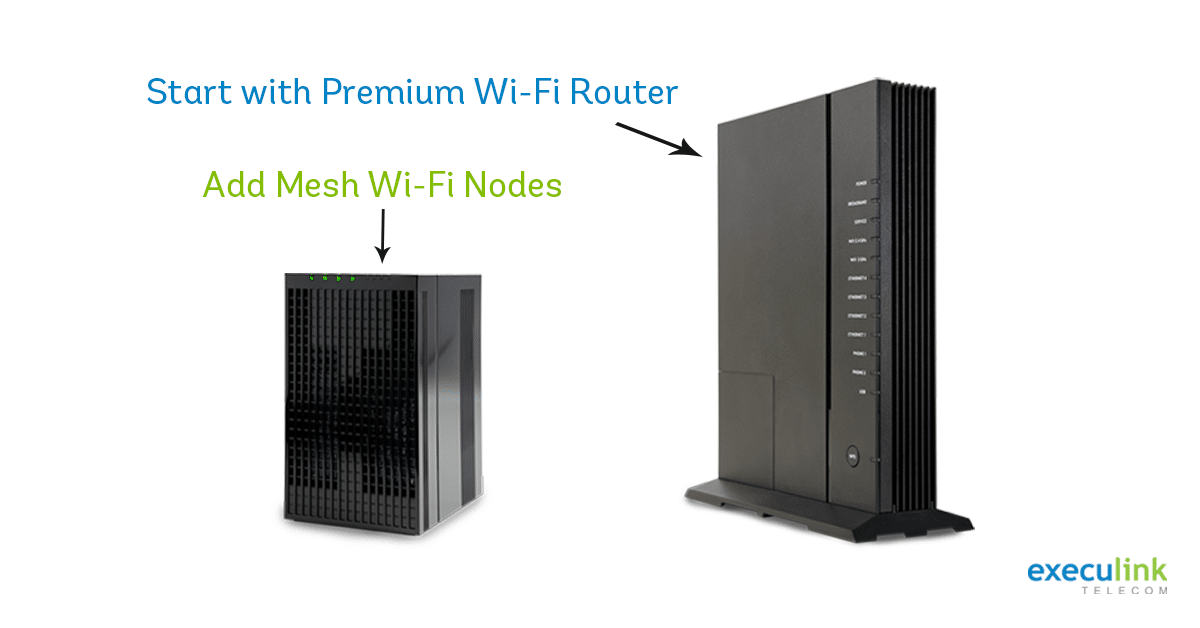
Execulink’s Premium Router and Mesh Wi-Fi Nodes

Have you been looking for better Wi-Fi coverage in your home?  The holiday season might be the perfect time to upgrade your Execulink router. The Premium Router connects to the Mesh Wi-Fi Nodes which are placed in hard-to-reach areas of your home, creating a consistent and fast signal no matter where you go.  Qualify your address to find out if they’re available to you!

Price point: Premium Router – $9.95/month and Mesh Wi-Fi nodes – $5.95/month

For the kids

4M Anti Gravity Magnetic Levitation Science Kit

This science kit teaches kids about magnetic force through several hands-on experiments. Make objects float such as a pencil or a screw. Your kids can try their hand at building a maglev and more! With a 4.5 star rating on Amazon, this toy is sure to keep your kids busy and they’ll learn something new too!

Price point: $35.47

3D Wooden Brain Teaser Puzzle

This game is appropriate for both kids and parents! It’s an intellectual challenge to teach problem solving skills  while also relieving stress and relaxing your mood by stimulating your brain. Tetris the pieces together for some puzzling fun!

Price point: $29.99

Elements: A Visual Exploration of Every Known Atom in the Universe

This hardcover book is an exploration of all the elements in the periodic table.  It’s an enthralling way to visualize science. Kids and adults of all ages would love to look through this. It would even make a perfect coffee table book! There’s a whole series if you would rather read about molecules or reactions!

Price point: $37.61

Hand Cranked Power Generator

This STEM learning toy for kids age 8+ allows them to construct their own kinetic powered LED lantern that uses a hand crank to light the LED bulb.  Problem solving and attention to detail are required to build the light. You could even use it as a tool for science class.

Price point: $18.50

Elenco FM Radio Kit

This kit will teach your kid to assemble a monophonic FM receiver.  It teaches the basics of working with a printed circuit board and a variety of electronic components.  Reviews say that the instructions are easy to follow and the price is right!

Price point: $23.00

We hope our list inspired you to consider a few new gadgets this holiday season for your family.  Finding the right gifts is challenging but the looks of surprise and excitement on Christmas Day make it all worth it!

Execulink is following its own giving journey this year with our annual Gifts of Christmas initiative; check out the non-profit organizations we’re supporting this year here. To ensure your gadgets are connected, consider Execulink’s Internet options by visit our webpage or reaching out to our Sales team at 1-866-706-1942. From our family to yours, we wish you a Merry Christmas and Happy New Year!

Click here to learn about Complete Wi-Fi

How do Wi-Fi Extenders Work?

The Internet has become an important staple in our daily lives, with people wanting to have 24/7 access to a connection in order to stay productive and entertained. There are many devices that need to work together to make this connected world a reality.

At Execulink Telecom, we want to keep you updated and informed on innovations in technology, so you have the knowledge to utilize them for your own purposes. Whether it’s trying to stream your favourite show on Crave or trying out a new online game, lack of Wi-Fi in the area of your home, you need it can be frustrating. If you’re struggling to get Wi-Fi to reach every corner of your home and need more coverage, then a Wi-Fi extender combined with an excellent Internet service provider may do the trick! Execulink’s Wi-Fi extenders are called Mesh Wi-Fi Nodes, you can choose to add them along with our Premium Router to create a Complete Wi-Fi set up in your home.

Here’s everything you need to know about how to use a Wi-Fi extender:

What is a Wi-Fi extender?

A Wi-Fi extender is used to extend the area of coverage for your Internet. If your Internet weakens the further your device is from your router, then you may need a WI-FI extender to maintain a strong connection.

Similar to a stereo amplifier, a WI-FI extender can amplify the signal. It can reach the corners of your home or floors of your home that may having a hard time getting the strength of signal you need whether it’s because of walls, obstructions like furniture, or other issues.

When trying your new Wi-Fi extender, experiment by placing it in different spots in your home to determine if that helps improve the signal.

Do Wi-Fi extenders work?

Wi-Fi extenders will work if you find the perfect location to place them in your home to provide Wi-Fi coverage to the dead zone. However, another key part of using a Wi-Fi extender is understanding that the quality of your Internet service provider must be good in order for the extender to work.  Without a solid Internet provider, extenders won’t make a big difference.

Many people appreciate Wi-Fi extenders to help them use more of their home or even outdoor space to access the Internet connection.

For instance, if you’re working from home a Wi-Fi extender may provide the opportunity to work outside, whether on the front porch or in the backyard, to make the scenery less monotonous.

What is the difference between Wi-Fi extender, repeater, and booster?

A WI-FI booster is an encompassing term for all of these extender technologies. They take the existing Wi-Fi signal and amplify it on a different broadcast channel. However, a WIFI repeater is slightly different, it takes the signal and amplifies it on the same broadcast channel and does this wirelessly which means there’s the potential for interference.

Since the extender uses a different channel, the signal tends to be stronger. Whereas a repeater – because it uses the same channel – may have slightly slower speeds in comparison.

Where should I place my Wi-Fi extender?

It can be challenging to decide where to place your Wi-Fi extender. The device needs to be close enough to your router to pick up the signal to amplify it, while still being in a spot where it can amplify the signal to the areas of your home that need a stronger signal.

If you want to enjoy your Wi-Fi connection outside, then be sure to place the extender in a room with an outdoor access point and ensure there aren’t many obstructions between your devices.

How many Wi-Fi extenders do you need?

You can use multiple Wi-Fi extenders at the same time. For those who have larger homes or office space, this may make sense. However, it’s important to keep in mind that with each additional extender, the overall connection will deplete slightly, which means you may experience slower speeds due to an overloaded network. Ideally, you should limit the number of extenders to two overall. Also, ensure you don’t connect the extenders to each other, and outline each one with a different name to prevent them connecting to one another.  You can connect up to 4 Mesh Wi-Fi Nodes with Execulink’s Premium Router.

What should I look for when buying a Wi-Fi extender?

There are several different types of Wi-Fi extender devices to choose from and therefore installing the device will vary. We recommend choosing our Mesh Wi-Fi nodes and Premium router to provide better Wi-Fi coverage in your home.  With the Premium Router you will receive better support from Execulink as we can gain more insight into your connection for troubleshooting.  An important thing to consider is that your extender has the latest firmware updates so it’s working optimally.

Choose Execulink

With over a century of experience in the telecommunications industry, Execulink has been serving Ontario proudly since 1904. Our team is extremely knowledgeable about our products and plans and happy to help in any way we can. We offer several unlimited Internet options that are straightforward and easy to understand.

If you want to try a Wi-Fi extender to gain better coverage, consider Execulink’s Mesh Wi-Fi nodes and Premium Router.  To explore your Internet service options, contact us at 1-866-706-1942 today.

Click here to learn about Complete Wi-Fi

10 Awesome Remote Team Building Ideas

Click here to see Execulink’s Business Internet options

With many companies working remotely these days its important to ensure your team is connected, with more than just high-speed Internet! We’re talking about human connection.  Without face-to-face interaction it can be tough to have the same level of comradery with your colleagues.  We searched for some awesome ideas to create an awesome work-from-home experience for everyone on your team.

1. A chat system to share photos and stories

Here at Execulink, one of the best ways our team stays connected is by sharing photos and stories on our company chat system.  By having a system set up like Mattermost or Slack, it makes it easy to banter with colleagues about current events, what movies or TV shows everyone is watching, and more!  Having features such as emoji reactions gives everyone an opportunity to chime in and express themselves.  The ability to pin posts to the thread ensures the important topics are accessible to everyone.

A member of our team has been sharing gifs of movies and asking the team to name the movie and the featured actors and actresses. It’s a fun and quick game that brightens our mornings!

2. Baby photo guessing game

Another fun photo sharing opportunity is to have everyone submit their baby photos and then distribute a survey encouraging everyone to guess which baby is which member of the team! This is sure to get some laughs.  You can set up the survey through websites like Survey Monkey, or Google Forms! When you’ve received entries just release the “answer key” to reveal the baby identities of your colleagues.

3. Company recipe book

This is a classic team building idea that has been done long before the days of telecommuting!  Everyone has a special family recipe that they refer to time and time again.  Accumulating these recipes into a company recipe book is a fun way to connect with your colleagues and try new foods and flavours.  You can publish it digitally or get it printed.  Some software suggestions for publishing this book include: One Note, Canva, Blurb, Heritage Cookbooks, Create My Cookbook, and Cookbook Create.
Click here to see Execulink’s Business Internet options

4. Scavenger hunts

Creating a scavenger hunt is a fun way to encourage curiosity on your team! Build a list of items, locations, or activities, and have participants take photos for proof.  Set a time limit for how long the scavenger hunt will go on for.  You want to give your team enough time to complete all the tasks!  At Execulink, we recently did a scavenger hunt and awarded prizes to someone in each department who completed the hunt. Create a theme for your scavenger hunt like holidays, local tourism, or food.

Here are a few general ideas!

  • Bake cookies
  • Your favourite home cooked dinner
  • Movie or concert ticket stubs
  • Recreate a popular TikTok dance
  • Do a face mask
  • Play a board game or do a puzzle
  • What’s on your Amazon Wish list?
  • Coupons
  • Something you cannot live without
  • Recreate an old family photo
  • Recreate a famous work of art

5. Virtual happy hour or coffee hour

This is a very popular video-call activity!  Spend an hour and connect socially with your team again.  Something that you miss when you’re working from home is the small talk or life updates that you get when you’re sitting beside your colleagues all day or chatting at the water cooler.  You can make it a happy hour or a non-alcoholic coffee hour!

6. Remote team MTV cribs

Getting to see your colleages homes is a unique insight into their lives. If you have some willing volunteers you can spend some time during a social call and tour your house MTV cribs style.  This is a great way to get to know your team a bit better as they show off their personality in their interior décor style!

7. Create a team playlist

Music is a wonderful way to connect with your colleagues.  You might find that you have similar taste in music to a few of your work-friends.  Listen to some new tunes to help you stay focused or unwinding on the weekend!  You can create themed playlists or maybe break it down by department – each person contributing a few songs to the list.

8. Water challenge

This challenge is more for your well-being with no prize necessary.  Sometimes we all need an extra reminder to stay hydrated.  Challenge your co-workers to drinking the recommended 8 glasses of water a day.  Have everyone print out this helpful sheet as a visual reminder.  The goal is to create a habit so that your hydration goals last beyond just the 30 days of the challenge.

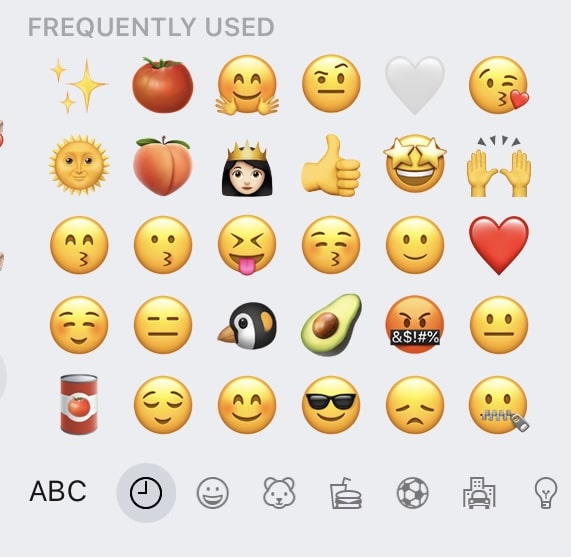
9. Guess the Emoji Board

Similar to the baby photo guessing game, you can have your team guess the most used emojis of their co-workers! These little characters are surprisingly telling of a person’s personality, interests and hobbies!  Have your co-workers screen shot their most used emoji board and then create your survey.

10. Typing speed test

A small competition that can be useful for professional purposes!  Having a fast word-per-minute is a useful skill for sending speedy emails.  Using the proper typing format is a sure way to increase your typing speed.  No pecking the keys with your index finger!  To test your skills try websites like typingtest.com or typingcat.com.  Challenge your co-workers to see who’s the fastest typist!

These are some awesome ways of staying connected to your colleagues during this challenging time.   To support your remote team building endeavours check out our Internet options to find the right package for your needs. Execulink offers High-Speed plans that are great for supporting video calls, browsing, streaming, and more!

Check out your Internet options today!

Humans of Execulink: Candice Irvine

Click here to see Execulink’s Home Internet options

Candice Irvine has worked for Execulink for over 6 years and has learned a ton during that time!  We had a fantastic opportunity to learn about her perspective as a Marketing Coordinator – Graphic Designer. Candice’s involvement in many of our projects ensures we maintain our brand voice and perspective.  Her creativity and user experience focus shines through in all of her work.  Learn more about her role in this blog!

1. How has your role changed over the 6 years that you’ve worked for Execulink? What has stayed the same?

I’d say in general my role has become more digital-focused. I do a ton more video work and website development now. That said I still develop the print stuff that people want to physically hold – sell sheets, channel guides, user guides, all that kind of stuff. As far as what’s changed, there’s always a new design to be tackled, a new skill to learn, a new medium to create for or a new service or project to wrap my head around. I love my job because of that – there’s always something exciting happening. I’m definitely NEVER bored.

2. What are some of your favourite blog posts or videos that you wrote or made?

Although I don’t write the blog posts anymore my favourite blog post I ever created will always be Super Mario Fan Theories. I often go back to that one and marvel over all the weird theories behind those games. That was a really fun one to research and write. My favourite video has got to be the commercial I made that we got to show at the Oxford Drive-In. Seeing something I made on such a huge screen was super exciting and mind blowing.

3. With so many projects on the go at all times, how do you stay organized?

For me it’s all about list-creation. I have a list of email tasks in my Outlook and our internal employee task-list on the intranet, but my main list is handwritten in my notebook which is always by my side throughout the work day. Those are the super important tasks that I can’t forget about. If one is starred or highlighted, you know it’s gotta be done ASAP. There is nothing more satisfying than taking my pen and ruler and making a crisp, flat line through a one of those tasks. Just fantastic.

4. What does delivering an awesome experience for customers mean to you?

I think about customer experience in terms of design and communication. For instance, how do you take something boring and complicated like a setup guide, and make it easy to follow for a non-technical person? How do you make a video about Internet hardware both informative and entertaining? How do you make a website a better overall experience for the average visitor? How do I tell the story of the values of our company in every design I make? For me, an awesome customer experience starts with the first ad, the first billboard they see, or the first visit to our website. In the back of my mind I’m constantly thinking about what this particular design or project or service means for the customer. And if I create whatever it is in a way that’s compelling, I think that adds to the overall experience of being with Execulink.

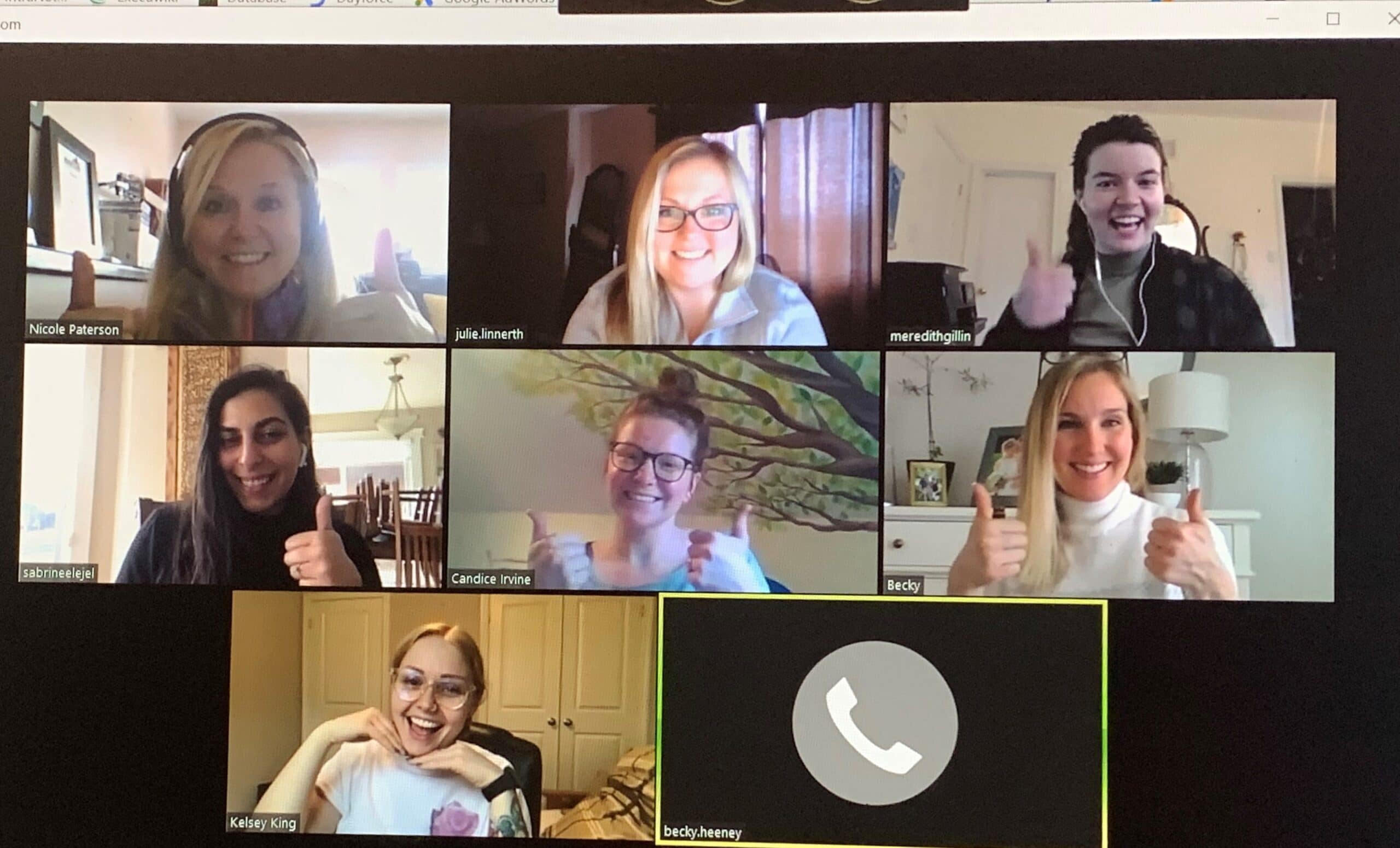
Execulink Telecom’s Marketing team having a video call in March 2020.

5. How would you describe the Marketing team at Execulink?

Oh just the worst group of people you’ve ever met. Hehe, just kidding. I absolutely love every single member of the Marketing team. I feel very grateful to be part of a team that gets along so well and feels like family. Collaboration is an everyday necessity for us, and we really do it well. We feed off each other’s ideas and feedback and none of us is afraid to lend a helping hand when one of us feels overwhelmed or confused about a project. I got lots of love for these fierce ladies.

Rapid Fire THIS OR THAT Questions!

  • Coffee or Tea? COFFEE (for those that know me, this one’s obvious)
  • Home or Office? Home
  • Laptop or Desktop? Laptop
  • Youtube or Twitch? Youtube
  • Comedies or Dramas? Dramas
  • Book or Movie? First book, then movie
  • Recordings or Live? Live
  • Winter or Summer? Summer for volleyball and motorcycling, Winter for skiing and snowboarding
  • Candy or Chocolate? Chips
  • Web Development or Graphic Design? Graphic Design

Candice’s willingness to take on new challenges and collaborate across departments makes her a valuable asset to Execulink. Her eye for design has been refined through her years of experience.  She keeps our designs user-friendly while also pushing Execulink forward with innovative thinking. Check out our careers page to see if there are any openings to join Candice and the marketing team!

Click here to check out your Residential Internet options!

Why the Premium Attendant Feature is Awesome

Click here to see Execulink’s Business Internet options

Our Premium Attendant feature can be included as part of your business’s Hosted Phone solution and is perfect for so many scenarios. We understand how essential managing your inbound calling is to your operations; you want to ensure an exceptional experience over the Phone so that you can stay connected and maintain customer satisfaction. The Premium Attendant feature helps you to achieve exactly that!

What is Hosted Phone?

To provide some background, let’s start by exploring our Hosted Phone option. It’s a cloud-based phone system that is hosted offsite. Your physical phones are located at your business, but the way they connect with the system is hosted by Execulink.  With no need to manage hardware upgrades or coordinate a complex cloud-based system onsite, there is freedom that comes with the Hosted Phone solution. All Hosted Phone systems are centrally located on Execulink’s private network.

What is the Premium Attendant?

The Premium Attendant is an auto attendant that helps you easily and efficiently handle your inbound calls. Callers are presented with a menu of options that allow them to be  connected quickly with the appropriate department or individual.

Execulink’s Premium Attendant can have several menus, each with their own greetings and options. Different options can be presented to the caller based on time of day, so whether your business is currently open or closed, the caller can be given the appropriate choices.

Auto attendants are perfect for creating a professional appearance for your business no matter its size.  An affordable option for many, the Premium Attendant can really take your small business to the next level.  You can even scale the service up as your business grows to suit your needs as they change. Check out our Hosted Phone page to see package prices.

Incoming Call Manager

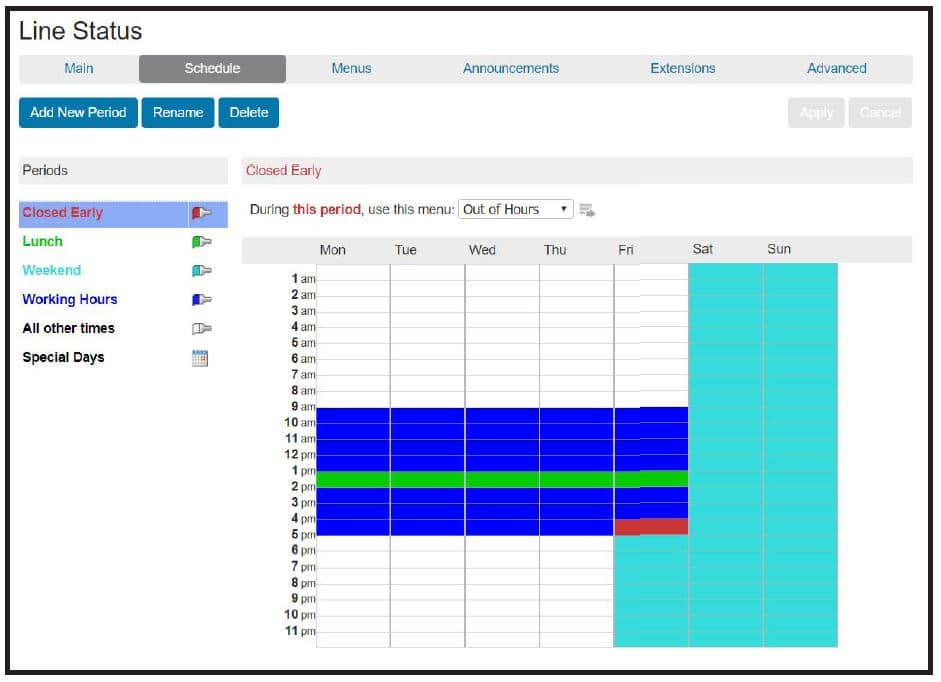
Use the Incoming Call Manager to direct your calls in a way that works for you.  Have a person or department answer during the day (known as live answer) and use the auto attendant after hours or during busy periods.  The Incoming Call Manager routes your calls based on rules.  Usually the rules you set up are based on time of day or day of the week.  For example, you can direct calls to your Customer Service department from Monday to Friday from 8am to 5pm and ensure that calls receieved at any other time are directed to the Auto Attendant instead.

Easy Configuration

Premium Attendant allows you to easily configure menus, schedules, and recordings using a familiar interface: MyExeculink. When you sign up for the service, Execulink’s Hosted Phone training covers call flow, helps you get set up, and shows you how to make changes yourself.

Setting up schedules in Premium Attendant.

Caller Experience and Call Flow

Call flow refers to how inbound calls are routed within your phone systems. When setting up your call flow, it’s easy to focus on this process from your business’ perspective, but it’s also important to consider the caller experience.

This is especially important when recording the announcements to present the options.  Give the option that gets the customer to the next step as soon as possible to limit the time spent on the phone.  Consider things like extensions, number of rings, and menus when mapping your call flow.

The Best Features of Premium Attendant

Our cloud-based Premium Attendant provides a variety of features that are more advantageous than most premises-based solutions. The benefits include:

  • Having up to 150 fully customizable multi-level menus offering intuitive, consistent navigation. This will direct your customers to the right department to ensure they get the answers they’re looking for.
  • Dial by Name / Extension option to transfer directly to the appropriate department or individual which reduces the need for a live receptionist.
  • Time of day and day of week programming can be used to present caller options that are time/date specific.
  • Menu options can fully utilize the 0-9, *, and # keys and can action errors such as incorrect user input.
  • Use Business Groups (with members up to 1000) to enable extensions to be directly dialed from the Premium Attendant.
  • Use announcements to let incoming callers know important updates or notices about your business
  • The caller can be presented with an option to leave a message in your general voicemail box which helps to capture general inquiries.
  • Use the Menu timeout option to take the appropriate action when a caller doesn’t press any buttons prior to the timeout period. There are a variety of functions such as hang up, replay announcement, and transfer to a specific number.
  • Use Error Handling to address problem calls by automatically forwarding them to a specific extension or even hanging up on them should they repeatedly select an invalid menu option or extension number

Get Started Today

Whether your business is small or large, you deserve an awesome Phone service that helps you stay connected and provide exceptional service to your customers.  With Premium Attendant, you can provide a seamless and easy way for your callers to navigate your phone system.  Learn more about our Hosted Phone technology here or connect with our Sales team at 1-877-561-6771 to discuss what’s right for your business today!

Click here to see Execulink’s Business Internet options

This blog was written in collaboration with Charlene Williams, an expert in Execulink’s Hosted Phone solution and an innovator on our Sales Support team.

10 Reasons Your Business Deserves Execulink’s Data Centre

Click here to see Execulink’s Data Centre options

Execulink offers a 2800 square foot state-of-the-art Data Centre beside our main office in Woodstock.  It stores businesses’ data in a secure and controlled location.  You could choose to use a Data Centre to house a hot site for your business website, to store database replication information, or it could act as a web server. This blog explores the 10 reasons why your business deserves the superior service provided with Execulink’s Data Centre.

1. The Infrastructure is Reliable and Accessible

Execulink’s Data Centre is built with rigid specifications to meet the demands of today’s hardware and technology.  Data Centres provide a controlled environment to protect the servers and hardware including fire suppression, redundant HVAC systems (for climate control), generators, and constant monitoring.

The Execulink Data Centre offers Redundant Primary Power (commercial power and generator back-up) providing continuous source of AC to large secondary UPS systems, offering a single or redundant A & B power feed to each collocated space, both AC and DC power choices are available.

For a company to create this sort of environment within their own buildings it can be complicated, expensive or unsustainable. These servers can take up a lot of square footage and your business may not have the space.  Through Execulink’s Data Centre, you can have access to this environment more affordably.

2. Disaster Recovery

Another alternative for many businesses is to use our Data Centre as a recovery location. In this scenario, companies will host their data in their office location and then use the Execulink Data Centre as an off-site backup location for their data in case of emergency. This is essential if your company retains confidential client data.

3. Guaranteed Uptime

Execulink’s Data Centre offers a 99.999% uptime guarantee.  This is most important when creating a disaster-recovery plan.  A guaranteed uptime is also relevant when deciding where to host your company’s website.  With current events, there is an ever-growing consumer expectation for e-commerce.  An uptime guarantee can have a direct impact on your bottom line if you sell your products through your website.  It will keep the site up and running with minimal downtime.

4. Store Mission Critical Data

Many companies decide to use a Data Centre for mission-critical data (which is data core the company’s mission and, if damaged or lost could cause significant financial or reputational damage to the organization).  This will vary from company to company and could be needed by the company’s employees frequently. Having a reliable and highly protected storage option in place makes it a prudent decision to pursue a data storage option with Execulink.

5. More Bandwidth

Data Centres are built to process data. Having this level or processing ability may not be accessible at your office location.  Data Centres handle the data through large bandwidth pipes and have redundancies in place to ensure access doesn’t deteriorate.

6. Security

Security is top-priority in the Data Centres because there are millions of dollars’ worth of hardware and data being protected within the building’s walls.  Video surveillance is provided 24/7 and swipe card access maintains security. Maintaining this level of security is also difficult for businesses to do on their own.

7. Scalability

Businesses are constantly evolving and growth sometimes means unpredictability in how much data will be generated by employees and customers.  Cloud based computing is growing in popularity which requires more Internet backbone.  When you collocate your equipment at a Data Centre then you can easily expand your hosted solution instantly.  If you were to host this internally there would be added expenses and time-consuming construction.

8. Opportunity Costs

If you were to create your own Data Centre on-site, then you would require personnel and need to pay higher electricity bills to maintain these servers. However, by hosting your data though a Data Centre you can free up the time of your IT department and save energy costs.  This saved money can be channeled for more growth in other areas of your business.

9. Smart Hands Service Operations Support

Execulink’s Data Centre offers a quarter, half or full rack of locked space.  You can easily add or subtract space for your servers.  We offer our Smart Hands Operation Support Team, even during COVID-19.  With this service comes, on-site technical assistance, visual verification for remote troubleshooting, swapping removable media, wiring services including moving, securing and terminating cables, rebooting, relaying equipment status and typing commands onto a pre-installed console, labelling equipment, sending photos, and more. We also offer this support remotely via video conferencing! If urgent access is required, you can arrange your visit by giving us a call.

10. Our Team is There for Your Business

Execulink’s head office and Data Centre is located easily from the 401 in Woodstock and central between London and Kitchener. There is free parking on-site with quiet rooms and restroom facilities available. You can create a customized solution for your business with personalized service from a unique assigned account manager.

Click here to see Execulink’s Data Centre options

As more businesses discover the benefits of outsourcing to a Data Centre, let Execulink Telecom’s facilities take your business to the next level in a secure and cost-efficient manner.  Execulink has over 115 years of experience in the telecom industry.  Our superior service and support teams create unparalleled results.  To learn more visit our Data Centre webpage or connect with our Sales team at 1-866-706-1992.

How to Connect Your Smart TV to the Internet

Click here to see Execulink’s Home Internet options

The Internet is an important part of our daily lives and with continuous technological advancements, there are a growing number of ways to experience it. Now with Smart TVs you can have the same incredible online experience but enjoy it on a larger screen. This type of technology allows you to watch your online content right on your TV, allowing for more comfort and flexibility. What more could you ask for!?

At Execulink, we provide high-speed Internet service across southern Ontario.  We understand how important it is to our customers to receive reliable service without interruption. We offer 24/7 customer support to help get your Internet running as fast as possible.

Options for Connecting your Smart TV to the Internet

Connecting your Smart TV to the Internet has never been easier! It can power your Netflix addiction or help you stream your favourite YouTube channel. Here are three main things to consider when making the connection:

1. Wi-Fi (wireless)

Newer models of Smart TVs are Wi-Fi enabled, which means they have a Wi-Fi adapter built into them. Having your TV connected via Wi-Fi allows you to place it wherever you’d like in your home – even mounted on a wall. This clean setup avoids wires running along the floor and is a convenient way to connect your Smart TV to the Internet.

To setup the system, configure the connection on the menu of your Smart TV by providing network login details in settings.

2. Ethernet cable (wired)

If you have an older model of Smart TV, then you may need to connect to the Internet using an ethernet cable. Simply plug the ethernet cable into your router and connect the other end to the back of your TV. This typically provides the most reliable connection and can help to limit lag-time. Although, it’s important to keep your Smart TV close to your router in order to run the cable between each device. This means you may have less flexibility in where you can place your Smart TV for optimal viewing.

Finally, configure the connection on the menu of your Smart TV by providing network login details in settings.

Ensure your Network and Internet are working

The key to having a great experience using your Smart TV is by ensuring you have the right Internet service provider (ISP). The ISP and Internet package you choose needs to be able to support your online activity. Get a package that has enough data to power your Smart TV usage. If you’re a heavier user of the Internet and have multiple people in your household with connected devices, then you will likely want to opt for a more powerful plan.

Smart TVs are incredible technology but sometimes they can make you feel like they’re not smart at all! If you run into any issues with your connection, you can ask your ISP to troubleshoot your Internet to keep your Smart TV functioning seamlessly.

When streaming content online via your Smart TV, the experience will only be as good as the connection supporting it. Ensure you choose an Internet package that can properly support your level of online activity. Re-evaluate your Internet needs if you require more data to regularly stream content.

What to do if your Smart TV won’t connect to Wi-Fi?

If you’re having difficulties connecting your Smart TV to Wi-Fi, then consider ways you can improve the connection. To start, try moving the wireless router closer to your Smart TV. This may help to strengthen the Wi-Fi signal since the further away the router is, the weaker the connection.

You can also consider our Complete Wi-Fi solution including the Premium Router and Mesh Wi-Fi Extenders.  The Premium Router can connect up to 60 devices in your home and the Mesh Wi-Fi Extenders are for those hard to connect places in your home to give the signal an extra boost.  Check out our Complete Wi-Fi page to learn more.

As mentioned previously, older Smart TVs sometimes don’t have a Wi-Fi option, but you may still be able to connect using an ethernet cable or Wi-Fi adapter. Hardwiring the connection by plugging in an ethernet cable from the router to the Smart TV usually does the trick.

Benefits of connecting your Smart TV to the Internet

A) Get access to your favourite streaming services

Some Smart TVs have your favourite streaming services preloaded. Enjoy access to Netflix, Spotify, Crave, YouTube, and more. You can watch online video anytime using your Smart TV and experience it on your big screen compared to your laptop or desktop.

B) Connect with other Smart home devices

For a fully smart home, some smart TVs can be connected with devices like Amazon, Alexa and Google Home. This allows you the freedom to control your TV from your other devices and create seamlessness between your devices for a truly smart home experience.

Link TV

You can easily connect your Smart TV to Execulink’s Link TV service. An Execulink Internet connection is required to access Link TV in select areas.  We recommend a minimum Internet speed of 10 Mbps to get the awesome TV experience you deserve. To use your Link TV service a Set Top Box is required to gain access to all the channels you know and love.  Explore our bundling options to find a package that suits your home!

Click here to see Execulink’s Home Internet options

Speed Up Your Internet Connection with Execulink

Whether you’re looking for faster Internet speed options for streaming video on your Smart TV, we have the services you and your family deserve. Don’t let poor service affect your ability to enjoy your favourite content.

With 24/7 support and a wide range of Internet options to suit every lifestyle, we have the awesome services your home or business needs to stay connected to what matters the most! Call us at 1-866-706-1992 today or visit our Internet page to find the Internet package you’ve been looking for!

The Internet Services You Deserve
Affordable. Reliable. Lightning fast.

We’re proud to provide the communities we know, love, and live in, with the reliable Internet, TV, Phone and Mobility services they deserve.

  • Your local choice for residential and business telecommunication services
  • Renowned 24/7 customer service you can depend on
  • Affordability, service, integrity and transparency are the pillars of our business

Here to help. 24/7.

Sales Inquiries

Sales: Mon-Fri 8AM-8PM, Sat 8AM-5PM

(866) 706-1991

Support Inquiries

Technical Support: 24/7, Customer Care: Mon-Sun 7AM-11PM

(866) 706-1994

Online Help

Chat With Us

We'll respond as soon as we can!
Email Us

We'll get back to you as soon as possible.

Support Centre

Find the answer to your question.

Check availability

Enter your address to find services and offers available to you!