
Staying Connected: How to Support Your Employees AND Your Business

Click here to see Execulink’s Business Internet options

We’ve chatted about working remotely from a worker perspective, but what about from a business point of view?

As Harvard Business Review states, “A positive work climate also leads to a positive workplace culture which, again, boosts commitment, engagement, and performance.”

Right now, many of us are working without a physical work climate or workplace culture, so it is of utmost importance that employees feel supported and connected to the intangible workplace climate and culture as much as possible. This not only benefits the overall feelings of positivity and well-being for employees, but bolsters engagement and performance. It’s a win-win.

But having an entire company or organization work from home is easier said than done without the right parameters in place. What can you, the business owner or organizational leadership, do to ensure that your staff feel connected, valued, and secure during this time and always?

To help you bridge the gaps, we’ve put together a list of tools that you can utilize to support both your team and your business as we continue to practice social distancing!

Flexible Workspace

Just like the name entails, Flexible Workspace is an awesome, flexible, and customizable cloud-based phone service that works on both WiFi and cellular data networks. With the included conference bridge, employees can simply dial into a common number to be connected securely wherever they may be.

There are a number of features available with the Flexible Workspace service. These features can be completely customized based on the needs of your organization.

The Premium Attendant included with this service offers several automated greetings, menus, and menu options, allowing for multi-department forwarding, proper handling of high-volume calls, and the creation of after-hours responses.

Incoming Call Manager is a feature that monitors incoming calls on your designated main business number and handles the calls according to customized parameters. It can be set up to handle incoming calls differently based on the time of day, the date, and depending on who is calling.

The Multi-Line Hunt Group (MLHG) feature allows for better organization and designation of incoming calls. When a call comes in, the MLHG delegates the call to an available employee or adds the call to a queue if all employees are busy. The Call Parking feature enables callers to be put on hold securely in the cloud so that anyone in your organization can pick up the call.

Best of all, the setup of Flexible Workspace can be completed quickly and easily!

This service is available to all, though Flexible Workspace is most easily available as an add-on through our Hosted Phone service. If you are not currently a Hosted Phone customer, not to worry; Flexible Workspace can effortlessly be a reality for you, too!

You and your employees deserve awesome. To set up Flexible Workspace and get your organization on track for secure, easy connection and communication, call 1 (877) 393-2854 or email us at sales@execulinktelecom.ca today!
Virtual Private Network

A Virtual Private Network (VPN) is a secure and reliable method of sharing information across multiple computer networks.

With employees working remotely, they’re using their own personal networks rather than the protected network supplied by their organization. This creates an opportunity for sensitive data to be intercepted or stolen. Utilizing a VPN connects remote users through their business’ private network or a third-party VPN service, effectively avoiding the potential for data theft; anyone intercepting the encrypted data won’t be able to read it.

An additional bonus to Virtual Private Networks is the ability to access an organization’s Intranet and resources safely and from anywhere. If your company uses shared files or hosted resources, a VPN will allow connected users to access and utilize everything they’d usually be able to access while in the office.

To put it simply, VPNs help bolster and assure security while allowing employees to make use of organizational resources, ensuring that business can continue as usual.

If a Virtual Private Network sounds like something your organization wants to take advantage of during this unprecedented period of working remotely, call 1 (877) 393-2854 or email us at sales@execulinktelecom.ca today!

Mobility

Staying connected while working from home is critical to the success of staff and of the business. Most employees don’t have a dedicated office phone, meaning they’re using their own personal mobile devices to call into meetings, create social posts on behalf of the business, conduct research, and more.

If you have employees who rely on their mobile phones and the associated data to conduct daily work tasks, it may be worth considering setting them up with dedicated work mobile phones to alleviate the concerns of personal costs incurred for business undertakings.

If setting up your team with dedicated work mobile options is something you’d like to explore, call 1 (877) 393-2854 or email us at sales@execulinktelecom.ca today!

You can also familiarize yourself with our Business mobility options by checking out our webpage.

Online Meeting Tools

There are a variety of online meeting tools that can help you and your employees stay connected and host meetings using video-conferencing and calling. You don’t have to cancel that board meeting, you just need to find the right online meeting tool for you.

We like Dialpad, but there are many platforms available!

Online Chat Tools

Much like meeting tools, there are many online chat tools to choose from. It’s important to consider the security of the chat tool you use for business purposes.

For that reason, we like Mattermost! It allows us to have one-on-one conversations with colleagues, larger chats for teams and departments, or company-wide communications. And it’s not only conversation; Mattermost allows for file and photo sharing, too!

Online Task Management Tools

Project and task management is critical when it comes to tracking progress and understanding which action items are priority.

Online task management tools, like monday.com, keep you and your team on track. Delegate tasks, rank priority, track time, and create customizable project or client boards to keep everything organized. You can even assign permissions to members of your organization so that they only have access to the tools and projects they need!

We hope that everyone is settling in to working remotely. It’s a period of change, but with the use of the tools and services outlined above, your business can be on its way to new heights of connectivity and productivity! For any inquiries into our Flexible Workspace, VPN, or Mobility services, call 1 (877) 393-2854 or email us at sales@execulinktelecom.ca today!


Click here to see Execulink’s Business Internet options

Making Working from Home Work for You

Click here to see Execulink’s Home Internet options

Ah, working from home.

It’s an alluring concept. Working from home definitely has its perks: no rushing to get ready, no commute to work, and you’ll be able to write off some everyday expenses for business (utilities and Internet, anyone?). It sounds great, doesn’t it?

While there are inarguably benefits to working remotely, it also comes with its own unique set of challenges. If you suddenly find yourself in a position in which you’ll be working from home, keep these tips in mind to make your experience as smooth and pleasant as it can be.

Get Ready in the Morning

It may be tempting to stay in your PJs and work from bed all day, but this is a surefire way to decrease productivity and increase the probability of napping on the job.

One of the best things you can do is to follow your morning routine as if you were getting ready to leave the house. That may mean taking a morning shower, getting dressed in clothing that doesn’t fall into the sweatpants and pajamas category, walking the dog, doing some morning stretching or yoga, or having breakfast. Some folks even swear by wearing shoes indoors!

Because there’s no commute when working from home, there should be time to allow you to complete your morning routine without rushing or eating into working hours. Whatever your morning routine looks like on days you’re leaving your home, that’s a great target for the days you’re staying home, too.

Doing this helps to shift your mindset from sleep mode to work mode and better prepares you for the workday. This doesn’t mean you can’t wear your comfy slippers or that you have to be fashion runway-chic, but it does mean you’ll feel more ready to tackle the day!

Define Your Workspace

When going into an office, we typically know exactly where we’re going to go. We may have a desk, a cubicle, or an office, and we know that’s our designated workspace. When working from home, your entire living space is liable to become your workspace. But just like staying in PJs all day, treating your entire home like an office isn’t the best way to effectively work from home.

If you have a home office with a desk and chair, you’ve got a great head start on defining your workspace. If you don’t have a designated home office, that’s ok! You can easily delegate a particular spot in your home as your workspace.

When choosing an area for your workspace, some things to consider are how ergonomically-sound that spot is. Try to avoid anywhere that you can recline; beds, sofas, futons, and armchairs make our brains think of relaxing, not working! Those furniture types just aren’t set up to allow you to work effectively and efficiently, both from a mental and a physical standpoint.

Better workspaces might be the kitchen table, the kitchen island with seating, or any flat surface you’re able to sit or stand in front of comfortably. While a standing desk is an excellent tool, it’s not always feasible to have one in the home. If you like to rotate between standing and sitting, it’s ok to switch between a standing workspace and a seated workspace. Just make sure that your keyboard is at elbow height and that you’re not having to strain your neck and eyes by constantly looking down at your screen!

Some tips and products for creating a comfortable workspace:

Use a laptop riser to elevate your laptop, saving your neck from downward strain.

They range in fanciness and in price, but we like the AmazonBasics Laptop Riser and the CORNMI Adjustable Laptop Stand.

Use a wireless keyboard and mouse to allow your hands to work at a comfortable height.

Laptop keyboards are great, but if you’re working from home on a laptop all day, a wireless keyboard and mouse will allow your hands and arms to be at a comfortable working height while your laptop is at a comfortable eye-level. We like the Logitech Wireless Combo for Windows computers and the Joyaccess Compact Full-Size Keyboard and Mouse for MacBooks.

Get yourself some blue light glasses to protect from eye strain.

This is actually a good work tip whether you’re working in an office or working from home. If your job requires you to look at a computer screen all day, wearing blue light glasses can help prevent retina damage from the artificial blue light generated by screens.

Bonus, you can wear these in the evening while watching TV or scrolling through your phone before bed to help lessen the effects that blue light has on the body’s ability to produce melatonin, the hormone that regulates the sleep-wake cycle!

Check out Canadian company Clearly for your blue light glasses needs.

Come Prepared to Snack Responsibly

Just like in-office work, you’ll need snacks and lunch when working from home. It may seem easier to snack and cook as you go, but this is how you’ll fall into the trap of constantly grazing and running out of time to eat lunch before that 1 PM video conference. It’s helpful to prep your lunch and snacks ahead of time, or at the very least, keep some easy-to-make foods on hand.

Though it might be tempting to whip up a delicious, freshly-cooked lunch during your lunch break, you’ll quickly come to realize that by the time you’ve prepped, cooked, and cleaned, you’re left with very little time to actually eat and enjoy the lunch you’ve made. If you’re set on cooking lunch every day, try to prep your ingredients the night before so you can shave some time off the process.

As for snacks, it becomes increasingly easy as the day draws on to split up your time with long walks to the fridge. If you can prepare or at least select the snacks you’ll be eating ahead of time, you’ll spend less time rummaging around in the pantry and more time enjoying the snack break.

Take it one step further and make sure you’ve got healthy snacks at home to prevent you from reaching for the easy bag of chips or simple box of crackers every time you get peckish. It’s more than okay to reach for treats sometimes, but your brain and body will feel and function better if you’re supplying them with nutrient-dense foods.

Set Boundaries

When you’re working from home, your work becomes your home and your home becomes your work. It’s easy for the two to melt together with no defined beginning or end. This leads to never really being off the clock and doesn’t allow your mind to have the rest it needs from focusing on work.

Setting clear boundaries helps to define the work from the personal and is important in maintaining a balance between the two. In our experience, there are two very important boundaries to set.

Boundary One: Breaks

Just because you’re working from home doesn’t mean you don’t need breaks. Like working in an office, you’ll need dedicated time to not working throughout the day. If you’re your own boss, you can decide these breaks on your own. If you’re an employee, follow your organization’s policy on breaks. Most follow a standard one hour for lunch model, or a half hour for lunch and two fifteen minute breaks taken in the morning and the afternoon.

Whatever the breaks you’re entitled to, make sure you take them.

Boundary Two: Time

Some people thrive on routine, whereas others like to go with the flow. The reality is that working from home allows you more flexibility in your schedule, but runs the risk of kind of always being working and not working at the same time.

Set a defined work day as best you can. If you want to work a standard workday, then 8 to 4 or 9 to 5 might be a good option for you. If you hate mornings, you can adjust your schedule to be 11 to 7 or 12 to 8 (but check with your employer first!). Either way, having a clear timeframe in which you are working will help you – and others – to identify when you’re not working.

This also means you should be signing out of all work-related programs and communication tools once your workday is done. Try to avoid answering work emails, Slack messages, and work calls while not on the clock.

Note:

If you’re in a management/supervisory or on-call role, it may not be possible for you to set such clear time boundaries. Maybe you need to be able to answer certain emails or phone calls while you’re not technically working. That’s fine, just keep in mind that setting boundaries will support you in both your work and personal endeavours.

Boundary Three: Space

If you live on your own, it’s a pretty easy boundary to set as far as your workspace goes. If you share your home with others, it may be necessary to outline a boundary around your workspace and time.

Setting ground rules with others in your home is helpful in making sure you’re able to secure the time and space you need to work and ascertains that others are aware of your needs.

Maintain Camaraderie

Even though you’re not physically working beside your colleagues, it’s still important to maintain a relationship with them. It will give both you and them a sense of community, which is a big reason why shared offices and work environments are successful.

If you can turn some of your emails or phone meetings into video meetings, it’s a great opportunity to see and connect with the other person or people you work with.

You should be communicating with your coworkers about work-related issues, certainly, but don’t forget the social stuff too. Don’t be afraid to drop your colleague a line asking them how their day is going, or to send them an interesting article, or share a funny meme with them. A little interaction goes a long way!

Change Your Environment

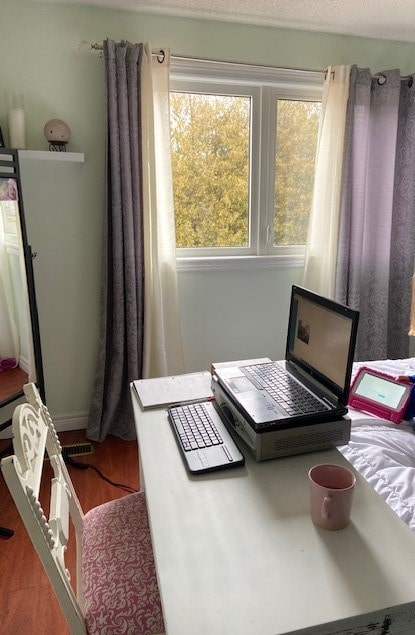
A member of our team moved their workspace from the kitchen to a bedroom. Natural light helps improve your mindset while working.

If you have the freedom to do so, changing up your environment every now and then is a good tool to use when it comes to working remotely.

The change in scenery can shift your perspective and be refreshing for your productivity. Sometimes the best ideas come from time spent sitting in the sun or in a room that isn’t your office.

Of course, take the necessary precautions when adjusting your workspace. Whether that’s cyber security safety measures, like using a VPN, or making sure you’re not putting yourself in harm’s way or compromising your health, it’s important to always put your wellbeing first.

Ensure you Have a Strong Internet Connection

Working from home requires a strong and reliable Internet connection.  Check out our Internet page to explore our best package options for High-Speed Unlimited Internet. Our Internet options ensure a steady connection!  If you run your own business from your home, consider our Business Internet options which will provide you access to the necessary features your Home business requires.

We hope these tips have you feeling prepared and ready to take on the adventure of working from home! Here at Execulink, we often have positions that have flexibility when it comes to working in-office or from home. Whichever role you’re in, we work hard to ensure you have everything you need to be successful. To join the team, check out our current openings.

Click here to see Execulink’s Home Internet options

How to Thrive, Not Just Survive, While Social Distancing

Click here to see Execulink’s Home Internet options

A lot of us find ourselves working remotely, practicing social distancing, and just generally staying home. There are a lot of activities that we might usually be doing during this time – like playing on sports teams, going to concerts, heading to the mall, or visiting our favourite restaurants – that we’re not able to partake in at the moment.

So if we can’t do what we’d normally do, what can we be doing instead?

That will depend on what area you’re in, what the government suggests or mandates, and what category we fall into, so let’s take a quick minute to highlight the differences between “social distancing,” “self-monitoring,” “self-quarantine,” and “self-isolation.”

Social Distancing

Social distancing is the biggest tool that we, as the general population, can be using in fighting the spread of COVID-19.

It means lessening opportunities for transmission within the community. This looks like avoiding large gatherings, using verbal greetings instead of shaking hands, keeping our distance from others’ personal space, and staying home if we’re feeling unwell. Limiting the time we spend in the grocery store or pharmacy, avoiding going out for meals, and skipping Happy Hour are all good examples of social distancing.

It’s important to note that social distancing doesn’t mean that we’re unable to attend to necessary errands or obligations, like getting groceries or visiting our doctor’s office if an urgent situation arises, but it does mean that we should be eliminating activities that are non-essential in our daily lives.

Self-Monitoring

If we’ve been asked to self-monitor, that means we should be checking our temperature and monitoring the development of any symptoms that could indicate a respiratory illness, like a cough, fever, or shortness of breath.

Self-monitoring is helpful in catching an illness earlier than we might otherwise do and allows for quicker intervention should we need it. It’s a useful tool if we haven’t been in close contact with anyone with a confirmed case of COVID-19, and can be practiced easily by both adults and children.

Self-Quarantine

This is where self-monitoring kicks it up a notch. The difference between self-monitoring and self-quarantine has some overlap, but the important distinction is that self-quarantine is practiced when we’ve knowingly been in contact with a confirmed case of COVID-19.

For example, if someone went to a concert and was in the general audience and it was later discovered that the performer was diagnosed with the novel coronavirus, that person would want to self-monitor.

However, if someone had VIP passes to meet the performer after the show, that person would need to self-quarantine as there was close contact with a confirmed case of the novel coronavirus.

Quarantining means staying home and away from the general population as much as possible for a 14-day period. If the home is shared, designating one room or area for quarantine is suggested.

Self-Isolation

Although quarantine may sound more serious, self-isolation is actually the most rigid and significant step in this process.
https://www.execulink.ca/https://www.execulink.ca/blog/were-here-for-you-during-covid-19/” rel=”noopener noreferrer”>COVID-19 is required to prompt self-isolation and requires more safety precautions. Self-isolation may occur at home or in medical care. It includes the steps of self-quarantine but may also require medical personnel to take extra measures, such as wearing more protective gear, when treating diagnosed patients, necessitate the patient to wear of a face mask and gloves when leaving their designated in-home isolation area or travelling to and from medical appointments to decrease the risk of transmission, and severely limiting contact with those sharing the same home.

So…What Can I Do?

Whether you’re social distancing, self-monitoring, self-quarantining, or self-isolating, there is plenty to do in the time we’d usually be working or going to school!

Read A Book

Hear us out. How many of us say that we want to read more, or have a book on our nightstand that’s more for show than actual reading? Now is the perfect time to delve into a story.

Penguin Books UK shares its list of 100 Must Read Classics as told by its readers while The Guardian offers more modern suggestions in its 100 Best Books of the 21st Century list.

This can be done during social distancing, self-monitoring, self-quarantine, and self-isolation.

Movie Night

There’s probably a movie that’s been sitting in our To Watch List forever that we keep scrolling by, thinking “next time.” Make some popcorn, snuggle up under a cozy blanket, and press play! The New York Times has plenty of suggestions to get you started with its 50 Best Movies recommendation.

This can be done during social distancing, self-monitoring, self-quarantine, and self-isolation.

TV Time

We know how good quality time in front of the TV can be. It’s time to let the guilt of binge-watching go and allow ourselves to enjoy all that TV has to offer us! Whether we’re using streaming services like Netflix or customizable and personalized TV services like our Link TV, there are endless film and show opportunities to explore.

Did we mention that many of our channels are offering free previews to help our communities stay entertained and educated during this unique time? Link TV users currently have free access to National Geographic, Showcase, the Cooking Channel, the Food Network, Nickelodeon, Treehouse, Disney, and many more until April 30, 2020 and CP24 and CTV News Network until April 17, 2020!

This can be done during social distancing, self-monitoring, self-quarantine, and self-isolation.

Get Your Sports Fix

Even though our favourite sports channels are on hiatus, it doesn’t mean we can’t enjoy watching our favourite games! There are so many pivotal games that have happened in previous years, so why not brush up on our sports history and reacquaint ourselves with our favourite moments in sports?

Check out TSN’s broadcast schedule or Sportsnet’s broadcast schedule to tune in to historic sports games, top moments, bloopers, and more!

This can be done during social distancing, self-monitoring, self-quarantine, and self-isolation.

Visit A Museum

We don’t mean actually going to visit a museum, of course, but thanks to Google Arts & Culture, you can visit hundreds of museums around the world for free from the comfort of your home!

Take a virtual tour of New York City’s Museum of Modern Art, le Chateau de Versailles in France, Amsterdam’s Van Gogh Museum, and countless others around the globe.

This can be done during social distancing, self-monitoring, self-quarantine, and self-isolation.

Tour A Zoo

It’s the next best thing to actually getting to see the world’s animals up close and personal!

Check out the Florida Aquarium’s “SEASPAN” daily Facebook Live, broadcasting at 10 AM EST, or the Cincinnati Zoo’s “Home Safari,” airing at 3 PM EST daily on Facebook Live.

This can be done during social distancing, self-monitoring, self-quarantine, and self-isolation.

Home Improvement

We’ve all got ideas for our home space, but we so rarely have the time to see these come to fruition. The coming weeks offer an opportunity to address some of the home projects we’ve been neglecting and feel a sense of productivity and pride in the outcome.

The DIY Network has plenty of suggestions to help us get started and Pinterest is sure to ignite that home improvement passion!

This can be done during social distancing and self-monitoring. If you are self-quarantining or self-isolating, it may be best to wait to tackle home improvement projects.

Learn An Instrument

Turn that decorative guitar into a functional one! Shift that ukulele that was given as a novelty gift into a practical present! With endless instructional videos and websites available to teach us how to master the instrument of our choosing, there’s no better time than now.

Joytunes has put together a blog highlighting 16 Resources for Learning an Instrument on Your Own to help the musical journey along.

This can be done during social distancing, self-monitoring, self-quarantine, and self-isolation.

Get Outside

That’s right. Just because we need to distance ourselves socially doesn’t mean we need to distance ourselves from Mother Nature. We can still enjoy a walk, a bike ride, or a hike, as long as we’re not travelling in large groups and maintaining a safe distance between us and others.

AllTrails has a database of more than 100k hiking trails to choose from and allows search by city, park, or trail name!

This can be done during social distancing and self-monitoring. If you are self-quarantining or self-isolating, please do not leave your home.

Break A Sweat

Groan. We know, we know. Exercising is the last thing you might want to think about right now. But we’ve got a lot of time on our hands to try that new workout plan and get our heartrates up, and regular exercise is directly correlated with an improved immune system!

We like Tone It Up, a free YouTube fitness channel offering a variety of workout styles for women, Blogilates, a free Pilates-focussed platform with videos, plans, and challenges, and Yoga with Adriene, a free YouTube channel that offers videos for all levels of yoga practitioners.

This can be done indoors and outdoors during social distancing and self-monitoring. If you are self-quarantining or self-isolating, please do not leave your home and practice only indoor exercise.

Keep the Learning Going

Even if the kids are excited about a break from school, there are many exciting, educational activities that can be done from the comfort and safety of home.

Nat Geo for Kids, Seussville, FunBrain, and Highlights Kids offer learning opportunities that are so much fun, the kids will forget they’re learning!

This can be done during social distancing, self-monitoring, self-quarantine, and self-isolation.

Nap, Journal, Be Kind

That’s right. Sleep a little more, reflect a little more, and cut ourselves a little slack. This is a time when we need to come together as a community without actually coming together physically, and that starts with being kind to ourselves, our neighbours, and our families. It’s time to rest, reflect, and do our best.

This can be done during social distancing, self-monitoring, self-quarantine, and self-isolation.

We hope that in the coming weeks, this list will help you maneuver the extra time you may have while stimulating your brain, your body, and your relationships with those around you in a safe, conscientious way.

While many of these activities can be done without technology, many of them require a strong Internet connection. If you think your modem may need updating or are interested in our Unlimited Internet Packages, call us at 1 (866) 706-2050 today.

Click here to see Execulink’s Home Internet options

We’re Here For You During COVID-19

Click here to see Execulink’s Home Internet options

The health and safety of our community and our people is paramount.

This is something that we have always believed and supported, both in word and in action. There has perhaps not been another time in Execulink Telecom’s history when this statement has rung truer than at present.

In light of the recent developments concerning COVID-19, Execulink Telecom has made the decision to support social distancing by closing its public storefronts until further notice and encouraging our staff to work from home whenever possible.

Let me take this opportunity to highlight some key points:

Though our stores and offices will be closed to the public, we are still available to you for any inquiries you may have or technical support you may need. Our Customer Care Team will continue to be accessible to you via phone at 1 (866) 706-1994,live chat, and email to support you. We are continuing business as usual with a few modifications to do our part in protecting both our employees and the public.

We are 100% committed to serving our customers and are available to you for all your Internet, TV, Phone, and Mobility needs. You will continue to be able to access all of your awesome services, including MyExeculink, at your leisure.

We are waiving overage fees for our Internet services until April 30, 2020 to meet the needs of our communities. We align the interests of our customers with the interests of Execulink. Though most of our customers already enjoy unlimited usage plans, we are confident that this will support those with limited usage plans during this time. This applies to both our residential and our business customers. We’re all family here.

Many of our TV channels are offering free previews until April 30, 2020 to help you navigate this time. You can now enjoy free previews of the Food Network, Showcase, Lifetime, the Cooking Channel, Nickelodeon, Treehouse, National Geographic, Disney, and many more. Please note that CP24 and CTV Channel News will be available for free preview until April 17, 2020.

Those working from home on VPNs (Virtual Private Networks) may experience slower than normal speeds. This is because the level of security used by VPNs is higher than usual.

We encourage responsible usage during this time. In the coming weeks, more people will be working from home and practicing social distancing, leading to higher volumes and overall Internet usage. It’s important to be considerate of your neighbours and communities, especially in times like these. If possible, try to reduce the time you spend online.

We will be assessing service calls and installations on a case-by-case basis to ensure the safety of our technicians as well as our customers.  This may change based on direction from Health Canada. Our commitment to you is to provide you with reliable service to the best of our ability at all times.

If you need to return hardware, we will arrange for shipping. Please note that due to store closures, in-person hardware returns are currently not being accepted. To arrange for hardware return, please email or call us so that we can send out a courier slip to make it easier on you.

This is an excellent opportunity to utilize our e-billing and online payment options. As our stores and offices will be closed to the public until further notice, it will not be possible to pay your bill in-person. You can eliminate the need for face-to-face contact when receiving and paying bills by choosing e-billing and paying online. This can be done via your own online banking or by setting up Pre-Authorized Payments. You can find more information by visiting MyExeculink.

All Execulink employees are encouraged to work from home when possible and to perform self-screening and self-discipline. Our employees are our biggest asset and we value their health and safety above all. Because of this, we are following recommendations from health officials to move to remote working conditions.

If any employee feels ill or unwell, they are required to stay home until they are fully recovered and seek medical attention if necessary. Self-quarantine measures are in place should any of our employees come into contact with someone carrying COVID-19.

All upcoming Execulink events are postponed until further notice. We consider the interests of all customers and stakeholders in every decision and are confident that the choice to reschedule our events for the future is in everyone’s best interest.

You can expect to hear from us as soon as updates become available. We believe in consistent and honest communication built on a foundation of integrity and respect and we will continue to do everything in our power to ensure that you are kept in the loop as the situation evolves.

We understand that these decisions may cause inconveniences and we apologize for that. In over 114 years of operation, Execulink has been met with challenges, but this situation is unique. As such, we are in uncharted territory and are committed to doing everything we can to minimize the impact you may experience.

Thank you for your patience as we navigate this challenging time in our communities, both local and global.

A big thank you to our employees, who have worked long and hard to ensure that we are in the best position we can possibly be to manage the impact of COVID-19 in our communities. I am proud to have such dedicated, caring people working with Execulink.

We look forward to connecting with you face-to-face again one day soon.

Until then, take care of yourselves and of each other.

Ian Stevens

CEO, Execulink Telecom

Click here to see Execulink’s Home Internet options

Humans of Execulink: Andrew Mustard and Georgia Owen

Click here to see Execulink’s Home Internet options

The Continuous Improvement Projects (CIPs) team supports Execulink through project management and bring organization, consistency and efficiency to the business. Andrew Mustard and Georgia Owen from the CIPs team sat down with us and discussed what it was like to facilitate projects here at Execulink.

1. How long have you worked at Execulink?

Andrew (A): I have been with Execulink since December of 2011. I originally started in the Marketing department and moved over to managing projects and improving processes 4 years ago.

Georgia (G): I have been here for just under 2 years in my current role. Years ago, when I was studying accounting at the University of Guelph, I worked as an Intern in the Finance Department for a summer here at Execulink. After I graduated I had an awesome opportunity to come back and earn a position on the Continuous Improvement Team.

2. How would you describe your role?

A: Our team oversees multiple projects across every phase of development – including supporting product launches, simplifying and improving internal processes, coordinating equipment and system updates – and everything in between.

G: We are able to contribute to all aspects of the business which is both rewarding and exciting – there aren’t many slow days in our world.

A: We also have the opportunity to coordinate projects across all departments here at Execulink. We work with some amazing people!

G: Meeting facilitation is a major part of our day to day work life. We fill our board rooms with some very intelligent people and assist these groups into creating solutions that ensure our customers are getting the telecommunications experience they deserve.

3. What are some challenges you’ve overcome while working here? What is your approach to problem solving?

A: Being ready for anything! We like to plan for the worst so when challenges arise, we are ready to act.

G: Before major launches, we always write down all potential issues and ensure we have a mitigation plan for each scenario.

4. What is your vision for the future of Execulink? What industry developments or technology are you excited about?

G: In our positions we are lucky to have a front row ticket to witness a lot of changes in the industry and within our company.

A: Recently we upgraded the middleware (channel guide, menu, etc) for our TV service which gives our customers a better viewing experience – a more modern guide interface, recommendations and other features you see on video platforms. It has been rewarding seeing these improvements positively impact our customers. We are looking forward to being able to continuously improve all of our services.

What are your favourite things to watch on TV?

G: Although we are both huge podcast fans (particularly anything true crime – Crime Junkies is an official CIPs recommendation) we also like TV shows.

A: I like a lot of shows on HBO – such as Watchmen, Westworld, Game of Thrones and Sucession.

G: The list of my favourite TV shows is similar to 95% of all girls – Greys Anatomy, The Bachelor, Dexter, House, The Office, and Friends.

Could you describe some of your hobbies?

A: I enjoy cycling and golf in the summer, and I enjoy both watching and playing hockey in the winter.

G: Growing up I was really into swimming – an activity I still really enjoy today in addition to participating in cross platform workouts. I have a passion for interior design and try to get up to my family cottage as often as possible.

What do you enjoy most about working together?

G: We work really well together and are always there to support each other. Productivity is very important to us but we always find time to laugh.

A: Not only are we able to help each other brainstorm to solve problems, but after difficult meetings/days it’s very beneficial to debrief with someone to wind down and improve for next time. I feel more relaxed around Georgia and I help bring out her creative side – we are an awesome team.

This was a great opportunity to learn about the CIPs team both personally and professionally.  Their collaboration skills are truly unparalleled! If you would like the opportunity to join Execulink and be part of a project Andrew or Georgia coordinate check out our careers page.

Click here to see Execulink’s Home Internet options

What is Internet Bandwidth?

From home, work and play, our lifestyles rely on a fast Internet connection. Most of us are craving a smooth experience online and there’s nothing worse than a slow Internet connection, disrupting our online activity. Fortunately, broadband Internet has made it possible for us to have higher speeds and higher bandwidth, so you can get the most out of your time online.

At Execulink Telecom, we often receive questions about how bandwidth can affect the speed of your Internet connection. This is why we’re breaking down exactly how Internet speed and bandwidth work together to create an awesome online experience!

What is Internet bandwidth?

Internet bandwidth is the maximum amount of data that can pass through a network link at a given amount of time.

To help you better understand bandwidth think of water flowing through a pipe. If the pipe is skinny, then it will take more time for the water to flow through it. However, if the pipe is wider, the same amount of water will flow through the pipe faster.

Similarly, a file will download faster when you have high-bandwidth versus low-bandwidth. As the bandwidth capacity increases, so does the amount of data that can flow through it to your device.

What is the difference between bandwidth and speed?

Internet bandwidth and Internet speed are closely connected and are often used interchangeably when discussing the quality of your Internet connection. But, there is a difference between the two.

Internet bandwidth is the amount of data that flows through the network. Internet speed, on the other hand, is how fast the data can be uploaded or downloaded from your computer.

For example, if you have a 100 Mbps package from your Internet service provider, that means your bandwidth is 100 Mbps and the most data your connection can download at one time is 100 Mbps.

Although, your actual Internet speed or data transfer rate will likely be less than your bandwidth because of several other factors such as distance, overhead, link quality and other bandwidth on the link that is already in use.

How do you find out your Internet bandwidth?

Bandwidth is measured in bits (Kilobit, Megabit or Gigabit) per second. The best way to find out your Internet bandwidth is by using an Internet Speed Test.

Keep in mind, factors such as temporary network connection congestion, testing at peak times, or your current Internet usage can affect the results of your test.

For the most accurate results, stop all downloads on your computer/network, scan your computer for spyware, and then try the Internet speed test.


What is good bandwidth?

Good bandwidth is relative and mostly depends on what you’re using your Internet connection for.

If your online activity is light, consisting of checking email, using social media and playing online games, then what’s considered good bandwidth will not be the same as somebody with heavy online activity.

Since video streaming tends to eat up the most Internet bandwidth, if you’re streaming a lot of videos, you’re going to require more bandwidth.

Most speed estimates are based on one user using the Internet. Keep in mind the speed of your Internet package isn’t necessarily the speed you will get. The packages are quoted as “up to” a certain amount of Mbps.

What affects Internet bandwidth?

Upload and download bandwidth – the amount of data travelling to the device can require more bandwidth to increase download speeds. Meanwhile, upload bandwidth is usually used less than download bandwidth because people are more likely to download than upload.

Internet usage – if you try to do many tasks online at the same time, your downstream usage can approach its maximum bandwidth. The best thing to do is do various Internet tasks separately, so it doesn’t slow your Internet speed down.

Background Internet usage- software updates and anti-virus programs running in the background can also use up bandwidth. Try turning these off while you’re using the Internet.

Multiple users – when there are many people using the Internet connection at the same time, they are all competing for Internet bandwidth.

Router location- the location of your router can affect your bandwidth. To get the most out of your Internet bandwidth place your router close to the area you use your computer most.

What causes bandwidth issues?

Common Internet bandwidth issues can almost always be traced back to a few popular online activities. These types of activities usually require large amounts of data for an extended period of time.

Research shows video streaming activities, such as Netflix or YouTube are often the culprits of bandwidth issues. Additional causes of bandwidth issues are large file transfers between computers or large downloaded files from the Internet.

Another reason, though not as likely, is your Internet service provider is bandwidth throttling, which means to intentionally reduce the speed of the Internet. This is used by providers to regulate network traffic and minimize bandwidth congestion.

How can you increase your bandwidth?

Automatically reboot your router – during the times you aren’t using it, set your router to automatically reboot to refresh your Internet signal. By doing this it will disconnect unauthorized devices, applications and programs.

Proxy cache – if you use the proxy cache, the websites you visit most frequently will be stored in the cache. This means these websites won’t have to be downloaded each time you visit them.

Upgrade your Internet package – if you find your Internet is continuously slow, then you may want to upgrade your Internet package to match your online activities or support extra devices using the bandwidth connection. You may need higher bandwidth to help speed up the Internet connection.

Wired connection – for optimal Internet bandwidth install an Ethernet connection. If you often use your device in the same place, then connecting to the Internet with a wire will help you avoid Wi-Fi network connection interferences and bandwidth issues caused by other devices using the same Internet connection.

Choose Execulink

With over a century of experience in the telecommunications industry, Execulink has been serving Ontario proudly since 1904. Our team is extremely knowledgeable and happy to help in any way we can. We offer several unlimited Internet options that are straightforward and easy to understand.

If you’re noticing that your Internet connection isn’t fast enough for your online activity, it may be time to upgrade your package. New to Execulink? Consider making the switch to our Internet service! Contact us at 1-866-706-2050 today. We will get your Internet connected quickly and efficiently.

Click here to see Execulink’s Home Internet options

How to Have an Awesome Staycation

Click here to see Execulink’s Home Internet options

If you can’t afford a tropical getaway this winter, don’t fret – stay home and make adventure come to you!  With the Internet at your fingertips there are a million and one things you can do to have an awesome staycation – binge your favourite shows, beat the next level on your favourite video game or have a spa day. The options are endless!  Rest and relaxation is sometimes just what you need.  Follow our guide to discover how to have an awesome staycation.

1. The best staycations start with a plan

Strategy is key. When you’re in your normal environment it’s easy to slip into checking your email, cleaning or working.   Instead, spend that extra time developing a meal plan, indulging in a fun activity or taking some time to rest. This will make your staycation unforgettable!

2. Hire someone to clean your house

Chores are certainly not a priority while on vacation.  So kick back, relax and let someone else take care of the pesky dirt and clutter that’s accumulated over the last few weeks. Check out local cleaning companies to find a good rate for the type of cleaning your home requires. PSA: Groupon has some great deals!

3. Make your home feel like a hotel

Accomplish the fresh hotel feeling by purchasing new sheets, fresh flowers or a candle. Small things like this will improve the ambiance of your home and make it feel like a new environment.

4. Buy something fun as a “souvenir”

This could be some new mugs, or any item you have been coveting for a while.  It really takes the self-care of your staycation to the next level.

5. Meal planning

Many people go on vacation to get a break from cooking or to explore exciting new foods – but who says you can’t conjure up some tasty, exotic recipes in your own home! If you want to eat out, explore local eateries you have been tempted to try.  Consider trying different cuisines you’ve never had before. Moroccan! Mexican! Mediterranean – and that’s just the M’s!  Splurge on your favourite foods at the grocery store or buy things you’d normally save for special occasions. Try mixing up a different cocktail recipe for your evenings spent at home, reserve a table for the fanciest restaurant in your area – the options are endless!

6. Get out of the house and visit local tourist attractions

There are certainly things in your hometown area that are meant for tourists. Maybe you just haven’t had the time to check them out. Try researching local museums or even the library!  Try visiting sites like Explore Waterloo Region, Norfolk Tourism, London Tourism or Ontario’s Blue Coast for ideas.

7. Take photos!

Making memories of life at home is equally as important as documenting journeys to exotic lands.

8. Binge your favourite shows

Have you been recording your favourite shows with your Cloud DVR but just haven’t had the time to catch up? Now is your chance to stream your favourites.  Or make your own film festival on your couch.  Consider searching for movies that were nominated for this year’s Oscars.

Your stay-cation is sure to be a grand success if you make a plan to do the things you care about. Prioritizing self-care and indulging in some special treats will leave you feeling rejuvenated when you return to work.

Click here to see Execulink’s Home Internet options

Do I Need Home Phone for Internet

Click here to see Execulink’s Home Internet options

Those who experienced the Internet at its early stages remember the days of dial-up connections. This cut off access to your phone line, required endless patience for slow loading pages, and would stop functioning the moment somebody forgot about the internet and picked up the phone to make a call. Of course, the introduction of high-speed internet quickly put an end to dial-up connections.

Now, all modern computers, tablets, laptops, and even cell phones, connect to Wi-Fi through a DSL service or satellite internet, without the need for expensive plans through your phone company. The question remains for many DSL Internet users, “Do I need a home phone for internet?” Surprisingly, the answer is both yes and no.

DSL Internet and How it Works

DSL (Digital Subscriber Line) internet requires the use of a phone line to access the internet. This makes it crucial to have a phone jack installed in your home, even if you don’t plan on hooking the phone up to a calling service. This line delivers a connection to your modem, which in turn transmits the internet to a router, allowing the signal to be captured via mobile devices through Wi-Fi.

There are two ways to install DSL, depending on whether you are using the phone lines in your home or not. The first is to install a device called a splitter. This allows you to split the signal coming into your home between the telephone and the internet connection. The second, called naked DSL, avoids the splitter by only hooking up the internet, and not home phone service, through the phone jack.

One of the great things about the DSL phone jack setup is that most homes come with the phone line pre-installed. Older homes, especially, required the phone jack to call in and out. Modern homes being built new don’t have jacks and require installation to achieve a DSL connection.

Benefits to DSL Internet Services

There are many internet connections, including Fibre, Satellite internet, Cable internet, Wireless broadband, and of course, DSL. Choosing which service to use takes thoughtful consideration and also depends highly on which service you qualify for in your area.  Some major benefits of DSL Internet include:

  • – DSL is a very fast internet service. Not the fastest, but can support most small to mid-sized families.
  • – In offices, DSL internet allows for long-distance phone calls while simultaneously surfing the web.
  • – Those who choose not to hook up a traditional home phone service can use a VoIP (Voice over Internet Protocol) service to place calls through the internet.
  • – Many home and business owners don’t require a special hookup because most buildings have phone jacks already.
  • – DSL connections can handle large quantities of data at a time due to high bandwidths.
  • – Business bandwidth is guaranteed with no need to worry about sharing broadband, or other connection types.

These are a few of the reasons more customers are choosing DSL over alternative internet connection options. At Execulink, we provide our customers with a myriad of service opportunities, including landline phone plans, DSL internet, and security system options.

Benefits to Home Phone Service

While most Canadians are choosing mobile phones over traditional home phone lines, our company offers landline phone plans and bundles. We know that with access to the Internet, VoIP also makes it easy to contact friends and family without a house phone. However, for businesses and homeowners alike, there are still many benefits to installing a home phone line. These include:

  • – A basic corded phone lets you make and receive calls even when the power goes.
  • – Landline phones (corded phones) don’t require charging.
  • – Home phone lines don’t drop calls.
  • – A landline phone can be used in tandem with DSL internet.
  • – Unlike mobile devices, landline phones can’t be hacked or download a virus.

Mobile phones have become a prominent and lasting part of modern life at home and in business. The combination of a mobile line and home phone still outweigh those of a mobile phone alone if:

  • – You have small children at home who may need to be left in the care of a babysitter.
  • – You have children who are old enough to be home alone but not old enough for a mobile phone of their own.
  • – You have a buzzer for your front door connected to a phone line and don’t want to be bothered with it at work.
  • – You receive important calls at home that could be put in jeopardy if the call should drop.

There are many reasons home phones still make the cut for many Canadians. If you’re wondering about home phone services and want to know more about plans and bundles, Execulink can help.

Landlines and DSL for Businesses

The term home phone tends to imply that the system is intended for use in a residential area. However, most businesses still choose to employ the use of both mobile and landline phones alongside DSL for maximum efficiency and productivity.

A landline connected to your business creates an air of permanence for staff and customers. It allows for multiple special tools and interoffice connections that may get lost on a mobile phone alone.

DSL paired with a landline creates the ability to utilize the internet at full capacity with fast download speeds and large bandwidth, while still taking and making calls over your landline connection.

Learn More with Execulink

After all this you might still be wondering, “do I need a landline or not?” For the sole purpose of installing and using high-speed internet, you don’t need a landline phone plan, just the jack used to install the internet. After that, it’s up to you whether you’d like to invest in a home phone package.

Being a local Ontario company with more than 100 years of experience in the telecommunications industry, Execulink strives to provide the best customer service at every step. One way we do this is by keeping our customers informed. If you have questions about landline phones, DSL internet, or any of our other services, don’t hesitate to contact us at 1-866-706-2050.

Click here to see Execulink’s Home Internet options

The best movies coming in 2020

Click here to see Execulink’s Home Internet options

2020 is going to be an exciting year at the cinemas!  Many new films will hit the big screen this year that will inspire and captivate us.  Check our list to see which ones have generated some early buzz this year!

Soul

From the director of Monsters Inc., Up and Inside Out, this animated film produced by Pixar Animation Studios is about souls developing their interests and talents in another dimension before they fuse with bodies in the physical world.  The main cast members include Tina Fey and Jamie Foxx.

Coming June 19th, 2020

Top Gun: Maverick

The trend of remakes and revivals continues with this Tom Cruise sequel to the 1986 hit.  The landscapes that come from seeing jet planes tearing through the sky at jet rattling speeds is sure to be awe-inspiring.  If you are interested in seeing more additions to 1980s franchise films, stay tuned for Ghostbusters: Afterlife and Bill and Ted Face the Music also coming in 2020!

West Side Story

Trailer coming soon!

The story is reborn and directed by Steven Spielberg. The romantic musical will star Ansel Elgort and Rachel Zegler.

The movie will hit theatres on December 18th 2020.

Dune

Trailer coming soon!

This epic science fiction film will surely blow audiences away.  It is the first part of a two-part adaption of the 1965 novel by Frank Herbert and will cover roughly half of the book.  Starring “it-boy” Timothee Chalamet, this film has already generated a ton of buzz for its mix of grimy realism and dreamlike imagery that comes alive through costuming and cinematography.

Coming November 20th, 2020

Wonder Woman 1984

This film is the follow up to the 2017 hit and takes place 30 years later. The 80s vibes are strong in this movie with shoulder pads and neon colours dominating the screen.

Coming June 5, 2020

It’s looking like 2020 will be the year of the super-heroine with Birds of Prey starring Margot Robbie’s Harley Quinn, coming on February 7th, 2020.  Not to mention Black Widow starring Scarlett Johansson, which is coming in May 2020.

Artemis Fowl

Based on the young adult fiction series written by Irish Author Eoin Colfer, this fantasy film will explore the world of a young Irish criminal mastermind as he kidnaps the fairy LEPrecon officer Captain Holly Short for ransom as he searches for his father to restore his family fortune.

Coming May 29th, 2020

Promising Young Woman

Written and directed by Emerald Fennell in her directorial debut, this dramatic thriller stars Carey Mulligan as Cassie, a promising young woman traumatized by a tragic event. She lives a double life by night.

Coming April 17, 2020.

The Personal History of David Copperfield

This is a spirited and shrewd adaption of the classic novel by Charles Dickens. It’s a multi-cultural take on the novel that is sure to thrill audiences everywhere.

No Time to Die

This Bond flick has been spiced up by a fresh director Cary Joji and writer, Pheobe Waller-Bridge.  Bond enters retirement with his girlfriend, leaving a new agent to save the world.  He is persuaded back into crime-fighting to battle against evil. The film features Rami Malek, Jeffrey Wright and Christoph Waltz.

These films are sure to bring joy to your family this year, with all sorts of dramas, comedies, remakes and revivals.  If you prefer to watch movies at home, check out our VOD offerings today!

Click here to see Execulink’s Home Internet options

Winter 2020 TV Guide

Click here to learn more about Link TV!

As we delve deeper into the cold, blustery months of winter, cuddling up with your favourite shows can be the highlight of the week.  Enjoy new shows like Flirty Dancing on CTV or Katy Keene on the W Network and stick to returning classics like Schitt’s Creek on CBC or Island of Brian on HGTV. We have compiled the ultimate Winter 2020 TV guide to see when your favourites are hitting the small screen!

Mondays

Family Feud Canada – New Series – CBC – December 23rd – 7:30pm

Nurses – new series – Global TV – January 6th – 8pm

America’s Got Talent: The Champions – CTV – January 6th – 8pm

Roswell, New Mexico – Showcase – March 16th – 9pm

Kids Baking Championship – Food Network –  January 27th – 9pm

Brain Games – National Geographic – January 20th – 9pm

All Rise – CTV – January 20th – 9pm

Spy Games – CTV Drama – January 20th – 10pm

Tuesdays

The Conners – CTV – January 21st – 7:30pm

The Great Chocolate Showdown – HGTV – February 4th – 9pm

Schitt’s Creek – CBC – January 7th – 9pm

Workin’ Mom’s – CBC – February 18th – 9:30pm

For Life – new series – CTV – February 11th – 10pm

Wednesdays

FBI Most Wanted – Global TV – January 7th – 7pm

Flirty Dancing – new series – CTV – January 1st – 8pm

Survivor – Global TV – February 12th – 8pm

Party of Five – new series – ABC Spark – January 15th – 9pm

Fortunate Son – new series – CBC – January 8t – 9pm

Criminal Minds – CTV – February 19th – 9pm

Thursdays

Katy Keene – new series – W Network – February 6th – 8pm

Back in Time for Winter – CBC – January 9th – 8pm

Station 19 – CTV – 8pm

Fridge Wars – CBC – February 27th – 8pm

The Oland Murder – CBC – February 27th – 8pm

Grey’s Anatomy – CTV – 9pm

The Sinner – Showcase – February 6th – 10pm

Tommy – new series – Global – February 6th – 10pm

Fridays

Outmatched – new series – CTV – January 24th – 8:30pm

Magnum P.I. – CTV – January 3rd – 9pm

Blue Bloods – CTV – January 3rd – 10pm

Saturdays

Hallmark Channel’s Love Ever After Movie Event – W Network – Starts February 1st

W5 – CTV – January 25th – 7pm

Sundays

Endlings – CBC – January 5th – 6pm

God Friended Me – CTV – January 5th – 7pm

High Arctic Haulers – new series – CBC – January 5th – 8pm

Zoey’s Extraordinary Playlist – new series – CTV – February 16th – 8pm

Island of Bryan – HGTV – February 23rd – 10pm

9-1-1 Lone Star – series premiere – CTV – January 19th – 10pm

The Masked Singer – CTV – February 2nd – 10pm

The Rookie – CTV – February 23rd – 10pm

Outlander – W Network – February 16th – 8pm

Special TV Events

The Juno Awards – CBC – March 15th – 8:00pm

Super bowl LIV – CTV – February 2 – 6pm

The Oscars – CTV – February 9th – 8pm

We are looking forward to these awesome shows!  If there are some that caught your eye but you don’t have the channel, add new channels to your Link TV lineup by logging in to MyExeculink!

Click here to learn more about Link TV!

The Internet Services You Deserve
Affordable. Reliable. Lightning fast.

We’re proud to provide the communities we know, love, and live in, with the reliable Internet, TV, Phone and Mobility services they deserve.

  • Your local choice for residential and business telecommunication services
  • Renowned 24/7 customer service you can depend on
  • Affordability, service, integrity and transparency are the pillars of our business

Here to help. 24/7.

Sales Inquiries

Sales: Mon-Fri 8AM-8PM, Sat 8AM-5PM

(866) 706-1991

Support Inquiries

Technical Support: 24/7, Customer Care: Mon-Sun 7AM-11PM

(866) 706-1994

Online Help

Chat With Us

We'll respond as soon as we can!

Email Us

We'll get back to you as soon as possible.

Support Centre

Find the answer to your question.

Check availability

Enter your address to find services and offers available to you!