
Can a new modem increase Internet speed?

Click here to see Execulink’s Home Internet options

In a world where the Internet dictates much of our business and social lives, having a strong connection is essential. When Internet speeds decrease, disruptions arise in downloads, uploads, streaming, and even basic browsing. Fortunately, there are a few ways to increase Internet speed.

At Execulink Telecom, we often receive questions about our maximum speeds and whether a router and modem could be the cause of a slow connection. Throughout this blog, we’ll talk about Wi-Fi, download speed, and how to speed up your Internet at home. Here’s what you need to know.

Making Your Internet Faster

If your modem is the root of the problem, the best solution is testing it against the speed of another router. We don’t always have access to multiple modems, this usually means upgrading to assess the situation.

Things to look for when you’re testing a new modem include:

  • Internet drop-outs or disconnects
  • Stalled downloads
  • Lags while streaming
  • Pixelation during streamed visual content
  • Inability to send or receive email
  • Smooth online gameplay

If you notice your Internet is suddenly running more smoothly, you’ll know for certain it’s the modem. Your modem could be running poorly for many reasons, such as age, wear, damage or dust and debris caught internally.

A good quality modem should last you up to 4-years. Most service providers recommend upgrading both modems and routers every 3 to 4 years for the best and fastest Internet.

Understanding Internet Speed Lingo

While browsing our Internet service plans you may have noticed that each price is dictated by a corresponding speed denoted in Mbps or MBps. This is a measurement standing for megabits and megabytes. These are two very different measurements, and it’s important to know them apart. The rule of thumb is that for every 1 megabyte there are 1024 kilobytes.

While downloading files online, you’ve probably noticed a counter suggesting your MB per second count. A 60 MB file downloading at 1 MB/second would take approximately a minute to complete. If your download speed is low and your file size large, it will take substantially longer. This is where speeding up your Internet is helpful.

Determining Your Current Internet Speed

Before you begin working to improve your current Internet speed you should determine what it is. You do this by running a speed test.  This site provides important feedback which not only tells you that you’re dealing with low speeds but in some cases, advises you on why.

Once you know what speed you’re currently running at, you can begin to diagnose the problem and look for a solution. The first place to look is your Internet service provider. The package you’ve chosen could be the reason your Internet is slower than you’d like. All plans function well for their intended purposes, providing a smooth connection and fast response time. However, if you are running multiple devices or performing multiple tasks at once, a basic Internet package may not be enough to perform all the actions you wish to achieve.

Your Modem and Router

If you have Internet and Wi-Fi, you have a modem and router. These devices transmit the Internet to your electronic devices.

Modem
source: https://images-na.ssl-images-amazon.com/images/I/510OAE6mvRL._AC_SX522_.jpg

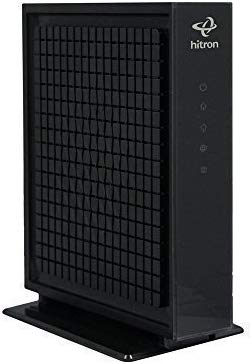
A modem shares data through cable lines, providing your computer with the ability to search the web, download, and stream. In other words, it is the tool that allows other technology to transmit data. This occurs via analog waves.

Router
source: https://us.comtrend.com/wp-content/uploads/2016/04/WR-6895-FRONT-RIGHT.jpg

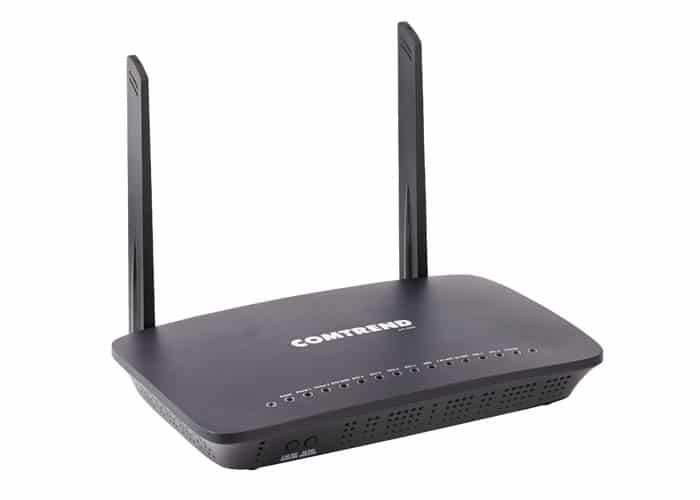
A router takes the data packets sent out into the atmosphere and shares them between networks. In its most basic form, it is a traffic controller, connecting you to your Internet provider’s services via Cable or DSL.

With this information in mind, the question remains, can swapping out your modem increase Internet speed? Let’s find out.

Where to Get a New Modem?

Obtaining a new modem is no difficult task. At Execulink we offer the option to rent a modem.  You can also purchase your own modem from a variety of retailers.

If you would like to buy your own modem, speak to our Sales team to ensure you are purchasing one which is suitable for your connection. There’s nothing worse than shelling out money only to realize you’ve bought something that isn’t compatible with your current technology.

Other Ways to Speed Up Internet

Unfortunately, buying a new modem only fixes a slow Internet connection if it’s the cause of your problem. There could be a variety of reasons your Internet is suddenly slower than usual. This includes:

  • Computer viruses
  • Poor connection due to damaged cables
  • Router positioning
  • Poor Wi-Fi reach due to insulation or brick walls
  • External interference
  • Wrong Internet package
  • Software update requirements not being met
  • Missing plugins

Working closely with your Internet provider, you should be able to deduce the problem and get to the bottom of things much more quickly. Here at Execulink, we offer 24/7 customer service for this exact reason. We understand that our customers need help day and night, and we want to be there to support you. Whether it’s a technical issue, or you simply need to increase your plan – we can help.

Choose Execulink

With over a century of experience in the telecommunications industry, Execulink has been serving Ontario proudly since 1904. Our team is extremely knowledgeable about our products and plans and happy to help in any way we can. We offer several unlimited Internet options that are straightforward and easy to understand.

If you feel that your modem needs replacing, or you’re interested in trying our Internet service, contact us at 1-866-706-2050 today. We will get your Internet-connected quickly and efficiently.  If you would like to explore your Internet options for your business, check out our Business Internet page to learn more.


Click here to see Execulink’s Home Internet options

Seniors Online Infographic

Click here to see Execulink’s Home Internet options


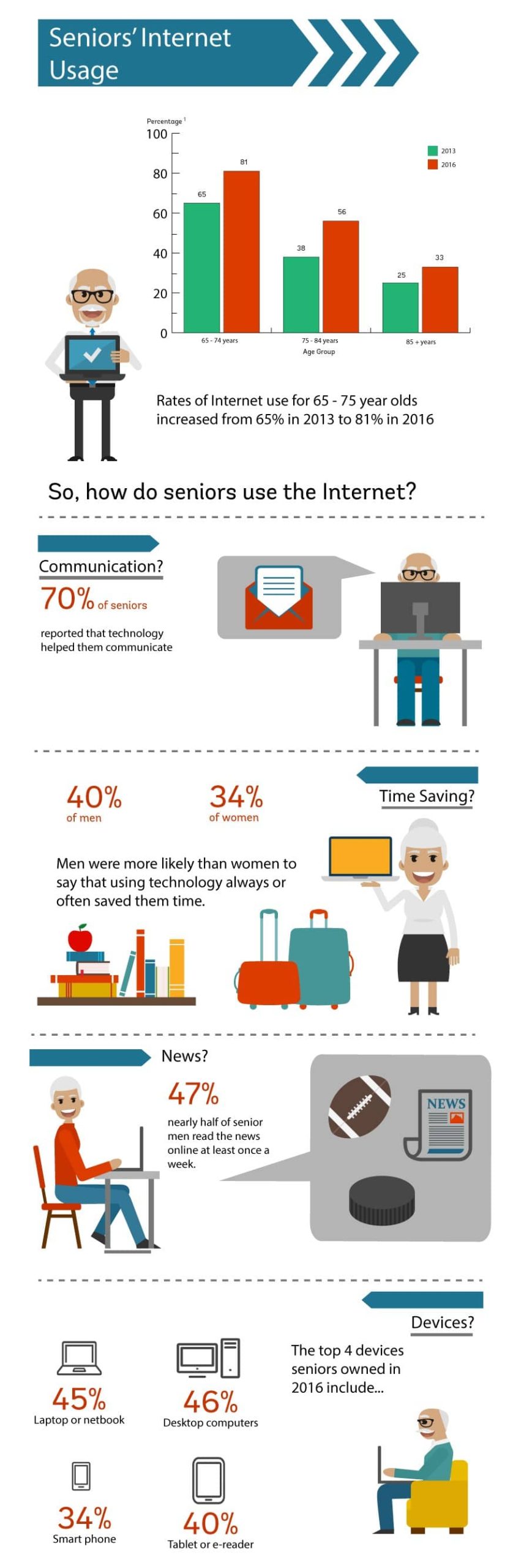
It’s always interesting to see census data from Statistics Canada to learn the habits, traits and demographic details of our society.  We decided to adapt some information from a recent general social survey (Canadians at Work and Home) from 2013 and 2016 into an infographic to show how seniors use the Internet.  For the purposes of this survey, seniors were considered to be anyone over the age of 65.  Check it out – you might be surprised by what you learn!

source: https://www150.statcan.gc.ca/n1/pub/11-627-m/11-627-m2019024-eng.htm
If you are interested in learning more about our Internet packages to find the perfect speeds for your household, check out our Internet page today!

Click here to see Execulink’s Home Internet options

The Top 5 Coding Kits for Kids

Click here to see Execulink’s Home Internet options

Finding toys that are the right mix of fun and educational can be a challenge.  If you want your kid to be exposed to basic computer programming, there are plenty of cool and exciting toys that teach the necessary skills.  Coding encourages abstract thinking and problem solving, which can be applied to any future career.  With Christmas coming soon, we thought it would be fun to compile a list of the best coding kits for kids that will provide your Christmas morning with some educational playtime!

1. Kano Computer Kit – Amazon – $170.37

(source: https://icdn6.digitaltrends.com/image/71su1lb5-l-_sl1500_-720×720.jpg)

Age range: 6 – 14

The Kano Computer kit gives your youngsters the opportunity to build their own computer, discover how it works and learn how to code with 100+ step-by-step creative challenges. You can make art, games, music and more!  It teaches logic, Python, JavaScript and Terminal commands. With this kit you do need to have a spare monitor available to use your Kano Computer.

2. Cubetto Playset Coding Toy – Amazon – $284.95


(source: https://images-na.ssl-images-amazon.com/images/I/619VdJeP7FL._SX466_.jpg)

Age range: 3+

This Montessori-approved coding toy for children aged 3+ is powered by a tangible programming language made of colourful blocks. It is screen less, friendly and ready to play. A challenge for some when learning to code is the lack of opportunity for hands-on learning.  This device alievates that problem with coding blocks and a control board that you can touch and manipulate.

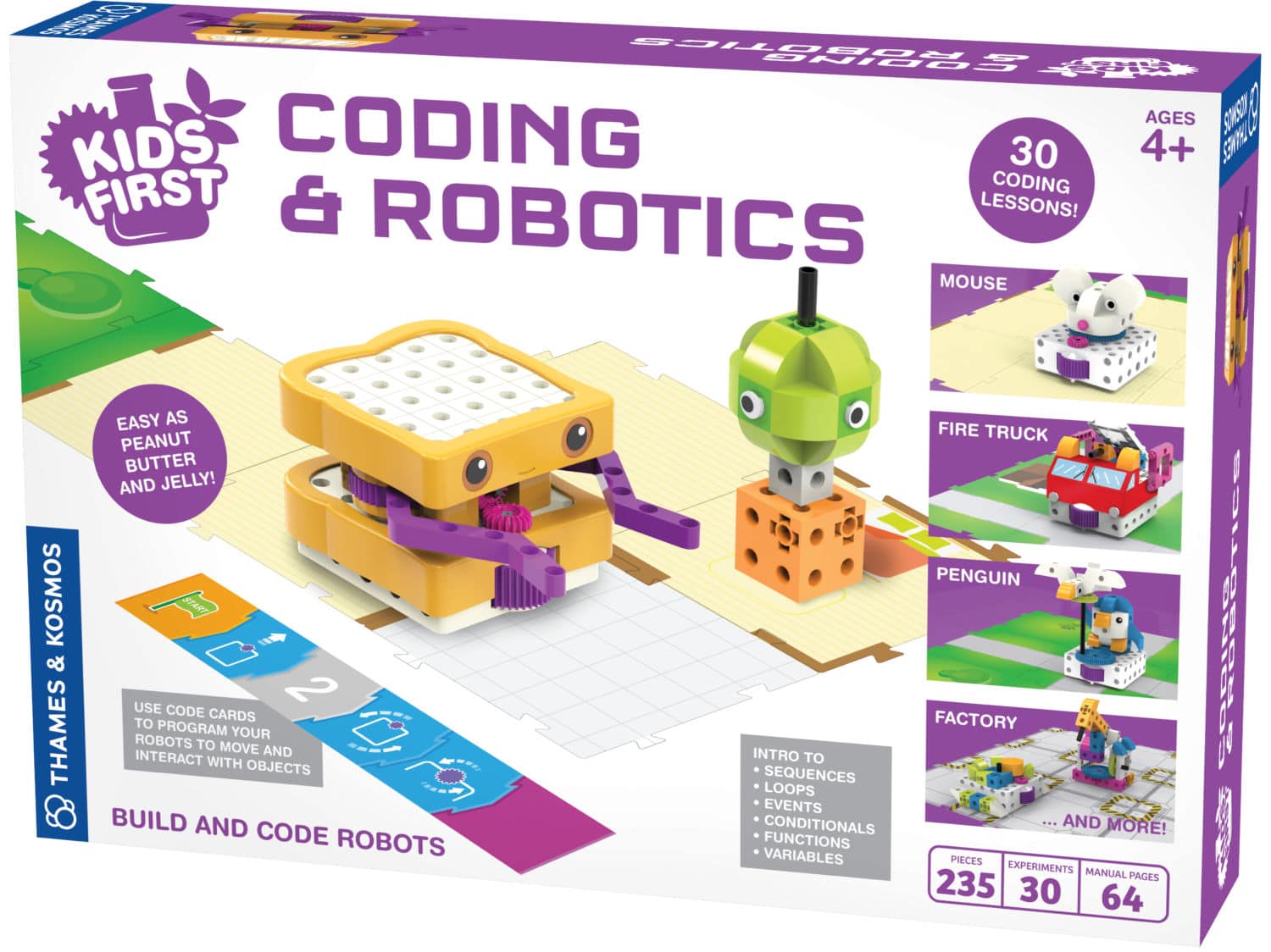
3. Thames & Kosmos Kids First Coding and Robotics – Amazon – $153.94

(source: https://www.thetoyinsider.com/wp-content/uploads/2018/09/tk_kids_first_coding__robotics.jpg)

Age range: 4 – 7

This is another awesome gift idea that teaches the fundamentals of coding and robotics.  Similar to the Cubetto it is unplugged with no software, apps or smart devices required.  The main teacher in this toy is Sammy, a peanut butter and jelly sandwich that teaches coding principles and skills.  Programs are created by laying down a sequence of physical code cards. You can program the robot to move around, activate its output gear, light up its LED, play sounds and more!

4. Harry Potter Kano Coding Kit – Amazon – $57.77

(source: https://kanome-cms-media-production.kano.me/media/components/647a1d26-f19d-4556-921d-60edef0ba775.jpeg)

For those who aspire to make magic, this toy lets you build a wand that responds to your movements!  Other games include making feathers fly, multiplying goblets, growing jellybeans, and more. To use this coding kit you will require a computer or tablet. It includes 70+ challenges that show you how to code with blocks, see JavaScript, level up slowly, learn about loops, logic and variables all while exploring the wizarding world of Harry Potter!

5. Fisher-Price Think & Learn Code-a-pillar – Amazon – $90.00

(source: https://www.toysrus.ca/dw/image/v2/BDFX_PRD/on/demandware.static/-/Sites-toys-master-catalog/default/dwda3e847b/images/04179E0C_8.jpg?sw=767&sh=767&sm=fit)

Age range: 3 – 4

This toy inspires big thinking by encouraging kids to arrange and rearrange the easy to connect segments in endless combinations, sending code-a-pillar on his path.  It encourages experimentation while developing skills like problem solving, planning and critical thinking.  You can configure the segments of the code-a-pillar to reach targets throughout the room.  This toy is part of Fischer-Price’s initiative to teach children how to think independently, moving beyond the a-b-c’s and 1-2-3’s.

We are so excited about the learning opportunities available to kids these days!  Developing STEM skills at an early age could ignite your kid’s curiosity for computer programming and set them up for success later in life. Finding learning opportunities through play is extremely beneficial because when learning is fun, it’s easy!  At Execulink Telecom, we pride ourselves in being innovative by delivering fast Internet speeds and investing in new technologies.  We are always looking for new local STEM initiatives to sponsor. If you are part of STEM group or event in need of funding, visit our sponsorship page today!

Click here to see Execulink’s Home Internet options

The Countdown is on with Google’s Santa Tracker at your Side!

Click here to see Execulink’s Home Internet options

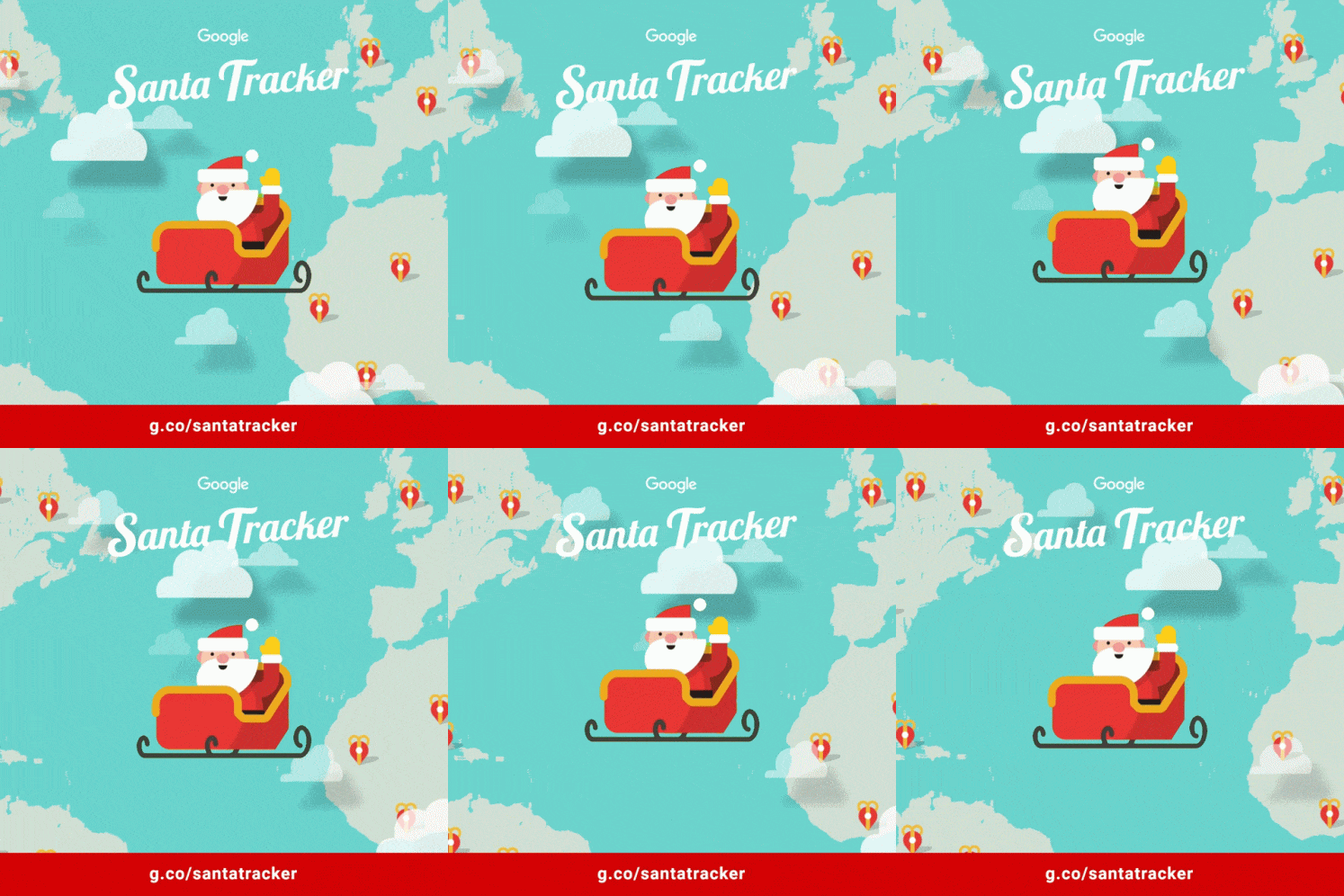
The Google Santa Tracker is a Christmas themed website which features online interactive Holiday activities and games. The site doubles as an advent calendar and even includes a tracker for Santa!  Once December 24th hits, you are able to track Santa’s movements around the world and count down how many days, hours, and minutes until he takes off!


The Google Assistant is integrated to the Santa tracker as well.  You can ask your Google assistant “What’s new at the North Pole?” and you will get fun updates from “Dimplesticks the Elf”. You can also call Santa from your Google Assistant and hear him rehearsing for a musical concert!

There are new activities unlocked throughout the month of December.  Don’t worry, you can play the previous days’ activities in case you get addicted to some of the fun puzzles! Play games that teach different Christmas traditions from around the world.  A few of the activities already released include Code Boogie, Santa’s Canvas, Snowbox, Elf Maker, and Santa Selfie.

In these activities you are able to make teach an elf to dance with code, draw your own picture on Santa’s canvas, build a virtual snowman, and give Santa a makeover.  Other games include: Elf Jetpack, Santa Search, Gumball Tilt and more!

Once you reach the 24th of December you are able to view the Santa Tracker. This allows you to follow Santa’s journey throughout the night. You can track which city he is visiting as he moves across different time zones around the world. I don’t know about you, but I can’t wait to see what activity will be released next!

Check out Santa Tracker here!

Click here to see Execulink’s Home Internet options

How to Fix Slow Internet

Click here to see Execulink’s Home Internet options

There’s nothing worse than trying to use the Internet only to find that the site won’t load, the video lags, or your download stalls. When these things happen, you know your Internet is too slow to process the commands you’re giving it.

At Execulink, we provide high-speed Internet service across southern Ontario. We understand how important it is to our customers to receive reliable service without interruption. While we offer 24/7 support to ensure our customers aren’t left with slow Internet issues, we still want you to be informed, if annoying Internet issues ensue. Try these troubleshooting tips to get your slow Internet moving.

Check for Limitations on Your Electronics

As faithful and long-lasting and older technology is, it doesn’t quite hold up next to newer models when it comes to Internet speed. If you’re using an old tablet, mobile phone, laptop, or even gaming system – it could be holding you back. Check the specifications on your router to see if it can support your Internet package’s speed.  As well, some older laptops and computers can’t stream online games or download movies at high enough speeds to keep the transition smooth. This results in lagging, stalls, and delays.

Unfortunately, the only fix for outdated hardware is buying new equipment. On the upside, buying a new computer means you’re all set to use the latest and greatest apps and software on the market without issue.

The Old-Fashioned Reset

Chances are that if you call any IT support line for a technology-related problem, the first thing they’ll ask you to do is reset it. Turning your modem and router off, waiting a count of 30-seconds, and turning everything back on again could be enough to kick start your Internet. The problem could be connection related, and if that’s the case, kicking your computer off the network and restarting everything should resolve it.

One way to check if it’s your connection rather than a device is to try your Internet from multiple devices in your home. If a movie streaming service has stalled on your laptop, for example, see if it will run on your tablet. If it’s slow all around, the reset might be just the thing to get it moving again.

Contact Your Internet Provider

Once you’re sure everything isn’t working the way it should be, call your Internet provider. Explain what’s happening, advise of any error messages involved, and see if they can tell you what’s going on. If you’re having trouble connecting to the Internet, or it’s too slow to do the things you want to do online, it could be that you have the wrong package.

Your Internet package should be based on the things you love to do online and the number of people in your household or office. Lighter packages are great for the budget, but not so great for those who want to stream over multiple devices simultaneously. Most of the economical packages are designed for those who want to send emails, browse the web, and maybe do a little light streaming. Anything more strenuous than that will require higher internet speeds.

At Execulink we offer a variety of customizable packages with no commitment and free installation. We know that each of our customers is different and the plan your neighbor uses may not work for you. Be sure to tell your internet provider where you’re seeing the most delay, whether it’s downloading, waiting for emails to send, or during movie and music streaming.

Reduce Usage of Apps Which Hog Bandwidth

There are so many apps now that modern Internet users could go their entire lives without ever needing a physical calendar or alarm clock again. The only problem with all these wonderful tools and games is that some of them continue to run in the background. The same issue exists for desktop computer and laptop users. Some music programs and downloading programs run silently in the background long after you’ve closed their windows. These inadvertently cause bandwidth-hogging issues.

In the settings of your iPhone you can select to close out of inactive apps after a certain amount of time. Similarly, you can check which apps are inactive on your computer, laptop, and tablet and close them down properly. Freeing up bandwidth means freeing up power for your devices to use your Internet more freely.

Try a Browser That Takes Less Juice

Some browsers require a little more power than others. While changing your browser isn’t a permanent solution for a slow Internet connection, it can increase speed for some time while you figure out your next step. Opera Mini and Chrome’s Lite Mode are both excellent options for browsing without all the bells and whistles that slow your Internet.

By optimizing your Internet this way you’ll have access to more of the things you like to enjoy online without the delay.

Sign up with Execulink to Experience Awesome

If you find your current Internet service provider can’t help with slow speeds, then it might be time to call in some faster Internet. At Execulink, we understand how frustrating it is when Internet is slow. We offer different Internet speeds for different lifestyles in the hopes that we can find something for everyone.

If you’re not sure what your current Internet speeds are, you can run a speed test. This will help you understand how fast you need your Internet to run to do the things you love. Execulink can help improve your wireless signal and get you an Internet plan that works for you.

Being a proud Ontario-based Canadian company, Execulink considers each of our customers a friend and neighbor. Our support team is on call 24/7 to help you troubleshoot a slow connection speed or choosing the right Internet plan.

For more information on repairing a slow Internet connection, troubleshooting wireless routers, or getting a better wireless signal in your home, contact Execulink at 1-888-936-1273 or by email at customercare@execulink.com. When it comes to wireless networking, we’ve got your back.

Click here to see Execulink’s Home Internet options

How to find the best Black Friday deals

Click here to see Execulink’s Home Internet options

Black Friday is the most competitive sales day of the year.  It seems that every year the deals grow and start earlier and earlier.  There are many retailers promoting Black Friday deals, its hard to know what is a good deal or not.  Whether you are online shopping or in a brick and mortar store, using some online tools can help you do your research.  Looking for a leg up on how to find the best deals for Black Friday? These are some apps that can help you find the best price out there.

Flipp

Flipp is an app that provides a list of digital retail flyers that are in your area. You can browse through over 800 local retail flyers and create shopping lists for products that are on sale. This is a great way to search for products or brands that are on your gift list and then compare between stores to what the best current sale price is. Flipp is available for free on iOS, Android and has a desktop version.

Honey

Honey is an add-on web browser extension that will help you find some extra savings on your online purchase. Honey is a data base that keeps up to date online promo codes for online retailers.  While you are completing your online purchase, click the honey extension button on your web browser and Honey will automatically search and apply current online promo codes that are available for that retailer. Instant savings without all the work! Honey is available for free on Chrome and Firefox.

Keepa

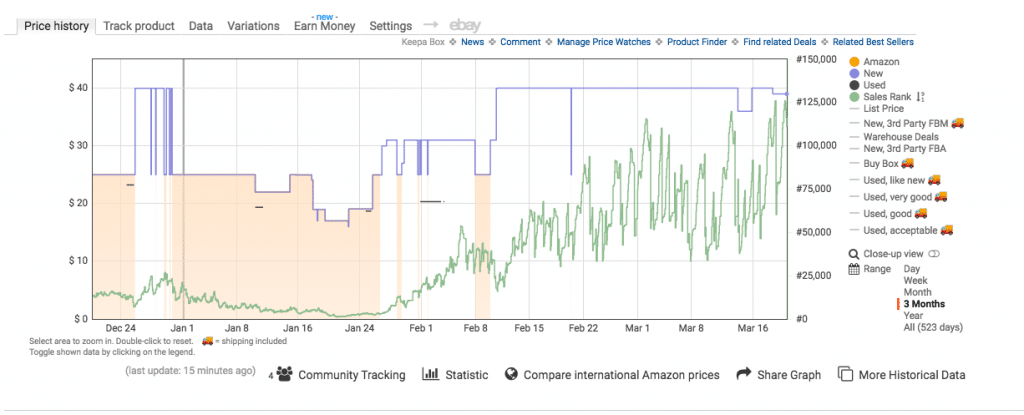
Keepa is a web browser extension that tracks product prices on Amazon to check the history of the online purchase price. Keepa provides charts and statistics of the Amazon price for the date range you specify. Install this add-on extension and when you are searching for products on Amazon, you will see the graph with the price history on the product description page. A summary of the data is available to see the date of the highest and lowest price.  You can also set up a list of products that you would like to track and get notifications to when the price drops.  Keepa is available for free on Chrome and Firefox.

Red Flag Deals

Redflagdeals website features retailer’s digital flyers so you can browse all the current sale flyers. What is nice about this site is that it has a Black Friday section to showcase all the retailers Black Friday flyers.  This site also highlights some of the best deals by store and links directly to the product on the retailer’s website.  Redflagdeals is free on iOS, Android and has a desktop version.

These are a few great online resources that can help you navigate through this Black Friday. Try some these apps out this holiday season and hopefully you can save a few bucks. Happy shopping and with some of your extra savings, treat yourself too!

Click here to see Execulink’s Home Internet options

What’s New with Smart Home Tech and IoT?

Click here to see Execulink’s Home Internet options

The Internet of Things, or IoT, is changing the way we live and what the future looks like for our daily lives.  When talking about a category as broad as “Things” categorizing and defining IoT can quickly become overwhelming. So let’s break it down a bit!

The Internet of Things or more commonly, IoT, is a buzzword that refers to a network of devices typically using sensors and software to process data in one way or another, making our lives more convenient.  The data is used for monitoring and controlling information from other devices through the Internet.  This could be as simple as a Bluetooth speaker to listen to Spotify or as complex as a smart kettle that turns off and notifies you when it reaches the perfect temperature.

In 2019 IoT smart home device sales will reach $13 billion and are forecasted to reach a value of more than $53 billion by 2022.  As well, Swedish firm Berg Insight predicts that 63 million American homes will qualify as “Smart” by 2022.

Integration of devices in the home

A growing issue is the expansion of niche products in the smart-home space.  There seems to be more smart home products with which you can outfit your home released everyday.  With each new system, there is a new device and sometimes a new app to add to your phone. No matter how potentially helpful these devices might be independently, they are not allied with any greater purpose.  Developing a system of interacting devices in your home is an industry challenge.

Integrating Smart Home Devices to One Platform

As this challenge faces innovators in the Smart Home space, there are some options including: Samsung SmartThings, Wink, Echo, Apple home kit or Josh ai. The challenge for the customer lies in doing research to determine which is the best for your home.  This can depend on which devices you currently own. The intention of these platforms is to keep your experience consistent.

The future of smart homes

Home Routines

Future homes could be entirely run by a Smart Home platform.  Finding ways to optimize everyday activities like waking up, meal planning and bed time are common areas for research and development amongst IoT companies.  For example, Crestron is working on a software that tracks a person’s habits, which music they like and how they prefer lighting depending on the hour of day. Then the device could use that information to build playlists and create the perfect lighting ambiance before bedtime.

Furniture

Robotic furniture company, Ori Living is working with Ikea to create furniture pieces that change based on your needs, from bed, to couch to closet space. Perfect for those interested in the rapidly growing “tiny homes” trend or for those living in a studio apartment! They take the murphy bed to the next level.

Lighting

The future holds many exciting things for those interested in upping the IQ of their lighting.  Getting lights to respond to your actions automatically is the next step for this technology.  For example, when lighting your home cinema, having your lights automatically dim when you’re watching a movie and adjusting appropriately depending on the genre.

Doors

Getting your door to automatically unlock as you approach using facial recognition software could be possible in the near future. Building on that idea, having the rest of your house automatically respond to your arrival could be possible, such as lights turning on or the kettle brewing!

Thermostat

It is currently possible to control your home’s temperature with an app (Nest, ecobee, etc).  The future could bring automatic temperature adjustments dependent on your movements within your house – such as exercising or showering.  Thermostats may even be able to sense if you are getting close to home and kick in to increase or decrease the temperature of your home depending on your preferences and the season.

Health

Cameras and sensors embedded in refrigerators could suggest more nutritious alternatives if you are reaching for too many sugary drinks.  If you require prescription drugs, medicine cabinets could check if you are remembering your daily pills.  Sensors in your toilet could event examine human waste before its flushed. Smart toilets such as this could help detect early signs of disease and help manage diabetes.

Challenges to IoT success

As every device in a smart home is connected to the internet, as a result there is risk of hacking.  Many of these devices have cameras which monitor the inside of your home or unlock your doors. If the technology is not entirely secure, then you could be putting your home and family at risk.  This risk could be catastrophic for the IoT industry.  The Canadian Government has implemented minimum cyber security requirements that are standard across the industry through the National Cyber Security Strategy. These standards require vigilant updates as technology changes.  At Execulink, we maintain strict cyber security policies that are designed to prevent unauthorized access by third parties.

ISPs as the backbone for your Smart Home

Homes are increasingly being built “smart”, even from the ground up.  The current approach is to add IoT technology to your home as an afterthought but, this is quickly changing. Experts say that soon smart home products will become as necessary as plumbing and electricity. As our world evolves it’s becoming increasingly important to stay connected with Internet services.  Explore Execulink’s Internet options to find the perfect package for your home and all its smart devices!

Click here to see Execulink’s Home Internet options

Who Invented the Internet?

Click here to see Execulink’s Home Internet options

The modern Internet has become such a staple in the lives of people around the globe that the UN has declared it a basic human right. It’s used for communication, research, education, and so much more. So, how did this technological marvel come to be one of the most influential tools in the world? We’ll tell you.

Creating the Internet: Tim Berners Lee

A world without the Internet seems like a lifetime ago, and yet it was only 1989 that the concept for the world wide web became a real scientific proposal. The idea came from a software engineer named Tim Berners Lee, who worked at the CERN laboratory near Geneva. Something Mr. Berners Lee figured out early was that sharing information between the CERN lab and scientists in other parts of the world was tough. By the time information arrived the team was moving onto something else. They needed a way to send and receive messages instantaneously.

During this time, computers could be used to create and store data, but then to access that data one required access to the computer it was created on or a disc onto which that data was saved. It wasn’t like the modern Internet where everything gets uploaded into the cloud and shared as needed.

The Evolution of the Internet

While Tim Berners Lee’s concept was thought to be intriguing by other computer scientists, it wasn’t accepted at first. It took him years of developing the idea to bring it any credibility. In 1990, Berners Lee created the outline for three huge components still relevant in computer networks today. This was:

HTTP

The acronym for HyperText Transfer Protocol, HTTP, is visible at the beginning of just about any web address you type into the address bar. When this information gets entered your browser sends a message find and deliver the website you’re looking for.

HTML

Also called Hyper Text Markup Language, HTML is a unique language used to design documents on the web. It’s comprised of various demands, which cause your site to assemble in a particular way, such as right aligned, in bold font, or in a specific colour.

URL

A URL or URI is the acronym we use for a Uniform Resource Identifier or Uniform Resource Locator. In other words, it’s a name used to recognize a location on the Internet. HTTP addresses are URL’s, but not every URL starts with HTTP.

In 1991 the world was invited to try the world wide web. In 1993 it was decided that the web would remain royalty-free – meaning, while we pay for Internet provision in our homes, physically accessing the Internet is free for everyone anywhere in the world.

Other Scientists Behind the Web

It may have been Tim Berners Lee who invented the idea of the world wide web. However, he had plenty of inspiration and resources made available by other scientists in the field. Leonard Kleinrock, a professor of engineering and computer science had a similar thought about computers sharing information. He developed something called packet switching using advanced mathematics and computer science. By 1969, he’d managed to connect two computers via nodes to share information. Unfortunately, the machines couldn’t handle the task and crashed. Through this Kleinrock invented the advanced research projects agency network.

In 1974, two like-minded scientists named Bob Kahn and Vint Cerf published their own paper on packet switching. It included the concept of transmission control protocol, which is now known as TCP/IP. This protocol is sometimes referred to as the Department of Defence model. TCP is what allows two hosts to interact via a computer network.

The Internet Today

The Internet started as a single network invention and has multiplied into networks of networks. With your IP address as your identifier, you can access the Internet from a variety of devices from anywhere in the world. All thanks to people like Berners Lee, Kleinrock, Kahn and Cerf. Their dedication to sharing information provided a gateway to communication and information we couldn’t have fathomed only decades ago.

Now, working with an Internet provider like Execulink, right here in Ontario, Canada, you have access to the net and unlimited opportunities for connection. Interested in learning more about the modern Internet and the variety of services you could benefit from? Contact our Sales team today or visit our Internet page to see the package options right for you!

Click here to see Execulink’s Home Internet options

Tech or Treat – 6 Halloween Gadgets and Gizmos

Click here to see Execulink’s Home Internet options

Spooky season has begun and as we gear up for trick-or-treating, we thought it would be a good idea to explore the technology that is making Halloween a little more fun!  Upgrade your haunted houses with virtual reality and find the best candy in the neighbourhood.  Are you still searching for a last-minute costume? Google has the tool for you!  Check out our collection of spooky Halloween technology and see if anything on this list piques your interest enough to make a new investment.

1. Ghost drone

Drones have quickly become the latest gadget craze and they can be a fun addition to your Halloween Décor. Meet the Ghost Drone that Alton Porter shared on YouTube.  If you already own a drone this is a low-cost way to scare your trick-or-treaters. You just need to purchase a small white sheet and a mask to imitate a ghost.  If you are interested in buying a drone, they can be a costly investment. Shopping at Best Buy, they range in price from about $100 – $6500.

2. Project your nightmares!

If you are the type of person who likes to be haunted by dementor look-a-likes, consider this projector-compatible DVD that will project a haunted family into your living room with an easy set-up.  Just sync your DVD player to your projector.  You can set it up so the ghosts appear in your window.  This will create the illusion of a haunted house and scare any passers-by.

(source: https://www.cnet.com/news/raise-your-halloween-game-with-a-free-atmosfx-digital-decoration/)

3. Alexa/Google, tell me a scary story!

Fill your house with spooky noises from everyone’s favourite electronic assistants!  Alexa has her own set of Halloween tips, tricks and treats.  Ask your Amazon Echo to tell some Halloween themed jokes, play a Halloween game or riddle, play spooky sounds and more.

Your Google Home assistant will bring up content to help you with your costume if you ask it to show you “DIY Halloween costume or make up videos”.   Tell Google to “Get Spooky” and an hour long playlist of haunting sounds and music will play to enhance your haunted house!

4. Doorbells aren’t just doorbells anymore!

If you are interested in seeing who is at your door you can buy a video doorbell from Amazon’s Ring or Google’s Nest and configure them to a device where you can watch video feed. This will let you keep an eye on your pumpkins to make sure they are safe from any vandalism that can occur near Halloween.  Your Google Home will notify you when activity is detected around your house.

Play a haunted chime with your Ring such as the Addams family theme song. The release of this new chime is also timed to promote a new film adaption of “The Addams Family”, which came out on October 11th. If you have a Nest, the doorbell can now cackle like a witch, a vampire or a monster.

You could also use the two-way audio feature on your Ring or Nest and say “Boo!” to scare people as they walk past. How frightful!

5. FrightGeist from Google

This year Google has put together a compendium of the most popular Halloween costumes. If you are in a tight cinch to find the perfect costume for an upcoming party, check out the list.  Based on Google trends, the list will tell you if your costume is popular or not.  Their results are determined by what people are searching.


source: https://frightgeist.withgoogle.com/

6. Find your neighbourhood treat map

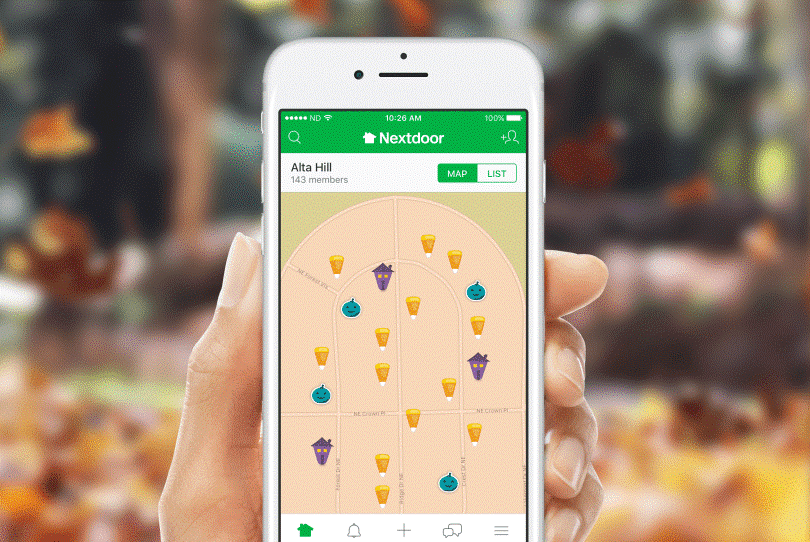
NextDoor is the go-to guide for seeing who is giving out treats or where the best decorated haunted houses are located in your neighbourhood.  This map can also let you know which houses are passing out a non-food treat for kids who have any allergies that prevent them from enjoying many of the popular Halloween candies. Download it today from the Apple App store or Google play store.

These spooky technological gadgets and apps are a fun way to improve your family’s Halloween.  With a projected ghost family your house is sure to be the spookiest on the block! We can’t wait for Oct 31st and all the fun that ensues with this sweet and scary holiday.

Click here to see Execulink’s Home Internet options

Fast Internet At Even Lower Prices. You Deserve It!

Click here to see Execulink’s Home Internet options

There is nothing we love more than making our customers happy and giving them the awesome experience they deserve. That’s why we were so excited to reveal that we have made significant changes to our wholesale Internet plans including better prices, unlimited usage, and zero activation fees. This exciting announcement comes at the heels of the awesome changes we recently made to Internet plans on our Fibre and Cable networks, which included higher speeds and lower pricing. The awesome just keeps on coming!

Email notifications from Execulink have been sent to those who will receive changes to their plans. Here is a small collection of what our customers had to say about this exciting news.

“And this is why we switched to Execulink.  Amazing!  Thanks for the great service!”

– Mark from Midland

“Thank you very much.  not very often you see your bills decrease.”

– Debbie from Fort Erie

“Thank you – what an unexpected and kind thing to do.”

– Gillian from Woodstock

“Thank you very much, the increased speed is very much appreciated. I am very happy with the service from Execulink and will happily continue as a customer and will always recommend your company.”

– Johannes from London

“Been with Execulink for years. Service is great and prices are very reasonable. They just gave us a 5-dollar reduction in monthly billing “because you deserve it.” Who else does that? Thanks ET!”

– Chris from Fort Erie

“Thank you so much. We have been with you guys since 1990s and would never want to change. You guys have been the best and most patient and I sure have appreciated your helpfulness over the years”

– Joan from London

Thank you for all of your awesome feedback! We are so happy to bring these awesome changes to your plans.  Check out our Internet page to learn about what is available in your area. If your business is seeking a new ISP, check out our business Internet page to learn more!

Click here to see Execulink’s Home Internet options

The Internet Services You Deserve
Affordable. Reliable. Lightning fast.

We’re proud to provide the communities we know, love, and live in, with the reliable Internet, TV, Phone and Mobility services they deserve.

  • Your local choice for residential and business telecommunication services
  • Renowned 24/7 customer service you can depend on
  • Affordability, service, integrity and transparency are the pillars of our business

Here to help. 24/7.

Sales Inquiries

Sales: Mon-Fri 8AM-8PM, Sat 8AM-5PM

(866) 706-1991

Support Inquiries

Technical Support: 24/7, Customer Care: Mon-Sun 7AM-11PM

(866) 706-1994

Online Help

Chat With Us

We'll respond as soon as we can!

Email Us

We'll get back to you as soon as possible.

Support Centre

Find the answer to your question.

Check availability

Enter your address to find services and offers available to you!