
Protect Your Small Business: How to Mitigate Common Cyber Threats

Protect Your Small Business: How to Mitigate Common Cyber Threats

Small businesses face the same cyber threats as larger organizations but often lack the resources to defend themselves. Cybercriminals frequently target small businesses because they assume defenses are weaker. Fortunately, by understanding the most common threats and taking simple steps to mitigate them, you can protect your business from cyberattacks.

Here are the most common cyber threats and the steps you can take to mitigate them.

  1. Phishing Attacks

What is it?

Phishing occurs when attackers send fraudulent messages (usually via email) to trick individuals into sharing sensitive information such as login credentials or financial data. These messages often appear to come from a trusted source, such as a bank or a well-known business partner.

How to Identify Phishing Attempts:

  • Unexpected emails asking for passwords or personal information.
  • Messages that create urgency or fear (e.g., “Your account will be locked if you don’t act now!”).
  • Suspicious attachments or links to unfamiliar websites.

How to Mitigate Phishing Risks:

  • Employee training: Teach employees to recognize phishing emails and avoid clicking on suspicious links or attachments.
  • Email filtering: Use filtering software to detect and block phishing attempts before they reach your inbox.
  • Enable Multi-factor Authentication (MFA): This adds an extra layer of protection to accounts even if login credentials are compromised.
  1. Ransomware

What is it?

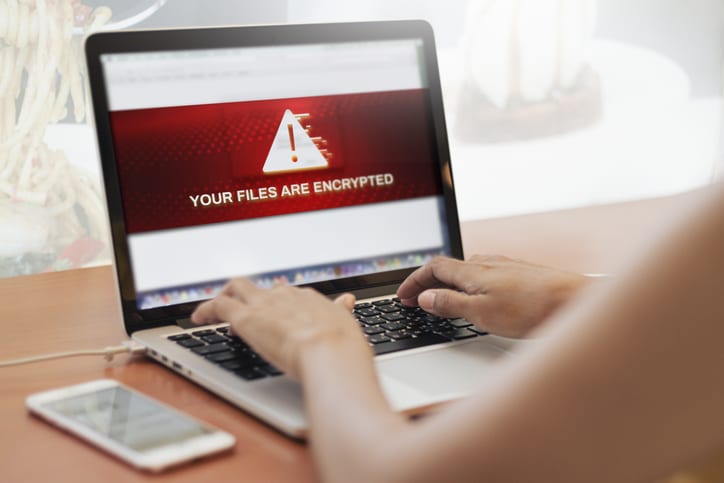
Ransomware is a type of malware that locks or encrypts your files until a ransom is paid. These attacks can be devastating to small businesses, often forcing operations to halt until the issue is resolved.

How to Identify a Ransomware Attack:

  • Files become inaccessible or encrypted.
  • A ransom demand is presented on the screen.
  • Unusual system performance or slowdowns.

How to Mitigate Ransomware Risks:

  • Regular backups: Regularly back up your data to a secure location (cloud or external hard drives) and test these backups to ensure they work.
  • Anti-ransomware software: Use anti-malware software designed to detect and prevent ransomware.
  • Access control: Restrict access to sensitive data and ensure only necessary personnel can make changes.

  1. Malware

What is it?

Malware is any type of malicious software designed to harm your computer systems or steal data. This can include viruses, spyware, and trojans.

How to Identify Malware Infections:

  • Systems are running slower than usual.
  • Unwanted pop-ups or unusual ads appear.
  • Files or programs you didn’t install show up.

How to Mitigate Malware Risks:

  • Antivirus software: Install reputable antivirus software and keep it updated to detect and remove malware.
  • Enable automatic updates: Regularly update all software and systems to patch vulnerabilities.

Cautious downloads: Ensure employees avoid downloading files from suspicious sources or websites.

  1. Data Breaches and Hacking

What is it?

Data breaches occur when attackers gain unauthorized access to sensitive information, such as customer details or business finances. Hackers often exploit weak passwords or outdated security systems to break into business networks.

How to Identify Data Breaches:

  • Unauthorized logins or changes to accounts.
  • Unexplained financial transactions.
  • Data or settings are altered without permission.

How to Mitigate Data Breach Risks:

  • Use strong passwords: Enforce strong password policies and use Multi-Factor Authentication (MFA) for all sensitive systems.
  • Firewalls: Install firewalls to monitor and block unauthorized traffic.

Regular audits: Conduct periodic security audits to monitor access and identify weaknesses.
  1. Denial-of-Service (DoS) Attacks

What is it?

DoS attacks overwhelm your website or network with an influx of traffic, rendering your services unusable. For small businesses, this can mean lost sales and frustrated customers.

How to Identify DoS Attacks:

  • Websites or online services become slow or unavailable.
  • Spikes in traffic from unknown sources.
  • Network instability or sudden crashes.

How to Mitigate DoS Attacks:

  • Cloud-based protection services: Use cloud solutions that offer DoS protection to handle traffic spikes.
  • Firewalls: Configure firewalls to detect and filter suspicious traffic.
  • Monitor traffic: Continuously monitor your network traffic for unusual patterns.

  1. Basic Incident Response Plan

Why It’s Important:

Even with the best defenses, cyber incidents can still happen. Having a plan in place allows you to respond quickly and mitigate damage.

Steps to Create an Incident Response Plan:

  • Key contacts: Identify the individuals responsible for managing a breach (IT support, management, etc.).
  • Disconnect affected systems: Immediately disconnect compromised systems from the network to contain the issue.
  • Data recovery: Use backups to restore systems and data quickly.

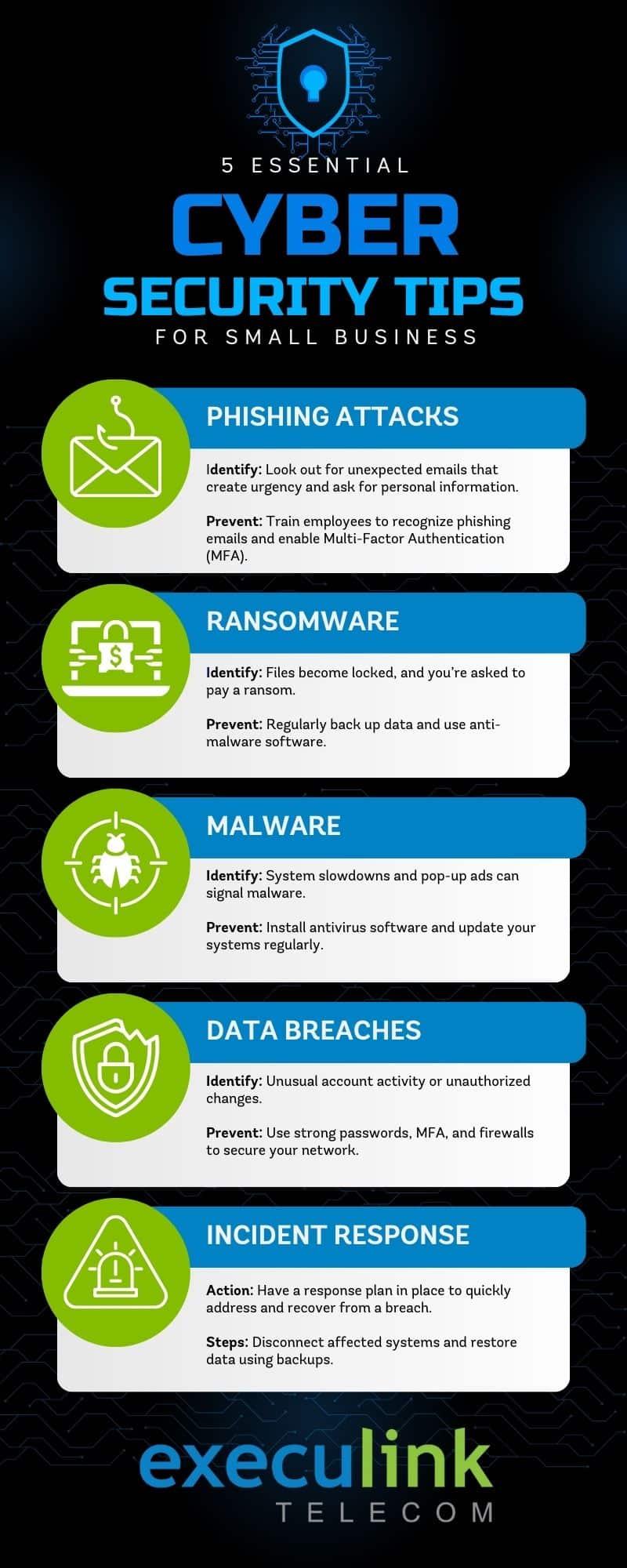
For a quick reference, here’s an infographic that outlines the top 5 essential cybersecurity tips for small businesses. Be sure to share it with your team!
 

Focus on Practical Steps to Stay Secure

Cyber threats are real, but small businesses can protect themselves by taking simple, proactive steps. Start by training your employees, implementing regular data backups, securing devices, and ensuring that your software is always up to date. Having a basic incident response plan will help your business recover quickly if something goes wrong.

Staying vigilant and adopting these basic cybersecurity practices can go a long way in keeping your business safe from the most common threats.

Protect Your Business with Confidence

At Execulink, we provide reliable internet and communications services that give small businesses a strong foundation for success. By working with a partner who values security, you can feel confident that your operations are supported by a trusted provider.

Contact us today

How to Sign up for Link TV

What is Link TV?

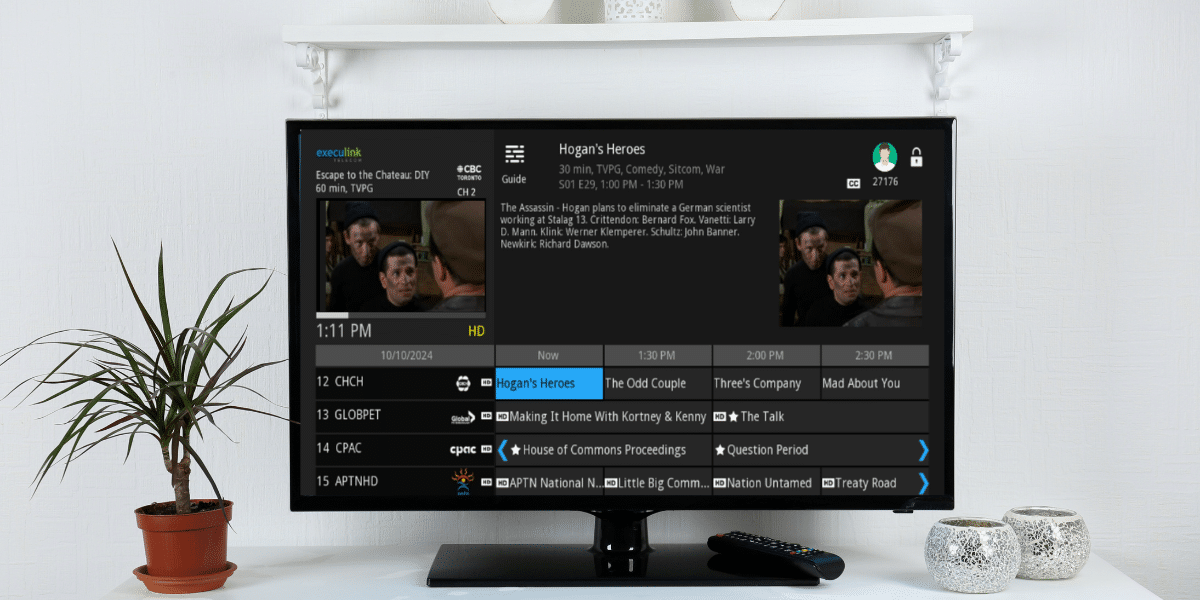
Link TV is a completely personalized TV experience – from the channels you pick, to the devices you watch on, to how and when you watch!

  • You get to pick only the channels or packages you want, which means you aren’t paying for channels that you aren’t going to watch! Choose from over 200 channels that are available in a Theme Pack, Single Pick or hand pick channels and build your own Pick 10, Pick 15 or Pick 25 package.
  • Watch TV from anywhere on any device. Use the free Execulink TV app to watch on your Phone or Tablet or Smart TV for Android, Fire TV, Apple TV. If you don’t have a Smart TV then you can rent a Set-Top Box to connect your TV to your router.
  • Finally, decide how and when you watch! Record using 5 included Cloud DVR hours (add more if you need it), Re-start your show from the beginning, pause, fast forward or even use Catch-up TV to scroll back in time up to 24 hours and watch the show you missed.

There are so many more benefits to Link TV and we encourage you to read about them!

How to sign up for Link TV

If you are a brand-new customer to Execulink, you can visit an office, call us at 1-866-706-1991 or sign-up on our website.

If you already have Execulink services, then simply log into your MyExeculink account and select the TV option. Take a look at this at this step-by-step video and watch how easy it is to sign up for Link today. Your TV service will be ready to start using within minutes!

Here is what our customers are saying about Link TV!

Best tv I have Ever had hands down. Being able to go back 24 hours and watch anything is a great bonus. Perfect picture and sound compared to satellite.
– Rick, Elmira, ON

We just recently switched to Execulink TV and Internet and we are loving it, we now have the freedom to pick the channels we watch most and not pay for a million ones we don’t. And the internet has not failed us yet. Thanks again Execulink everyone has been very helpful on the phone and in person.
– Mari-Ann, Tillsonburg, ON

We switched our television and Internet to Execulink from a big box provider. The flexibility to choose channels, and a very easy self setup made the change easy and painless. The service is reliable, easy to use and guides are simple to use. Would highly recommend Execulink!

– Lane, Woodstock, ON

Cybersecurity Tips for Small Business Owners

As a small business owner in Ontario, you’ve probably heard a lot about cybersecurity in recent years. It’s a topic that might seem overwhelming or even something that only large corporations need to worry about. However, the reality is that small businesses are increasingly being targeted by cybercriminals because they often have fewer resources to dedicate to security.

October is both Small Business Month and Cybersecurity Awareness Month, making it the perfect time to ensure your business is protected from digital threats. Here are some practical, easy-to-implement tips that can help you safeguard your business.

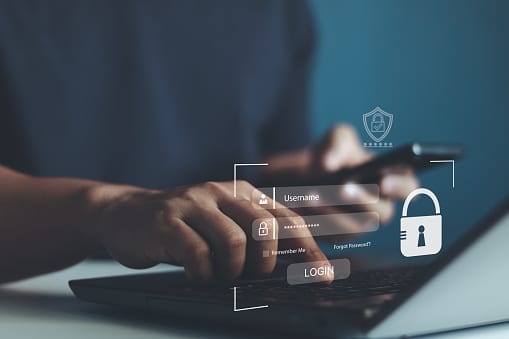
Cyber security, Smartphone protection with 2Fa, Two-Factor Authentication, Privacy protection data. internet network security technology. Encrypted data. Personal online privacy. Cyber hacker threat.
  1. Use Strong Passwords and Two-Factor Authentication (2FA)

One of the simplest yet most effective ways to protect your business is by using strong, unique passwords for every account. Passwords should be at least 12 characters long and include a combination of letters, numbers, and symbols. Consider using a password manager to keep track of them.

Why it matters: Weak passwords are one of the easiest ways for hackers to gain access to your business accounts. Two-factor authentication (2FA) adds an extra layer of security by requiring a second form of verification, such as a code sent to your phone, when logging into sensitive accounts.

A 2019 report from Microsoft found that 2FA can block 99.9% of automated attacks, while Google reports that SMS-based 2FA can prevent 100% of automated attacks, 96% of bulk phishing attempts, and 75% of targeted attacks. Using 2FA significantly reduces the likelihood of unauthorized access, ensuring that even if passwords are compromised, your accounts stay protected.

Shot of businesspeople in the workplace
  1. Educate Your Employees on Cybersecurity

Cybersecurity isn’t just an IT issue—it’s a team effort. Your employees are often the first line of defense against cyber threats. Regular training on how to spot phishing emails, suspicious links, and other common tactics used by cybercriminals is essential.

Why it matters: Even the best security systems can fail if your team unknowingly clicks on a phishing email or downloads malicious software. Educating your employees reduces the risk of human error leading to a security breach.

In fact, 82% of data breaches involve a human element, often due to employees falling victim to phishing attacks or other forms of social engineering. Training your employees can lead to a 70% reduction in security-related risks, emphasizing the value of proactive security awareness programs.

A finger press red Update button on blue digital laptop keyboard.
  1. Keep Your Software Up-to-Date

Software updates aren’t just about adding new features; they’re also about fixing security vulnerabilities. Ensure that your business’s operating systems, antivirus software, and any other applications you use are always up to date.

Why it matters: Cybercriminals often exploit weaknesses in outdated software. By keeping everything updated, you minimize the risk of someone exploiting these gaps to access your data.

In 2023, 35% of malware was delivered via email, often through vulnerabilities in outdated systems. Keeping software updated ensures that these known vulnerabilities are patched, reducing your exposure to cyber threats.

Business networks with cyber security software. Businessman shows cloud storage network technology icon, large network of backup platforms. Cloud technology concept.
  1. Backup Your Data Regularly

Regular data backups are crucial for protecting your business in case of a ransomware attack or system failure. Back up important files daily, and make sure these backups are stored securely, either in the cloud or on a separate physical drive that isn’t connected to your main network.

Why it matters: If your system is compromised, having a recent backup means you can restore your data without paying a ransom or losing important business information. It’s an inexpensive insurance policy that every business should have in place.

The average cost of a ransomware attack in 2024 is $4.91 million, but with secure backups, you can avoid paying ransoms and quickly recover lost data, minimizing operational disruption.

Creative abstract wireless networking on mobile devices business communication technology concept: color 3D render illustration of modern black glossy touchscreen smartphone with list of WiFi network connections message on screen in the shopping mall or airport terminal with selective focus bokeh blur effect
  1. Secure Your Wi-Fi Network

Many small businesses don’t think twice about their Wi-Fi security, but an unsecured network can be an easy entry point for cybercriminals. Make sure your network is password-protected, and consider setting up a separate network for guests or clients to use, so it doesn’t interfere with your business operations.

Why it matters: Unsecured networks make it easy for hackers to eavesdrop on your business activities or even steal sensitive data. By securing your Wi-Fi, you add another layer of protection to your operations.

Distributed Denial of Service (DDoS) attacks, which can overwhelm networks and make them inaccessible to legitimate users, are becoming more frequent. Microsoft reports that it mitigates 1,700 DDoS attacks daily, highlighting the importance of having a secure network in place.

Businessman looking at a antivirus security log in screen on a computer. There is a shield and protection message on the screen, an office can be seen in the background
  1. Install Firewalls and Antivirus Software

Firewalls act as a barrier between your business’s network and potential threats from the outside world. Antivirus software helps detect and remove malicious software that could harm your systems.

Why it matters: These tools are essential for keeping your network safe from outside attacks. Firewalls and antivirus software act as gatekeepers, monitoring your network for suspicious activity and blocking harmful intrusions before they can cause damage.

With ransomware attacks rising by 74% between 2022 and 2023, having proper antivirus protection and firewalls in place is critical to preventing these increasingly common threats from infiltrating your business.

A small group of developers work together to solve coding problems. They are sitting at the conference table
  1. Develop a Cybersecurity Plan

Every business, no matter how small, should have a cybersecurity plan in place. This plan should outline your security protocols, data backup procedures, and a response plan in case of a breach. Having a plan ensures that you and your team know what to do if something goes wrong.

Why it matters: Without a clear plan, a cyberattack can turn into a much larger problem. Knowing what steps to take in the event of a breach will help your business recover more quickly and with less damage.

Data breaches cost an average of $4.88 million globally in 2024. A well-prepared cybersecurity plan can significantly reduce these costs by ensuring that your team responds quickly and effectively, minimizing downtime and damage.


Why Cybersecurity Matters for Ontario’s Small Businesses

Small businesses in Ontario are the backbone of local communities, but they often underestimate the importance of cybersecurity. With more operations moving online and sensitive data being stored digitally, the risks are higher than ever. Cyberattacks can lead to lost revenue, damaged reputation, and even legal liabilities.

By implementing these cybersecurity tips, you can protect your business, your customers, and your reputation. The good news is that you don’t need to invest in expensive, complex systems. Many of these tips are low-cost and easy to apply, making them accessible to businesses of all sizes.

Stay Proactive, Stay Safe

As a small business owner, protecting your business from cyber threats doesn’t have to be complicated. By following these tips and ensuring your systems are secure, you take important steps toward safeguarding your business. However, it’s also important to work with a trusted telecom provider that keeps cybersecurity at the forefront of their services.

A reputable telecom partner will offer more than just internet and phone services; they’ll also provide built-in security features, such as secure networks, encrypted communications, and reliable backups, helping you protect your business without the need for additional layers of complexity. Partnering with a provider who understands the unique challenges small businesses face can give you peace of mind, knowing that your business’s data and communication are secure.

Take Action Today!

Don’t wait until it’s too late. Protect your business with these essential cybersecurity tips and partner with a telecom provider that prioritizes your security. Contact Execulink today to learn how our business solutions can keep your data safe and your operations running smoothly.


Get in Touch Now

Stay secure. Stay connected. Stay ahead.

Stay Safe Online: Essential Cybersecurity Tips

In our increasingly digital age, cybersecurity is more important than ever. As we navigate our daily online activities—whether it’s banking, shopping, or simply browsing social media—there are countless opportunities for cyber threats to impact us. That’s why October, designated as Cybersecurity Month, serves as a great reminder to take proactive steps to protect our digital lives.

At Execulink, we are committed to helping our customers stay safe online. From enhancing email protection to adopting robust login measures, we’ve built layers of security into our services to provide you with peace of mind. Let’s dive into key cybersecurity tips and explore the tools Execulink offers to safeguard your online world.

Essential Cybersecurity Tips

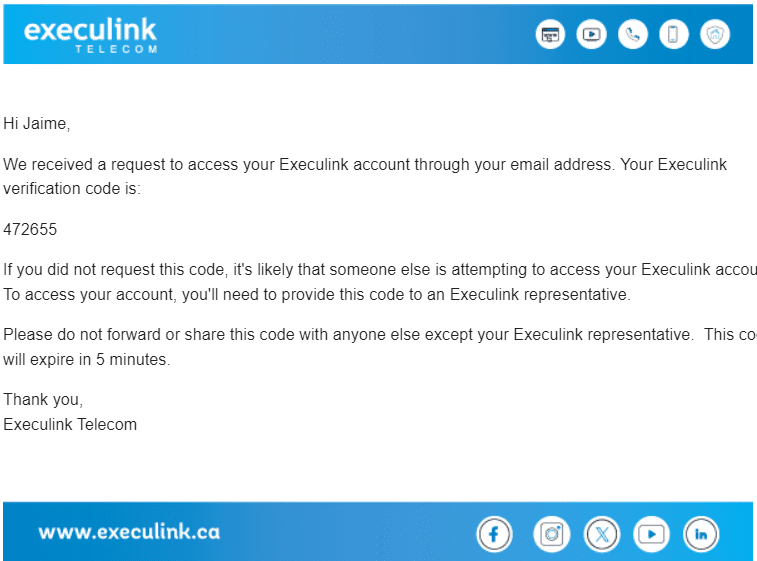
Enable Two-Factor Authentication (2FA): Two-factor authentication is one of the most effective ways to secure your online accounts. Even if someone obtains your password, 2FA adds an additional layer of security by requiring a second form of verification, such as a one-time code sent to your phone. Make sure 2FA is enabled on your email, banking, and social media accounts. We’ve made 2FA mandatory for our customers, ensuring that your login is protected by more than just a password.

Use Strong Passwords and Change Them Regularly: One of the simplest yet most overlooked security measures is creating strong passwords. Use a combination of uppercase and lowercase letters, numbers, and special characters. Avoid using easily guessable information like birthdays or common words and remember to change your passwords regularly. At Execulink, we’ve enforced enhanced password requirements to make it harder for cybercriminals to access your accounts.

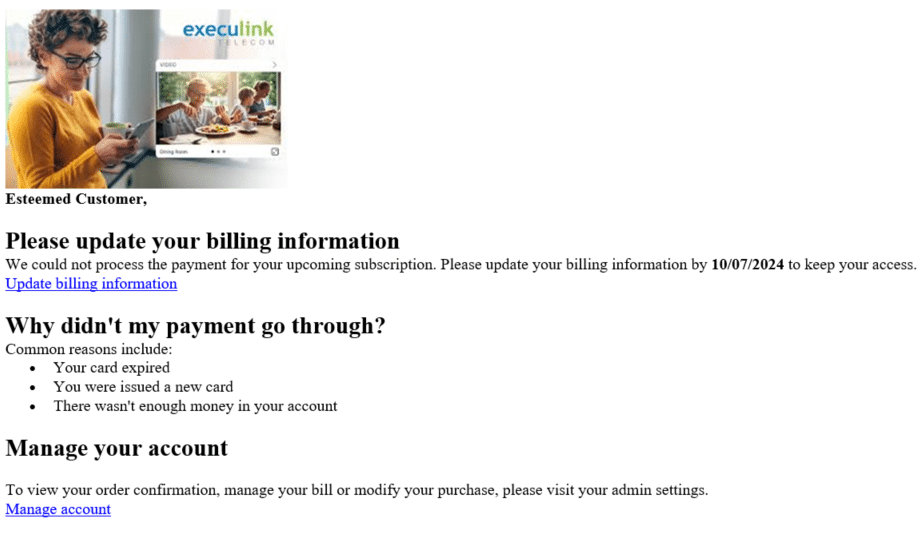
Beware of Phishing Attacks: Phishing is one of the most common cyber threats where attackers attempt to trick you into revealing personal information. Be cautious of emails or messages from unknown sources, especially those that ask you to click on links or download attachments. If an email looks suspicious, verify the sender’s identity before taking any action. If you receive any phishing emails, like the example below, please follow these steps to report them to us.

Update Your Software Regularly: Keeping your software and devices updated is crucial to protect against new vulnerabilities. Regular updates often contain security patches that fix known threats. Whether it’s your smartphone, computer, or web browser, ensure that automatic updates are enabled.

Secure Your Wi-Fi Network: An unsecured Wi-Fi network can be a goldmine for hackers. Always use a strong password for your home network, and consider changing it periodically. Additionally, turning off Wi-Fi access for devices that aren’t in use can reduce your exposure to cyber threats.

This Cybersecurity Month, take the time to review your security practices and make improvements where necessary. Together with our built-in security measures, you can enjoy the Internet with greater confidence, knowing that your data is safe from harm.

Humans of Execulink: Shannon Buelow


Meet Shannon Buelow, a seasoned leader at Execulink Telecom with 16 years of experience. As a Community Sales Supervisor, Shannon oversees a dynamic team involved in both storefronts and sales, focusing on community engagement and customer advocacy. With a proven track record in driving sales initiatives and spearheading projects, including Execulink’s largest Fibre build in Strathroy, Shannon’s dedication to enhancing customer experiences and supporting her team is at the heart of her work.

Heading into the busy holiday season, we asked Shannon to share her best tips for businesses preparing for this critical time of year. Here’s what she had to say:

What’s your favourite tip for businesses to get ready for the busy holiday season?

  • Kick off promotions early, tighten up your sales calendar, and make sure customer service, shipping, and fulfillment are all set. This keeps things running smoothly and helps you keep customers happy, building loyalty during the holiday rush.

Why is customer experience so important during the holidays?

  • Customer experience matters even more during the holidays because it’s a busy, high-pressure time for both businesses and shoppers. People are usually stressed, trying to meet deadlines, and expecting things to go smoothly without any hassles.

What’s one thing businesses often overlook when preparing for the holiday rush?

  • Staffing. Your team needs extra support to keep up with the workload. Having enough trained people makes a big difference in keeping things running smoothly and giving customers a good experience.

How can small businesses make their customers feel special during the holiday season?

  • Personalized communications like ‘thank you’ notes, unique gift wrapping with a holiday theme, host in-store events like workshops or meet & greets, and showcase local products/artisans.

What’s one way Execulink helps businesses stay connected and efficient during the holidays?

  • Execulink provides flexible communication and high-speed internet solutions that easily adapt to the extra traffic during the busy holiday season. Plus, we have backup options to keep businesses connected, even if there’s a disruption or outage.

As businesses gear up for the holiday season, Shannon’s insights highlight the importance of preparation, personalized customer care, and efficient operations. With Execulink’s reliable communication and internet solutions, you can ensure your business stays connected and responsive when it matters most.

Contact Execulink Today to learn how we can support your business this holiday season.

Fall TV 2024 Must-Watch List

As the leaves begin to change and the air turns crisp, fall TV season is officially upon us, bringing with it a fresh lineup of must-watch shows. Whether you’re in the mood for a gripping drama, a lighthearted comedy, or the return of some fan favourites, this fall promises something for every type of viewer.

Here’s the fall 2024 TV must-watch list:

Sunday

Fight Night: The Million Dollar Heist (Showcase at 9pm) – Showcase is on free preview Oct 1-31st!

Outrageous Pumpkins (Food Network at 10pm)

Rock Solid Builds (HGTV at 10pm)

The Secret of Skinwalker Ranch and Beyond Skinwalker Ranch (History at 9pm)

Forbidden Love (TLC at 10pm)

90 Day Fiance: Before the 90 Days (TLC at 8pm)

Sister Wives (TLC at 10pm)

Inside Taronga Zoo (Animal Planet at 8pm)

The Walking Dead: Daryl Dixon (AMC at 9pm)

Europe From Above (National Geographic at 9pm) – New season starts October 27th

Industry (Crave at 9pm)

The Penguin (Crave at 9pm)

Monday

Rescue: HI Surf (CTV at 7pm)

Below Deck Sailing Yacht – New Season starts Oct 7th (Bravo)

Halloween Baking Championship (Food Network at 9pm)

True Crime News (Slice at 8pm)

To Catch a Smuggler (National Geographic at 9pm)

90 Day Fiance: The Other Way (TLC at 8pm)

The Traitors Canada (CTV at 10pm)

Paris Has Fallen (CTV Drama at 9pm)

Insomnia (CTV Drama at 10pm)

Poppa’s House (Global) – New comedy series starts October 21st!

Top Chef Canada (Food Network at 10pm) – New season starts October 14th

Tuesday

Murder in a Small Town Season 1 (Global at 9pm) – moves to Wednesday nights on October 15th

Deadman’s Curse (APTN at 8pm)

The Real Housewives of Beverly Hills – New Season starts Nov 26th (Bravo)

American Sports Story (FX at 10pm)

Ray Winstone’s Sicily (TLN at 9:30pm) – TLN is on free preview Oct 1 to Dec 31st!

Gold Rush Mine Rescue with Freddy and Juan (Discovery at 10pm)

High Potential (CTV at 10pm)

Hysteria! (Showcase at 9pm) – New series starts October 22nd

Wednesday

The Real Housewives of Salt Lake City (Bravo at 9pm)

Grotesquerie (FX at 10pm)

The Golden Bachelorette (Citytv at 8pm)

Outback Opal Hunters (Discovery at 8pm)

The Ark (CTV Sci-Fi at 10pm)

Dark Side of Comedy (Much at 10pm)

Survivor Season 47 (Global at 8pm) – started September 18th

How (Not) to Get Rid of a Body (Investigation Discovery at 10pm)

The Masked Singer (CTV at 8pm)

The Challenge (MTV at 8pm)

Hoarder Houses Flippers (HGTV at 9pm) – New season starts October 30th

Snakes SOS: GOA’s Wildest (National Geographic at 9pm) – New series starts October 23rd

Thursday

911 Season 8 (Global at 8pm)

Mr. Throwback (Showcase at 9pm)

Mr. Bigstuff (Showcase at 9:30pm)

House of Ali (HGTV at 10pm)

Rick and Morty: The Anime S1 (Adult Swim at 12am)

Creepy Cinema, co-hosted by Mario Cantone (TCM at 8pm)

Southern Charm – New season starts Dec 5th (Bravo)

The Old Man (FX at 10pm)

Gem Hunters Down Under (Discovery at 10:15pm)

Doctor Odyssey (CTV at 9pm)

Grey’s Anatomy (CTV at 10pm)

Jersey Shore: Family Vacation (MTV at 9pm)

Matlock (Global at 9pm)

Friday

Defending Europe (National Geographic at 9pm)

Making Change: The Most Significant Political Films of All Time (TCM at 8pm)

Celebrity Family Feud (Game TV at 8pm)

My Haunted Hometown (T+E at 10pm) – T+E is on free preview until Nov 3rd!

Ru Paul’s Drag Race: Global All Stars (Crave)

Saturday

Uzumaki S1 (Adult Swim at 12:30am)

Have I Got News for You (CNN at 9pm)

Other Specials

2024 Shocktober Premieres (Hollywood Suite) – Starting Oct 1st

Hallmark channel’s fall into love (W Network) – Saturdays and Sundays until October 13th

Hallmark channel’s Countdown to Christmas (W Network) – Starts October 18th

Secret History: Women Warriors (APTN)

Stingray Music AMA’s – Oct 1-31st

NHL season (Sportsnet and TSN) – Starts October 8th

MLB Post Season (Sportsnet) – Starts October 1st

NFL Sunday afternoon games (CTV and TSN)

House of the Dragon (Entire season on Crave)

From dramas to comedy to sports, there are lots of awesome programs to watch this fall. To add new channels to your Link TV lineup visit your MyExeculink account! To sign up for TV service or learn more, visit our webpage here.

National Preparedness Month: How Execulink Smart Home Can Keep Your Home Safe

September is National Preparedness Month, the perfect time to make sure your home is ready for whatever comes your way. With the rise in severe weather, power outages, and unexpected emergencies, it’s more important than ever to take steps to protect your family and property. Execulink’s Smart Home can help you do just that! From added convenience to enhanced safety, our Smart devices are designed to keep your home secure and your mind at ease when it matters most.

Here’s how they can make a difference in an emergency:

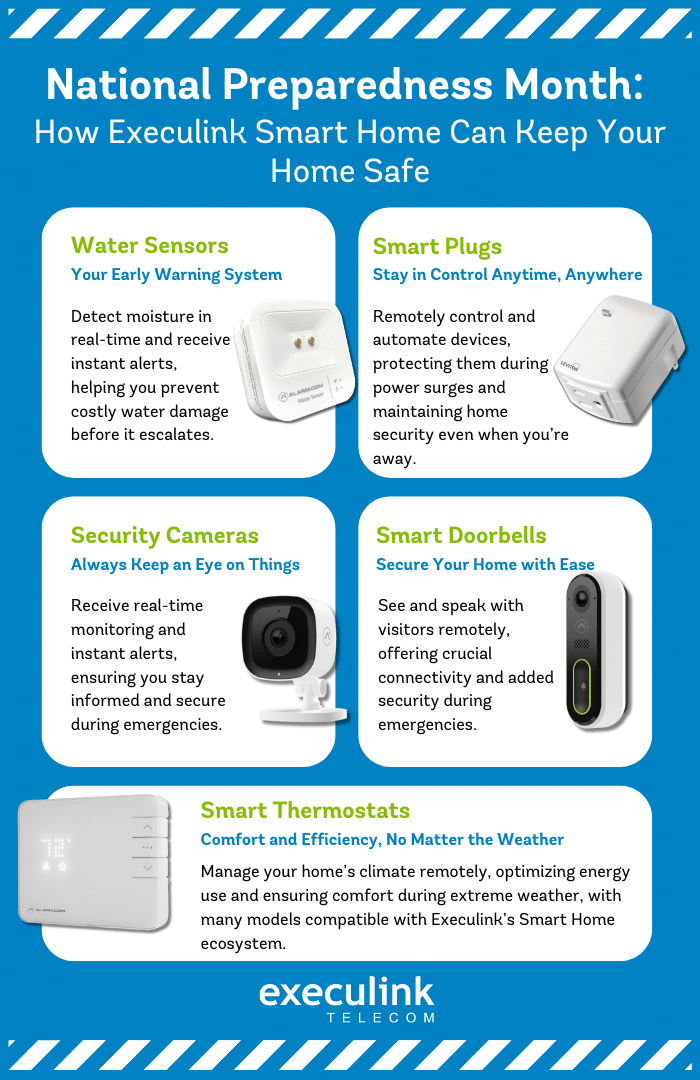
Water Sensors: Your Early Warning System

Water damage can be a nightmare for homeowners, leading to expensive repairs and stress. Whether it’s from a burst pipe, a leaky appliance, or a flooded basement, catching the problem early is crucial. Execulink’s Smart Water Sensor can help by detecting moisture in real-time and sending instant alerts to your phone. This means you can take quick action before a small leak turns into a big disaster. Place these sensors in spots like basements, under sinks, or near washing machines to stay ahead of potential issues.

Smart Plugs: Stay in Control Anytime, Anywhere

When the power goes out or surges, it is important to protect your devices from potential damage. With Execulink’s Smart Plug, you can remotely turn off or on any plugged-in devices, ensuring everything stays safe during an emergency. Plus, you can automate your devices to keep things running smoothly, even if you’re not home. For instance, set your lights to turn on at dusk to give your home a lived-in look and keep burglars at bay.

Security Cameras: Always Keep an Eye on Things

In an emergency, knowing what’s happening around your home is crucial. Execulink’s Smart Security Cameras let you monitor your property in real-time, no matter where you are. Whether you’re checking in during a storm or ensuring first responders have access, these cameras provide peace of mind when you need it most. With motion detection and instant alerts, you’ll always know if something unusual is going on.

Smart Doorbells: Secure Your Home with Ease

Execulink’s Smart Doorbells let you see and speak with visitors from anywhere, making them vital during emergencies. Whether you’re out and need to communicate with a delivery person or even emergency personnel, a smart doorbell keeps you connected. It’s also a great way to deter potential intruders, adding an extra layer of security when you need it most.

Smart Thermostats: Comfort and Efficiency, No Matter the Weather

Extreme weather can put a strain on your heating and cooling systems. Smart Thermostats allow you to manage your home’s climate from anywhere, keeping your home safe and comfortable no matter what. Whether you’re preventing pipes from freezing in the winter or keeping things cool in a summer heatwave, you’ll stay in control. Plus, these thermostats help you optimize energy usage, which is especially handy during power-saving efforts. There are also many compatible smart thermostats that can integrate seamlessly with Execulink’s Smart Home ecosystem. To see a list of compatible devices, click here.

Being prepared isn’t just about having a plan—it’s about having the right tools. Execulink’s Smart Home devices offer a comprehensive approach to home safety and emergency preparedness. As we mark National Preparedness Month, there’s no better time to ensure your home is ready for anything.

Ready to get started? Visit our website today to explore our range of Smart Home products and boost your home’s safety and preparedness!

How Fast & Reliable Internet Enhances Remote Learning for Students

In today’s digital age, fast and reliable Internet is no longer a luxury—it’s a necessity, especially for students. The rise of remote and hybrid learning has revolutionized education, making the Internet a central part of how students access lessons, communicate with teachers, and collaborate with peers. As telecommunication services evolve, they play a crucial role in ensuring students have the tools they need to succeed, whether they’re attending classes from home, working on projects, or preparing for exams. In this blog, we’ll highlight the importance of a strong Internet connection for students and provide tips for choosing the right Internet plan for your household’s educational needs.


The Need for Speed: Why Fast Internet is Essential for Remote Learning

Whether it’s participating in live video lectures, downloading assignments, or accessing cloud-based educational tools, students require a high-speed Internet connection to stay connected with their classes. Slow or unreliable Internet can lead to dropped calls, buffering videos, and lagging during online exams—all of which disrupt learning and make it difficult for students to keep up.

Here’s how fast Internet supports a successful remote learning experience:

Smooth Video Conferencing: Platforms like Zoom, Microsoft Teams, and Google Meet are now standard for remote classes. A poor connection can lead to blurry video, choppy audio, or even complete disconnection from class sessions.

Quick Access to Online Resources: From research materials to e-textbooks, students need quick access to large files and cloud-based platforms. Slow download speeds can delay assignments and research, impacting a student’s ability to work efficiently.

Collaborative Tools: Many schools rely on collaborative platforms like Google Drive or Microsoft Office 365, where students work on shared documents and presentations. Slow Internet can lead to lag and students missing out on important information or making it difficult to complete work.

Multitasking and Device Usage: Today’s students often need to juggle multiple tasks, like streaming a lecture while accessing an online textbook or research article. Additionally, many households have more than one person using the Internet for school or work simultaneously. Fast Internet ensures that everyone can stay connected without performance issues.

Tips for Choosing the Right Internet Plan for Educational Needs

With remote learning in full swing, it’s crucial to choose an Internet plan that meets your family’s specific needs. Here are some key factors to consider when selecting the right plan for students:

Consider Bandwidth Needs: Bandwidth refers to the amount of data that can be transferred over an Internet connection in a given amount of time. For households with multiple students or where parents are also working from home, you’ll need more bandwidth to accommodate simultaneous activities. Look for plans offering at least 100 Mbps for smooth online learning and working, but if multiple devices are used heavily for video calls, you might need higher speeds, such as 300 Mbps or more.

Upload vs. Download Speeds: While download speeds are essential for streaming lessons and accessing resources, upload speeds are just as important for activities like turning in assignments, uploading large files, or presenting projects during live classes. If students are submitting video assignments or working with media-heavy projects, it’s a good idea to consider a Fibre Internet plan, which offers synchronous speeds (equal upload and download speeds), allowing for smooth uploads as well.

Unlimited Usage: Remote learning can be data-intensive, especially with high-definition video calls, streaming educational videos, and downloading large files. All Execulink plans have unlimited usage, ensuring that students can work without worrying about hitting a data cap and experiencing slower speeds for the rest of the month.

Reliable & Stable Connections: A high-speed plan is only useful if it’s reliable. Look for Internet providers that prioritize uptime and offer minimal downtime, as even brief outages during an exam or class session can be disruptive. Fibre Internet is the most reliable form of Internet service as it is delivered underground and is unaffected by inclement weather.

Benefits of a Strong Internet Connection for Students

Better Engagement: With a solid Internet connection, students can actively participate in virtual classes, ask questions, and collaborate with classmates without worrying about being disconnected.

Flexibility: Whether they’re attending a live lecture from home, participating in a group project on the go, or completing assignments from a family member’s house, a fast and stable connection ensures they stay productive.

Improved Performance: When students don’t have to worry about buffering videos, slow downloads, or dropped calls, they can focus on learning and performing their best, leading to better grades and more enjoyable learning experiences.

Access to Advanced Learning Tools: Enables students to leverage advanced educational tools, such as interactive simulations, virtual labs, and online tutoring platforms, which can enhance their learning experience and understanding of complex subjects.


Telecommunication services play a pivotal role in modern education by ensuring students have the connectivity they need for successful remote and hybrid learning. By choosing the right Internet plan—one that offers fast speeds, unlimited data, and reliable connections—parents can help set their students up for academic success. As remote learning becomes more integrated into the education system, investing in high-quality Internet is no longer an option, but a necessity for staying ahead in the digital classroom. Make sure to check out all Execulink’s Internet packages and plans to ensure your students have an awesome online learning experience.

Getting the Most Out of Your Business Phone System: Features You Didn’t Know You Needed


Do you even know what your business phone system could be capable of? If you’re like many business owners, you might only be scratching the surface. Despite the clear benefits of upgrading, many Canadian businesses still rely on outdated legacy phone systems, missing out on features that could save time, money, and boost customer satisfaction. Your phone system is more than just a tool for making calls—it’s a powerful asset that can streamline operations, enhance customer service, and keep your team connected. But are you using it to its full potential?

Execulink Telecom’s business phone solutions are packed with features that can help you work smarter, not harder. Let’s explore some key features that you might be missing out on—and how they can make a real difference for your business.

  1. Call Analytics and Reporting: Make Smarter Decisions with Real Data

You can’t improve what you don’t measure. Execulink’s Business Cloud Contact Centre gives you access to call analytics that show what’s happening behind the scenes. Track call volumes, identify peak times, and monitor how long customers are waiting.

By using these insights, you can make data-driven decisions. For example, if calls spike on Monday mornings, you can schedule more staff to handle the rush. If certain issues keep cropping up, you can address them proactively. It’s all about using real data to make adjustments that keep your business running smoothly and your customers happy.

  1. Virtual Receptionist and Automated Attendants: Keep It Professional Without Extra Staff

Handling every call with a personal touch is great, but not always realistic, especially for small teams. That’s where Execulink’s Premium Attendant comes in. Acting like a virtual receptionist, it greets callers, provides options to direct their calls, and ensures they reach the right person without delay.

This feature operates 24/7, so even after hours, your business remains accessible. Whether directing calls to the correct department or handling simple inquiries, this feature maintains a professional image and ensures no caller feels ignored—key factors in building trust and satisfaction with your customers​.

  1. CRM Integration: Know Your Customers Better

Great service starts with knowing your customers. Execulink’s Business Cloud Contact Centre integrates with CRM tools like Salesforce, allowing your team to see key customer details right when they answer a call. No more fumbling for information or asking repetitive questions—just seamless, personalized service from the first hello.

For instance, when a regular customer calls, your agent can instantly see their history, past issues, or current orders, making interactions smoother and more meaningful. This kind of integration not only saves time but also makes your customers feel valued and understood—a significant factor in customer retention.

  1. Advanced Call Management: Don’t Miss Important Calls

Missing a call can mean missing out on business. Execulink’s Advanced Call Management features ensure you stay connected no matter where you are. With Find Me/Follow Me, calls can be forwarded to multiple numbers in sequence—from your office phone to your mobile and even your home phone.

Simultaneous Ringing lets calls ring on multiple devices at the same time, so the first available person can answer. During busy times, Call Queues keep customers informed and engaged instead of sending them straight to voicemail, ensuring a better caller experience and maximizing every chance to connect​

  1. Voicemail to Email and Unified Messaging: Stay on Top of Messages Anywhere

You’re not always at your desk, but you still need to stay on top of messages. Execulink’s Voicemail to Email feature sends voicemails directly to your email, so you can listen from any device—whether you’re on your computer, phone, or tablet.

With Unified Messaging, all your communications—calls, voicemails, emails—are in one place. This keeps things simple and ensures you’re always up-to-date, making it easier to respond promptly and keep business moving, no matter where you are or what you’re doing.

  1. Real-Time Collaboration Tools: Help Your Team Work Better Together

Keeping your team connected is crucial, especially if you have remote workers or multiple locations. Execulink’s Business Cloud Contact Centre includes tools like Inter-Agent Chat, Live Call Monitoring, and Whisper Coaching, which make real-time collaboration easy.

Managers can listen in on calls, provide guidance without interrupting, or jump in when necessary. These features are great for training, supporting team members in real-time, and maintaining high service standards across the board. It’s about making sure your team is always supported and equipped to provide the best customer experience possible.

Make Your Phone System Work Harder for You

Your business phone system is more than just a way to make calls—it’s a strategic tool that can help you run your business better. By taking advantage of advanced features like call analytics, virtual receptionists, CRM integration, and real-time collaboration tools, you can turn your phone system into a powerful ally in your day-to-day operations.

Execulink Telecom is here to help you achieve the full potential of your phone system. If you’re ready to see what your system can really do, get in touch with us today. Let’s make your phone system work as hard as you do.

Ready to explore the full capabilities of your business phone system? Contact Execulink today to get started or visit our Voice Solutions page to learn more.

Explore More Features:


Case Study: Enhancing Home Security with Execulink’s Smart Home Services

From K9 to Cameras: A Transition in Home Security

Les B., a widower and retired Police officer from the Tillsonburg OPP Detachment and the Ontario Police College, had relied on a German Shepherd for home security for over 12 years. With the passing of his dog and living alone, he felt the need for additional security measures to ensure peace of mind.

Motivation and Decision-Making Process

Les was motivated to explore Smart Home solutions after seeing an ad from Execulink. Given his new circumstances and need for enhanced home security, he decided to investigate further. His decision to choose Execulink’s Smart Home was greatly influenced by the friendly and informative staff at the Tillsonburg office, who provided clear answers to all his questions and was a reassuring presence throughout the process. Additionally, interacting with and viewing the interactive Smart Home display at the Tillsonburg office, which allowed him to explore the features and benefits firsthand, played a key role in his decision.

Installation and Setup

The installation process was described as efficient, seamless, and well-executed. Les had high expectations based on his discussions with the Execulink team, and these were met during the setup.

Benefits and Impact

Within three days of installing the Smart Home system, Les’s cameras captured footage of a stolen vehicle near his home. The recordings were instrumental in helping OPP investigators track down details of the incident. Les, with his background as a retired police officer, was particularly pleased to see the system in action, providing crucial evidence and enhancing his sense of security.

He also noted the ability to monitor who comes and goes from his home, which has further contributed to his peace of mind, especially when he is away or during the night.

Usability of the Smart Home App

Despite not being tech-savvy, Les found the Smart Home app fairly simple to use, which added to his overall positive experience.

Overall Experience

Les has been a loyal Execulink customer since the early days of North Norwich Telephones Limited and continues to highly recommend their Smart Home services. He frequently shares the benefits with his neighbors, encouraging them to consider Execulink for their own home security needs. Les values the peace of mind that Execulink’s reliable service provides, day and night, and appreciates the friendly, local support that truly sets them apart from big-name competitors. As Les puts it, “I have been with Execulink almost from the beginning and have been wooed by [the competition] many times, but they cannot compare to my experiences with Execulink. I like it local with people who care and understand my needs!”

Les B.’s experience with Execulink’s Smart Home highlights how comforting and effective a good home security and monitoring system can be. Thanks to the friendly support from our Tillsonburg office and the smooth installation process, Les now enjoys the peace of mind he was looking for. His story shows how Execulink helps make homes smarter and safer, and why he’s become a loyal advocate for our services. It’s a great example of how choosing a local provider can offer personalized care and reliable security that truly meets your needs.

The Internet Services You Deserve
Affordable. Reliable. Lightning fast.

We’re proud to provide the communities we know, love, and live in, with the reliable Internet, TV, Phone and Mobility services they deserve.

  • Your local choice for residential and business telecommunication services
  • Renowned 24/7 customer service you can depend on
  • Affordability, service, integrity and transparency are the pillars of our business

Here to help. 24/7.

Sales Inquiries

Sales: Mon-Fri 8AM-8PM, Sat 8AM-5PM

(866) 706-1991

Support Inquiries

Technical Support: 24/7, Customer Care: Mon-Sun 7AM-11PM

(866) 706-1994

Online Help

Chat With Us

We'll respond as soon as we can!

Email Us

We'll get back to you as soon as possible.

Support Centre

Find the answer to your question.

Check availability

Enter your address to find services and offers available to you!