A Complete Guide to Execulink’s Fibre Installation and Construction Processes

Fibre to the Home is the delivery of a communications signal over optical fibre, brought directly to your home or business. Fibre’s underground infrastructure allows for a more reliable and more secure Internet experience, with some of the fastest speeds in Ontario!

We’re proud to deliver Fibre to thousands of homes in communities across Southwestern Ontario. If your neighbourhood is included in one of our builds, you’re probably wondering what to expect over the next few months. We’ve got you covered! To help you prepare for the upcoming Fibre activities in your area, check out our step-by-step overview below!

Planning:

Before we can begin construction in your neighbourhood, we first have to assess the area and obtain permission from the town to begin building. If your home is located in a multi-dwelling unit (apartment or condominium) or on a private road, some additional work may be required to obtain permits.

Our contractor will mark your property with coloured paint or flags to identify any underground utilities such as gas (yellow), water (blue), hydro (red), or cables (orange), so you can rest assured they are not damaged during the construction phase. A pink paint line on the road indicates the side of your house where we will be stubbing the Fibre pipe.

Construction:

Our construction team, Weber Contracting, will begin building Fibre in your neighbourhood. They use horizontal directional drilling and hydro extraction, which are minimally invasive and trenchless methods used to bury the Fibre cables underground along your street. If you live on a road with no sidewalk, a non-invasive plow machine is used to install the Fibre cables underground through the ditches.

You may notice orange or grey pipes sticking out of the ground, this is temporary and once we install underground access vaults, the pipes are buried, spliced, and then redirected to each property.

Please note: If we need to build across an underground gas or hydro utility, a small hole will be cut in the ground to view our progress and ensure nothing is damaged. We are committed to patching up these holes as quickly as possible, or if necessary, temporarily covering them with plywood and a pylon for safety reasons.

Pre-wire & Site Survey:

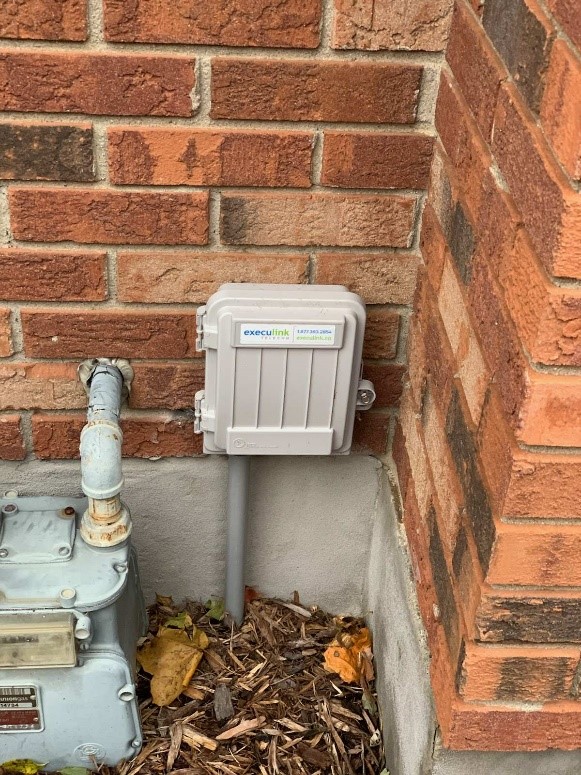
At the pre-wire/site survey appointment, a technician will visit to determine the best location to connect the Fibre build from the road to your home. A small grey box will be mounted on the side of your house; its job is to connect the Fibre outside to your internal home wiring.

During this time, we will also identify any additional underground utilities on your property, such as sprinkler systems, electric dog fences, and wires, and mark them with coloured flags so they are not damaged during the installation process.

Installation:

Once the Fibre network becomes active in your community, your home is ready to be installed! At the installation appointment, a technician will return to your home to connect the Fibre build from the road to the small grey box placed on the side of your house during the pre-wire/site survey. Then we will connect the Fibre internally at your hydro panel, utilizing your existing home wiring. This is also, where we will mount the ONT (Optical Network Terminal) and any other hardware required to service your home.

Finally, a modem/router will be installed on the main floor to ensure the best coverage throughout your home.

In some cases, we will need to run temporary Fibre line above ground from the street, directly to your home to provide you service as quickly as possible.

Cleanup:

Your lawn is in good hands! Although our construction and installation processes may require us to dig on your property, you can rest assured that we are committed to cleaning up our mess to your satisfaction. This means refilling any outstanding holes and repairing all areas of your lawn that were disturbed, with topsoil and grass seed.

Please note: Grass seed requires optimal weather conditions and time to settle before it is fully established. Please be patient and allow Mother Nature sufficient time to work her magic before you can expect a full restoration of your property.

For questions about our Fibre process or if there is an immediate safety concern, please contact us at 1.866.765.2282 or email weconnect@execulinktelecom.ca.

Click here to learn more about Fibre!

When to Invest in a Private Wide Area Network (PWAN)

As businesses grow they often expand with new locations in different cities, states, countries or even continents. A growing business is a great achievement but as it grows you need more bandwidth to handle more data quickly and securely across greater distances. With offices and branches separated geographically you need the ability to communicate, share resources and interconnect with your customers, partners, buyers and suppliers. To do this seamlessly organizations rely on a secure and reliable network for the exchange of their sensitive data and delivery of services and applications between sites.

Business Networks

Networks are the backbone of businesses today that enable the interconnectivity and support of different types of applications, devices, and people within a single-site organization situated in one place or multi-site locations spread across the globe. What type of network your business needs will depend on the size of your organization and requirements. Multi-site locations that are geographically spread apart require a Wide Area Network or WAN to stay connected. Let’s take a deeper look into a WAN.

Wide Area Network (WAN)

A Wide Area Network connects Local Area Networks (LAN) and other types of networks together across a larger geographic area. A WAN allows organizations with offices in distant locations to transmit data between networks. It’s designed to interconnect, communicate and share resources from site-to-site, centralizing your company’s IT infrastructure. This allows your employees to access data and connect devices as if they were all in the same place.

Public and Private-WAN

There are two options when choosing a WAN for your multi-site business – Public and Private-WAN. A WAN commonly utilizes the Internet, which is a public network to form a connection. While this is a viable option, public networks are more vulnerable to cyber-attacks, delays, and disconnections due to sharing with the wider population. If you are a multi-site organization that hosts and shares business-critical data connecting through a public network may not be ideal. In this case, a Private Wide Area Network (PWAN) may be the right choice.

What is Private Wide Area Network (PWAN)?

Private-WAN is a Wide Area Network that uses a dedicated connection that prioritizes private Internet traffic and data between multiple locations with a secure path for the exchange of information, delivery of services and applications without risking security and reliability.

If your organization operates or plans to operate a multi-site business in geographically dispersed locations, and you need to secure your business data, PWAN was specifically designed to deliver privacy, centralized networks and boost business productivity.

When investing in a Private-WAN, it’s important to look at the key features provided by your network provider to ensure you are getting the reliability and security your business needs. Execulink’s Private-WAN is a high-quality, high performance and fully managed private network solution. Businesses can quickly expand and connect new and existing networks from their head office, branch sites, and data centers into a single, secure solution. As their organization expands and migrates to cloud and managed services they get the uptime, reliability, and flexibility they need regardless of their site locations. Check out the features and benefits of Execulink’s Private-WAN solution below.

Features and Benefits of a Private Wide Area Network

­­­­Security

Secure your data in transit

Organizations are challenged with putting safeguards in place to protect their valuable digital information. However, the reliance on internet and networks in today’s business environment means an ever-increasing risk of network intrusion and data loss. As data zaps around the globe in milliseconds, do you really know if your data is secure? PWAN encrypts and secures your data in transit.

Private-WAN: encryption protects your data

Encryption is the most important privacy preserving technology available. It protects your data when it’s sitting on your computers and when it’s being delivered around the internet. Implementing encryption is essential and Execulink offers DTLS in two cipher strengths – AES128, and AES256 to guard the packets that pass over your various network connections.

In addition to standard encryption, Private-WAN technology distributes packets across multiple Internet connections. The data packets from the LAN are distributed across all available circuits. Even if an attacker manages to intercept the packets on one of your individual Internet connections, only a small fragment of the entire traffic stream can be captured. The packets are re-combined in the Private-WAN head-end and the combined traffic is authenticated by the receiving server with a hash-based message authentication code (HMAC, from RFC2104). This ensures an attacker can’t intercept, modify, or forge messages sent between your sites.

­­­­Cost Control

PWAN reduces costs using commercial broadband connections. Execulink Private-WAN combines any existing carrier circuits into a single over-the-top virtual network that delivers faster download and upload speeds at a cost-effective price. Eliminate un-used “backup circuits” and use all-the-circuits-all-the-time for better ROI. Link aggregation from Private-WAN increases speeds, and delivers built-in failover and redundancy.

Reliability & Failover

Keep productivity flowing with no downtime?

When your network or internet connections degrade or fail and voice and video calls drop, your employees become frustrated, and your customer experience suffers. Businesses need internet and data networks that respond gracefully to inevitable connectivity issues.

Reliability with failover

Combine multiple internet connections (regardless of provider or type) to create reliable network connectivity. If one connection degrades or goes offline, your data will continue to flow to its destination uninterrupted. When the problem connection is fixed, the system automatically adds it back. No re-configurations or specialists are required. It’s that simple.

Take your internet to the next level

With robust reliability, businesses can provide customers and staff with near 100% uptime, regardless of branch or office location. Execulink gives you the confidence to run your business without the risk of downtime. This always-on feature lets you create the network that’s right for your business and save you time and money in the process.

Availability

The ability to easily add users and nodes regardless of geography is a must to future-proof your WAN and meet ever-increasing expectations. PWAN makes corporate applications, like data backup, available at all branches.

Monitoring and Management

See the Big Picture

Private-WAN gives you the ability to monitor and manage the networks that customers use to connect to your managed services. Proactively monitor network statistics and respond in real-time to keep your customers happy. Identify and resolve network issues that impact end-user experience and satisfaction. Reduce trouble-tickets and time to resolution.

If your business is growing and you have expanded or plan to expand your branches across multiple locations it might be time for you to invest in a WAN. If your sites need to be able to share sensitive data without storing it over the internet and still operate efficiently without delay and disruption, a Private-WAN is an effective and fool-proof technology.

Execulink’s Networking Solutions and full suite of business services will help you drive productivity, increase efficiency and keep your employees and co-workers connected no matter where they are. Call us at 1-877-561-6771 today or visit our Networking Solutions page to find the right networking solution for your business.

Check out Execulink’s Private-WAN Solution Today!

Build a Healthier Business in 2022 with the Right Technology

If there is anything the past couple of years has taught us, it is definitely that the importance of technology in business cannot be understated. For many, moving their business services to a digital form or updating their current technology helped them adapt to the changing economic challenges so they could maintain their operations and continue to service their customers. Without technology, many more businesses would have been forced to close all or part of their business.

The pandemic certainly brought on many challenges for businesses to overcome, but it also accelerated the adoption of technology. More business owners and decision-makers realized the power of modern technology and now truly understand the benefits to their organization.

Technology could be considered the wheel that keeps your business spinning. The right tools can help streamline processes, increase efficiencies, drive your strategy and growth while giving you a competitive advantage. In today’s landscape, it is almost impossible to do business without modern technology and tools. More and more organizations are moving to remote and hybrid work models which heavily rely on Internet connectivity, network solutions, and collaboration or project management tools to keep dispersed teams connected and centralized no matter where they are.

Below we have highlighted some essential tools that should be considered to help you build a healthier business in 2022.

Internet Connectivity

Internet

The Internet is the backbone of a company’s operations and this was definitely highlighted at the start of the pandemic when organizations were forced to close and limit in-person activity. Businesses had to accommodate remote working and many had to shift their current operations with new or updated technology to continue to serve their customers. Internet provided them with the flexibility and agility they required to adapt to the new normal.

When shifting to remote and hybrid work models Internet connectivity is the first priority. With employees now working at-home their at-home workspace now has to function as an extension of the company office. This requires connectivity solutions that have the ability to keep up with their competing network usage since in many cases they may be sharing the network with their spouses and kids. To improve communications and maximize productivity employees will need enough bandwidth and speeds to be able to access and deploy the business applications and services they need. Business-grade and Dedicated Internet solutions will provide a strong foundation that will help to sustain a seamless remote and hybrid work model, reducing lag time and increasing download and upload speeds.

To ensure network connectivity, providers like Execulink also offer solutions to help maximize speed and reliability and offer a network connection if your primary Internet goes down. Hybrid Bonded Internet and LTE Backup can enhance your connection and give you peace of mind.

LTE Backup Solution

Having your business’ Internet go down will halt your operations, but it could also affect your bottom line or your company’s reputation.  Although different Internet types have varying degrees of reliability, no Internet hardware is 100% immune to severe weather, construction accidents, or cyber-attacks.  Any of these things could leave your essential business tools like point-of-sale computers practically useless. Having an LTE Backup solution is an excellent choice to maintain your network to avoid interruptions. It’s a hardware solution that can get you back up and running seamlessly.

Execulink’s LTE Backup solution uses a cellular gateway coupled with a SIM card to provide an alternate method of access to the Internet using Mobile networks.  The failover kicks in when your primary connection goes down so that you never have to worry about downtime again. It’s perfect for businesses that require 24/7 Internet to function and it will keep your devices connected.

Hybrid Bonded Internet

Successful emergent innovations in the digital business landscape have become a daily occurrence. The “Internet of Things” is swiftly becoming the new milestone for growth, sustainability, and success for businesses – with uptime, bandwidth, and quality of service playing an essential role for prosperity and profit.  Whether your business needs consistent uptime, better quality bandwidth, or confidence in your overnight backup, Hybrid Bonding can make those needs a reality!

Hybrid Bonding utilizes services such as DSL, Cable, Wireless, Fibre, or even Mobile Data and bonds multiple lines into a single managed access. Whether it’s Fibre with Cable, multiple DSL lines, or a combination of all of the above; the bonding hardware brings together these services to provide a high quality, single-IP, redundant solution for your business.

Wi-Fi

Strong, reliable business Wi-Fi connectivity is more important now than ever before, whether you work out of your home or in the office. Businesses require flexibility and Wi-Fi gives them the freedom to access the Internet from anywhere within the signal range. It allows users to move their devices around without losing connection and access other devices that are connected to their network. The mobility Wi-Fi offers to your employees will drive employee productivity and collaboration.

There are obvious benefits of having Wi-Fi internally to conduct business but benefits extend to your customers as well. Offering Wi-Fi access to your customers when they visit your business will increase your customer experience and satisfaction, while also increasing your sales.

Execulink’s Complete Wi-Fi Solution, the Premium Router, and Mesh Wi-Fi Node have the technology built in to overcome connection issues in smaller spaces like your home office. This router and node combination allows for a higher quality Wi-Fi signal in your home or business with faster speeds, improved Wi-Fi coverage, and increased stability for video calls.

Creating a strong Wi-Fi connection in a larger business setting is possible with Access Points. Execulink uses Ubiquiti Access Points to increase coverage beyond 1000 sq. ft. This is useful if you have a voice-over IP solution, you can walk around the whole building without any dropped calls.

Unified Communications

As businesses continue to adjust to the new normal, they are increasingly seeing the value in reliable communications systems that can adapt to their changing business needs. Now more than ever, it’s important to have the right business phone systems in place. As a primary source of communication between your employees, co-workers, and customers, if the phone system goes down or cannot adapt, it will have a massive impact on your productivity, customer satisfaction, and brand reputation.

Direct Routing for Microsoft Teams

Microsoft Teams is a collaboration app within the Microsoft 365 suite of software and services. It’s designed for teamwork that combines instant messaging, voice, video, and file-sharing in real-time. With the number of employees now working remotely and communicating across different locations, many businesses are adopting Microsoft Teams and their advanced voice and calling features.

Calling was introduced in 2018 as a new communication feature enabling organizations to use their Teams platform as their primary business phone system with full PBX voice calling capabilities. By adding voice and PBX capabilities to Teams it allows businesses to standardize their voice services across all regions to lower costs, reduce complexity, and provide a consistent experience.

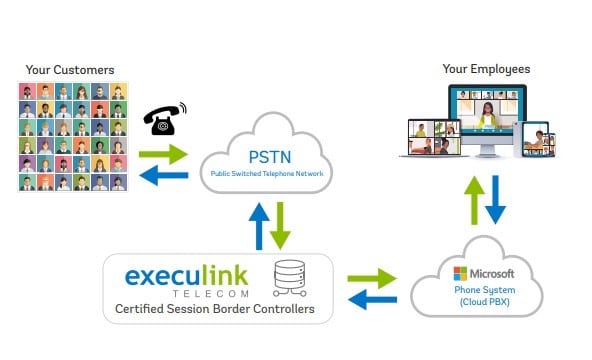
Execulink’s Direct Routing enables voice connectivity between your customers and employees through access to the PSTN (Public Switched Telephone Network) with the help of a secure, hosted Session Border Controller. Certified Session Border Controllers are a firewall for VoIP and provide a layer of security and protection from attacks, breaches, and Distributed Denial of Service (DDOS) while providing Quality of Service (QoS) between multiple networks. Unlike other providers, Execulink leverages a geographically redundant SBC network hosted on Canadian soil to connect to a Microsoft Teams PBX.

There are many benefits of Direct Routing but many businesses opt for Direct Routing over Microsoft Calling Plans because it enables customers to choose their own telecom provider to host their PBX, allowing for greater affordability and flexibility with calling plans.

Hosted PBX

A Hosted PBX (Private Branch Exchange) is an Internet-based or cloud-based phone system that is hosted off-site. It allows you to make calls using the Internet rather than relying on copper wires or fibre optics to make a connection as many traditional analog phones do. Your phones are physically on-site, but they connect to secure cloud servers through a new or existing Internet connection.

Routing calls through the Internet allows for multiple/concurrent calls without worrying about individual lines. The potential number of concurrent calls is based on your Internet bandwidth. The better your bandwidth, the more calls you can have simultaneously. To give you an example, a typical voice DSL connection allows for 7-8 concurrent calls, whereas a Fibre voice connection can provide 100+.

A hosted phone service provider like Execulink can review your call capacity expectations with you and provide a dedicated voice connection so you never have to worry about how many “lines” you have!

Business Network Solutions

Networks are the backbone of businesses today that enable the interconnectivity and support of different types of applications, devices, and people within an organization. They are used to transmit, receive and exchange data, voice, and video traffic so employees, suppliers, and customers can share resources and communicate.  In today’s business landscape, organizations have moved to a remote or hybrid workplace, with employees communicating across different locations and even time zones. Networks can be used to link thousands of users within one organization or multi-site locations spread across the globe, giving them access to a centralized network as if they were all operating from one space.

Virtual Private Network

A Virtual Private Network (VPN) is a secure and reliable method of sharing information across multiple computer networks. With employees working remotely, they’re using their own personal networks rather than the protected network supplied by their organization. This creates an opportunity for sensitive data to be intercepted or stolen. Utilizing a VPN connects remote users through their business’ private network or a third-party VPN service, effectively avoiding the potential for data theft; anyone intercepting the encrypted data won’t be able to read it.

An additional bonus to Virtual Private Networks is the ability to access an organization’s Intranet and resources safely and from anywhere. If your company uses shared files or hosted resources, a VPN will allow connected users to access and utilize everything they’d usually be able to access while in the office.

IP-VPN

Internet Protocol Virtual Private Network (IP VPN) is very similar to a VPN, connecting to your main network across an ISP, but the main difference is that it uses multiprotocol label switching (MPLS) technology to prioritize Internet traffic and avoid public gateways to increase security. This guarantees that mission-critical applications always get the bandwidth needed while less important traffic waits in line.

Prioritizing Internet traffic will help to better serve VoIP, video conferencing, and cloud services. If your business has multiple employees and branches that require remote and secure access to your company intranet to share sensitive data, an IP VPN is a great solution.

Local Area Network (LAN)

A Local Area Network includes both wired and wireless connections (WLAN) that are designed around multiple users within a single building or between buildings in close proximity like schools and campuses. LANs connect groups of computers/devices and enables them to connect to web servers and internal servers so users can access, share files and resources over a single Internet connection.

Transparent Local Area Network (Transparent LAN)

A Transparent LAN Service connects multiple Local Area Networks through an Ethernet service so they can share the same network without complex protocol conversion, carrier equipment, or expensive dedicated facilities. Transparent LAN service can be configured in multiple configurations including point-to-point or multipoint-to-multipoint arrangements. It is designed to increase network manageability by making separate LANs look like one single network.

Wide Area Network (WAN)

A Wide Area Network is a bit more complex than a LAN. A WAN connects Local Area Networks (LAN) and other types of networks together across a larger geographic area. A WAN allows organizations with offices in distant locations to transmit data between networks, essentially allowing them to access data and connect devices as if they were all in the same place as long as they have access to the established WAN. It’s designed to interconnect, communicate and share resources from site to site, centralizing your company’s IT infrastructure.

Private Wide Area Network (PWAN)

There are two options when choosing a WAN – Public and Private WAN. A WAN commonly utilizes the Internet, which is a public network to form a connection. While this is a viable option, public networks are more vulnerable to cyber-attacks, delays, and disconnections due to sharing with the wider population. If you are a multi-site organization that hosts and shares business-critical data connecting through a public network is probably not for you. In this case, a Private Wide Area Network (PWAN) may be the right choice.

A Private Wide Area Network uses a dedicated connection that prioritizes private Internet traffic and data between multiple locations with a secure path for the exchange of information, delivery of services and applications without risking security and reliability. If your organization operates or plans to operate a multi-site business in geographically dispersed locations, and you need to secure your business data, PWAN was specifically designed to deliver privacy, centralized networks, and boost business productivity.

Execulink’s Private-WAN is a high-quality, high-performance, and fully managed private network solution. Businesses can quickly expand and connect new and existing networks from their head office, branch sites, and data centers into a single, secure solution. As their organization expands and migrates to cloud and managed services they get the uptime, reliability, and flexibility they need regardless of their site locations.

Colocation

Data Center Colocation or “colo” is a practice of outsourcing in-house server equipment in a third-party data center where shared space is rented to store hardware related to data storage and other equipment. Typically the customer supplies the servers and other equipment needed to run their daily operations and the colo provider rents them a secure, monitored space with service options that guarantee a certain amount of bandwidth and uptime, ongoing maintenance, support, and power.

When you outsource your Data Centre to a colocation facility you can streamline your operations and focus your resources and efforts on your core business tasks. Small businesses gain access to a large IT department without the capital investment that many simply cannot afford. Medium to large enterprises can expand their infrastructure capacity as their business data grows and technology advances, increasing the availability and performance of their applications.

Whether your business is small or large colocation enables you and/or your IT staff to focus on your core business objectives and innovation, without having to worry about the costly logistics and infrastructure that goes along with building an in-house data center.

The pandemic has shone a light on the importance of tech preparedness. It’s up to businesses to maintain and evolve their new digital transformation as the role of technology in business continues to expand to build a healthier business now and in the future.

Call us at 1-877-561-6771 today or visit our Business Solutions page to find the right technology and tools for your business.

Learn more about Execulink’s Business Solutions here!

Humans of Execulink: Jewel Hartviksen

Our Customer Liaison team plays a vital role at Execulink by helping our customers stay connected.  We had the pleasure of learning more about this role from Jewel Hartviksen. She provides an awesome customer experience with her friendly attitude and strong understanding of Execulink’s services. She frequently gets kudos from customers for her outstanding work!

How long have you worked at Execulink and how would you describe your day to day activities?

I started in August 2020 and was part of a 5-week remote training class. This gave me time to learn about all of the resources available to help with my role as a Customer Liaison. Now my daily activities include answering a variety of calls, emails, and chats from Execulink customers to assist with troubleshooting issues with Internet, Phone, TV, email, and billing! No two shifts are the same!

What advice do you have for a new member joining the Customer Liaison team?

Flexibility and patience are important!  There are many resources available to assist you.  Execulink Telecom has an excellent Resource Specialist team, wiki, Execulink Helps app and call guide for reference.

In your experience, what is the most frequently asked question from Execulink Telecom customers?

We work a variety of shifts, lately I have been working the afternoon shift, and I find that we get more calls about TV services and customers wanting assistance with programming their remotes in the afternoon and evening.  I let our customers know that they can call in at any time, as we are available 24/7 to assist them!

What has been your proudest moment from working at Execulink Telecom?

I was able to assist someone with troubleshooting issues with his 90 year old mother’s Internet connection so that she was able to keep in touch with family during the lockdown. I did a follow up call when he was allowed one hour visiting time at her long-term care home and we got her connected properly!

What has been the most important innovation you have witnessed in your lifetime?

Cellphone!  I don’t know what I would do without mine!

Rapid Fire – This or That Questions!

  • PC or Macbook? PC
  • Sit-stand desk or sitting-only desk? Sitting only
  • Mornings or afternoons? Mornings
  • Typing or handwriting? Typing
  • 1 monitor screen or 2 monitor screens? I have 3 at my desk!
  • Speakers or headphones? Headphones
  • Comic books or novels? Novels
  • Board games or video games? Board games
  • Plans or surprises? Plans
  • USB backup or cloud storage? Oldschool… USB!

Jewel is an AWESOME member of the Execulink team! She is wonderful to work with and the feedback she receives from customers says it all. If you are interested in joining our team check out our careers page to learn more!

Find Your Future Career at Execulink Today!

The Difference Between Business Internet and Home Internet

There are so many uses for the Internet, and not having it can make you feel disconnected.  Depending on your circumstances, you may be wondering if you should invest in a business Internet connection or a home Internet connection. If you’re running a business, then a slow Internet connection can be frustrating. This can put a stop to your productivity, collaboration, and sales. There are distinct benefits to both home Internet and business Internet; consider the differences of each below and think deeply about your present and future internet needs. To further help with your decision we have also provided some factors to consider when determining which type of connection will fit your needs.

What is Business Internet?

Business Internet is a connection dedicated to helping keep your business online and connected to your consumer base and business network. Business Internet has features built in that work for these specific needs.

What is Home Internet?

Home Internet is a connection dedicated to keeping you online while you’re home – whether it’s your family, visitors, or basic work functions. Home Internet has features built in that work for these specific needs.

To understand what type of Internet connection will work for you, start by understanding the key differences between business Internet and home Internet:

Starting Speeds

Since businesses often need fast Internet to help their staff complete tasks and operate efficiently, business Internet packages typically have faster starting speeds. This usually ranges from 25 Mbps to 10 Gbps. Meanwhile, home Internet starting speeds typically range from 5 Mbps to 1 Gbps. Consider the types of activities you do online and how much bandwidth is required.

Dynamic vs. Static IP

Business internet typically comes with a Static Internet Protocol (IP) address, which is a fixed address that does not change, allowing other devices to identify it upon connection. Residential Internet comes with a dynamic IP address, assigned by the network when they connect and changes each time the connected device accesses the internet. Dynamic IP’s are ideal for casual internet users, but for business having a static IP is ideal for hosting a website, servers, and providing remote access to a corporate network, among other things.

Service Level Agreement

Many business services come with a service level agreement (SLA). This is signed to ensure that the business has the level of service consistently needed to conduct business; low latency, 24/7 support, and uptime are most likely guaranteed as part of this agreement. If they don’t meet these terms, then you can qualify for discounts or early contract termination. This option is not typically available to residential internet clients.

Cost

You’ll often spend less on home Internet than you will on business Internet. This may be one of the reasons preventing you from taking the leap to secure a business Internet plan. Although, it’s important to avoid choosing the less expensive plan simply because of the cost, ensure the plan you opt for has the features your business needs. For some, the cost of a business Internet plan will be worth it if the added features and reliability help you to run your business more efficiently and effectively.

Dedicated Line

Home Internet plans usually have an Internet line that is shared with other people who live in your neighbourhood. In contrast, business Internet plans can feature a dedicated line, which means they don’t have to share their bandwidth with other homes or businesses in the area. This can be beneficial because your business Internet won’t experience slower speeds during peak times.

Dedicated Customer Service

While both residential and business internet customers enjoy access to 24/7 support teams to assist when something goes wrong, many Internet service providers have a dedicated team to support their business clients, ensuring that they have expert knowledge on hand, when they need it. They can help to quickly troubleshoot any issues to avoid any disruptions to your business operations, ensuring that a service hiccup doesn’t impact the productivity of your team.

Factors that you should consider as you’re finding the best-fit plan for your needs:

Online Activities

If you use your Internet to mostly check emails, browse the web, or maintain a website, then a high-speed home Internet plan might be ideal. Yet, if you’re constantly running complex software and video conferencing, then a business Internet package is likely more suitable.

Size of the Space

Business Internet can be set up to cover more ground and meet performance standards even if there are many floors in a building.

Number of Employees

If your business has a large team of employees, then you may need to support their Internet activities with a powerful business Internet connection.

Speed

One of the best ways to understand your internet needs is to run a speed test while you’re using the Internet for your usual activities.

Whether you’re interested in home Internet or dedicated business Internet, ensure that you’re working with a trusted ISP that will put you first and will go above and beyond to ensure that you’re not paying for more than what you need.  At Execulink, we provide high-speed Internet service across southern Ontario. We understand how important it is to our customers to receive reliable service without interruption.

With 24/7 support and a wide range of Internet options to suit every lifestyle, at Execulink we have the awesome services your home or business needs to stay connected to what matters the most! Call us at 1-877-561-6771 today or visit our Internet page to find the Internet package you’ve been looking for!

Check out your Business Internet Options

Check out your Home Internet Options!

Network Solutions to Keep Your Business Connected

Do you have a business with two or more computers/devices that need to be linked together to communicate and send data? Then you need a network. A network interconnects your computer equipment so you can share resources, exchange files, and communicate electronically. Networks can be simple or complex systems based on your business infrastructure. They are built using hardware and software, such as routers, access points, cables, and business applications.

There are many types of networks available but each is designed to accommodate specific business types and needs. If you are starting a new business, looking to expand, or need to update your current solution, choosing the right network is vital to ensure seamless communications, secure your data and grow your business. When you work with a Network Solutions provider like Execulink, they can help you design a network that is configured to your business.

Network solutions continue to evolve as networking needs evolve. So, to help you understand the different types of networks, we have outlined a list of the most common and widely used computer network types.

Common Network Solutions

Personal Area Network (PAN)

A Personal Area Network is the most basic type of network. It is designed around an individual user, within a residence or small office. PANs are made up of a wireless modem and transmit data over a short distance, among multiple devices including laptops, tablets, phones, printers, and keyboards. They are managed by one person, or organization from a single device.

For example, a home office likely utilizes a PAN to connect their laptop, phone, and printer. A PAN allows the user to share and sync content, like emails, photos, and documents across all devices.

Local Area Network (LAN)

A Local Area Network is one of the most common types of network. LAN connections include both wired and wireless connections that are designed around multiple users within a single building or between buildings in close proximity like schools and campuses.

LANs connect groups of computers/devices and enables them to connect to web servers and internal servers so users can access, share files and resources over a single Internet connection. They are typically privately owned and managed.

Wireless Local Area Network (WLAN)

A Wireless Local Area Network is similar in function to a LAN but uses wireless network technology vs. physical cables to connect to the network. The connection between computers and devices is completely wireless.

Transparent Local Area Network (Transparent LAN)

A Transparent LAN Service connects multiple Local Area Networks through an Ethernet service so they can share the same network without complex protocol conversion, carrier equipment, or expensive dedicated facilities. Transparent LAN service can be configured in multiple configurations including point-to-point or multipoint-to-multipoint arrangements. It is designed to increase network manageability by making separate LANs look like one single network.

Wide Area Network (WAN)

A Wide Area Network is a bit more complex than a LAN. A WAN connects Local Area Networks (LAN) and other types of networks together across a larger geographic area. A WAN allows organizations with offices in distant locations to transmit data between networks, essentially allowing them to access data and connect devices as if they were all in the same place as long as they have access to the established WAN. It’s designed to interconnect, communicate and share resources from site to site, centralizing your company’s IT infrastructure.

Private Wide Area Network (PWAN)

There are two options when choosing a WAN – Public and Private WAN. A WAN commonly utilizes the Internet, which is a public network to form a connection. While this is a viable option, public networks are more vulnerable to cyber-attacks, delays, and disconnections due to sharing with the wider population. If you are a multi-site organization that hosts and shares business-critical data connecting through a public network may not be ideal. In this case, a Private Wide Area Network (PWAN) may be the right choice.

A Private Wide Area Network uses a dedicated connection that prioritizes private Internet traffic and data between multiple locations with a secure path for the exchange of information, delivery of services and applications without risking security and reliability. If your organization operates or plans to operate a multi-site business in geographically dispersed locations, and you need to secure your business data, PWAN was specifically designed to deliver privacy, centralized networks, and boost business productivity.

Execulink’s Private-WAN is a high-quality, high-performance, and fully managed private network solution. Businesses can quickly expand and connect new and existing networks from their head office, branch sites, and data centers into a single, secure solution. As their organization expands and migrates to the cloud and managed services they get the uptime, reliability, and flexibility they need regardless of their site locations.

Software-Defined Wide Area Network (SDWAN)

A Software-Defined Wide Area Networks is the latest network technology and approach to managing a WAN. SD-WAN is a virtual WAN architecture that uses software to control connectivity, management, and services between a WAN. It allows organizations to leverage any combination of transport services – including MPLS, LTE, and broadband internet services to securely connect users to applications.

Virtual Private Network (VPN)

A Virtual Private Network is a secure, point-to-point connection between two network endpoints that allow users to connect to a central network remotely through the public Internet. Employees are able to work remotely from anywhere and connect to their company’s intranet so they have access to shared files from their office computers that they usually could only access while in the office.  A VPN is a secure and reliable method of sharing information across multiple computer networks.

Internet Protocol Virtual Private Network (IP VPN)

An IP VPN is very similar to a VPN, connecting to your main network across an ISP, but the main difference is that it uses multiprotocol label switching (MPLS) technology to prioritize Internet traffic and avoid public gateways to increase security. This guarantees that mission-critical applications always get the bandwidth needed while less important traffic waits in line.

Prioritizing Internet traffic will help to better serve VoIP, video conferencing, and cloud services. If your business has multiple employees and branches that require remote and secure access to your company intranet to share sensitive data, an IP VPN is a great solution.

As you can see, the types of networks that are available for business are designed for specific business applications and models, so you must align the right solution with your current and future business goals.

Connect your business and branches to your customers with secure and reliable networking solutions from Execulink and transform how your business communicates. Call us at 1-877-561-6771 today or visit our Networking Solutions page to find the right network for your business.

Check out Execulink’s Networking Solutions Today!

Your Ultimate 2021 Holiday TV Guide

Deck the halls! It is time to cozy up to the TV and check out all the awesome holiday programming available this year. When the snow starts falling, curling up beside the TV and getting into the festive spirit is easier with tons of movies, series, and specials available to binge watch to your heart’s content. We have compiled some of the awesome content that will be available for you to watch with your Execulink TV service! Some of these channels are even on free preview!

ABC Spark

Link TV: 261

Basic TV: 276

Enjoy ABC Spark’s 25 Days of Christmas with holiday favourites including Home Alone, Daddy’s Home 2, Almost Christmas, and Deck the Halls from December 1 – December 25.

ABC

Link TV: ABC Detroit: 7

Basic TV: ABC Detroit: 223

ABC has lots of special content coming out including the return of the “Disney Parks Magical Christmas Day Parade” which is back for the first time since 2019. This will air on Saturday, December 25 at 10am – 12pm.

Ryan Seacrest will wrap up the year as he hosts the annual favourite “Dick Clark’s New Year’s Rockin’ Eve” from New York’s Times Square on December 31.

ABC comedies and dramas will get the holiday treatment including the Goldbergs, Home Economics, and Grey’s Anatomy.

AMC

Link TV: 219

Basic TV: 219

AMC is running the annual seasonal block of 55 titles and more than 575 hours of holiday programming  in the days leading up to Christmas. The “Christmas Blowout” from December 24 to December 25 is packed with a lineup including: National Lampoon’s Christmas Vacation, White Christmas, The Polar Express, Four Christmases, Fred Claus, Scrooged, Jack Frost (1998), Jack Frost (1979), Snow Day, Frosty’s Winter Wonderland, Rudolph’s Shiny New Year, ‘Twas the Night Before Christmas, and The Year Without a Santa Claus.

Crave

Available On Demand

Link TV: 301 – 304

Basic TV: 602 – 605

Crave has a Holiday Collection with a ton of Christmas movies available On Demand including:

  • Love Actually
  • Elf
  • It’s a Wonderful Life
  • The Polar Express
  • & more!

CTV 2

Link TV: 6

Basic TV: 210

CTV has lots of holiday movies and specials on air this year! Check out their special holidays webpage to stream content like Michael Buble’s Christmas in the City and the Original Santa Claus Parade featuring performances by Ed Sheeran, Carrie Underwood, and Tyler Shaw & The Tenors.

CTV Drama

Link TV: 153

Basic TV: 281

This channel is on Free Preview until January 4! They are running a Christmas movie marathon from Friday December 17 at 6am until 4am on December 18.

Also, catch the complete Bones marathon from December 18 until January 1.

Disney Channel

Link TV: 183

Basic TV: 262

Families can enjoy Disney holiday themed episodes and specials all through December including Disney Channel Original Movie Christmas…Again?!, DuckTales, and Sydney to the Max.

Food Network Canada

Link TV: 145

Basic TV: 569

There’s lots of holiday programming available on Food Network Canada. Watch the Holiday Baking Championship every Monday at 9pm. The season finale is on December 21!

On Christmas Eve you will be able to enjoy a marathon of Beat Bobby Flay and on Christmas Day a marathon of Diners, Drive-Ins, and Dives.

Global

Link TV: 3

Basic TV: 206

The SNL Christmas Special is premiering on December 16 and playing again on December 20.

HGTV

Link TV: 146

Basic TV: 46

Enjoy the best of HGTV marathons starting December 20 – January 2. Watch holiday specials including House Hunters: Ho Ho Home, Fixer to Fabulous: Holiday Surprise, and My Lottery Dream Home: David’s Holiday Extravaganza.

Lifetime

Link TV: 263

Basic TV: 291

Lifetime has been running Lifetime Original Holiday Movie marathons every weekend since November 27 with movies such as A Picture Perfect Holiday, Holiday in Santa Fe, Blending Christmas, and Mistletoe in Montana.

Showcase

Link TV: 242

Basic TV: 227

Watch a Star Wars movie marathon from December 24 – December 30!

Stingray Music

Link TV: 801-900

Basic TV: 900-999

From November 1 – January 6 there are holiday music favourites playing! Tune into an endless array of holiday favourites and maybe discover some new ones along the way.

Stingray Naturescape

Link TV: 800

Basic TV: 899

The fireplace channel is playing all day from December 1 – January 9.

SuperChannel Heart and Home

Link TV: 314

Basic TV: 271

The Heart and Home Christmas holiday programming event continues until January 2 with over 24 new merry movies. Coming soon there is:

Dec 17 – Christmas at Castlebury Hall

Dec 18 – When Hope Calls: A Country Christmas *Special two-episode premiere

Dec 24 – Secret Santa

Dec 25 – Christmas with a Prince: The Royal Baby

Teletoon

Link TV: 195

Basic TV: 249

Teletoon brings the best of Cartoon Network’s holiday specials from all your favourites including Craig of the Creek, Teen Titans Go! and Total Dramarama.

Treehouse

Link TV: 197

Basic TV: 554

Enjoy the best Treehouse holiday programming all season long with themed episodes and specials from Pikwik Pak, Toon Bops, Bubble Guppies, Peppa Pig, Ricky Zoom, Baby Shark’s Big Show! and Blues Clues & You!

W Network

Link TV: 136

Basic TV: 280

The W Network has been playing new and exclusive Hallmark Channel Countdown to Christmas movies since October 22. There are new movie premieres every weekend! Coming soon there is:

Dec 17 – Sugar Plum Twist – Premieres at 8pm

Dec 18 – The Christmas House 2: Deck Those Halls – Premieres at 8pm

Dec 19 – Tis the Season to be Merry – Premieres at 8pm

Dec 25 – Small Town Christmas – Premieres at 8pm

YTV

Link TV: 198

Basic TV: 204

Holiday programming has been playing on YTV since December 3 with your favourite series, holiday movies and specials including: A Loud House Christmas, The Middlemost Post: Parker Saves Christmas, and Dr. Seuss’ The Grinch, and SpongeBob SquarePants: SpongeBob’s Road to Christmas.

We hope this blog helps you plan when to watch holiday movies and specials! On behalf of everyone at Execulink we wish you and your family a happy holiday season! To sign up for Link TV visit our page here and to add these channels to your Link TV lineup log in to your MyExeculink account!

Learn more about Link TV!

Tools and Technology for a Hybrid Workplace

Brought on by the pandemic was a major shift to remote working. Initially, this was a solution to enable companies to continue their operations while in-person connectivity was halted, however, it was quickly realized by both employers and employees that there are many benefits to remote working. As a result of this shift, today’s business landscape has forever changed. Many organizations have now moved to, or are planning to move to a hybrid working model.

A hybrid working model is set up to allow employees to work remotely and in the office. The benefits gained from offering a more permanent and flexible arrangement for staff include increased employee satisfaction and retention, increased productivity and performance, a decrease in the overall environmental impact, and lower operating costs to your business.

It’s important to note, however, that to adopt a hybrid work model, businesses still require technology and tools to manage off-site work and enable seamless collaboration among their dispersed staff. Below we will explore some hybrid working tools that companies should consider when transitioning to a hybrid workplace.

Hybrid Workplace Model: Tools and Technology

Internet Connectivity

Internet connectivity is the first priority when shifting to remote and hybrid work models. An employee’s at-home workspace now has to function as an extension of the company office so a fast, reliable Internet connection is essential. To improve communications and maximize productivity employees will need enough bandwidth and speeds to be able to access and deploy the business applications and services they need.

This requires connectivity solutions that have the ability to keep up with the network usage. Business grade and Dedicated Internet solutions will provide a strong foundation that will help to sustain a seamless hybrid work model, reducing lag time and increasing download and upload speeds.

To ensure network connectivity, providers like Execulink also offer solutions to help maximize speed and reliability and offer a network connection if your primary internet goes down. Hybrid Bonded Internet and LTE Backup can enhance your connection and give you peace of mind.

Remote Access Solutions

It is possible to recreate a physical office space remotely with dedicated networks and remote access solutions.

Virtual Private Network (VPN) is a secure, point-to-point connection between two network endpoints that allow users to connect to a central network remotely through the public internet. Employees are able to work remotely from anywhere and connect to their company’s intranet so they have access to shared files from their office computers that they usually could only access while in the office.  A VPN is a secure and reliable method of sharing information across multiple computer networks.

Utilizing a VPN connects remote users through their business’ private network or a third-party VPN service, effectively avoiding the potential for data theft; anyone intercepting the encrypted data won’t be able to read it.

To put it simply, VPNs help bolster and assure security while allowing employees to make use of organizational resources, ensuring that business can continue as usual.

Internet Protocol Virtual Private Network (IP VPN) is very similar to a VPN, connecting to your main network across an ISP, but the main difference is that it uses multiprotocol label switching (MPLS) technology to prioritize internet traffic and avoid public gateways to increase security. This guarantees that mission-critical applications always get the bandwidth needed while less important traffic waits in line.

Prioritizing internet traffic will help to better serve VoIP, video conferencing, and cloud services. If your business has multiple employees and branches that require remote and secure access to your company intranet to share sensitive data, an IP VPN is a great solution.

Hosted PBX

As businesses continue to adjust to the new normal, they are increasingly seeing the value in reliable communications systems that can adapt to their changing business models.

A Hosted PBX (Private Branch Exchange) is an Internet-based or cloud-based phone system that is hosted off-site. It allows you to make calls using the Internet rather than relying on copper wires or fibre optics to make a connection as many traditional analog phones do. Your phones are physically on-site, but they connect to secure cloud servers through a new or existing Internet connection.

A hosted phone solution allows you to take your business with you, anywhere and anytime. You can customize your call flow based on your business’s specific needs, replicate a dynamic office environment from your mobile device, and take calls if you’re out of the office. Essentially, employees can work from anywhere! This is ideal for remote working as well as for any outbound staff who may be required to travel.

If your business has multiple locations, the hosted phone system enables all of your sites to function as a single organization, even when each site is separated geographically. A hosted phone provides a unified management platform and the extension of shared feature sets at each site. With direct extension dialing between offices and remote presence for home office users, phone calls are managed as if all of your employees are in the same physical location even when they’re not.

Direct Routing for Microsoft Teams

Microsoft Teams is a collaboration app within the Microsoft 365 suite of software and services. It’s designed for teamwork that combines instant messaging, voice, video, and file-sharing in real-time. With the number of employees now working remotely and communicating across different locations, many businesses are adopting Microsoft Teams and their advanced voice and calling features.

Calling was introduced in 2018 as a new communication feature enabling organizations to use their Teams platform as their primary business phone system with full PBX voice calling capabilities. By adding voice and PBX capabilities to Teams it allows businesses to standardize their voice services across all regions to lower costs, reduce complexity, and provide a consistent experience.

Execulink’s Direct Routing enables voice connectivity between your customers and employees through access to the PSTN (Public Switched Telephone Network) with the help of a secure, hosted Session Border Controller. Certified Session Border Controllers are a firewall for VoIP and provide a layer of security and protection from attacks, breaches, and Distributed Denial of Service (DDOS) while providing Quality of Service (QoS) between multiple networks. Unlike other providers, Execulink leverages a geographically redundant SBC network hosted on Canadian soil to connect to a Microsoft Teams PBX.

There are many benefits of Direct Routing but many businesses opt for Direct Routing over Microsoft Calling Plans because it enables customers to choose their own telecom provider to host their PBX, allowing for greater affordability and flexibility with calling plans.

If you are one of the 66% of employers around the world that are considering redesigning their workplace to accommodate a hybrid workplace, ensure you have the necessary tools and technology to foster a more flexible and inclusive workspace. Centralizing communications for both on-site and remote workers will only help your business succeed in this new era of work.

Call us at 1-877-561-6771 or visit our Business Solutions page to learn more about the tools and technology available to accommodate a hybrid work model.

Learn more about Execulink’s Business Solutions!

10 Awesome Series and Movies Available on Crave!

You can easily add Crave to your Link TV package through your MyExeculink account and binge watch until your heart is content. Crave content is available through five awesome live TV channels, On Demand and on your phone, tablet or browser through Watch TV Everywhere!

1. And Just Like That…A New Chapter of Sex and the City (HBO Max Original December 9)

Rotten Tomatoes Rating: TBD

IMDB Rating: TBD

This one is for fans of HBO’s classic Sex and the City!  This show reunites Sarah Jessica Parker (Carrie), Cynthia Nixon (Miranda), and Kristin Davis (Charlotte) through new adventures around New York City. Follow Carrie, Miranda, and Charlotte as they navigate the complicated reality of life and friendship in their 50s. The show will feature new and old cast members including Chris Noth (Mr. Big) and Mario Cantone (Anthony).

Watch the trailer here and tune in on December 9th!

2. Letterkenny (Crave Original December 25)

Rotten Tomatoes Rating: 90%

IMDB Rating: 8.6/10

Pitter-patter, let’s get at ‘er. A new season (Season 10) of Letterkenny is streaming Christmas Day! You can catch six all-new episodes only on Crave!

The award-winning half-hour comedy revolves around the dustups Wayne (Keeso) and his buds Daryl (Nathan Dales) and Dan (K Trevor Wilson), as well as Wayne’s free-spirited younger sister Katy (Michelle Mylett), get into with their small-town rivals.

Check out the trailer for the new season here and tune in on December 25!

3. 1Q5Q (Crave Original December 9)

Rotten Tomatoes Rating: TBD

IMDB Rating: TBD

1Q5Q or (1 Queen 5 Queers) stars Canada’s Drag Race judge Brooke Lynn Hytes, who leads fierce and fiery discussions about all things queer in the new eight-part series! This show is an update to the MTV Canada hit 1 Girl 5 Gays that ran from 2009 to 2014. Each episode is focused on a single topic and brings together a panel of diverse voices to speak openly and honestly through fast-paced, unrestrained conversations. Learn more here!

4. Landscapers (HBO Original December 6)

Rotten Tomatoes Rating: TBD

IMDB Rating: TBD

HBO’s four-episode limited series Landscapers, starring Emmy-winner Olivia Colman and Emmy nominee David Thewlis. This true crime miniseries is a black comedy drama that revolves around the true story of the 1998 murders of Nottinghamshire residents William and Patricia Wycherley.

Watch the trailer for this binge-able new miniseries here!

5. Santa Inc. (HBO Max Original December 2)

Rotten Tomatoes Rating: TBD

IMDB Rating: TBD

This stop-motion animated comedy show stars Seth Rogen as a potty-mouthed Santa Claus and an equally raunchy Sarah Silverman as an elf named Candy. Candy is the highest-ranking female elf in the North Pole. When Amazon poaches the successor to Santa Claus on Christmas Eve, Candy goes for her ultimate dream — to become the first female Santa Claus in the history of Christmas.

Watch the trailer for this new animated comedy here!

6. Space Jam: A New Legacy (Dec 10)

Rotten Tomatoes Rating: 25%

IMDB Rating: 4.4/10

Did you miss your chance to watch Space Jam this summer? Lucky for you it is coming to Crave soon! This live-action/animated sports comedy film is a sequel to the beloved movie Space Jam (1996). Watch as a rogue artificial intelligence kidnaps the son of famed basketball player LeBron James, who then has to work with Bugs Bunny to win a basketball game.

Watch the trailer here.

7. The Suicide Squad (December 24)

Rotten Tomatoes Rating: 90%

IMDB Rating: 7.3/10      

This 2021 American superhero film is based on the DC comic Suicide Squad. The film stars an ensemble cast including Margot Robbie, Idris Elba, John Cena, Joel Kinnaman, Sylvester Stallone, Viola Davis, and more. In the film, a task force of convicts known as the Suicide Squad are sent to the island nation of Corto Maltese to destroy evidence of the giant alien starfish Starro the Conqueror.

Watch the trailer here!

8. Dexter: New Blood (Showtime, Available On Demand)

Rotten Tomatoes Rating: 74%

IMDB Rating: 9.1/10      

This limited series premiered on November 7th and stars America’s favourite fictional serial killer, Dexter. This show is set 10 years after Dexter went missing in the eye of Hurricane Laura, he is now living under an assumed name in Upstate New York, Iron Lake, far from his original home in Miami. This show follows a weekly release schedule with new episodes on Sundays.

Watch the trailer here!

9. The Sex Lives of College Girls (HBO Max Original, Available On Demand)

Rotten Tomatoes Rating: 95%

IMDB Rating: 6.8

Mindy Kaling and Justin Nobel created this new teen comedy-drama starring some up-and-coming actors! It follows the lives of four 18-year-old freshmen roommates at Essex College in Vermont as they navigate their new freedom. A bundle of contradictions and hormones, these sexually active college girls are equal parts lovable and infuriating.

To watch the trailer, click here!

10. In the Heights (Available On Demand)

Rotten Tomatoes Rating: 94%

IMDB Rating: 7.4/10

A film version of the Broadway musical by Quiara Alegría Hudes and Lin-Manuel Miranda. The film stars Anthony Ramos (Usnavi), who plays a sympathetic New York bodega owner, who saves every penny and sings about a better life. Watch the trailer here.

Based on this list of awesome shows and movies, December is sure to be an exciting time on the small screen with your Crave subscription through Link TV! To start building your channel package visit Execulink’s TV page or update your existing subscription through your MyExeculink account!

Click here to learn more about Link TV!

What is Direct Routing for Microsoft Teams?

You may have heard of Microsoft Teams since it’s one of the fastest-growing business products in the world. Microsoft Teams is a collaboration app within the Microsoft 365 suite of software and services. It’s designed for teamwork that combines instant messaging, voice, video, calling, and file sharing in real-time, with the ability to access teams inside and outside your organization.

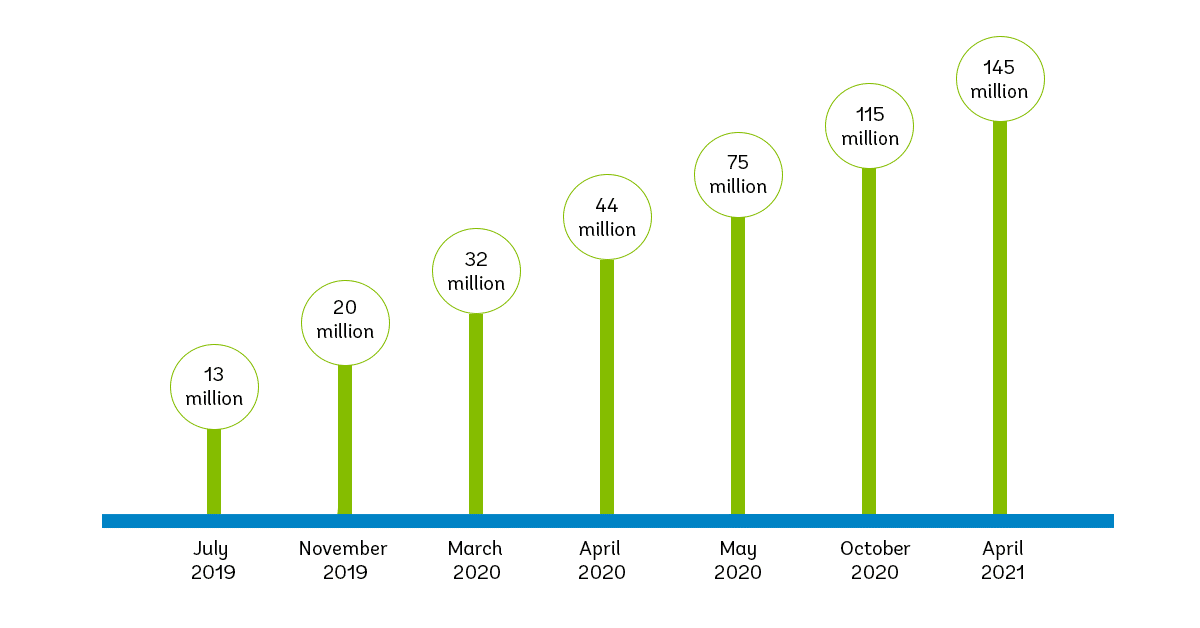
Due to the impact of the COVID-19 pandemic and the growing practices of social distancing and working from home, Microsoft Teams saw a huge uptake in users from 20 million in November 2019 to 75 million by April 2020. Since then, as of April 2021, the users have doubled to 145 million, with more than 500,000 organizations using teams.

Microsoft Teams is constantly being updated and introducing new features to its already robust collaboration platform. In 2018, calling was introduced as a new communication feature enabling organizations to use their Teams platform as their primary business phone system with full PBX voice calling capabilities. By adding voice and PBX capabilities to Teams, users can combine all of their collaboration features for a truly unified communications solution.

However, to make and receive phone calls and use the call functionality you need a Phone System License, a phone number and Public Switched Telephony Network (PSTN) connectivity. To get this you have two options: Microsoft Calling Plans and Direct Routing.

  1. Microsoft Calling Plans: Microsoft provides a phone number to users and PSTN services.
  2. Direct Routing: Connect your existing PSTN connectivity to Teams via a Session Border Controller and SIP Trunks.

What is Microsoft Calling Plans?

Microsoft becomes the PSTN carrier, providing the connection from the Phone System to the PSTN. Microsoft provides a phone number for inbound calls and a minute’s package for outbound calls.

Businesses can choose a Domestic or Domestic and International Calling Plan based on their needs that are available as a per-user license. This option is typically more expensive and only available in certain countries.

What is Direct Routing?

Direct Routing refers to the process of routing Microsoft Teams to the PSTN. Many businesses opt for Direct Routing because it enables customers to choose their own telecom provider to host their PBX, allowing for greater flexibility with calling plans.

How does Direct Routing work?

Direct Routing works by enabling voice connectivity between your customers and employees through access to the PSTN (Public Switched Telephone Network) with the help of a secure, hosted Session Border Controller.

Certified Session Border Controllers are a firewall for VoIP and provide a layer of security and protection from attacks, breaches, and Distributed Denial of Service (DDOS) while providing Quality of Service (QoS) between multiple networks. Unlike other providers, Execulink leverages a geographically redundant SBC network hosted on Canadian soil to connect to a Microsoft Teams PBX.

Benefits of Direct Routing

Unified Communications: With Direct Routing your Teams platform transforms into a business phone system with full PBX voice calling capabilities, allowing you to call, chat, meet, file share, and more all from one application, from anywhere on any device.

Greater Flexibility: Microsoft has strict limitations on carriers and location. With Direct Routing you pick your own provider to host your PBX allowing for greater flexibility with calling plans. This allows you to stay with your existing provider for your lines and calling plans if they offer direct routing, in turn, avoiding any expenses related to changing providers. It also reduces the need for separate contracts with different carriers across regions.

Cost Savings: Direct routing for Microsoft Teams doesn’t require any extra hardware, outside of your PC or laptop. No on-site phone system is needed since Direct Routing is a hosted solution. All you need is a broadband connection and Teams installed on your devices, saving you from purchasing and maintaining any hardware and equipment.

Business Continuity: You can keep your existing customer-facing numbers and DIDs so you can migrate your voice to Teams with ease.

Reliable PSTN Access: Session Border Controllers have geographical and physical redundancy, ensuring impeccable uptime so your calls go uninterrupted.

Broader Geographic Coverage: Providers like Execulink have nationwide coverage and North American calling options including long distance. With Microsoft calling plans, minutes are allocated to each user per month and are only available in certain countries.

Lower Rates: Choosing your own provider allows you to take advantage of lower rates than Microsoft Calling Plans.

In today’s business landscape, organizations have moved to a remote or hybrid workplace, with employees communicating across different locations and even time zones so it’s no surprise that more and more businesses are adopting Microsoft Teams and looking to the advanced voice and calling features it offers. Microsoft Teams Voice capabilities allow businesses to standardize their voice services across all regions to lower costs, reduce complexity, and provide a consistent experience.

If you are currently a ‘Microsoft Teams’ business or considering Microsoft 365, integrate Direct Routing into Microsoft Teams and turn your Teams environment into a business phone system with enterprise-grade voice capabilities. Make and receive calls from your Teams app, on any device, from anywhere.

Call us at 1-877-561-6771 or visit our Direct Routing for Microsoft Teams page to learn if Direct Routing is right for your business.
Learn more about Execulink’s Direct Routing for Microsoft Teams!

The Internet Services You Deserve
Affordable. Reliable. Lightning fast.

We’re proud to provide the communities we know, love, and live in, with the reliable Internet, TV, Phone and Mobility services they deserve.

  • Your local choice for residential and business telecommunication services
  • Renowned 24/7 customer service you can depend on
  • Affordability, service, integrity and transparency are the pillars of our business

Here to help. 24/7.

Sales Inquiries

Sales: Mon-Fri 8AM-8PM, Sat 8AM-5PM

(866) 706-1991

Support Inquiries

Technical Support: 24/7, Customer Care: Mon-Sun 7AM-11PM

(866) 706-1994

Online Help

Chat With Us

We'll respond as soon as we can!

Email Us

We'll get back to you as soon as possible.

Support Centre

Find the answer to your question.

Check availability

Enter your address to find services and offers available to you!