
Tips and Tricks: How to Boost Your Wi-Fi

Click here to see Execulink’s Home Internet options

Are you ever bothered by a slow or dropping signal in certain areas of your house? Especially right when you are in the middle of an intense scene in a movie or doing important work? If that doesn’t bother you, I admire your patience! For those of you who it does bother, here are a few quick tips to help boost that signal and get you better, faster wireless without breaking the bank.

An Antenna
Make sure that your router has an antenna, and if it does, fiddle with the antenna to find the best possible placement that maximizes your signal. If your router’s antenna is internal, you are able to purchase external ones which will help send a stronger signal. When adjusting your antenna, point it towards the spot in your house where your Wi-Fi is the weakest. It will help improve the signal in that area.

Placement
Placement is key! The more walls, doors, floors, etc. the signal has to travel through the weaker it will be. The closer to the middle of your home is one of the best places for your router. Routers also work better if they are out in the open and not very close to walls (if you are able) and if they are elevated. So your best bet to get the fastest and strongest signal you can is to have your router placed towards the center of your home, not too close to a wall, and sitting on a shelf or table (for example).

What to avoid while Streaming
If you happen to have an old router and are planning on streaming TV or a movie, make the popcorn first. That’s right, always make your popcorn or heat up your snack first. Why? It just so happens that microwaves in use can interfere with your Wi-Fi signal. Baby monitors and cordless phones will also have this effect. This is also has to do with the channels that your router and other electronics are picking up.

Channel
There might be others in your neighborhood, apartment building, etc. or even other electronics in your house (for example a baby monitor) that could have their router on the same signal as yours. Remember playing with walkie talkies when you were younger? Well the way a router works is really similar; the more people on a channel the more interference there is. To counteract this, switch the channel your router is on.

Range Extender
Routers usually have a certain distance that they will send a signal to reliably. Any farther and the signal will get weak and slow. To help enhance the distance your Wi-Fi signal reaches, you are able to purchase a wireless range extender. These pick up the Wi-Fi from your existing router and re-broadcast it.

Private
One of the biggest ways to increase your Wi-Fi signal and speed is to make sure your Wi-Fi is always private. This will prevent others from using your network and will protect you more when you are online. If you don’t have a password set on your Wi-Fi, set one now (the harder it is the better). This way other people near you can’t pick up and use your Wi-Fi.

Firmware
If you have an older router it might just be time to update it. There are always changes being made to software for routers to help make them faster and perform better. In some cases it’s as easy as pressing an upgrade button; others might require you to download software to perform the update. By simply updating the firmware on your router it might boost your signal and help increase your speed as well.

We understand how frustrating it can be to have a lagging Wi-Fi signal. Hopefully these tips and tricks help to alleviate some of that frustration, and give you and your family the best possible Wi-Fi signal for your home.

Click here to see Execulink’s Home Internet options

Game of Thrones 7 Premieres This Sunday!

Click here to learn more about Link TV!

Game of Thrones Premieres This Sunday! Here’s Everything You Need to Know to Catch Up.

So for months now you’ve been telling yourself that you’re going to re-watch all the episodes of season 6 in preparation for season 7. Well, I’m sorry to say that like me, you’ve pretty much run out of time. Game of Thrones is back this Sunday. But don’t be sad… Game of Thrones is back! OMG GAME OF THRONES IS BACK!!!!

So let’s get you all caught up and ready for the action that is sure to be crammed into this entire season. Here are some important plot points from the last season to get you caught up.

EPISODE 1, “THE RED WOMAN”

  • We find out why Melisandre, the Red Woman, constantly wears that necklace. She is actually really old. We’re not trying to bodyshame anyone but wow. That’s really hard to look at.
  • Brienne and Pod save Sansa and Theon from Ramsay’s men.
  • In Dorne, Ellaria kills Prince Doran for being a weak leader, while in King’s Landing, one of her daughter’s (a “Sandsnake”) does the same to Doran’s son, Trystane.
  • Daenerys is swept up by a khalasar (the horse-guys that used to be led by Khal Drogo), and is placed in a temple to live her life out as a widowed khaleesi (wife of a khal).
  • Arya is a blind beggar on the streets of Braavos. Boourns.
  • Jon Snow is still dead.

EPISODE 2, “HOME”

  • Jon Snow’s alive! Thanks, Melisandre. You sort of kind of redeemed yourself. Maybe.
  • Tyrion frees Daenarys’ dragons.
  • Ramsay kills his father, his step-mother Walda, and their newborn son to ensure that he is the only heir to the Bolton house. Oh, so I guess you’re still doing that whole evil incarnate thing eh?
  • Euron Greyjoy is looking to lead the Iron Islands so comes home and throws his bro Balon off a bridge.

EPISODE 3, “OATHBREAKER”

  • Bran uses his time-travelling-in-the-mind abilities to witness Part 1 of his dad Ned’s arrival at the tower where a pregnant Lyanna Stark was being kept by Rhaegar Targaryen, who’d stolen her away from Robert Baratheon during Robert’s rebellion many moons ago.
  • Arya gets her sight back!
  • Jon oversees the deaths of those who killed him and quits the band. HIS WATCH IS OVER BROS. Mic drop.
  • The High Sparrow announces that Cersei must stand trial for her moral crimes.
  • Rickon and Osha are back! (YAY!) Back into the hands of Ramsay Bolton (NO!).

EPISODE 4, “BOOK OF THE STRANGER”

  • Jon and Sansa reunite, and get news that Ramsay has Rickon.
  • Daenerys lights her captivity temple on fire and saunters out naked a la season 1, while Daario and Jorah arrive to “save” her.
  • The High Sparrow has Margaery and Loras Tyrell in prison.
  • Ramsay kills Osha.

EPISODE 5, “THE DOOR”

  • It’s revealed that the white walkers were created by the Children of the Forest to protect themselves from humans. GOOD JOB GUYS GREAT MOVE NO PROBLEM.
  • While Bran is inside another vision, the Night King tracks him down IRL, and while Hodor is trying to “Hold the door!” in the present, Bran watches a young Hodor seizure, yelling “Hold the door” over and over until it eventually transforms into “Hodor” which is the only word he will say for the rest of his life. And that’s when we all cry uncontrollably.
  • Oh ya, and—cherry on top—Summer (Bran’s direwolf) dies too.
  • Euron pushes Yara out of the way to rule the Iron Islands, but she and Theon sneak off while he’s sealing the deal and steal all the ships.
  • Daenerys learns of Jorah’s greyscale and tells him to go find a cure.
  • A second red priestess in Meereen tells Varys and Tyrion that Daenerys is the prophecied one that was promised. They tell her to spread the news.

EPISODE 6, “BLOOD OF MY BLOOD”

  • Uncle Benjen aka Coldhands aka Half-Zombie Dude shows up to save Meera and Bran.
  • Sam brings Gilly and the baby to his home, where his dad is mean to them so Sam steals the family sword and gets out of there.
  • Arya doesn’t kill who she’s supposed to so Jaqen H’ghar sends the waif girl after her.
  • Margaery brings Tommen into the faith, making the High Sparrow pretty much King.
  • Jamie is stripped of his Kingsguard post and banished from the city.

EPISODE 7, “THE BROKEN MAN”

  • The Hound is living in a religious commune that immediately gets slaughtered by thieves.
  • Margaery slips her grandma a note indicating she’s not as into the High Sparrow as she seems.
  • Sansa sends a note asking for help to the Vale, worried that House Stark doesn’t have the power it needs to win the battle over the Boltons.
  • Jaime and Bronn arrive at Riverrun, which is being taken over by the Freys.

EPISODE 8, “NO ONE”

  • Arya kills the waif (YAY!) and then tells Jaqen that she’s going home (YAY!).
  • The Hound meets up with the Brotherhood Without Banners, and Beric Dondarrion tries to recruit him.
  • Tommen says no more trial by combat, essentially leaving his mother helpless in the trial.
  • Brienne runs into Jaime at Riverrun, where she’s trying to recruit the Tullys (Catelyn Stark’s original House) to Jon’s cause.
  • Catelyn’s brother Edmure surrenders the house to the Frey/Lannister armies, and Brynden “the Blackfish” Tully dies in the fight.
  • Daenerys returns to Meereen on a dragon to find the masters attacking the city.

EPISODE 9, “BATTLE OF THE BASTARDS”

  • Daenerys and her dragons make short work of the masters’ forces.
  • She makes an alliance with Yara, giving her the Iron Islands in the future in exchange for her Iron navy.
  • Huge battle between Ramsay’s team and Jon’s team, with Rickon being the bait.
  • Littlefinger’s Vale team saves the day, and they all retake Winterfell (YAY!).
  • Sansa lets Ramsay’s dogs eat him to death (gross, but YAY!)

EPISODE 10, “THE WINDS OF WINTER”

  • Cersei  and Maester Qyburn use wildfire to blow up the entire Sept of Baelor and everyone in it, including Margaery, her father, Loras Tyrell, the High Sparrow, and Lancel Lannister.
  • Tommen kills himself.
  • Arya kills Walder Frey and his two sons as payback for the Red Wedding.
  • Sam, Gilly and the baby arrive at the Citadel.
  • Melisandre is banished for causing Shireen’s death. Davos will kill her if he ever sees her again.
  • The Northern houses deem Jon “King in the North” and pledge to fight the WWs with him.
  • Daenerys breaks up with Daario and officially makes Tyrion the Hand of the Queen.
  • Bran’s vision confirms that L+R=J (Jon is Lyanna Stark and Rhaegar Targaryen’s love child) and that while dying she gives baby Jon to Ned, making him promise to protect him. JON IS HALF TARGARYEN AND DAENERYS’ NEPHEW WHAAAAT.
  • Jaime returns to King’s Landing and is horrified. Cersei’s on the throne.
  • Daenerys, her dragons, and the Ironborn all sail back to Westeros.
  • WINTER IS HERE GUYS

So there you have it. Last season was a lot of death and sadness (I LOVE YOU HODOR!), but it also had a lot of huge wins for fans:  Jon Snow came back from the dead, Uncle Benjen came back halfway from the dead, the Hound is still alive, Ramsay died, Daenerys is finally going to conquer Westeros, Arya is finally getting a better plotline, and Cersei proved she is extremely badass.

I can’t wait to see what this next season has in store. My predictions? Jaime HAS to kill Cersei. His whole identity as “Kingslayer” came about from killing the Mad King because he threatened to do exactly what Cersei did, a wildfire massacre. Also, I’m really hoping for a white walker dragon. The whole series is called “A Song of Ice and Fire”. Don’t get much closer to that than a fire dragon battling an ice dragon.

Whatever happens, Execulink TV customers can enjoy a special free offering of HBO on Sunday night so they can watch the premiere at 9pm! Winter is here folks, and it’s gonna be a heck of a season!

Click here to learn more about Link TV!

Local Events for Canada Day 150

Click here to see Execulink’s Home Internet options

As Canada’s 150th birthday approaches it is interesting to see what is going on in South Western Ontario. There is so much happening in the area, so many different and interesting activities, that I have no idea what I am going to do for the day to celebrate!

Grand Bend and Area

There are many activities happening in the area this coming Canada Day. A few include Forest Kiwanis Canada Day 150 Celebration and Grand Bend Canada Day Celebrations.  At Forest’s celebration you will have the chance to watch a parade starting at 1:30 pm, see the unveiling of the new memorial carving, and enjoy a BBQ and live entertainment until the fireworks at dusk. The Grand Bend Canada Day Celebrations will have live music at the Rotary Community Stage and then fireworks starting at 10 pm.

KW and Area

This Canada Day there will be fireworks being held in multiple locations throughout the KW region. A few locations include Bingemans, Columbia Lake Fields, Riverside Park, Kitchener City Hall, Norm S. Hill Park, and Schmidt Park. Other activities include:

  • Canada Day in DTK: Kitchener City Hall will host free country music including the River Town Saints and James Barker Band as well as food vendors and fireworks off of City Hall.
  • Canada Day at the Waterloo Region Museum: Learn about how people lived and ate in 1914 and enjoy games such as croquet and horseshoes.
  • Joseph Schneider’s House: This July 1st also celebrates the 201st anniversary of the building of Joseph Schneider house. Celebrate with cake at 2 pm on Saturday and free admission for the weekend.
  • University of Waterloo Canada Day Celebration: The award winning children’s performers Bobs & Lolo will perform for the kids and then Tom Cochrane with Red Rider for the adults, followed by a firework display!
  • Cambridge Canada Day Celebrations: There will be live entertainment, a parade, Children Area and Carnival, and fireworks.
  • McDougall Cottage Canada Day Celebration: Here you can celebrate the Scottish-Canadian heritage with tours, treats, crafts, and music.
  • SteamFest 150: Take a ride on the 100 year old steam train, starting and ending in St. Jacobs. Enjoy jigger rides and steam cooked food as well!

This isn’t all–There are a ton of other activities happening in the area as well!

London and Area

In London there is a large variety of cultural and Canadian celebrations throughout the city and surrounding area. A few I personally found interesting include the Sesquifest, Dominion Day at Fanshawe Pioneer Village, and the Confederation Party.  Here is a summary of these events and a few more:

  • Fireworks: Some locations you can find fireworks include White Oaks Parks, Harris Park, Argyle Arena, Prince Andrew School Park (Lucan), Main Beach (Port Stanely), Pinafore Park (St. Thomas), Lake Whittaker Conservation Area.
  • Canada Day at Harris Park: This gathering includes a First Nations gathering, Canada birthday cake, exhibits honoring famous Canadians, and fireworks.
  • Sesquifest: If your Canada Day is already packed like mine, this is, luckily, a 5 day celebration in downtown London. Here you can experience a 360-degree projection drone, go ice skating, see iconic Canadian headliners and as always, enjoy food and beverages.
  • Dominion Day: Dress up in your Sunday best and party the old fashioned way. Enjoy cake, lemonade and other activities at the Pioneer Village that bring the past to life!
  • Confederation Party: Party like its 1867, 1917, and 1967! Enjoy carnival games and historically themed performances, tour the Eldon house, and enjoy live music.
  • South London Canada Day: At this celebration you are able to leave your hand print on a Canada 150 banner, have fun in a photo booth, enjoy food and end the night with a drone light show and fireworks.
  • Canada Day at Delaware Speedway: Go and watch the APC series, Ontario Legends Series, Open Wheel Modifieds, and fireworks!
  • Canada Day Train ride: This is a round trip scenic rail ride starting in Port Stanely.

Norfolk County

In Norfolk County things kick off in Delhi on Friday, June 30, at 7pm. At this time the Tobacco Kiln will receive its official heritage designation. Throughout the evening, you are able to enjoy a mix of folk and bluegrass music and a BBQ.

On Canada Day, there is a ton of things happening as well:

  • Port Dover Celebrations: Go and see a soap box derby, a parade of boats, a parade, live music, food, and of course, fireworks!
  • Canada Day Car Show: Start your morning right with a Pre-50s-themed classic car show being held at the Ramblin Road Brewery Farm.
  • Open House Farm Party: Visit Wholesome Pickins in Delhi for a day filled with food tasting, bouncy castles, face painting, and more.
  • Otterville Canada 150 Celebrations: This is a 3 day celebration that includes BBQ’s, farmers market, bubble soccer, baseball, a chicken wing ding, canoe races, a rubber ducky race, and of course, fireworks!
  • Port Rowan: In Port Rowan you can enjoy hot dogs and cake as well as a melody of live music. Then venture down to Backus Heritage Conservation and take a tour of the Backhouse Grist Mill for free!

Tillsonburg

In Tillsonburg you can never miss that Canada Day pancake breakfast and farmer’s market in the morning and the model ship regatta afterward. From there you can enjoy the Annandale NHS fun fair, the classic car show, the parade, the “Back to the 50’s” concert. Then to end the night, you guessed it, FIREWORKS!

Woodstock

Last but not least, we have Woodstock’s Canada Day Celebrations. Enjoy the crafters alley, exhibitions and demonstrations, the Lion’s Club beverage garden, and Canada Day CUPCAKES. Oh and end the night with a spectacular fireworks display!

Phew, now that those are all listed out… I have to decide what to do with myself this Canada Day! There are so many amazing activities and events going on to celebrate Canada’s 150th birthday that it will be difficult to choose what to do. Either way, I know I am going to enjoy some birthday cake, fireworks, and all of the Canadian pride and joy!

Sources:

http://www.lambtonshores.ca/en/Calendar/events/Details.aspx?Id=84be8cd1-347e-4b49-b40f-61b4094573e6
http://www.todocanada.ca/canada-day-fireworks-festivals/
https://www.norfolktourism.ca/events/
http://www.tillsonburg.ca/Modules/News/index.aspx?newsId=92e9cd20-3a90-4f82-913b-f5f15d3a4152
https://www.cityofwoodstock.ca/en/visiting-woodstock/canada-150—july.asp

Click here to see Execulink’s Home Internet options

The Rise of eSports to Network Television

Click here to see Execulink’s Home Internet options

I guess the best place to start would be what is eSports? This term, although I have a gamer brother, was a fairly unknown term to me until recently. I knew my brother often watched gamers that live streamed themselves playing on platforms like YouTube and Twitch, but I was extremely unaware of how popular it has become to watch people compete in video games.

So what is it exactly?

ESports are organized, multiplayer video games. Over the past few years, or decade, this concept has blown up, so much so that being a professional gamer is a viable option as a career. The interest in eSports has drastically changed, to a point where watching eSports is just as popular for millennials as watching traditional sports like hockey. With the growth and interest of watching different players or teams compete, you are starting to see arenas fill for these tournaments, and I don’t mean your small town arena. Just last summer, an LoL (league of Legends) tournament was held in Toronto… at the ACC. This tournament brought in just as many people as a Raptors game would. In other words, more than 15 000 diehard fans attend the tournament and even more watched the live stream.

So where did it all begin?

The earliest documented video game competition occurred in 1972 at Stanford, playing the game Spacewar.  From there you saw more and more video game competitions starting. Notably, in the 90’s you saw many Nintendo game based competitions.

This idea of turning video games into a live multiplayer competition exploded in the 00’s. Now you see the phenomenon of eSports in sold out arenas. Instead of having local competitions, you see global tournaments that are broadcasted out to millions.  Being a professional gamer has become a viable, well-paying career that leads to sponsorships, ownerships of teams and winning prize money at tournaments. And who doesn’t want to do what they love and enjoy!!

What’s next in the world of eSports?

With game streaming sites like Twitch raking in close to 10 million daily active users, we knew it wouldn’t be long before network television wanted a piece of that pie. NBC just announced that they will be working with the FACEIT online gaming platform to host a 2v2 Rocket League tournament, with a winning prize of $100,000. For those of you that don’t know, Rocket League is a game that was developed by Psyonix, and is basically a soccer game played in cars! Although it might sound dumb, it’s extremely addictive and its ever-growing popularity proves that fact. NBC will be hosting regional tournaments in America and European regions and will end with the 2-day grand finals. You will be able to watch this tournament in late August on a variety of NBC Universal and Comcast networks and internet platforms. The tournament will also be presented across live streaming, video on demand, and linear platforms.

It’s interesting to think of where the world of eSports will go in the future, and how it could one day overtake traditional sports in popularity. A word of advice: if you don’t have what it takes to be the next Gretsky or Bautista, try picking up a controller instead!

Click here to see Execulink’s Home Internet options

Execulink at the 2017 London Technology Showcase

Click here to see Execulink’s Business Internet options

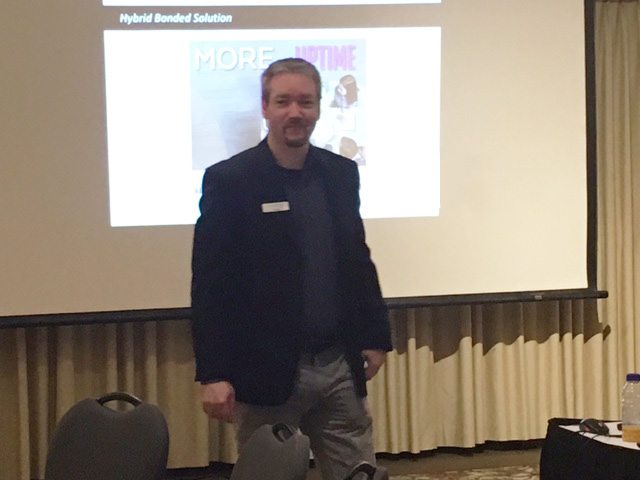
Yesterday we were proud to attend the London Technology Showcase in London, Ontario. The event brought together over 25 IT vendors including D-Link, Barracuda, Cisco, Nutanix, Dell, Lenovo, Fortinet, Jolera and other big names of the tech world. The goal of the showcase was to educate clients on available technologies and discuss how the partner organizations can deploy technology within their businesses.

The event included 36 featured seminars that focused on IT-based solutions, such as WIFI and surveillance measures, security appliances, uninterrupted power solutions and more. We were excited to lead two informative seminars: “Building Redundancy and Reliability using Execulink’s Hybrid Bonded Internet”, and “Tools and Tricks for Managing a Secure WAN.”

We discussed how our unique Hybrid Bonded Internet solution could deliver a faster, stronger, more flexible internet solution to businesses by fusing the benefits of multiple Internet links and carriers into one. Our second seminar reviewed the importance of having network security, and the necessary tools that help you optimize your connections and keep your business’ data safe.

We wanted to take this opportunity to thank everyone who attended the event and our seminars in particular. We always enjoy having the chance to educate and inform our local businesses and partners about how our services might be able to help them make a safer, more connected business. Until next time, London!

For more information on our Hybrid Bonded solution, click here.

Click here to see Execulink’s Business Internet options

What Does a Phishing Email Look Like?

Click here to see Execulink’s Home Internet options

You may have heard of something called phishing, but don’t confuse this with your dad’s cottage hobby; what you catch from phishing is not near as exciting. Phishing is a type of scam that criminals are using to steal money from you. They accomplish this by installing malicious software on your computer and by stealing your personal data.

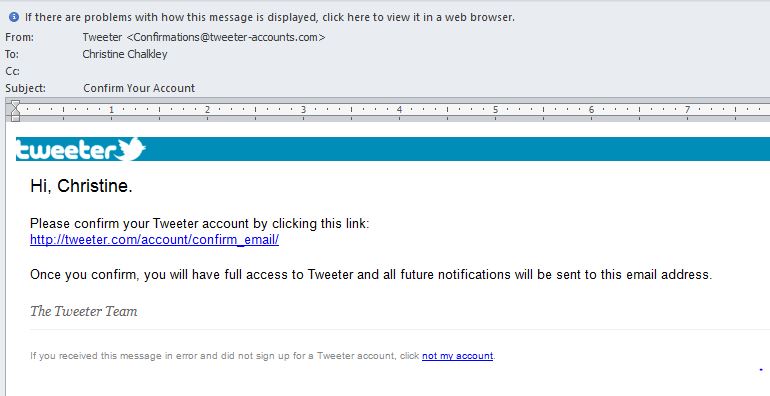
So what does a phishing email look like? Here are some common things that you can spot in these fraudulent emails:

The “From” field might come from an email address you don’t normally communication with. The email can be from someone outside of your work organization and not related to your job responsibilities. The sender’s email can look like it’s from a suspicious domain. It could be an unexpected or unusual email with an embedded hyperlink or an attachment from someone you haven’t communicated with recently.

The “To” field might include a mix of seemingly random people from your organization or a list of unrelated addresses. You might have been cc’d on an email to one or more people and you don’t personally know any of the other people.

The “Subject” field could be a subject line that is irrelevant or does not match the message content. The email message is in reply to something you never requested or sent.

There could be an attachment that was not expected or makes no sense to the email message.  A big red flag is the hyperlink that is attached. To test the legitimacy of a link, hover over the hyperlink. If the address looks strange or is for a different website, that’s a bad sign.

The hyperlink or content may also be a misspelled version of a known website—for example, using facebonk.com instead of facebook.com.

If the hyperlink seems illogical, forward, or asks you to look at embarrassing or compromising pictures of someone you know, these are all red flags.

If the hyperlink is threatening in nature and asks you to click on a link or attachment to avoid a negative consequence, that’s also a red flag. However, it could sound very beneficial as well: “Click here to get a free TV”. Basically, if it sounds too good to be true, it probably is. .

The email could be full of grammatical or spelling errors.

These emails can look like they are from a legitimate company or website or they could look like they came from your CEO.  They might use logos, names of companies, names of departments or job titles that appear to be real. Check if the company name is spelled correctly. Also check if the email is coming from a name you personally know, whether the email address is actually their correct email.

Do Not:

  • Open any email attachments that end with: exe, .scr, .bat, .com, or other executable files you do not recognize.
  • Click an embedded link in a message without hovering your mouse over it first to check the URL.
  • Respond or reply. It’s better to just delete the email.
  • “Unsubscribe” – it’s better to delete the email then to deal with the security risk.

Do:

  • Check the email “From” field to validate the sender is actually someone you know or from a correct email address.
  • Check for a “double-extended’ scam attachment. A text file named “safe.txt” is safe but a file called “safe.txt.exe” is not.
  • Report any suspicious emails to your IT department.
  • Report any suspicious emails to the Canadian Anti-Fraud Centre.

Trust your gut if the email seems odd; question it. If it looks like it came from someone you know, speak to the person in a different form of communication, maybe face to face or by phone to confirm the legitimacy of the email. Speak to your IT department before you click on the link or attachment. When in doubt, just delete the email.

It’s awful when it happens, but with these tips and tricks, you can stay safe from the nasty phishers out there. It’s more important than ever to say vigilant about your online security and stay skeptical whenever confronted with suspicious emails. We hope these tips help keep you and your family safe online!

Click here to see Execulink’s Home Internet options

Internet Basics: What’s the Difference between a Modem and a Router?

Click here to see Execulink’s Home Internet options

The modem and the router: Two pieces of Internet equipment in millions of homes in Canada and yet every day we get questions from people asking why they need them or what they even do! So, we wanted to shine a little light on both of these devices and explain in quick and simple terms what they’re all about.

THE MODEM

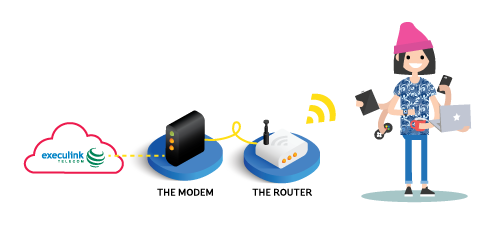
Think of the modem like a bridge. It bridges the gap between your home network and your ISP, sending, receiving and converting data so you can use the Internet. While not every type of Internet requires a modem in your home (eg. Fibre and Fixed Wireless), every Internet service has some type of similar device that converts the data coming from the transporting material (eg. Fibre lines, coaxial cable, wireless signal), and turns it into a format that your router can understand and push to your device(s).

THE ROUTER

What does a router do? Well, it routes! That is, it routes your Internet connection from one physical connection to multiple devices, so that they have access both to the Internet and eachother. So through a router you could have multiple computers and devices connected to the Internet. Many routers are wireless (contain wireless radios) that let you connect Wi-Fi devices wirelessly as well. Additionally, the router adds some protection to your devices in that they aren’t directly exposed to the Internet.

Modem-Router.png

THE MODEM/ROUTER

Depending on the service, you may have the option for a combination device that serves as both a modem AND a router.

We hope this quick info session has helped you get your head around this equipment a little better.

Click here to see Execulink’s Home Internet options

Earth Hour’s Here! Here’s What You Need to Know

Click here to see Execulink’s Home Internet options

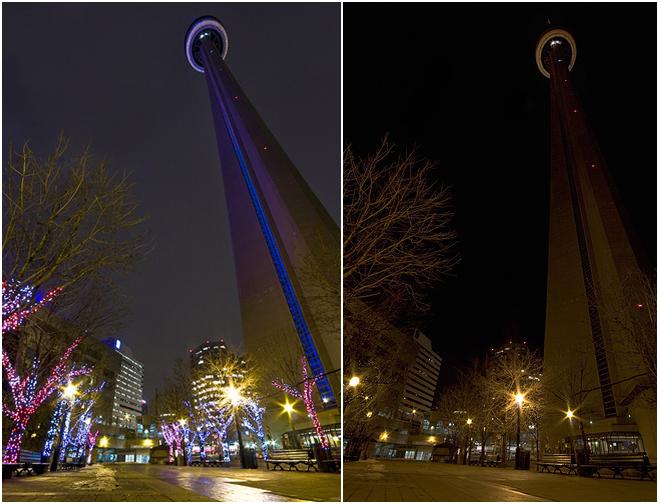
I don’t know about you, but I’m awful for remembering to turn my lights off for Earth Hour. So many years I’ve wanted to participate—to gather up all my candles, shut all my lights off and show my support for Mother Nature—but then inadvertently let it slip by.  So let’s be better this year. Let’s set a reminder on our phones right now: Earth Hour is this Saturday, March 25th, 2017 from 8:30PM-9:30PM. For this hour, turn off all the lights in your house and show your support for global action on climate change.

earth-hour-cn-tower.jpg

What is Earth Hour?

Earth Hour is actually a charitable organization based out of Singapore. They are an “open source movement” created by WWF (World Wildlife Fund) and other worldwide volunteer organizations. It started as a lights-off event in Sydney, Australia in 2007 and grew to the global phenomenon it is today.

Who Celebrates Earth Hour?

As many as 172 countries across the globe celebrate Earth Hour by turning off their lights for an hour. And it’s not just for residences of those countries to take part in; over 400 iconic landmarks including Sydney Opera House, London’s Big Ben, the Empire State Building and the Eiffel Tower all go dark for the hour too. It even reaches as far as the International Space Station—so to say it’s just a global event is really doing it enough justice!

Eiffel-tower-earth-hour.jpg

What’s the Impact?

If you’re wondering how exactly this event helps with climate change, take a look at the below video. It certainly opened my eyes to all the ways the WWF is healing the Earth one problem at a time.

Take Your Support Further!

Want to take your Earth Hour activism to the next level? Why not dedicate a few social media posts to the cause by donating your Facebook feed? Earth Hour will utilize your social media to share interesting facts about the event and spread the word. If you really want to show your support, you could also donate some money to WWF’s Earth Hour fund here.

Whether your hosting your own event, going to one (search nearby events here), or just staying home with the family, we hope you have a fantastic Earth Hour this weekend!

Source: www.earthhour.orghttp://www.wikinomics.com/blog/index.php/2008/04/02/global-citizens-love-the-earth-for-an-hour/comment-page-1/

http://econews.com.au/146/earth-hour-ready-to-go-beyond-the-hour/

Click here to see Execulink’s Home Internet options

5 Facebook Privacy Tips to Keep Your Profile Secure

Click here to see Execulink’s Home Internet options

Facebook has over 1 billion active users! Wow, that’s lot of people!  Facebook has become a common place for most people to get their news or see what their friends are up to. Since so many people have Facebook and use it to gather information, you might be wondering how to make sure what you are sharing is not available for the world to see. Here are 5 tips to help make your Facebook profile more private and secure.

1. Public information:

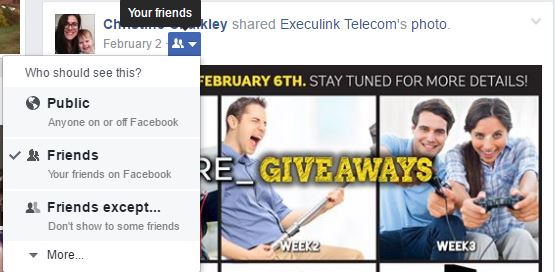
Some information on Facebook will always be public such as your name, profile picture and your cover photo. But there are some privacy settings that can you can set that can keep any other information from your profile private, like your posts and pictures.  You are able to select whether your information will be public for everyone in the world to see or whether only your Facebook friends can see what you post.

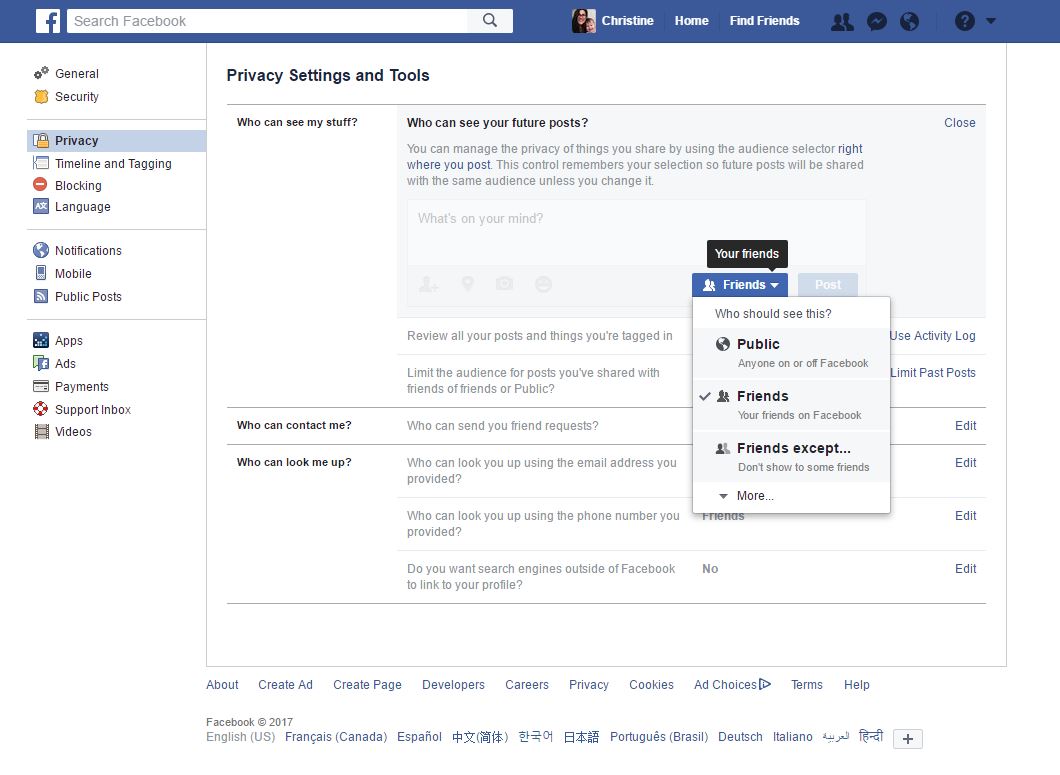
Settings

Settings → Privacy → Who can see my stuff → Who can see your future posts → Edit: choose Public, Friends, Friends except, Specific friends or Only me.

Public_Info

Other settings you can select here are who can contact you and who can search for you. If you don’t want to be searched publicly, change your settings to ‘Friends’.

2. Check what personal info you are sharing publicly

If you are a little unsure about what settings you have and want to check what other people can see on your profile, there’s a way to do that!

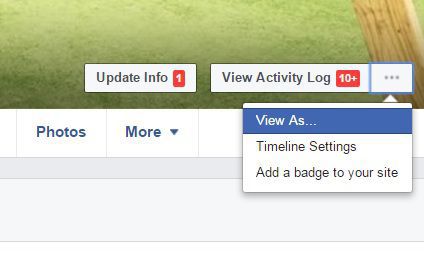
viewas
Profile → … beside View Activity Log → View As

With this view you are able to see all the posts that would show on you profile to someone who wasn’t your friend.. While you are here, check your Timeline, About, Friends and Photos tabs to see what information you are sharing publicly. Know that you can’t change anything while you are in this view. If you notice anything here that you would like to change, click back to your profile or settings to change what you need.  If you notice any posts that show up publicly, you can go to your profile and find the post that you would like to change. Beside the date and time of your post you can change it to only be viewed by your friends or yourself.

Public_Post

 3. Review your Facebook connected apps

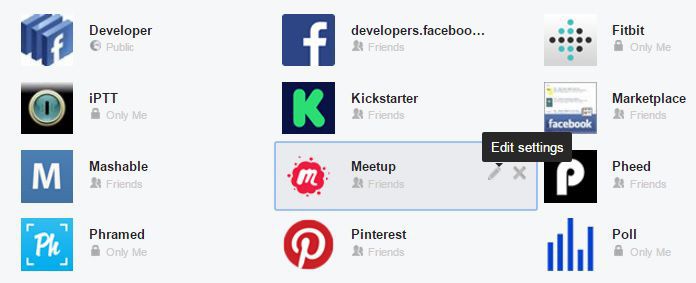
You will want to check what apps you have given access to and what permissions you’re allowing for them.  If you have ever let a third party app or game use your Facebook login to access the app, then this is a setting that you definitely want to make sure you check. This will show what apps Facebook has access to and what information from your profile is shared.

Connected_Apps

Settings → Apps → Logged in with Facebook → Edit settings or remove access.

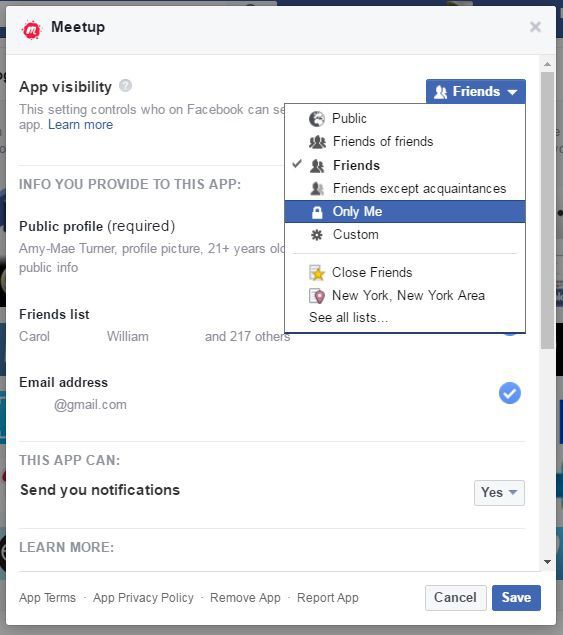
Connected_Apps_setting

When you click edit, you can get a more detailed look at the apps settings. First check who the app is visible to. Select ‘Only Me’ if you don’t want anyone to see that you have this app.  You can also check here whether the app has access to your friends list, likes, photos or other information. Uncheck any information that you don’t want shared, note some may be mandatory for the app and you will be unable to check this shared information. You can also remove any apps here that you don’t want Facebook to have access to anymore but just clicking the X button to remove the app.

4. Password Security

Your password should be at least 12-15 characters long, using a combination of upper and lower case letters, numbers and symbols.  Don’t include your or your kid’s names, birthdays or any other personal details. You also want to make sure that you have different passwords for all your other personal online accounts so if one of your passwords is compromised, your other accounts would remain secure.  Also don’t email yourself any of your passwords. If you are stuck on creating a password you can use a password generator like random.org/passwords to help. Here’s a list of the most common passwords for 2016, so don’t use any of these.

5. Things not to share through Social Media

Here are just some tips of things that you shouldn’t share on your profile or posts. You don’t want to take the chance that any private information is getting into the wrong hands.

  • Don’t share your full address or phone number.
  • Don’t share financial information through your Facebook page, whether it be a post to your friends or through a private message.
  • Don’t post while you are on vacation, as tempting as it is to share to people that you are going away, this practice can entice someone to break into your home while you are away.
  • Complain about work or share project related information. Check if your work has a social media policy. Even if you post on your personal account about your work, you may be in violation of your work’s social media policy and worse case may get fired for something you said.

Quick Help Center:

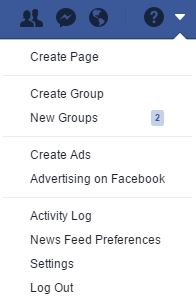
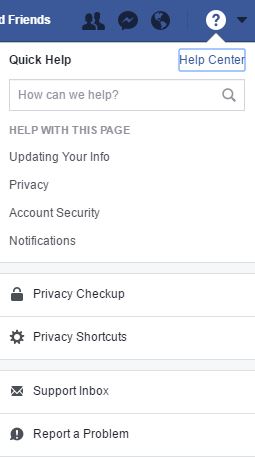
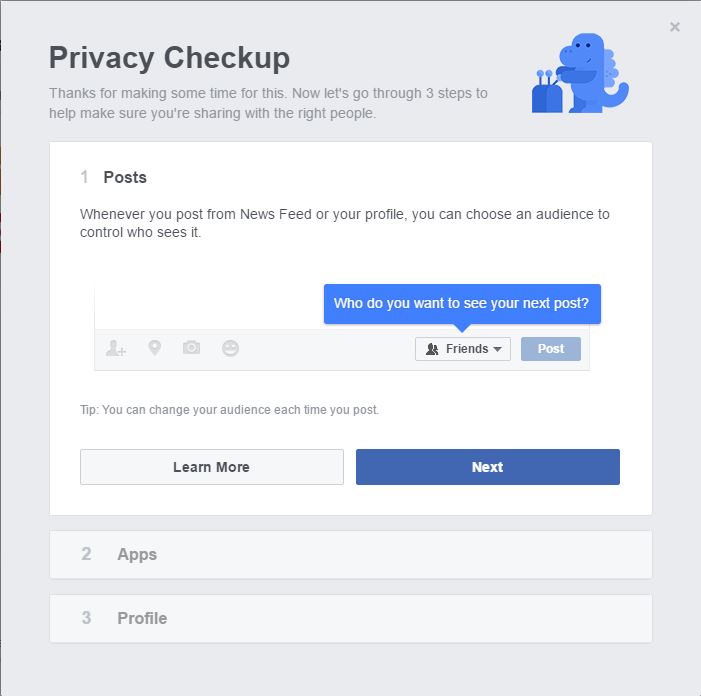
For a quick run through about some of the stuff we talked about today, go to your Facebook page and check the Quick Help Center at the top right of your page.

Privacy_Check_up

Privacy Checkup is will run a quick review of some of the privacy settings we’ve discussed here.. This guide will check who can see your posts, what apps have access your information and who can see your profile information.

Privacy_Check_up2

Hopefully these tips will help you set up a more secure and private Facebook page. If you want some additional help with learning, check if your local library has any programs that can help teach you any social media skills. The more you know, the safer and more secure you’ll be!

Click here to see Execulink’s Home Internet options

Best of YouTube Videos February

Click here to see Execulink’s Home Internet options

Welcome Execureaders to another edition of “Best of YouTube!” This month we have some music videos, some crazy award show moments and 7 brand new planets!  So sit back and check out these popular videos.

Katy Perry – Chained To The Rhythm (Official) ft. Skip Marley
51,580,365 views

Katy Perry’s new song for “Chained to the Rhythm” is the first single from her upcoming 5th studio album. The video is set in a futuristic amusement park that includes a crazy roller coaster that literally flies through the air. I give it up to Katy Perry for still looking good while filming on a roller coaster. Can I also mention that I love her rose coloured hair? This is a hair trend that I really dig lately. This song is super catchy and now I have this song stuck in my head and it’s probably in yours now too.

The Weeknd – Reminder
36,922,439 views

“Reminder” appears on Toronto native The Weeknd’s latest album Starboy.  Watch out for Drake’s cameo in this video. Torontonians unite! The Weeknd is very popular right now, seems like he has a billion singles out. I know that’s an exaggeration, but seriously he’s got a lot of singles out there right now.

Lady Gaga’s FULL Pepsi Zero Sugar Super Bowl LI Halftime Show | NFL
27,325,615 views

Lady Gaga performed at this year’s 51st NFL Super Bowl half time show.  We wrote a blog earlier about the cool 300 Intel drones that opened this performance. Lady Gaga sang some of her biggest hits: Poker Face, Born This Way, Telephone, Just Dance and Bad Romance. Lady Gaga is known for her crazy outfits, but I have to say she looks fabulous in her custom Versace outfits. And I give it up to her for dancing and rocking out a 13 minute performance in heals!  Good job Gaga, you killed this performance!

Wheel of Musical Impressions with Alessia Cara
13,567,826 views

We can’t have a ”Best of  YouTube” without Jimmy Fallon! This month Canadian Alessia Cara plays “Wheel of Musical Impressions”, an ongoing gag where  the guest and Jimmy perform musical impressions of other artists. Alessia pulls off some awesome impressions of Ariana Grande, Nikki Minaj and Lorde.  I think it takes a lot of talent to pull off not only doing an impression of a celebrity, but to do it while singing– bravo! Way to go Alessia, you got talent.

GUMMY FOOD vs. REAL FOOD CHALLENGE!!! Kids Eat a Real Frog!
12,739,640 views

These two kids took part in a food challenge where they ate gummy food and the real counterpart. I’m shocked over this kid’s reaction to eating hamburgers, hot dog and a pickle. Really? There’s that much disdain for eating a hamburger? These kids are also tricked into eating frog legs and alligator jerky.  I think most of those gummy versions of the food actually looked pretty gross. I guess kids are notorious for being picky eaters, so candy will always win!

Tough-Talking Teen Danielle To Dr. Phil: ‘You Were Nothin’ Before I Came On This Show’
11,512,749 views

Wowza, some people just blow me away. Danielle was a guest on Dr. Phil back in September 2016. She was only 13 years old and became known for her catch phrase “cash me on the outside.” She came back on the show last month for a follow up and with a ton of arrogance stated that Dr. Phil was nothing until she came on the show. She’s just another kid who is trying to get famous for saying stupid things.

Adele Wins Album Of The Year | Acceptance Speech | 59th GRAMMYs
9,702,699 views

Adele won 5 awards at this year’s Grammy Awards including Album of the year, Record of the Year, Song of the Year, Best Pop Vocal Album and Best Pop Solo Performance. Impressive sweep! In Adele’s tearful award speech for Album of the Year, she admitted she wasn’t deserving of the award and that Beyonce should have won for Lemonade. Check out the blog we wrote with all the Grammy highlights here.

Richard Vs Barack
7,513,933 views

Retirement looks good on you, Barack! While on vacation in the British Virgin Islands, Barack Obama and Richard Branson decided to have a friendly challenge: could Barack learn to kitesurf before Richard could learn how to foilboard? The challenge was set and they practiced for days. On the final day they had a battle of who could stay up the longest. Just look how blue that water is and how breathtaking the scenery is in this video. I think winter must be getting to me–I’m longing for warm days and the beach!

NASA & TRAPPIST-1: A Treasure Trove of Planets Found
6,479,502 views

NASA made a huge announcement recently that they found 7 new planets outside of our solar system that are earth sized and may have potential for water. This video shows the reactions of scientists who worked on this project.  Compared to all the other videos on this month’s best of YouTube, this video might make you a feel a wee-bit smarter. So go ahead and watch this video and also read these 4 cool things, so you can impress your friends with some cool space info.

Oscars Mistake: Moonlight Wins Best Picture after La La Land Mistakenly Announced | ABC News
4,486,655 views

That horrifying moment where the Oscars made a HUGE mistake and the wrong movie was named the winner for Best Picture. Awkward! If you are living under a rock and missed this whole story, check out our blog post to read what all went down at this year’s Oscars. PriceWaterCooper has admitted that they are to blame for this mistake of providing the wrong envelope to be read. No matter how many times I watch this, it is still so painful to watch.

Honourable mention:

Animal Adventure Park Giraffe Cam

April the Giraffe is pregnant and about to give birth. Animal Adventure Park set up a live stream of April to capture the birth of her baby calf. April is 15 years old and this is her 4th calf. Did you know that giraffes are pregnant for 15 months? Talk about exhausting. April’s due date was mid-February and calves are born hooves first. Ouch? Giraffes instinctually hide their labour so we probably won’t notice when April is in labour until the hooves come out. The suspense is killing me! After the calf is born, there will be contest to name the baby. My vote is Gillie for a girl and Jimmy for a boy.

You are now up to speed with all the videos that were popular on YouTube this past month. I bet you still have Katy Perry’s song stuck in your head (I know I still do).  I’m going to be optimistic– by the time you read “Best of YouTube” for March, it will be in spring weather and we’ll all have the warmth we all have been waiting for!  Until then, keep tubin’!

Click here to see Execulink’s Home Internet options

The Internet Services You Deserve
Affordable. Reliable. Lightning fast.

We’re proud to provide the communities we know, love, and live in, with the reliable Internet, TV, Phone and Mobility services they deserve.

  • Your local choice for residential and business telecommunication services
  • Renowned 24/7 customer service you can depend on
  • Affordability, service, integrity and transparency are the pillars of our business

Here to help. 24/7.

Sales Inquiries

Sales: Mon-Fri 8AM-8PM, Sat 8AM-5PM

(866) 706-1991

Support Inquiries

Technical Support: 24/7, Customer Care: Mon-Sun 7AM-11PM

(866) 706-1994

Online Help

Chat With Us

We'll respond as soon as we can!

Email Us

We'll get back to you as soon as possible.

Support Centre

Find the answer to your question.

Check availability

Enter your address to find services and offers available to you!